AWS Control Tower Landing Zone 4.0 में अपग्रेड करना
परिचय
यदि आप AWS Control Tower Landing Zone 3.x का उपयोग कर रहे हैं, तो अब आप version 4.0 में अपग्रेड कर सकते हैं ताकि आप अपने AWS organization में governance controls लागू करने में अधिक flexibility प्राप्त कर सकें। यह पोस्ट प्रमुख architectural changes के बारे में मार्गदर्शन करती है, migration impact को समझने में मदद करती है, और एक सफल upgrade के लिए step-by-step मार्गदर्शन प्रदान करती है।
AWS Control Tower के पिछले versions (3.x और पहले) में, landing zone को सक्षम करने के लिए आपको mandatory service integrations के साथ एक predefined organizational structure स्वीकार करनी होती थी। Landing Zone 4.0 इन constraints को हटाता है, जिससे आप:
- अपनी मौजूदा organization को restructure किए बिना AWS Control Catalog से 1,200 से अधिक controls तक पहुंच प्राप्त कर सकते हैं
- अब आपके पास अपनी विशिष्ट आवश्यकताओं के आधार पर कौन सी AWS services सक्षम करनी हैं यह चुनने की स्वतंत्रता है। Service integrations अब mandatory नहीं हैं, जिससे आप:
- केवल आवश्यकता पड़ने पर detective controls के लिए AWS Config सक्षम कर सकते हैं
- यदि आपके पास मौजूदा audit logging solutions हैं तो AWS CloudTrail को स्वतंत्र रूप से प्रबंधित कर सकते हैं
- अपनी identity management strategy के आधार पर AWS IAM Identity Center में opt-in कर सकते हैं
- अपनी backup आवश्यकताओं के अनुसार AWS Backup integration को control कर सकते हैं
- AWS Control Tower governance लागू करते हुए अपनी own organizational unit (OU) hierarchy परिभाषित कर सकते हैं
- Dedicated service integration accounts की आवश्यकता के बिना केवल AWS Organizations integration और controls के साथ एक minimal landing zone deploy कर सकते हैं
यह controls-dedicated model विशेष रूप से मौजूदा landing zones वाले enterprises के लिए मूल्यवान है, क्योंकि यह आपको AWS Control Tower governance को incrementally अपनाने की अनुमति देता है। आप पिछले versions में आवश्यक extensive restructuring के बिना controls और compliance monitoring लागू कर सकते हैं।
AWS Control Catalog से अधिकतम मूल्य प्राप्त करने पर अतिरिक्त मार्गदर्शन के लिए, AWS documentation देखें: Search and discover governance controls with Control Catalog in AWS Control Tower।
Benefits और architectural changes
Landing Zone 4.0 महत्वपूर्ण सुधार प्रस्तुत करता है जो अधिक flexibility और operational efficiency प्रदान करते हैं। निम्नलिखित comparison version 3.x और 4.0 के बीच प्रमुख अंतरों को highlight करता है:
| Feature | Version 3.x | Version 4.0 |
|---|---|---|
| Service integrations | Mandatory | Optional |
| AWS Config S3 bucket | AWS CloudTrail के साथ Shared | Dedicated bucket |
| AWS Config aggregator | Organization + Account aggregators | Service-linked aggregator |
| Delegated administrator | None | AWS Config के लिए Audit account |
| OU structure | Mandatory Security OU | Flexible, customer-defined |
| Manifest field | Required | Optional |
| Config baseline | AWSControlTowerBaseline का हिस्सा | Standalone ConfigBaseline |
| Drift notifications | Amazon SNS | Amazon EventBridge |
Prerequisites
AWS Control Tower Landing Zone 4.0 में upgrade करने से पहले, सुनिश्चित करें कि आप निम्नलिखित आवश्यकताओं को पूरा करते हैं:
महत्वपूर्ण: यह upgrade irreversible है। AWS Control Tower पिछले landing zone version में downgrade का समर्थन नहीं करता। एक बार Landing Zone 4.0 में upgrade करने के बाद, आप version 3.x पर वापस नहीं जा सकते। पहले non-production environment में upgrade का परीक्षण करने और आगे बढ़ने से पहले comprehensive backups लेने की दृढ़ता से अनुशंसा की जाती है।
सामान्य prerequisites
-
Organizational drift को resolve करें: Landing Zone 4.0 में upgrade करने से पहले सभी organizational drifts को resolve करने की दृढ़ता से अनुशंसा की जाती है। आप AWS Control Tower console में drift check कर सकते हैं। Upgrade से पहले unresolved drift upgrade के बाद और OU re-registration के बाद भी persist हो सकती है, जिसे resolve करने के लिए AWS Support case की आवश्यकता हो सकती है।
-
AWS Control Tower prerequisites की समीक्षा करें: सुनिश्चित करें कि आपका environment सभी standard AWS Control Tower prerequisites को पूरा करता है।
-
Service integration dependencies की समीक्षा करें: Baselines के बीच dependencies को समझें। यदि आप भविष्य में AWS Config integration अक्षम करने की योजना बनाते हैं, तो service dependencies के कारण आपको Security Roles, AWS IAM Identity Center, और AWS Backup integrations भी अक्षम करने होंगे।
-
Comprehensive backups लें: Upgrade करने से पहले, अपनी वर्तमान configuration को document और back up करें:
- Organizational structure (OUs, accounts, account-to-OU mappings) export करें
- वर्तमान Landing Zone settings, Config aggregator views, और SNS topic configurations का screenshot या export करें
- Config rules और aggregator configurations export करें
- CloudFormation StackSet templates और parameters export करें
- प्रति OU current baseline versions और प्रति OU control enablement status document करें
- यदि applicable हो तो CfCT CloudFormation templates save करें
# Export organizational units
aws organizations list-organizational-units-for-parent \
  --parent-id <ROOT_ID> > org_units_backup.json

# Export all accounts
aws organizations list-accounts > accounts_backup.json

# Export Config rules
aws configservice describe-config-rules > config_rules_backup.json

# Export Config aggregators
aws configservice describe-configuration-aggregators > aggregators_backup.json

# Export Control Tower IAM roles
aws iam get-role --role-name AWSControlTowerExecution > ct_exec_role_backup.json
aws iam get-role --role-name AWSControlTowerCloudTrailRole > ct_cloudtrail_role_backup.json
AWS CloudFormation StackSet prerequisites
Closed/suspended account stack instances हटाएं
जब AWS accounts close किए जाते हैं, तो management account के AWSControlTowerBP-* StackSets में उनके AWS CloudFormation stack instances स्वचालित रूप से हटाए नहीं जाते। Upgrade के दौरान, AWS Control Tower इन StackSets को update करने का प्रयास करता है और विफल हो जाता है क्योंकि यह closed accounts में AWSControlTowerExecution assume नहीं कर सकता। यह एक documented limitation है।
Pre-flight check:
# Identify closed/suspended accounts
CLOSED=$(aws organizations list-accounts \
  --query "Accounts[?Status!='ACTIVE'].Id" --output text)

# Check for orphaned stack instances in AWS Control Tower StackSets
for SS in $(aws cloudformation list-stack-sets --status ACTIVE \
  --query "Summaries[?starts_with(StackSetName,'AWSControlTowerBP-')].StackSetName" \
  --output text); do
  for ACCT in $CLOSED; do
    COUNT=$(aws cloudformation list-stack-instances --stack-set-name "$SS" \
      --query "length(Summaries[?Account=='${ACCT}'])" --output text)
    [ "$COUNT" -gt 0 ] && echo "BLOCKER: $SS has $COUNT instances for closed account $ACCT"
  done
done
सुझावित Remediation:
# For each StackSet flagged as BLOCKER in the pre-flight check above,
# remove the orphaned instances for the closed account
aws cloudformation delete-stack-instances \
  --stack-set-name "<stackset-name>" \
  --accounts '["<closed-account-id>"]' \
  --regions '["us-east-1","us-west-2"]' \
  --retain-stacks \
  --no-cli-pager
महत्वपूर्ण:
--retain-stacksflag आवश्यक है। इसके बिना, AWS CloudFormation stack delete करने के लिए closed account मेंAWSControlTowerExecutionassume करने का प्रयास करता है, जो विफल होगा।
AWS Control Tower baseline stacks पर termination protection verify करें
v4.0 upgrade member accounts में कुछ AWS CloudFormation stacks (विशेष रूप से AWS Config-related baselines) को delete या replace करता है। यदि उन stacks पर termination protection सक्षम है, तो StackSet operations विफल हो जाते हैं और upgrade stall हो जाता है।
Pre-flight check (management account से चलाएं):
# Assume role into a member account
CREDS=$(aws sts assume-role \
  --role-arn "arn:aws:iam::<member-account-id>:role/AWSControlTowerExecution" \
  --role-session-name "tp-check" --query Credentials --output json)

export AWS_ACCESS_KEY_ID=$(echo $CREDS | jq -r .AccessKeyId)
export AWS_SECRET_ACCESS_KEY=$(echo $CREDS | jq -r .SecretAccessKey)
export AWS_SESSION_TOKEN=$(echo $CREDS | jq -r .SessionToken)

# Check AWS Control Tower baseline stacks for termination protection
aws cloudformation describe-stacks --region <region> \
  --query "Stacks[?starts_with(StackName,'StackSet-AWSControlTowerBP-')].\
  [StackName,EnableTerminationProtection]" --output table
सुझावित Remediation:
aws cloudformation update-termination-protection \
  --no-enable-termination-protection \
  --stack-name "<stack-name>" --region <region>
AWS CloudTrail prerequisites
यदि आप API के माध्यम से upgrade कर रहे हैं और AWS CloudTrail integration सक्षम है:
- IAM role policy अपडेट करें:
AWSControlTowerCloudTrailRoleसे मौजूदा inline policy detach करें और नई managed policyAWSControlTowerCloudTrailRolePolicyattach करें।
# Detach inline policy
aws iam delete-role-policy \
  --role-name AWSControlTowerCloudTrailRole \
  --policy-name <inline-policy-name>

# Attach new managed policy
aws iam attach-role-policy \
  --role-name AWSControlTowerCloudTrailRole \
  --policy-arn arn:aws:iam::aws:policy/service-role/AWSControlTowerCloudTrailRolePolicy
- S3 bucket पर S3 replication configurations समझें: CloudTrail के लिए Control Tower managed S3 bucket की सुरक्षा के लिए mandatory SCP (CTS3PV8) अब s3:PutReplicationConfiguration action को block करता है। चूंकि LZ 4.0 मौजूदा CloudTrail bucket का उपयोग जारी रखता है, कोई भी current replication configurations सामान्य रूप से काम करती रहेंगी। हालांकि, upgrade के बाद आप replication rules modify या recreate नहीं कर पाएंगे।
AWS Config prerequisites
-
Data storage changes समझें: Upgrade के बाद AWS Config data एक नए dedicated S3 bucket में store किया जाएगा। Historical data मूल shared bucket में रहेगा और automatically migrate नहीं होगा।
-
Dependent workflows की पहचान करें: सभी workflows, scripts, और tools document करें जो S3 buckets से सीधे AWS Config data access करते हैं, जिसमें शामिल हैं:
- Log aggregation tools (Splunk, Datadog, आदि)
- SIEM integrations
- Custom dashboards (tag compliance, patch compliance, आदि)
- Automated compliance reporting tools
-
S3 bucket पर S3 replication configurations समझें: Config के लिए Control Tower managed S3 bucket की सुरक्षा के लिए mandatory SCP (CTS3PV7) अब s3:PutReplicationConfiguration action को block करता है।
-
Custom AWS Config advanced queries का inventory करें: यदि आपके पास management account में organization-level aggregator के विरुद्ध बनाई गई custom AWS Config advanced queries हैं, तो upgrade के बाद इन्हें audit account में recreate करना होगा।
-
SNS topic subscriptions की समीक्षा करें: AWS Control Tower SNS topics पर सभी subscriptions की समीक्षा करें, विशेष रूप से third-party integrations (ServiceNow, PagerDuty, आदि) के लिए HTTPS endpoints।
-
Pre-existing Config resources वाले accounts की पहचान करें: यदि आपके पास Control Tower द्वारा नहीं बनाए गए pre-existing AWS Config delivery channels वाले enrolled accounts हैं, तो ये delivery channels स्वचालित रूप से नए Config S3 bucket की ओर point करने के लिए update नहीं होंगे।
Upgrade प्रक्रिया
यह section आपके AWS Control Tower landing zone को version 3.x से version 4.0 में upgrade करने के लिए step-by-step मार्गदर्शन प्रदान करता है।
Step 1: Upgrade की तैयारी करें
-
AWS Control Tower console access करें अपने management account में अपने home region में।
-
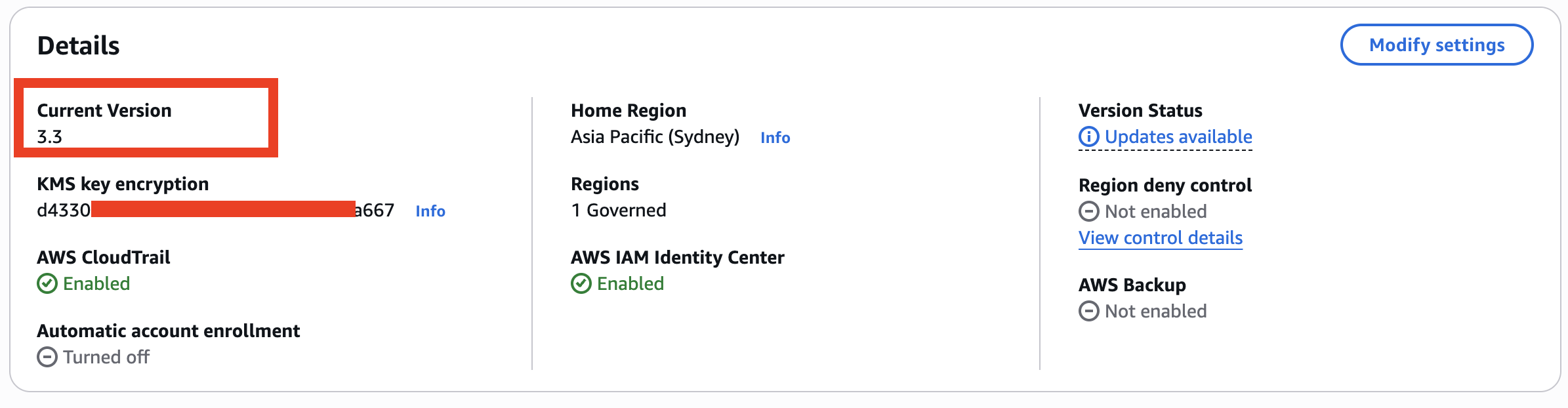
Landing zone version की समीक्षा करें: Landing Zone settings page पर जाएं और अपना current version verify करें।
-
Drift check करें: Landing Zone settings page पर, verify करें कि आपका landing zone "No drift detected" दिखाता है।
-
Enabled service integrations की समीक्षा करें: Note करें कि कौन से service integrations वर्तमान में सक्षम हैं (AWS Config, AWS CloudTrail, AWS IAM Identity Center, AWS Backup)।
Step 2: Upgrade शुरू करें
आप AWS Control Tower console या AWS CLI/API का उपयोग करके Landing Zone 4.0 में upgrade कर सकते हैं।
Console के माध्यम से upgrade
-
AWS Control Tower console में Landing Zone settings पर जाएं।
-
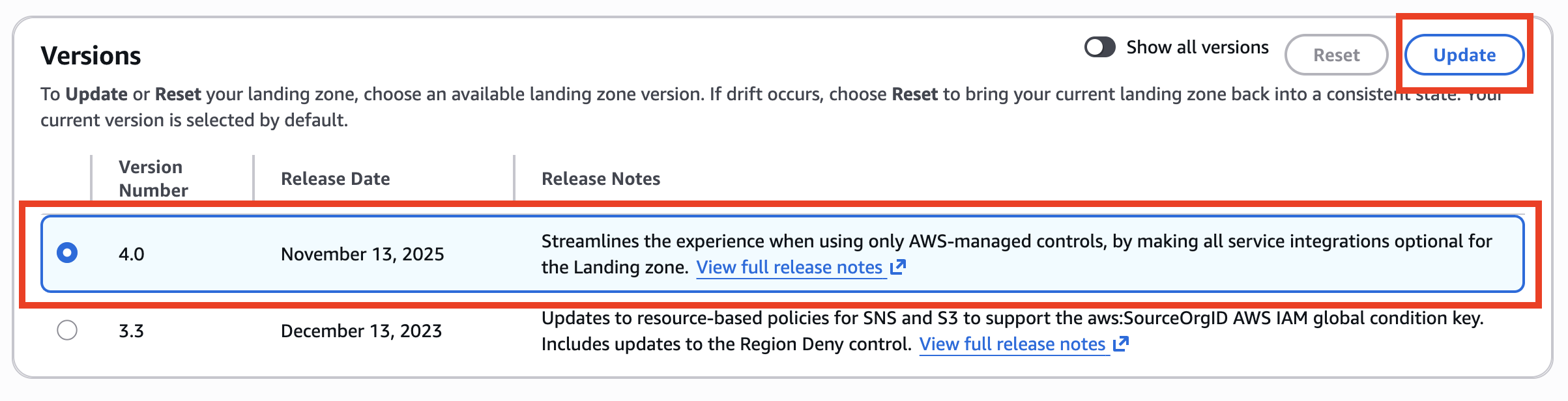
Landing Zone version 4.0 चुनें और upgrade प्रक्रिया शुरू करने के लिए "Update" बटन click करें।
-
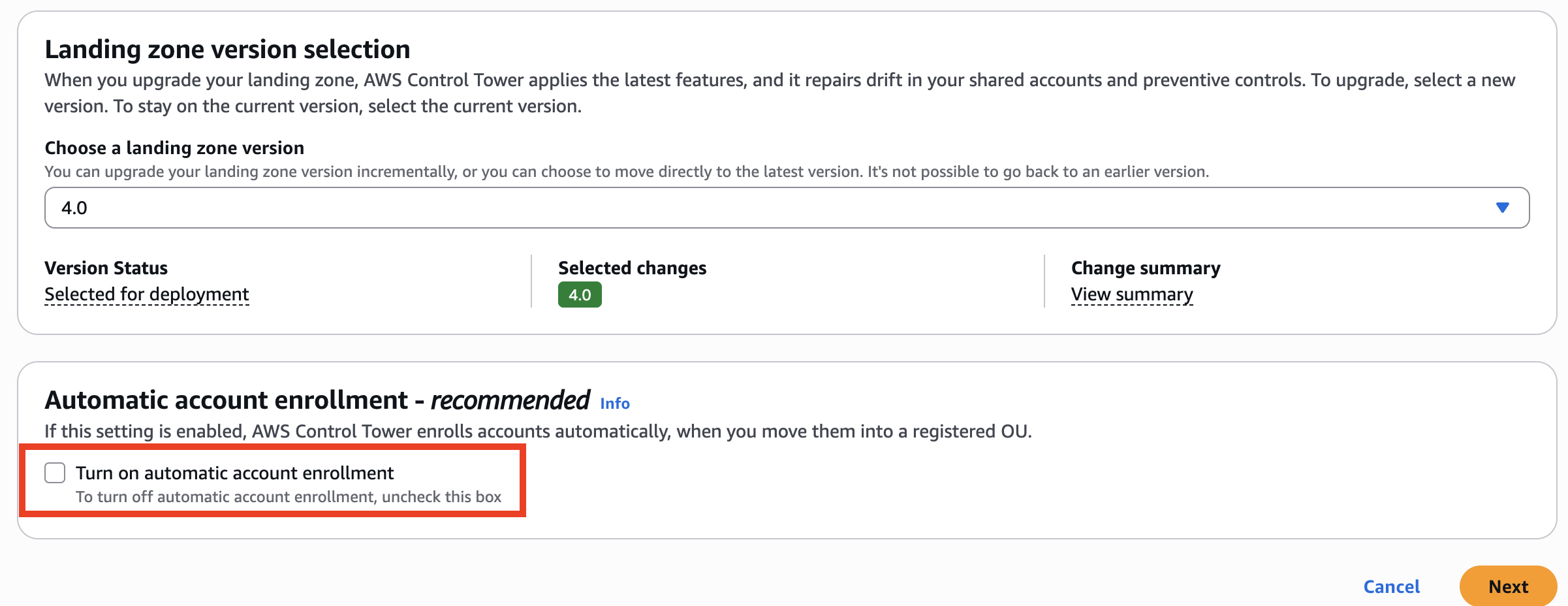
अगले page पर, confirm करें कि Landing zone version 4.0 selected है और वैकल्पिक रूप से automatic account enrollment configure करें। कृपया ध्यान दें कि upgrade के बाद, पिछले version पर वापस जाना संभव नहीं है। Next click करें।
-
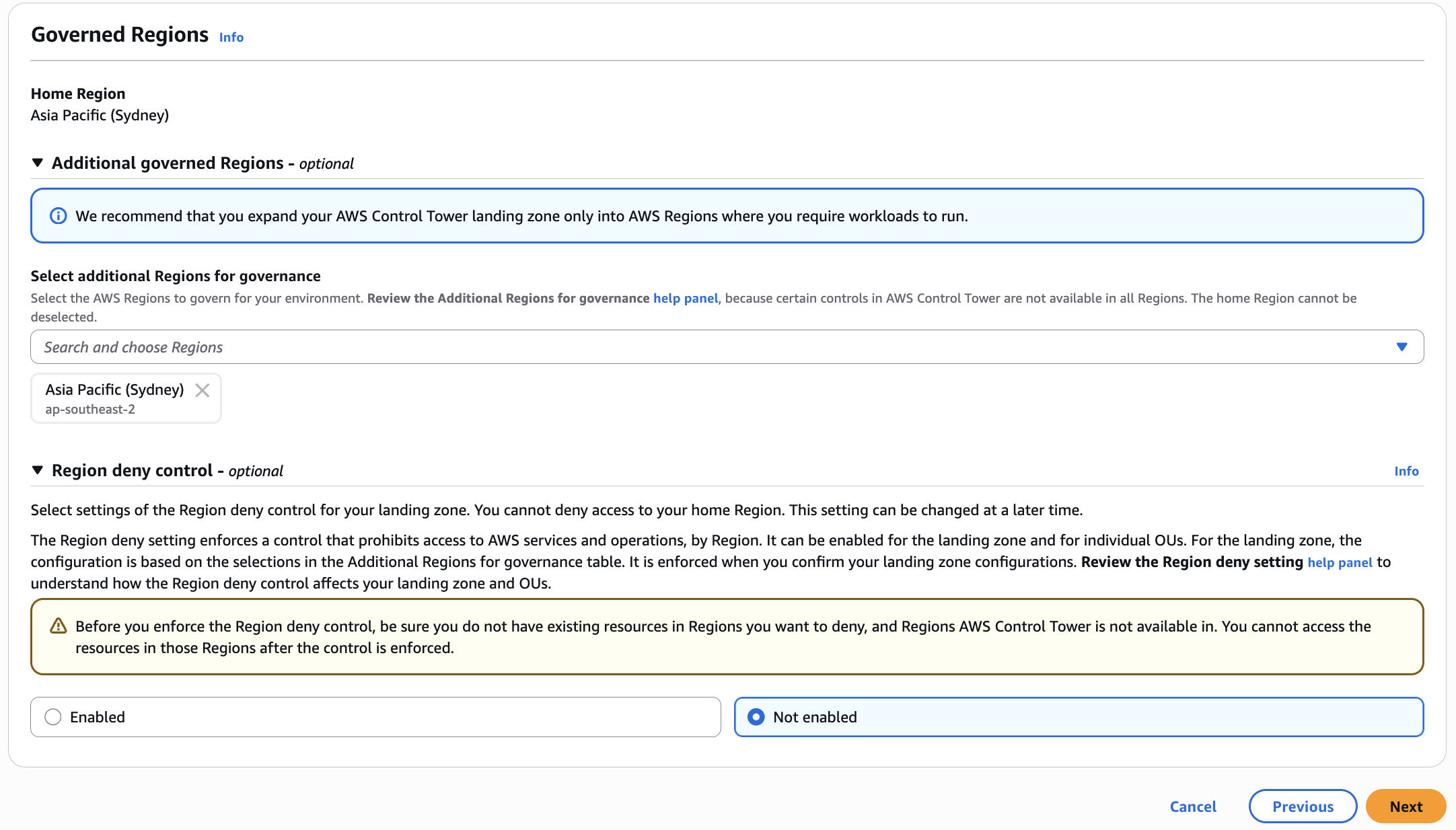
अपनी Governed Regions और Region deny control settings की समीक्षा करें, फिर Next click करें
 5. यह वह page है जहां आप "Service Integrations" update कर सकते हैं, फिर Next click करें
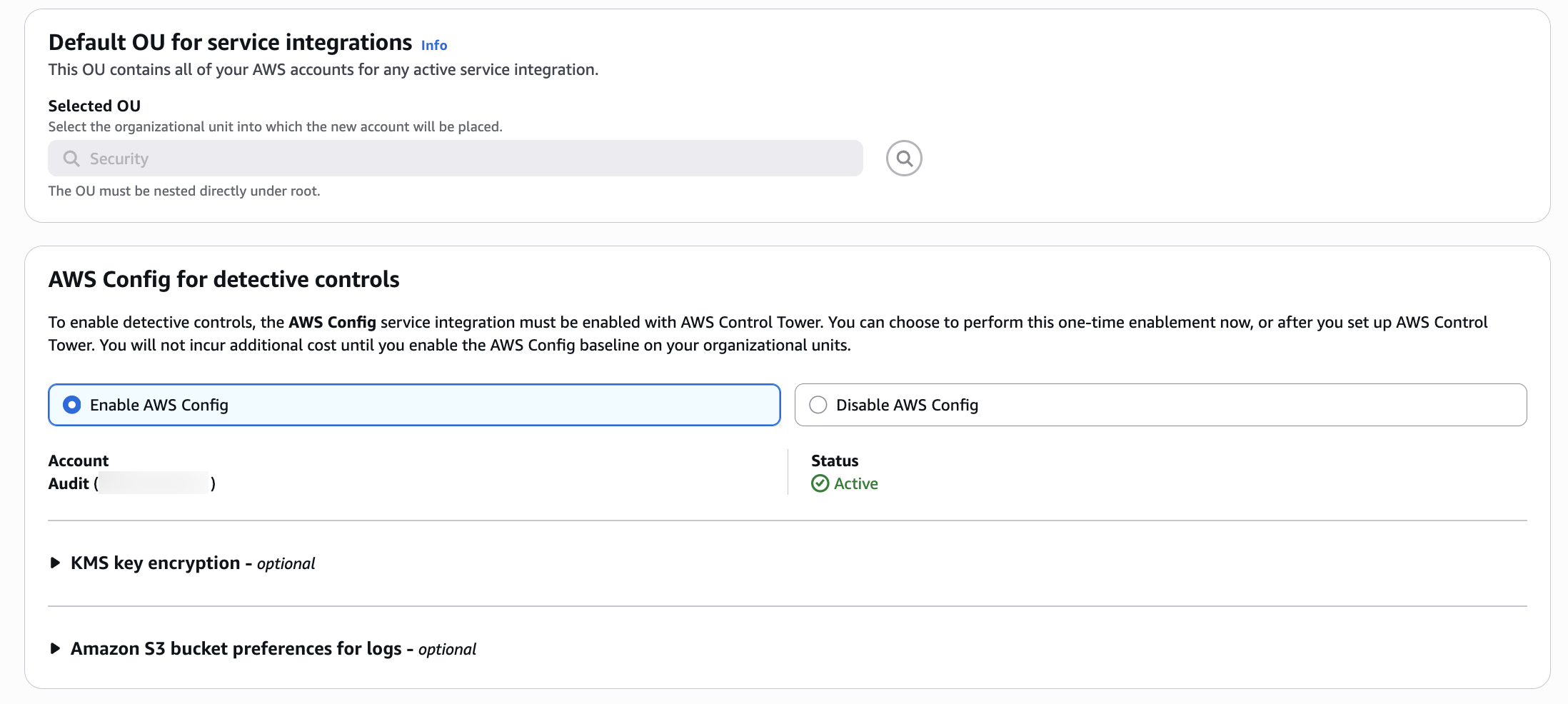
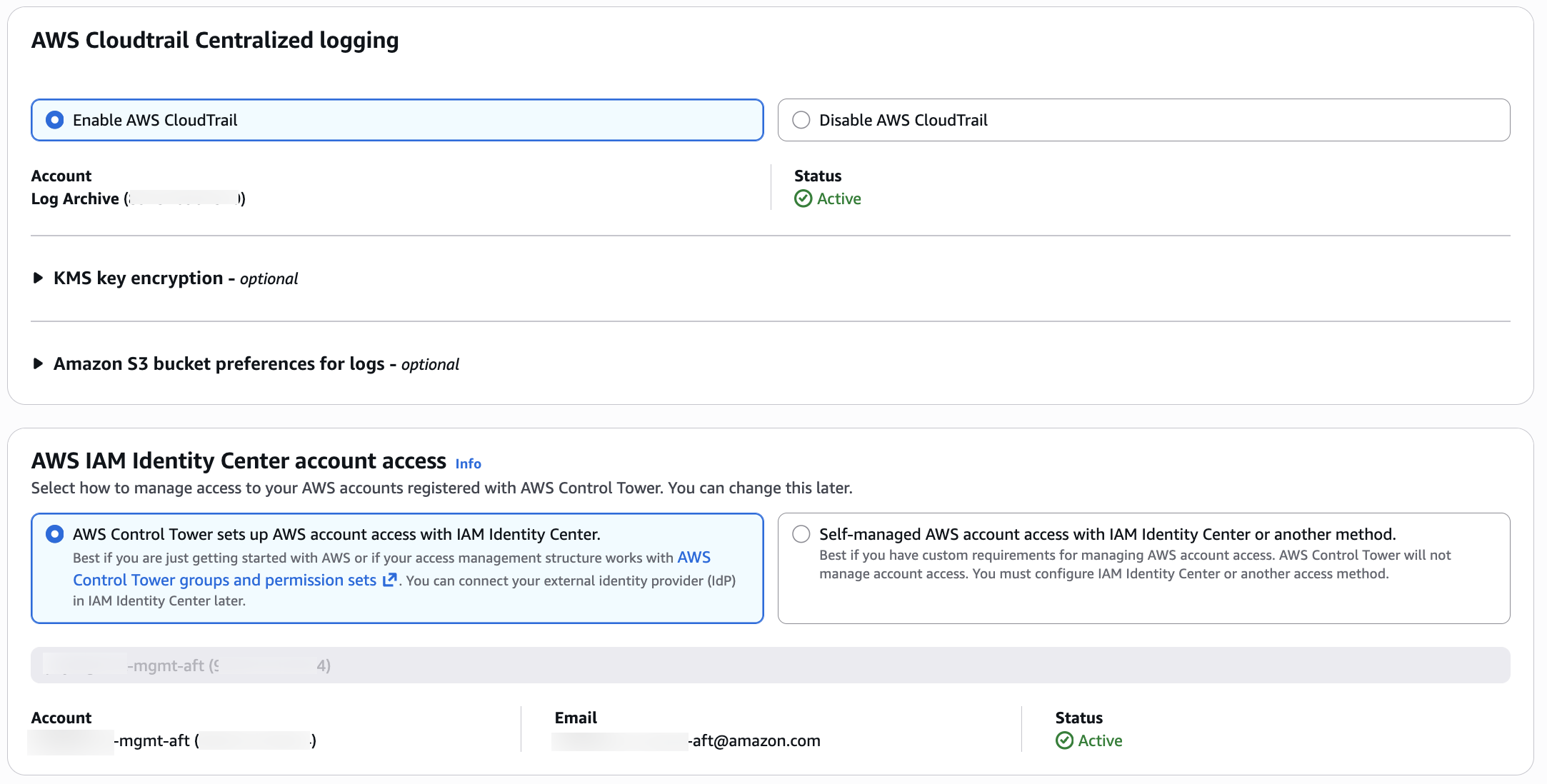
 5. Landing Zone settings की समीक्षा करें और फिर upgrade confirm करें: Upgrade प्रक्रिया शुरू करने के लिए "Update landing zone" click करें।
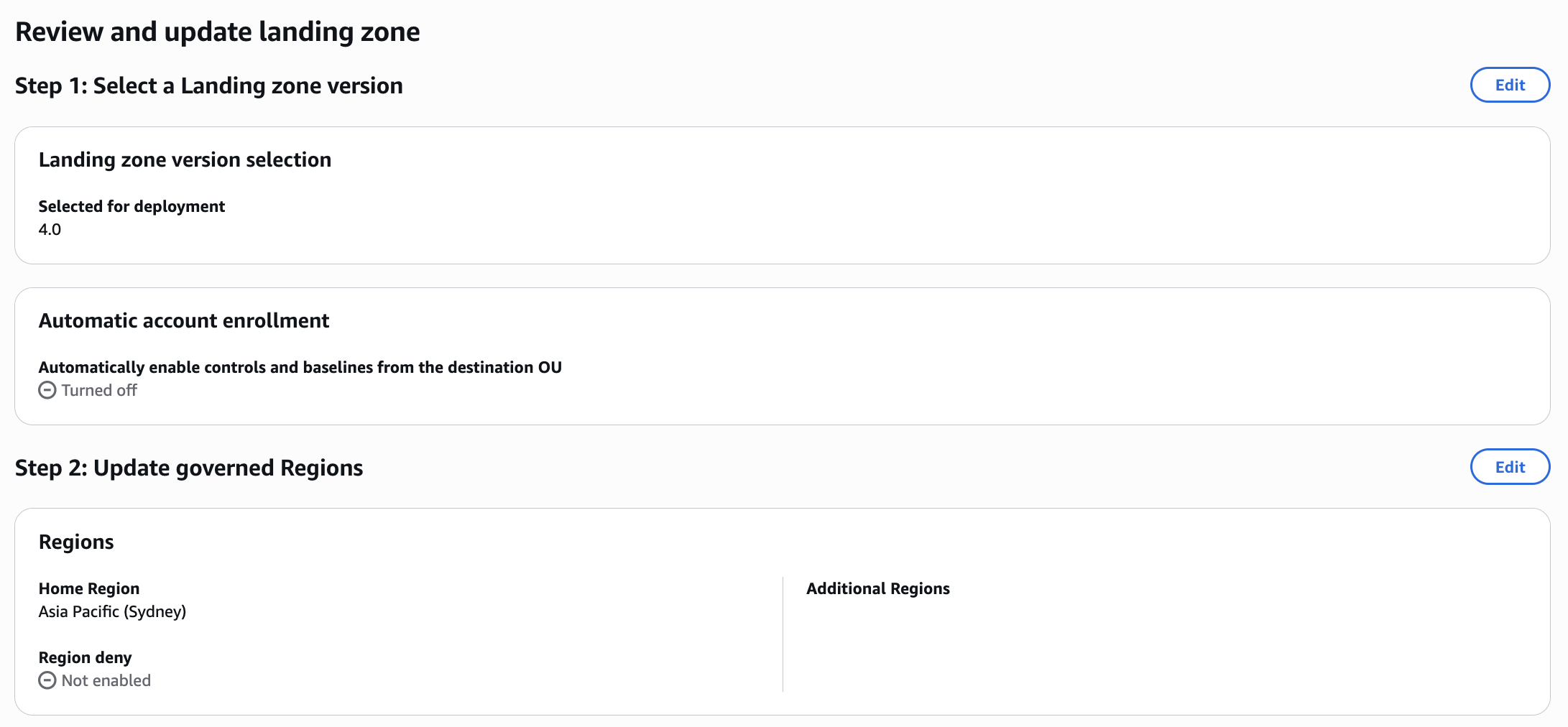
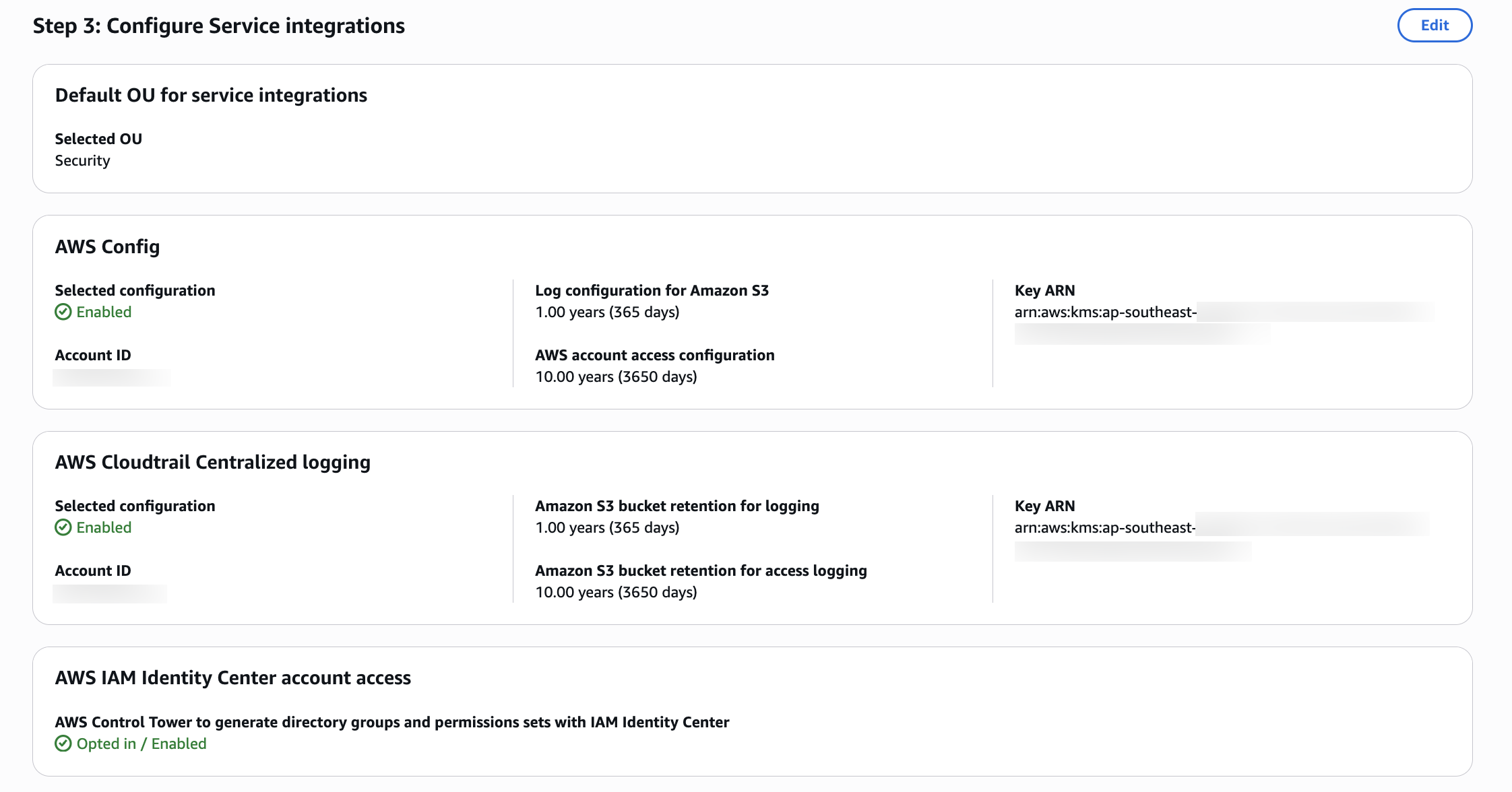
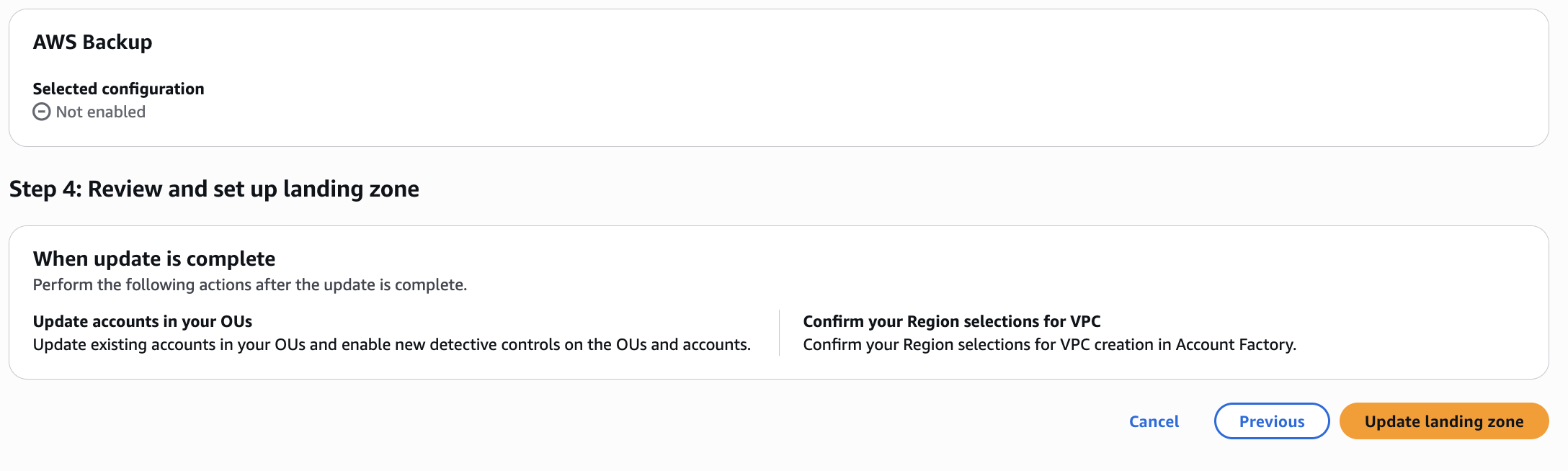 6. Upgrade progress की निगरानी करें: Upgrade प्रक्रिया में आमतौर पर 30-60 मिनट लगते हैं। आप AWS Control Tower console में progress monitor कर सकते हैं।
Step 3: Upgrade completion verify करें
-
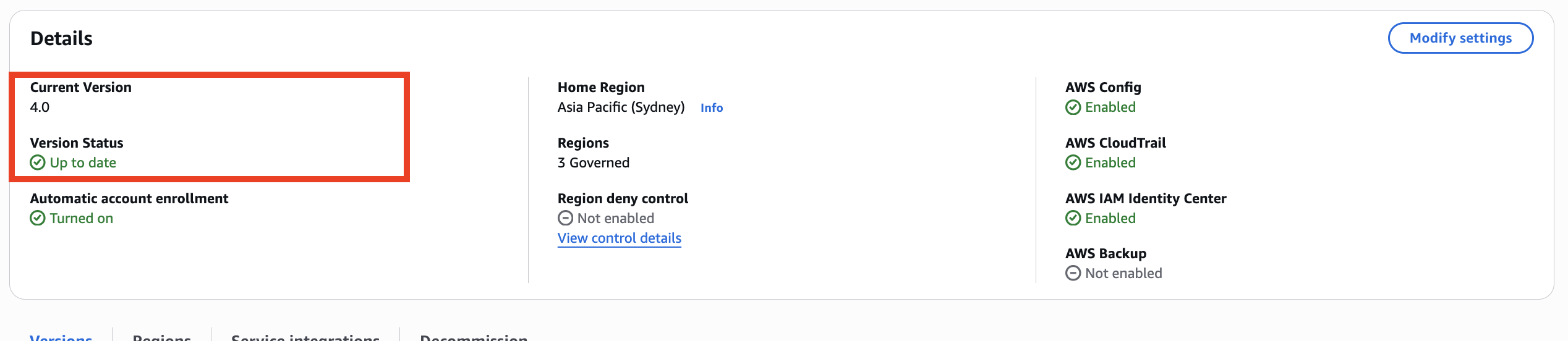
Landing zone status check करें: AWS Control Tower console में, verify करें कि landing zone status "Active" दिखाता है और version "4.0" दिखाता है।
-
Service integrations की समीक्षा करें: Confirm करें कि पहले से सक्षम सभी service integrations enabled और functional बने हुए हैं।
-
किसी भी upgrade errors check करें: किसी भी error messages या warnings के लिए AWS Control Tower console की समीक्षा करें।
Step 4: नई Config baseline verify करें
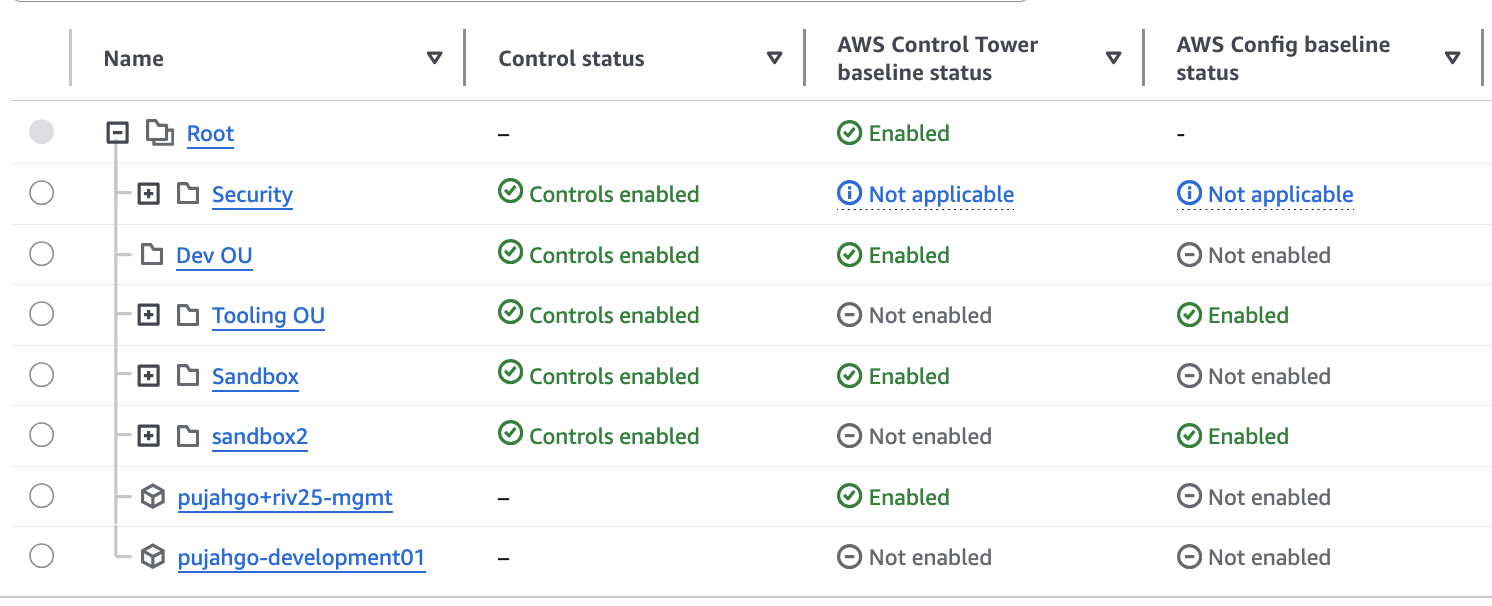
- नया
ConfigBaselinebaseline: अब OU level पर comprehensiveAWSControlTowerBaselineकी आवश्यकता के बिना detective controls support के लिए एक अलगConfigBaselineहै। अधिक जानकारी के लिए OU level पर baseline types की list देखें।
Step 5: AWS Config changes verify करें
Landing Zone 4.0 में upgrade करने के बाद, AWS Config महत्वपूर्ण architectural changes से गुजरता है। इन verification steps का पालन करें:
Delegated administrator registration verify करें
Confirm करें कि Audit account AWS Config delegated administrator के रूप में registered है:
# Check delegated administrator for AWS Config
aws organizations list-delegated-administrators \
  --service-principal config.amazonaws.com \
  --region <your-home-region>
Expected output में आपकी Audit account ID दिखनी चाहिए।
Service-Linked Config Aggregator verify करें
Confirm करें कि Service-Linked Config Aggregator (SLCA) आपके Audit account में मौजूद है:
# Describe configuration aggregators in Audit account
aws configservice describe-configuration-aggregators \
  --region <your-home-region>

पुराने aggregators हटाए गए verify करें
Confirm करें कि legacy aggregators हटा दिए गए हैं:
# In the management account - check for old aggregator (should return empty or not found)
aws configservice describe-configuration-aggregators \
  --region <your-home-region>
Custom Config query migration verify करें
यदि आपके पास management account में custom AWS Config advanced queries थीं, तो अब ये केवल management account में locally चल सकती हैं। Cross-account queries चलाने के लिए, उन्हें audit account में recreate करें:
# In the Audit account - verify the new aggregator shows all member accounts
aws configservice describe-configuration-aggregator-sources-status \
  --configuration-aggregator-name aws-controltower-ConfigAggregatorForOrganizations \
  --region <your-home-region>
नया S3 bucket creation verify करें
Confirm करें कि नया dedicated AWS Config S3 bucket Audit account में मौजूद है:
# List S3 buckets in Audit account
aws s3 ls | grep aws-controltower-config-logs

Note: Member accounts से Config data upgrade के बाद नए S3 bucket में दिखने में 24 घंटे तक लग सकते हैं।
CloudTrail bucket unchanged verify करें
Confirm करें कि AWS CloudTrail Log Archive account में मौजूदा bucket का उपयोग जारी रखता है:
# List S3 buckets in Log Archive account
aws s3 ls | grep aws-controltower-logs
Config delivery channels verify करें
Check करें कि सभी enrolled accounts में AWS Config delivery channels नए S3 bucket की ओर point करते हैं:
# Describe delivery channels
aws configservice describe-delivery-channels \
  --region <your-home-region>

SLCA data aggregation verify करें
Upgrade पूरा होने के बाद full data aggregation के लिए 24-48 घंटे दें:
# Get aggregated compliance summary
aws configservice get-aggregate-compliance-details-by-config-rule \
  --configuration-aggregator-name aws-controltower-ConfigAggregatorForOrganizations \
  --config-rule-name <any-config-rule-name> \
  --account-id <test-account-id> \
  --aws-region <region> \
  --region <your-home-region>
Downstream dashboards और tools verify करें
Config data नए bucket में flow शुरू होने के बाद (24 घंटे तक), verify करें कि सभी dependent dashboards और tools fresh data प्राप्त कर रहे हैं।
Step 6: AWS CloudTrail changes verify करें
AWS CloudTrail Landing Zone 4.0 में minimal changes से गुजरता है, लेकिन आपको निम्नलिखित verify करना चाहिए:
IAM role policy update verify करें
यदि आपने API के माध्यम से upgrade किया, तो confirm करें कि AWSControlTowerCloudTrailRole नई managed policy का उपयोग करता है:
# List attached policies for CloudTrail role
aws iam list-attached-role-policies \
  --role-name AWSControlTowerCloudTrailRole
CloudTrail logging जारी है verify करें
Confirm करें कि organization trail logging जारी रखता है:
# Describe trails
aws cloudtrail describe-trails \
  --region <your-home-region>
Step 7: SNS topic changes verify करें
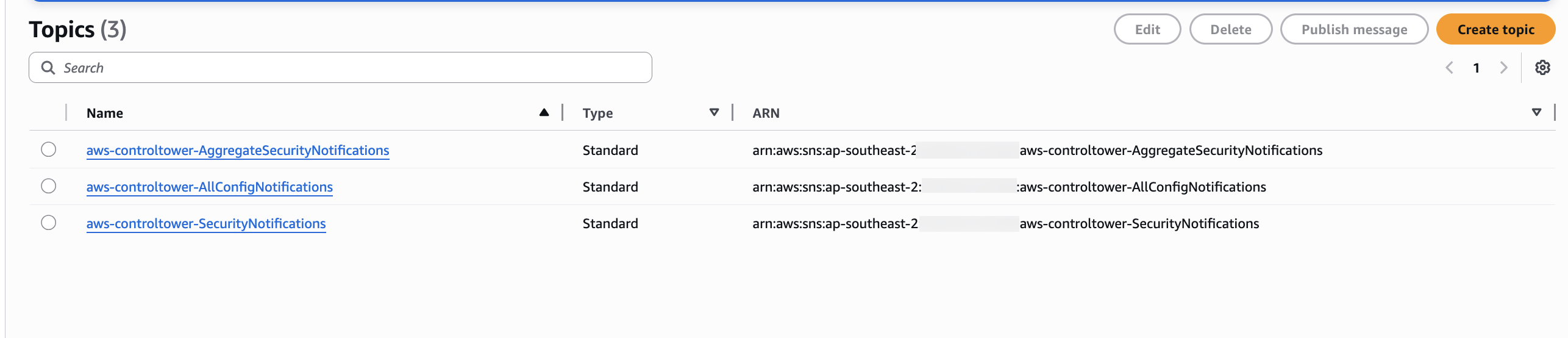
Landing Zone 4.0 प्रत्येक service integration के लिए dedicated SNS topics introduce करता है। Audit account में SNS topics verify करें:
# List SNS topics in Audit account
aws sns list-topics --region <your-home-region>
Step 8: Control changes verify करें
AWS Control Tower Landing Zone 4.0 के साथ, mandatory controls में कई changes हुए हैं। Changes verify करने के लिए documentation Changes in Landing Zone 4.0 controls follow करें।
Organizational units को re-register करें
Landing Zone 4.0 में upgrade करने के बाद, आपको member accounts पर नए baseline versions लागू करने के लिए अपने OUs को re-register करना चाहिए। यह एक incremental प्रक्रिया है जो phases में की जा सकती है।
OU re-registration को समझना
जब आप एक OU re-register करते हैं:
- AWS Control Tower उस OU के भीतर सभी member accounts को नए baseline version के साथ update करता है
- Control Tower-managed SCPs refresh होते समय अस्थायी रूप से inactive होते हैं (आमतौर पर मिनट)
- Custom SCPs enforced रहते हैं और प्रभावित नहीं होते
- Workloads बिना interruption के चलते रहते हैं
- आप एक single batch में प्रति OU 1,000 accounts तक process कर सकते हैं
महत्वपूर्ण: Parent OU को re-register करने से child OUs में cascade नहीं होता। Hierarchy में प्रत्येक OU को individually re-register किया जाना चाहिए।
Phased rollout strategy
अनुशंसित दृष्टिकोण:
- Hierarchical enablement: Child OUs से पहले top-level OUs से शुरू करें।
- Mixed baseline versions: Transition periods के दौरान acceptable (hybrid 3.x और 4.0)
- Batch processing: एक OU के भीतर सभी accounts update करने के लिए "Re-register OU" का उपयोग करें
- प्रत्येक OU Monitor करें: अगले OU पर आगे बढ़ने से पहले successful re-registration verify करें
Console के माध्यम से OU re-register करें
- AWS Control Tower console में OU page पर जाएं
- वह OU चुनें जिसे आप re-register करना चाहते हैं
- Re-register OU click करें
- Update किए जाने वाले accounts की समीक्षा करें
- Confirm करने के लिए Re-register OU click करें
- Console में re-registration progress monitor करें
Troubleshooting: यदि कोई account upgrade से पहले पहले से drifted state में था, तो re-registration के बाद भी यह drifted रह सकता है। ऐसे मामले में, persistent drift की जांच और resolution के लिए प्रभावित account में AWS Support के साथ एक support case खोलें।