मौजूदा EC2 वर्कलोड के लिए OLA
AWS OLA प्रोग्राम
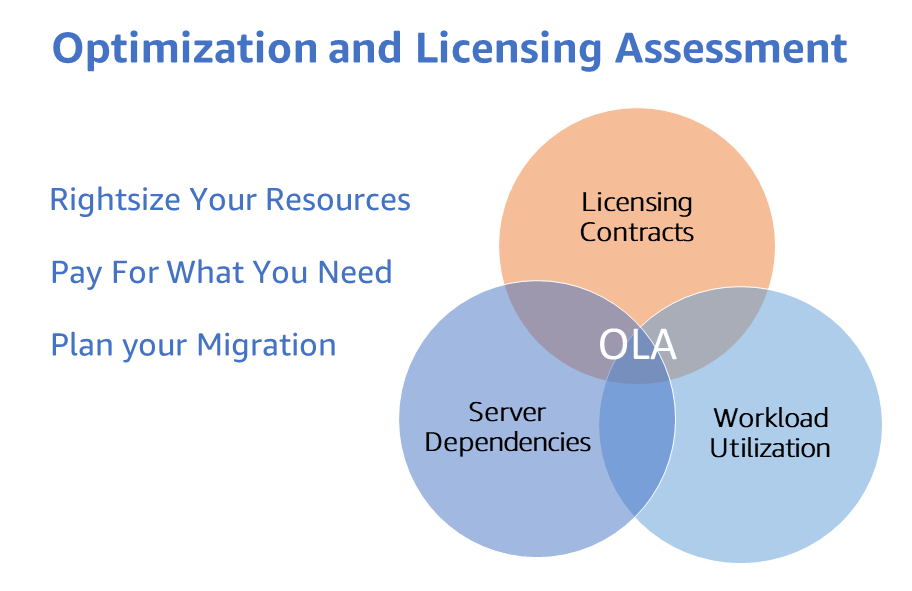
AWS Optimization and Licensing Assessment (AWS OLA) ग्राहकों को वर्कलोड को cloud में migrate करने और resources को cost optimize करने का सबसे अच्छा दृष्टिकोण प्रदान करता है। यह एक मानार्थ प्रोग्राम है जो ग्राहकों को उनके नए और मौजूदा वर्कलोड का एनालिसिस करने, resource allocation, third-party licensing, और application dependencies को optimize करने के लिए उनके on-premises और cloud environments का आकलन करने और इस प्रकार resource efficiency बढ़ाने और संभावित रूप से compute spending पर बचत करने में मदद करने के लिए है।
इस प्रक्रिया में एकत्र किए गए डेटा के माध्यम से, AWS OLA प्रोग्राम एक व्यापक रिपोर्ट प्रदान करता है जिसका उपयोग ग्राहक अपनी cloud यात्रा और migration के लिए सूचित निर्णय लेने के लिए कर सकते हैं। रिपोर्ट वास्तविक resource उपयोग, मौजूदा licensing entitlements के आधार पर deployment विकल्पों को model करती है और ग्राहकों को हमारे लचीले licensing विकल्पों के माध्यम से संभावित cost savings उजागर करने में मदद करती है।
AWS OLA प्रोग्राम से गुजरने के लाभों में शामिल हैं,
- tool-based discovery दृष्टिकोण के साथ अपने वर्कलोड के लिए resource allocation को rightsize करना जो compute resources में insights प्रदान करता है और प्रत्येक workload के लिए सबसे अच्छा Amazon Elastic Compute Cloud (Amazon EC2), Amazon Relational Database Service (Amazon RDS), या VMware Cloud on AWS instance size और type की पहचान करने में मदद करता है।
- अपने cloud infrastructure को optimize करके costs कम करना जो प्रमुख पहलुओं में से एक है।
- Seasonal workloads और agile experimentation के प्रबंधन में flexibility के लिए license-included या BYOL instances सहित licensing scenarios model करना ताकि optimized licensing विकल्पों का पता लगाया जा सके और इस प्रकार अनावश्यक licensing costs को समाप्त किया जा सके।
मौजूदा EC2 वर्कलोड के लिए AWS OLA
AWS OLA (Optimization and Licensing Assessment) मौजूदा EC2 workloads के लिए costs optimize करने पर केंद्रित है जिसे 'AWS OLA for EEC2' कहा जाता है - Existing EC2 Workloads assessment के लिए AWS OLA (Optimization and Licensing Assessment)।
AWS OLA for EEC2 AWS Enterprise Support plan में enrolled ग्राहकों के लिए Amazon EC2 rightsizing recommendations प्रदान करने के लिए AWS Compute Optimizer का लाभ उठाता है। OLA for EEC2 एक streamlined process के माध्यम से एक self-service engagement है, जिसमें AWS OLA team एक assessment report के रूप में recommendations तैयार करती है और संबंधित AWS account team Amazon EC2 rightsizing और cost optimization के लिए ग्राहक को उन findings को प्रस्तुत करती है। Amazon EC2 rightsizing recommendations के अतिरिक्त, AWS OLA BYOL (Bring Your Own License) और License Included Microsoft SQL Server instances के लिए Microsoft SQL Server optimization strategies भी प्रदान करता है। OLA for EEC2 Amazon EC2 rightsizing के पूरक strategies को सामने लाता है जो Microsoft SQL Server spend को कम करते हैं 1) lower CPU recommendation वाले Microsoft SQL Server on EC2 instances पर CPU configurations को optimize करके और 2) licensable SQL editions (Enterprise/Standard) चलाने वाले non-production servers को free SQL Developer edition में downgrade करके।
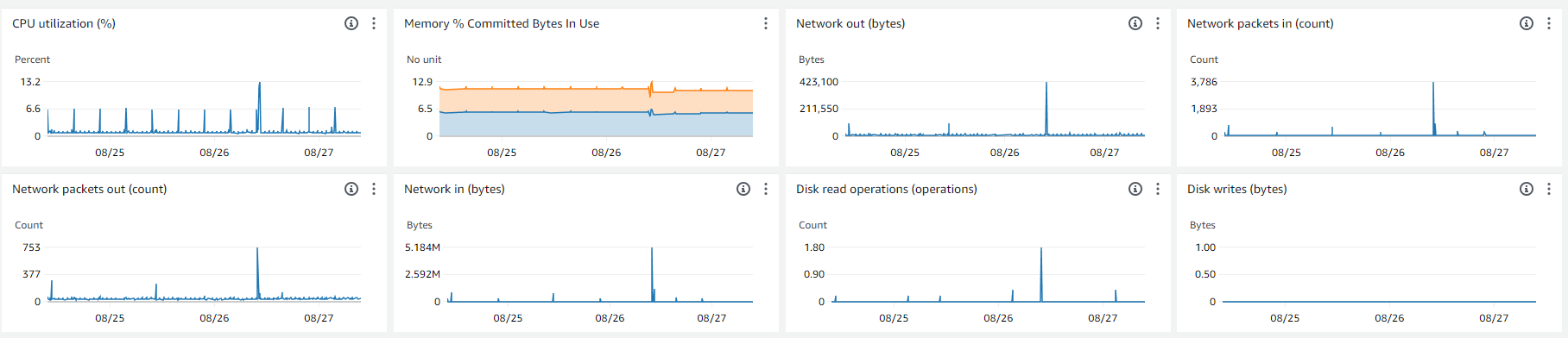
Assessment करने के लिए, AWS OLA for EEC2 प्रक्रिया ग्राहक के AWS accounts से environment parameters एकत्र करती है, जिसमें memory और CPU utilization जैसे metrics शामिल हैं (Amazon CloudWatch और CloudWatch agent के माध्यम से)। आवश्यक parameters एकत्र होने के बाद, AWS OLA team aggregated data का उपयोग करके recommendations तैयार करती है और AWS TAMs और account team को एक PPT deck और Excel report प्रस्तुत करती है जो बाद में ग्राहकों को प्रस्तुत की जा सकती है। Report द्वारा प्रदान की गई insights ग्राहकों को उनके मौजूदा Amazon EC2 spend को optimize करने और उनके workloads के लिए licensing optimization strategies का पता लगाने में मदद करती हैं।
AWS OLA for EEC2 assessment
Enterprise Support वाला कोई भी AWS ग्राहक एक मानार्थ Optimization and Licensing Assessment (OLA) for Existing EC2 workloads के साथ अपने मौजूदा Amazon EC2 Instances (Linux और Windows) की costs optimize कर सकता है। आपके workloads के लिए बिना किसी लागत के AWS OLA for EEC2 assessment कराने के लिए, कृपया अपनी AWS account team से संपर्क करें।
सटीक rightsizing के लिए Amazon CloudWatch memory metrics
जबकि AWS OLA for EEC2 Amazon EC2 rightsizing के लिए एक assessment report प्रदान करता है, Amazon CloudWatch द्वारा प्रदान की गई insights ग्राहकों के लिए resources की अधिक सटीक rightsizing के लिए memory utilization metrics शामिल करने के मूल्य को समझती हैं। इसलिए AWS OLA for EEC2 प्रोग्राम के साथ Amazon CloudWatch memory metrics monitoring को प्रोत्साहित और सुविधाजनक बनाकर, ग्राहकों को अपने AWS environments के लिए अधिक प्रभावशाली resource optimization recommendations मिलती हैं और उनके workload resource consumption का एक व्यापक परिप्रेक्ष्य भी प्राप्त होता है। इससे आपको अपने workloads की लागत कम करने और प्रदर्शन सुधारने में मदद मिलती है।
Amazon EC2 Instances डिफ़ॉल्ट रूप से Amazon CloudWatch को कई metrics emit करते हैं। हालांकि, memory metrics Amazon EC2 द्वारा प्रदान की जाने वाली default metrics में से एक नहीं है। Amazon EC2 की memory metrics जानने से आपके EC2 instances के वर्तमान memory utilization को समझने में मदद मिलती है, ताकि instances न तो under-provisioned हों और न ही over-provisioned। Amazon EC2 instances का under-provisioning आमतौर पर system या application के performance को impair करता है, जबकि over provisioning बेकार खर्च में परिणामित होता है। Big Data Analytics, In-memory Databases, Real-time Streaming जैसे Memory heavy applications को operational visibility के लिए instances पर memory utilization monitor करने की आवश्यकता होती है।
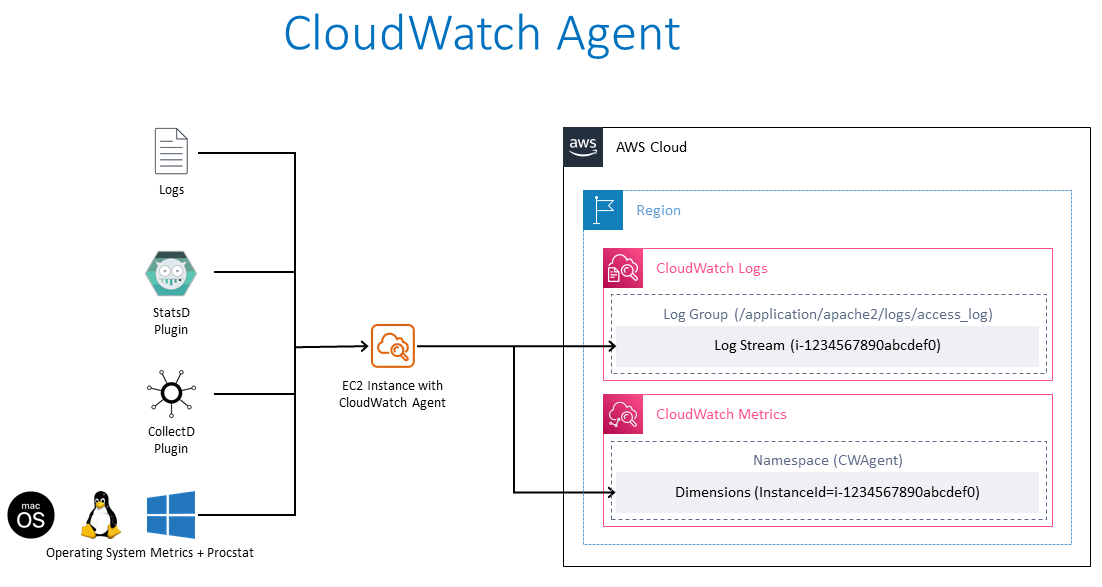
Amazon EC2 Instances से Memory metrics collection
Amazon EC2 Instances से memory metrics collect करने के लिए, उच्च स्तर पर steps इस प्रकार हैं।
- निम्नलिखित permissions के साथ AWS Identity and Access Management (IAM) में एक role बनाएं
- Amazon EC2 instances को manage करने के लिए Amazon Systems Manager, यदि Amazon EC2 Instance(s) Systems Manager द्वारा managed हैं तो आवश्यक है। AWS Systems Manager Agent (SSM Agent) Amazon EC2 instances पर आवश्यक है ताकि instance AWS Systems Manager के साथ communicate कर सके और instance के विरुद्ध remote commands और scripts execute किए जा सकें, जैसे EC2 Instances पर आपकी ओर से Systems Manager Run Command चलाना। AWS Systems Manager Agent (SSM Agent) एक Amazon software है जो Amazon EC2 instances पर install और run किया जाता है, जो Amazon Systems Manager service को EC2 Instances को managed instances के रूप में update, manage, और configure करना संभव बनाता है। SSM agent Systems Manager service से requests प्राप्त करता है, उन्हें process करता है और Systems Manager service को status और execution information वापस भेजता है। कृपया ध्यान दें कि, AWS Systems Manager Agent (SSM Agent) डिफ़ॉल्ट रूप से AWS द्वारा प्रदान किए गए कुछ Amazon Machine Images (AMIs) पर preinstalled है।
- यदि CloudWatch agent wizard का उपयोग CloudWatch agent configuration file generate करने के लिए किया जाता है, तो वैकल्पिक रूप से Systems Manager Parameter Store को आगे की retrieval के लिए configuration file store करने के लिए secure common location के रूप में उपयोग किया जा सकता है। तब CloudWatch Agent को configuration file लिखने के लिए Systems Manager Parameter Store में write-access और configuration file पढ़ने के लिए read-access की आवश्यकता होगी।
- Amazon CloudWatch को data (metrics और logs) लिखने के लिए CloudWatch agent
- Amazon EC2 Instance(s) launch करें और पहले step में बनाया गया IAM role assign करें। इस IAM role के लिए, कृपया नीचे Appendix [1] में Trust Policy और Appendix [2] में Amazon Managed Policies - AmazonSSMManagedInstanceCore, CloudWatchAgentAdminPolicy और CloudWatchAgentServerPolicy (JSON format में permissions सहित) देखें जिनका उपयोग किया जा सकता है।
- आवश्यक EC2 instance(s) (Windows या Linux) पर CloudWatch agent install करें या तो manually या Systems Manager Run Command का उपयोग करके।
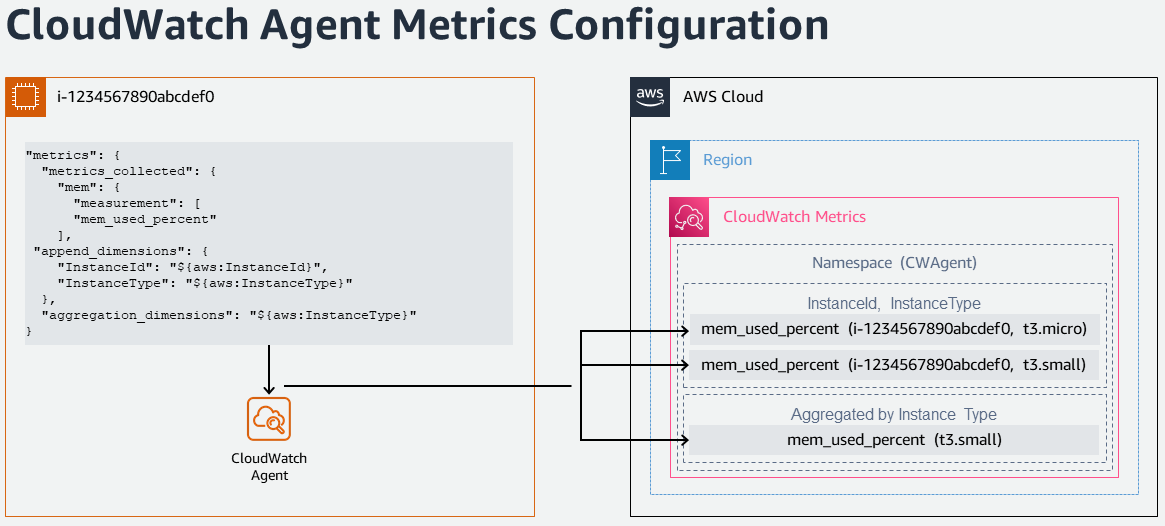
- Memory metrics collect करने और Amazon CloudWatch में लिखने के लिए CloudWatch agent configure करें।
- CloudWatch console में collected metrics और logs देखें।
- Log data analyze करने के लिए CloudWatch Logs Insights का उपयोग करें
बड़े पैमाने पर Amazon EC2 Instances से Memory metrics collection
एक या अधिक Amazon EC2 Instances पर Amazon CloudWatch को signal collection (metrics और logs) के लिए CloudWatch agent install और configure करने हेतु नीचे दिए गए steps follow किए जा सकते हैं।
- Amazon EC2 Instance (Windows या Linux) से Remote Desktop या SSH का उपयोग करके connect करें, CloudWatch agent configuration file तैयार करने के लिए एक बार आवश्यक।
- Metrics और logs collection setup करने के लिए CloudWatch Agent Configuration Wizard चलाएं
- CPU, memory, disks जैसे host metrics configure करें
- वैकल्पिक रूप से monitor करने के लिए custom log files जोड़ें (उदा., IIS logs, Apache logs)
- वैकल्पिक रूप से Windows Event logs monitor करें
- Configuration को Systems Manager Parameter Store में store करें, यदि वही configuration अधिक Amazon EC2 Instances पर लागू की जा सकती है।
- Systems Manager Run Command का उपयोग करके CloudWatch Agent configuration को अन्य EC2 Instances पर apply करें। AmazonCloudWatch-ManageAgent Systems Manager Command document का उपयोग एक ही run में multiple EC2 instances पर CloudWatch configuration update करने के लिए किया जा सकता है।
Amazon EC2 Instances से memory metrics collection का Automation
Amazon CloudWatch को signal collection (metrics और logs) को automate, orchestrate और बड़े पैमाने पर manage करने के लिए नीचे दिए गए steps follow किए जा सकते हैं। AWS CloudFormation template का उपयोग निम्नलिखित actions perform करने के लिए किया जा सकता है
- एक IAM execution role बनाएं जो Systems Manager automation को आपकी ओर से Amazon EC2 Instances पर runbooks execute करने की अनुमति देता है।
- CloudWatch agent को Amazon CloudWatch में data (metrics और logs) लिखने की permissions के साथ IAM role setup करें
- Amazon EC2 Instances पर CloudWatch agent install और configure करने के लिए एक custom runbook build करें। कृपया नीचे Appendix [3] देखें, एक उदाहरण custom runbook document जिसका उपयोग CloudWatch Agent install करने और CloudWatch Agent को या तो default metrics के साथ या Amazon Systems Manager Parameter Store में एक parameter के साथ configure करने के लिए किया जा सकता है
- Systems manager parameter store में एक CloudWatch agent configuration file upload करें।
संदर्भ
- CloudWatch Agent के साथ Amazon EC2 instances से Metrics और Logs Collect करें
- AWS Systems Manager का उपयोग करके Amazon EC2 instances के लिए memory metrics Setup करें
Appendices
[1] Amazon EC2 द्वारा role assume करने के लिए Trust Policy
{
  "Version": "2012-10-17",
  "Statement": [
    {
      "Effect": "Allow",
      "Action": ["sts:AssumeRole"],
      "Principal": {
        "Service": ["ec2.amazonaws.com"]
      }
    }
  ]
}
[2] AmazonSSMManagedInstanceCore - AWS Systems Manager service core functionality enable करने के लिए Amazon EC2 Role की AWS Managed Policy।
{
  "Version": "2012-10-17",
  "Statement": [
    {
      "Effect": "Allow",
      "Action": [
        "ssm:DescribeAssociation",
        "ssm:GetDeployablePatchSnapshotForInstance",
        "ssm:GetDocument",
        "ssm:DescribeDocument",
        "ssm:GetManifest",
        "ssm:GetParameter",
        "ssm:GetParameters",
        "ssm:ListAssociations",
        "ssm:ListInstanceAssociations",
        "ssm:PutInventory",
        "ssm:PutComplianceItems",
        "ssm:PutConfigurePackageResult",
        "ssm:UpdateAssociationStatus",
        "ssm:UpdateInstanceAssociationStatus",
        "ssm:UpdateInstanceInformation"
      ],
      "Resource": "*"
    },
    {
      "Effect": "Allow",
      "Action": [
        "ssmmessages:CreateControlChannel",
        "ssmmessages:CreateDataChannel",
        "ssmmessages:OpenControlChannel",
        "ssmmessages:OpenDataChannel"
      ],
      "Resource": "*"
    },
    {
      "Effect": "Allow",
      "Action": [
        "ec2messages:AcknowledgeMessage",
        "ec2messages:DeleteMessage",
        "ec2messages:FailMessage",
        "ec2messages:GetEndpoint",
        "ec2messages:GetMessages",
        "ec2messages:SendReply"
      ],
      "Resource": "*"
    }
  ]
}
CloudWatchAgentAdminPolicy - AmazonCloudWatchAgent उपयोग करने के लिए full permissions के साथ Amazon Managed Policy
{
  "Version": "2012-10-17",
  "Statement": [
    {
      "Sid": "CWACloudWatchPermissions",
      "Effect": "Allow",
      "Action": [
        "cloudwatch:PutMetricData",
        "ec2:DescribeTags",
        "logs:PutLogEvents",
        "logs:PutRetentionPolicy",
        "logs:DescribeLogStreams",
        "logs:DescribeLogGroups",
        "logs:CreateLogStream",
        "logs:CreateLogGroup",
        "xray:PutTraceSegments",
        "xray:PutTelemetryRecords",
        "xray:GetSamplingRules",
        "xray:GetSamplingTargets",
        "xray:GetSamplingStatisticSummaries"
      ],
      "Resource": "*"
    },
    {
      "Sid": "CWASSMPermissions",
      "Effect": "Allow",
      "Action": ["ssm:GetParameter", "ssm:PutParameter"],
      "Resource": "arn:aws:ssm:*:*:parameter/AmazonCloudWatch-*"
    }
  ]
}
CloudWatchAgentServerPolicy - Servers पर AmazonCloudWatchAgent उपयोग करने के लिए full permissions के साथ Amazon Managed Policy
{
  "Version": "2012-10-17",
  "Statement": [
    {
      "Sid": "CWACloudWatchServerPermissions",
      "Effect": "Allow",
      "Action": [
        "cloudwatch:PutMetricData",
        "ec2:DescribeVolumes",
        "ec2:DescribeTags",
        "logs:PutLogEvents",
        "logs:PutRetentionPolicy",
        "logs:DescribeLogStreams",
        "logs:DescribeLogGroups",
        "logs:CreateLogStream",
        "logs:CreateLogGroup",
        "xray:PutTraceSegments",
        "xray:PutTelemetryRecords",
        "xray:GetSamplingRules",
        "xray:GetSamplingTargets",
        "xray:GetSamplingStatisticSummaries"
      ],
      "Resource": "*"
    },
    {
      "Sid": "CWASSMServerPermissions",
      "Effect": "Allow",
      "Action": ["ssm:GetParameter"],
      "Resource": "arn:aws:ssm:*:*:parameter/AmazonCloudWatch-*"
    }
  ]
}
[3] CloudWatch Agent install करने और CloudWatch Agent को default metrics या Amazon Systems Manager Parameter Store में parameter के साथ configure करने के लिए एक उदाहरण custom runbook document
#-------------------------------------------------
# Composite document and State Manager association to install and configure the Amazon CloudWatch agent
#-------------------------------------------------
InstallAndConfigureCloudWatchAgent:
Type: AWS::SSM::Document
Properties:
    Content:
    schemaVersion: '2.2'
    description: The InstallAndManageCloudWatch command document installs the Amazon CloudWatch agent and manages the configuration of the agent for Amazon EC2 instances.
    parameters:
        action:
        description: The action CloudWatch Agent should take.
        type: String
        default: configure
        allowedValues:
        - configure
        - configure (append)
        - configure (remove)
        - start
        - status
        - stop
        mode:
        description: Controls platform-specific default behavior such as whether to include
            EC2 Metadata in metrics.
        type: String
        default: ec2
        allowedValues:
        - ec2
        - onPremise
        - auto
        optionalConfigurationSource:
        description: Only for 'configure' related actions. Use 'ssm' to apply a ssm parameter
            as config. Use 'default' to apply default config for amazon-cloudwatch-agent.
            Use 'all' with 'configure (remove)' to clean all configs for amazon-cloudwatch-agent.
        type: String
        allowedValues:
        - ssm
        - default
        - all
        default: ssm
        optionalConfigurationLocation:
        description: Only for 'configure' related actions. Only needed when Optional Configuration
            Source is set to 'ssm'. The value should be a ssm parameter name.
        type: String
        default: ''
        allowedPattern: '[a-zA-Z0-9-"~:_@./^(*)!<>?=+]*$'
        optionalRestart:
        description: Only for 'configure' related actions. If 'yes', restarts the agent
            to use the new configuration. Otherwise the new config will only apply on the
            next agent restart.
        type: String
        default: 'yes'
        allowedValues:
        - 'yes'
        - 'no'
    mainSteps:
    - inputs:
        documentParameters:
            name: AmazonCloudWatchAgent
            action: Install
        documentType: SSMDocument
        documentPath: AWS-ConfigureAWSPackage
        name: installCWAgent
        action: aws:runDocument
    - inputs:
        documentParameters:
            mode: '{{mode}}'
            optionalRestart: '{{optionalRestart}}'
            optionalConfigurationSource: '{{optionalConfigurationSource}}'
            optionalConfigurationLocation: '{{optionalConfigurationLocation}}'
            action: '{{action}}'
        documentType: SSMDocument
        documentPath: AmazonCloudWatch-ManageAgent
        name: manageCWAgent
        action: aws:runDocument
    DocumentFormat: YAML
    DocumentType: Command
    TargetType: /AWS::EC2::Instance

CloudWatchAgentAssociation:
Type: AWS::SSM::Association
Properties:
    AssociationName: InstallCloudWatchAgent
    Name: !Ref InstallAndConfigureCloudWatchAgent
    ScheduleExpression: rate(7 days)
    Targets:
    - Key: tag:Platform
    Values:
    - Linux
    WaitForSuccessTimeoutSeconds: 300