APM Implementation Guide: Application Signals and Transaction Search
Overview
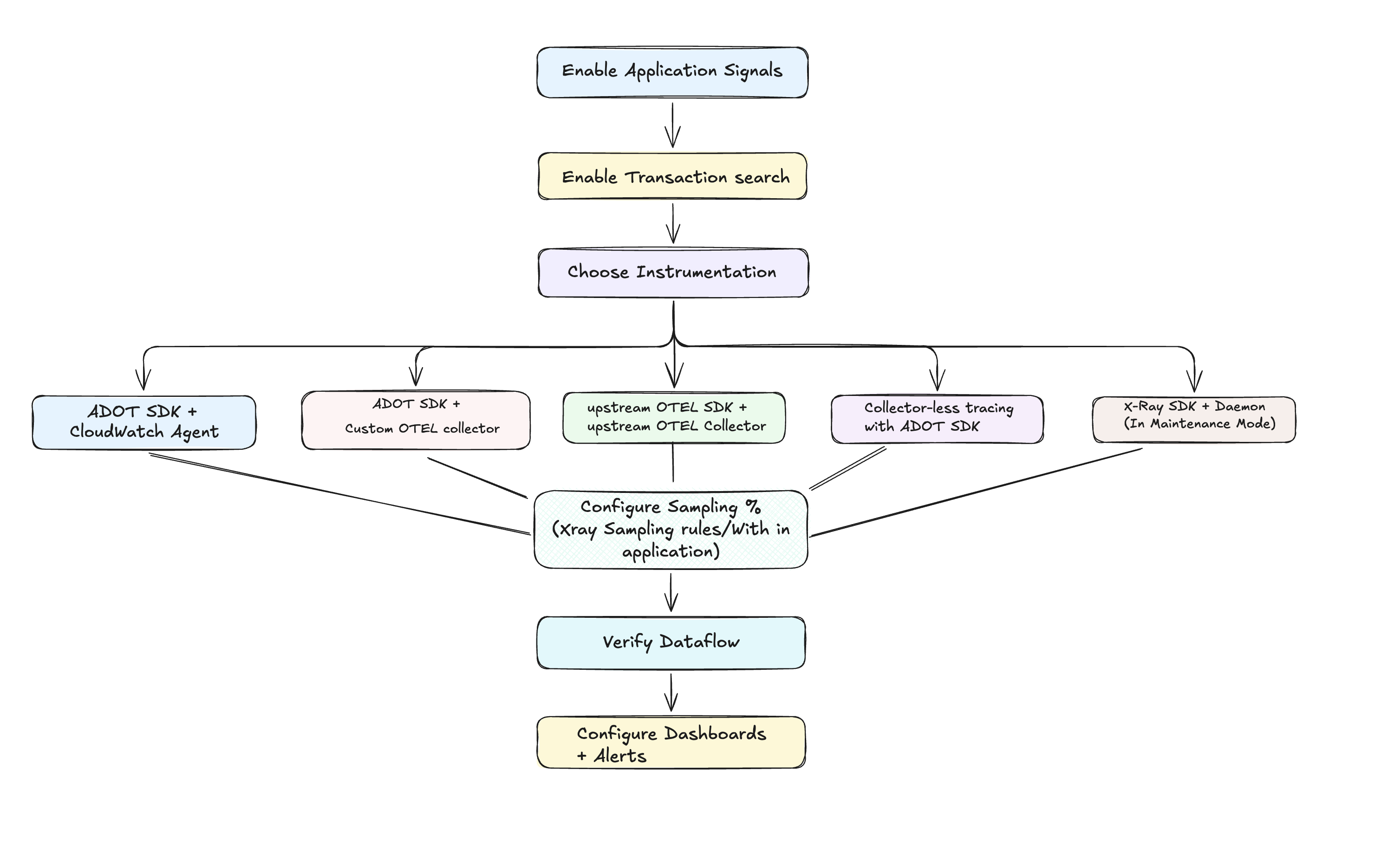
The setup path: enable, choose an instrumentation setup, tune sampling, verify, then alert.
This guide is the entry point to the APM implementation deep dive for Amazon CloudWatch Application Signals with Transaction Search. It covers the architecture, the instrumentation and collector options, and the sampling decisions that control cost and accuracy.
Application Signals gives you service-level health out of the box: auto-discovered services, an application map, and RED (rate, errors, duration) metrics for every operation. Transaction Search stores complete span data in CloudWatch Logs in OpenTelemetry format, so you can query every transaction and apply Logs Insights, metric filters, and subscription filters to span data.
The guide also explains why teams on traditional AWS X-Ray sampling should move to this model. X-Ray SDKs and the X-Ray daemon entered maintenance mode on February 25, 2026, and receive security fixes only.
When to use this
Select a scenario to see how this guide helps.
You are turning on Application Signals and Transaction Search for the first time.
Follow the setup path: prerequisites and permissions, enable Application Signals, enable Transaction Search, pick an instrumentation setup, then configure sampling and trace indexing.
You need to pick between the CloudWatch agent, a custom collector, upstream OpenTelemetry, or no collector at all.
The five instrumentation and collector setups are compared side by side below, with who each one suits, what it gives you, and what you give up.
You run X-Ray SDKs or the X-Ray daemon and need a migration path.
The X-Ray SDKs and daemon are in maintenance mode. The guide compares the two architectures and maps your current setup to an OpenTelemetry-based one.
Your RED metrics do not match your traffic, or you are unsure how sampling affects them.
ADOT SDK setups calculate RED metrics client side on 100% of requests before sampling. Upstream OpenTelemetry and collector-less setups calculate them server side, so accuracy depends on sampling everything.
You want complete span capture without per-trace pricing.
Transaction Search stores spans in CloudWatch Logs with selective indexing. 1% of spans are indexed as X-Ray trace summaries at no extra charge, and you can raise or lower that rate.
You need working instrumentation examples for your language.
The instrumentation samples cover auto-instrumentation, manual instrumentation, and combined approaches, with demo applications you can deploy and explore.
Guidance
Application Signals supports five combinations of SDK and collector. Step through them to see who each one suits, what it delivers, and the trade-off you accept.
ADOT SDK + CloudWatch agent
Best for AWS-native environments that want a managed experience
The most integrated option. RED metrics are calculated on 100% of requests in the application before the sampling decision, X-Ray sampling rules apply by default, and you get Container Insights correlation and CloudWatch Logs integration out of the box. See the architecture →
Accurate service metrics no matter how low you set trace sampling, with AWS support for the whole stack.
Telemetry goes to AWS only, and the ADOT SDK covers Java, Python, .NET, and Node.js.
Pick your path
- Starting fresh
- Migrating from X-Ray
- Check prerequisites, permissions, and supported systems.
- Enable Application Signals and Transaction Search in your account.
- Choose an instrumentation setup. For most AWS-native workloads, start with ADOT SDK + CloudWatch agent.
- Set your sampling and trace indexing rates, then verify services appear in the Application Signals console.
- Read why to migrate to compare the X-Ray architecture with Application Signals and Transaction Search.
- Enable Transaction Search so complete span data lands in CloudWatch Logs.
- Replace the X-Ray SDK with the ADOT SDK and the X-Ray daemon with the CloudWatch agent. Your existing X-Ray sampling rules keep working.
- Follow the X-Ray to OpenTelemetry migration guide for language-specific changes.
Why it matters: both paths end at the same place, OpenTelemetry instrumentation with complete span capture, but the order of steps differs. Starting fresh is a configuration task. Migrating is a code change, so plan it service by service.
How the telemetry flows
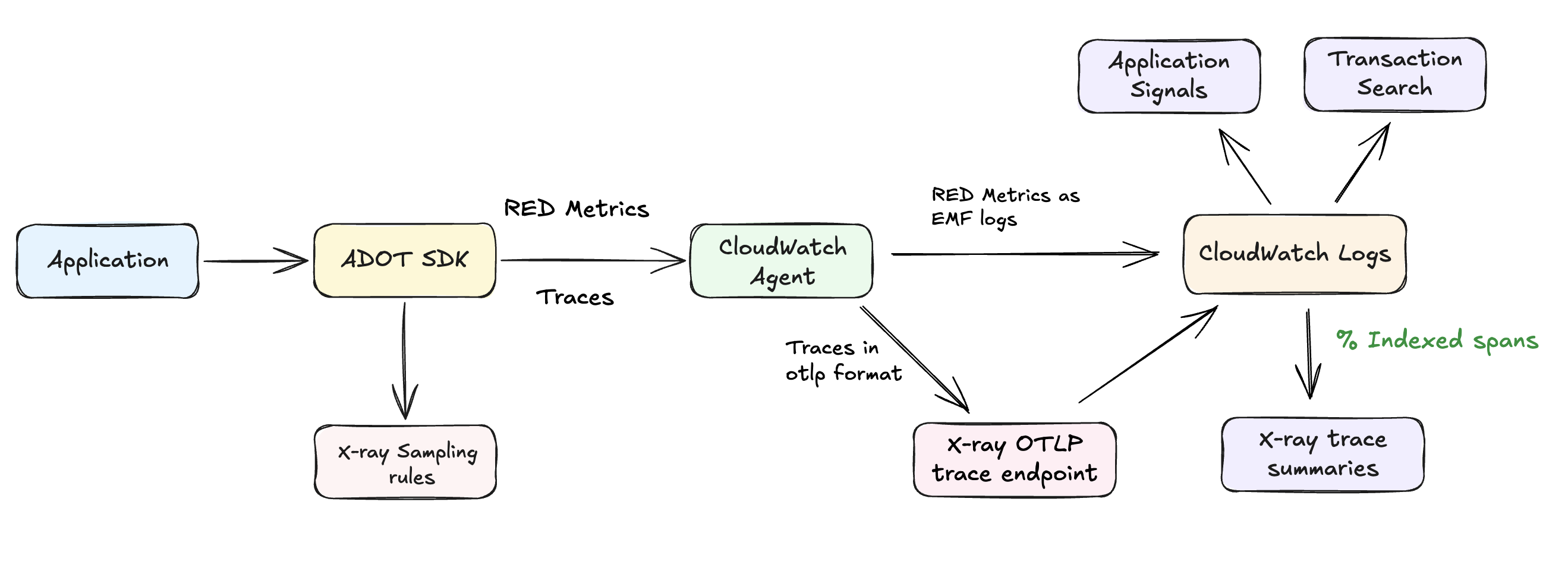
ADOT SDK + CloudWatch agent: RED metrics and traces land in CloudWatch Logs, and a configurable share of spans becomes X-Ray trace summaries.
Request sampling and trace indexing are separate controls. Sampling decides which requests are sent to AWS. Indexing decides what share of those spans also becomes X-Ray trace summaries for debugging. Keep indexing low, since the first 1% is included at no extra charge, and use sampling to manage volume.
Read the full guide
Guide chapters
New to Application Signals? Read Setup first, then jump to the setup you picked in Instrumentation setups. Migrating from X-Ray? Start with Why migrate.
Related
- EKS Java Application Monitoring: Application Signals and OpenTelemetry for Java workloads on Amazon EKS
- .NET Application Monitoring: the same Application Signals pattern applied to .NET workloads
- ADOT Collector at Scale: scaling the collector that underpins the custom-collector setups