Big Data and Spark Observability
Overview
Apache Spark workloads on Amazon EMR generate logs and metrics across distributed cluster nodes. This entry covers collecting that telemetry into CloudWatch for centralized log management, and optionally into Amazon Managed Service for Prometheus (AMP) and Amazon Managed Grafana (AMG) for richer metric visualization and alerting.
The CloudWatch agent on EMR EC2 instances captures system and Spark metrics, while CloudWatch Logs centralizes driver and executor output for troubleshooting.
Prerequisites
- An AWS account with EMR, CloudWatch, and (optionally) AMP/AMG permissions
- An Amazon EMR cluster (version 5.x or 6.x)
- IAM role for EC2 instances with
CloudWatchAgentServerPolicyattached - CloudWatch agent installed via EMR bootstrap action
EMR cluster requirements:
- EMR release 5.33+ or 6.x (earlier releases lack full CloudWatch agent support on Amazon Linux 2).
- Cluster instances must run Amazon Linux 2 — the CloudWatch agent RPM is not available for Amazon Linux 1 AMIs.
- The SSM Agent must be running on every node so the CloudWatch agent can pull its configuration from SSM Parameter Store. EMR 5.33+ and all 6.x releases ship SSM Agent by default; if you use a custom AMI, install it manually.
IAM roles and policies:
- The EC2 instance profile used by EMR (typically
EMR_EC2_DefaultRole) must have theCloudWatchAgentServerPolicymanaged policy attached, grantingcloudwatch:PutMetricData,logs:CreateLogGroup,logs:CreateLogStream,logs:PutLogEvents, andssm:GetParameterpermissions. - If you forward metrics to AMP, the instance profile also requires
aps:RemoteWritepermission on your AMP workspace.
S3 bucket for bootstrap actions:
- Create (or reuse) an S3 bucket in the same Region as your cluster to host the bootstrap script. EMR nodes download bootstrap actions from S3 at launch, so the bucket must be accessible to the instance profile. Enable SSE-S3 or SSE-KMS encryption and block public access.
Architecture
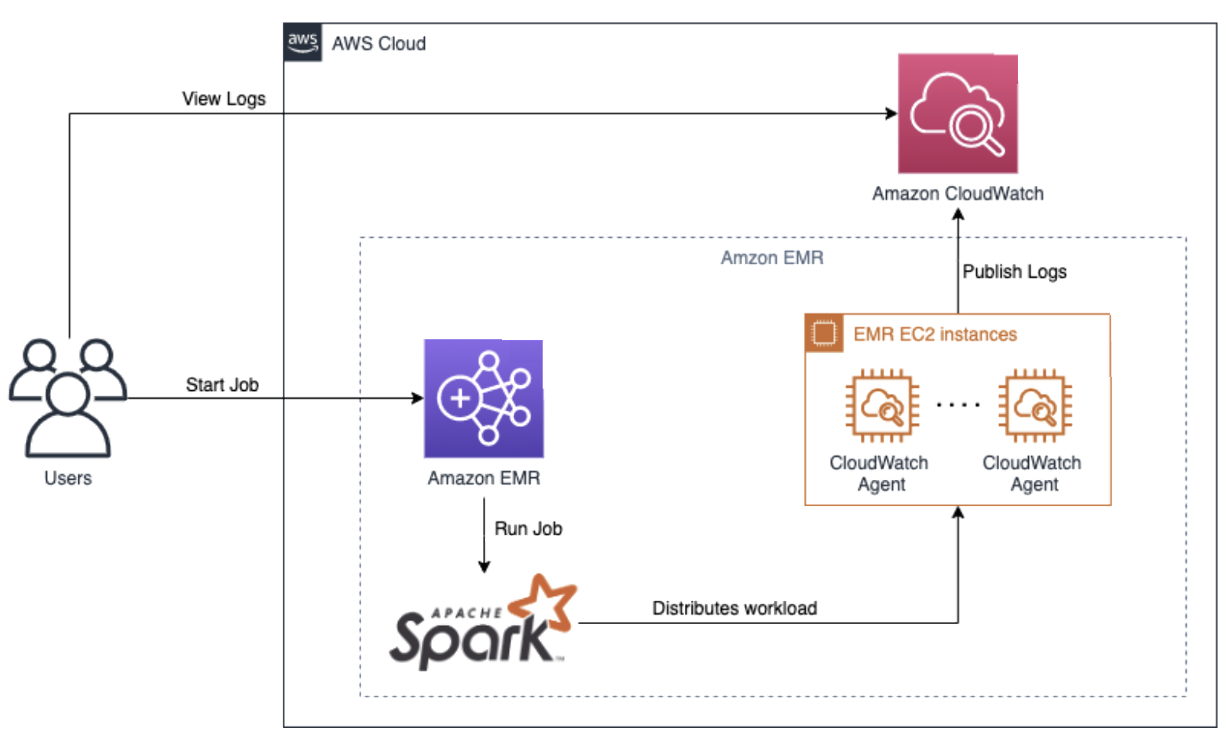 Spark Big Data observability on AWS: EMR nodes emit metrics and logs to CloudWatch
The signal flow works as follows:
- Users submit Spark jobs to an Amazon EMR cluster.
- EMR EC2 instances (primary, core, and task nodes) run the Spark driver and executors. Each node writes application logs to local paths:
/var/log/spark/for Spark driver/executor logs,/var/log/hadoop-yarn/for YARN ResourceManager and NodeManager logs, and/mnt/var/log/for additional container output. - The CloudWatch agent on every node collects two signal types:
- Metrics — system-level (CPU, memory, disk I/O) and Spark-specific metrics (JVM heap usage, GC time, shuffle read/write bytes) published to a custom CloudWatch namespace.
- Logs — tails the Spark and YARN log files and streams them to CloudWatch Logs log groups, one per log path.
- CloudWatch stores the metrics and log events. You can build CloudWatch dashboards, set metric alarms for cluster health, and run Logs Insights queries against Spark output.
- (Optional) The CloudWatch agent's Prometheus
remote_writeconfiguration forwards metrics to an Amazon Managed Service for Prometheus (AMP) workspace for long-term storage and PromQL-based querying. - Amazon Managed Grafana (AMG) connects to either CloudWatch or AMP as a data source, providing pre-built dashboards for EMR cluster health, Spark job performance, and YARN resource utilization.
Users → Amazon EMR (Spark) → EMR EC2 Instances
                                    │
                            CloudWatch Agent
                                    │
                    ┌───────────────┴───────────────┐
                    ▼                               ▼
          CloudWatch Metrics              CloudWatch Logs
                    │                               │
                    ├── (remote_write) ──► AMP       │
                    │                               │
                    └──────────┬────────────────────┘
                               ▼
                    Amazon Managed Grafana (optional)
Deploy
Step 1 — Store CloudWatch agent configuration in SSM Parameter Store
Create an SSM parameter named AmazonCloudWatch-EMR-Config containing the agent configuration. The JSON below collects system metrics and tails the key Spark and YARN log paths:
{
  "agent": {
    "metrics_collection_interval": 60,
    "run_as_user": "root"
  },
  "metrics": {
    "namespace": "EMR/Spark",
    "append_dimensions": {
      "InstanceId": "${aws:InstanceId}"
    },
    "metrics_collected": {
      "cpu": { "measurement": ["cpu_usage_idle", "cpu_usage_user", "cpu_usage_system"], "totalcpu": true },
      "mem": { "measurement": ["mem_used_percent", "mem_available_percent"] },
      "disk": { "measurement": ["disk_used_percent"], "resources": ["*"] },
      "diskio": { "measurement": ["reads", "writes", "read_bytes", "write_bytes"] }
    }
  },
  "logs": {
    "logs_collected": {
      "files": {
        "collect_list": [
          {
            "file_path": "/var/log/spark/spark-*.out",
            "log_group_name": "/emr/spark/driver",
            "log_stream_name": "{instance_id}",
            "retention_in_days": 30
          },
          {
            "file_path": "/var/log/hadoop-yarn/yarn-*.log",
            "log_group_name": "/emr/yarn/resourcemanager",
            "log_stream_name": "{instance_id}",
            "retention_in_days": 30
          },
          {
            "file_path": "/mnt/var/log/hadoop-yarn/containers/**",
            "log_group_name": "/emr/yarn/containers",
            "log_stream_name": "{instance_id}",
            "retention_in_days": 14
          }
        ]
      }
    }
  }
}
Store it:
aws ssm put-parameter \
  --name "AmazonCloudWatch-EMR-Config" \
  --type String \
  --value file://cwagent-emr-config.json
Step 2 — Create the bootstrap action script
Upload the following script to your S3 bucket. It installs the CloudWatch agent and fetches the SSM-managed configuration:
#!/bin/bash
set -euo pipefail
sudo yum install -y amazon-cloudwatch-agent
sudo /opt/aws/amazon-cloudwatch-agent/bin/amazon-cloudwatch-agent-ctl \
  -a fetch-config -m ec2 -s \
  -c ssm:AmazonCloudWatch-EMR-Config
aws s3 cp install-cwagent.sh s3://<your-bucket>/emr-bootstrap/install-cwagent.sh
Step 3 — Launch the EMR cluster
aws emr create-cluster \
  --name "spark-observability" \
  --release-label emr-6.10.0 \
  --applications Name=Spark \
  --ec2-attributes InstanceProfile=EMR_EC2_DefaultRole \
  --instance-groups InstanceGroupType=MASTER,InstanceCount=1,InstanceType=m5.xlarge \
                    InstanceGroupType=CORE,InstanceCount=2,InstanceType=m5.xlarge \
  --bootstrap-actions Path=s3://<your-bucket>/emr-bootstrap/install-cwagent.sh,Name=InstallCWAgent \
  --log-uri s3://<log-bucket>/emr-logs/
Step 4 — (Optional) Forward metrics to AMP
If you use Amazon Managed Service for Prometheus, you have two options:
Option A — CloudWatch agent Prometheus scraping (EMF path). The CloudWatch agent can scrape Prometheus-format metrics from local endpoints and publish them to CloudWatch as EMF metrics. Add a prometheus section to the agent configuration in SSM:
{
  "prometheus": {
    "cluster_name": "emr-spark",
    "log_group_name": "/emr/prometheus",
    "prometheus_config_path": "/opt/aws/amazon-cloudwatch-agent/etc/prometheus.yaml",
    "emf_processor": {
      "metric_namespace": "EMR/Spark",
      "metric_declaration": [
        {
          "source_labels": ["job"],
          "label_matcher": ".*",
          "dimensions": [["ClusterName", "InstanceId"]],
          "metric_selectors": ["^jvm_.*", "^spark_.*"]
        }
      ]
    }
  }
}
This path keeps metrics in CloudWatch (not AMP). Use it when you want Prometheus-style scraping without adding an AMP workspace.
Option B — Standalone Prometheus remote_write to AMP. For native PromQL querying in AMG, install a standalone Prometheus server (via bootstrap action) and configure remote_write to your AMP workspace:
global:
  scrape_interval: 60s
remote_write:
  - url: https://aps-workspaces.<region>.amazonaws.com/workspaces/<workspace-id>/api/v1/remote_write
    sigv4:
      region: <region>
    queue_config:
      max_samples_per_send: 1000
      max_shards: 200
Step 5 — Submit a Spark job
Submit a workload to start generating telemetry:
aws emr add-steps --cluster-id <cluster-id> --steps \
  Type=Spark,Name="TestJob",ActionOnFailure=CONTINUE,\
  Args=[--class,org.apache.spark.examples.SparkPi,\
  /usr/lib/spark/examples/jars/spark-examples.jar,100]
Validate
- Check CloudWatch metrics — confirm the custom namespace appears:
aws cloudwatch list-metrics --namespace "EMR/Spark" --query 'Metrics[0:5]'
You should see metric names such as cpu_usage_user, mem_used_percent, and disk_used_percent with an InstanceId dimension.
- Verify log groups — confirm Spark and YARN logs are flowing:
aws logs describe-log-groups --log-group-name-prefix "/emr/"
- Query Spark job failures — use CloudWatch Logs Insights against
/emr/spark/driver:
fields @timestamp, @message
| filter @message like /(?i)(ERROR|Exception|FATAL)/
| sort @timestamp desc
| limit 25
- Identify slow stages — query YARN container logs for task duration outliers:
fields @timestamp, @message
| filter @message like /completed in/
| parse @message "completed in * ms" as duration_ms
| stats avg(duration_ms) as avg_ms, max(duration_ms) as max_ms by bin(30m)
- Validate AMP ingestion (if configured) — in Amazon Managed Grafana, run a PromQL query:
up{job="emr-spark"}
A value of 1 per instance confirms the scrape target is healthy.
Troubleshoot
| Symptom | Likely Cause | Fix |
|---|---|---|
| No metrics from EMR nodes | CloudWatch agent not installed; bootstrap action failed | Check bootstrap action logs in S3 at s3://<log-bucket>/<cluster-id>/node/<instance-id>/bootstrap-actions/ |
| Spark logs missing | Agent config does not include Spark log paths | Update the SSM parameter to include /var/log/spark/ and /mnt/var/log/hadoop-yarn/ |
| High CloudWatch costs from verbose logging | DEBUG-level Spark logging generating excessive log events | Set Spark log level to WARN via spark.driver.extraJavaOptions=-Dlog4j.logger.org.apache.spark=WARN |
| Bootstrap action fails with exit code 1 | Script has wrong line endings (CRLF) or missing execute permission | Re-save the script with Unix line endings (dos2unix) and ensure the S3 object is readable by the instance profile |
| Bootstrap action returns "Unable to fetch SSM parameter" | Instance profile lacks ssm:GetParameter permission, or the parameter name does not match | Attach AmazonSSMReadOnlyAccess to the instance profile and verify the parameter name matches exactly, including case |
| Logs not appearing in CloudWatch despite agent running | Instance profile IAM role missing logs:CreateLogGroup or logs:PutLogEvents permission | Verify the IAM role includes logs:CreateLogGroup, logs:CreateLogStream, and logs:PutLogEvents; check agent logs at /opt/aws/amazon-cloudwatch-agent/logs/amazon-cloudwatch-agent.log for permission errors |
| AMP remote_write returns 403 | Instance profile missing aps:RemoteWrite, or workspace ID is wrong | Add aps:RemoteWrite permission and double-check the workspace ID in the prometheus.yaml URL |
| Metrics appear in CloudWatch but not in Grafana | AMG data source not configured, or IAM role for Grafana workspace lacks cloudwatch:GetMetricData | In AMG, add CloudWatch or AMP as a data source and verify the service-managed IAM role has the required policies |
Related Solutions
- Databricks Monitoring — sibling big-data observability pattern for Databricks on EC2
- MSK Monitoring — data-streaming tier observability with the same AMP/AMG pattern
- EKS Infrastructure Monitoring — relevant for EMR-on-EKS migration paths
- Observability Cost Management — managing CloudWatch and AMP costs at scale