CloudWatch Metrics and EMF
Related Events
Overview
Metrics are numerical time-series data that track system performance, resource utilization, and business outcomes. CloudWatch collects, stores, and visualizes metrics from AWS services (vended metrics) and your applications (custom metrics). Understanding how to design your metric strategy — choosing dimensions wisely, managing cardinality, and selecting the right emission method — is foundational to effective observability.
This guide covers metric design principles, the role of dimensions and cardinality, high-resolution metrics, and CloudWatch Embedded Metric Format (EMF) as a cost-effective approach for emitting custom metrics from structured logs.
When to use this
- You are designing a custom metrics strategy and need to understand dimensions and cardinality trade-offs.
- You want to emit custom metrics without the cost or complexity of direct
PutMetricDataAPI calls. - You need high-resolution (1-second) metrics for latency-sensitive workloads.
- You are evaluating whether to use vended metrics, custom metrics, or EMF for a particular signal.
- You want to combine metrics and detailed log data into a single instrumentation path.
Guidance
Know your KPIs and measure them
The most important thing with metrics is to measure the right things. Start by naming your high-level business goals, then work backwards to the operational metrics that impact them.
There is no singular, complete source for your business KPIs. You must understand your application well enough to know your output goals.
For example, an e-commerce application might track orders per hour. Working backwards: for orders to happen, users must search products, add to cart, enter delivery details, and complete payment. Each workflow has measurable latency, throughput, and error rates that contribute to the top-level KPI.
Having identified your KPIs, work backwards to see what metrics in your workload impact them. Store business metrics and operational metrics together so you can correlate them.
Vended metrics versus custom metrics
Vended metrics are emitted automatically by AWS services at no additional charge — EC2 CPU utilization, RDS connections, S3 request counts, and many more. These cover infrastructure health but rarely capture application-level or business-level signals.
Custom metrics fill the gap. You emit them via:
PutMetricDataAPI (or an SDK wrapper)- CloudWatch Agent (for system metrics like memory and disk)
- Embedded Metric Format (structured logs that extract metrics automatically)
Choose custom metrics when vended metrics do not cover your KPIs or application-specific performance indicators.
Dimensions and cardinality
A dimension is a name-value pair that identifies a metric uniquely. For example, InstanceId is a dimension for EC2 CPU metrics. Each unique combination of metric name + dimensions creates a separate time series.
Cardinality is the total number of unique time series. High cardinality arises when dimensions have many possible values (user IDs, request IDs, unbounded tags). CloudWatch supports up to 30 dimensions per metric, but each unique combination incurs storage and query cost.
Design dimensions deliberately:
| Do | Don't |
|---|---|
| Use bounded values (region, service name, status code) | Use unbounded values (user ID, request ID, timestamp) |
| Aggregate where possible (service-level, not request-level) | Create a dimension per customer in a multi-tenant system |
| Plan dimensions around your query patterns | Add dimensions "just in case" |
If you need high-cardinality context for debugging, put it in log fields alongside EMF metrics. Query the detail via CloudWatch Logs Insights — do not make every attribute a dimension.
High-resolution metrics
Standard CloudWatch metrics have 60-second resolution. High-resolution metrics support 1-second granularity, useful for:
- Latency-sensitive applications where 60-second averages mask spikes.
- Auto-scaling decisions that need faster signal.
- Short-lived operations (Lambda cold starts, queue drain times).
High-resolution metrics cost more. Use them selectively for metrics where sub-minute visibility changes your operational decisions.
Querying metrics with metric math
Metric math lets you combine multiple metrics using expressions. Common patterns:
- Error rate:
Errors / Requests * 100 - Conditional alarms:
IF(latency > threshold, 1, 0)to create boolean signals for alarms - Top-N search:
SORT(SEARCH('{AWS/EC2,InstanceId} MetricName="CPUUtilization"', 'Average', 300), MAX, DESC, 10)
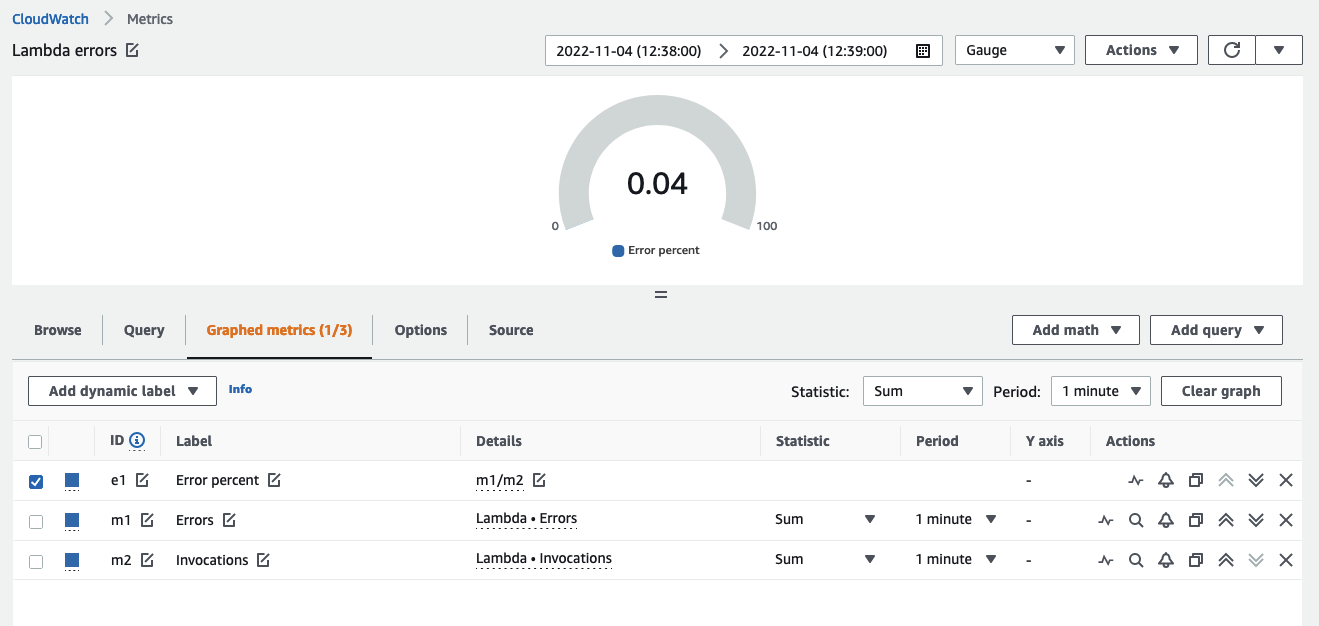
Use metric math to derive values from separate data sources and trigger alarms on computed KPIs rather than raw infrastructure metrics.
Anomaly detection
CloudWatch anomaly detection learns what normal looks like over a two-week training period, accounting for hourly, daily, and weekly patterns.
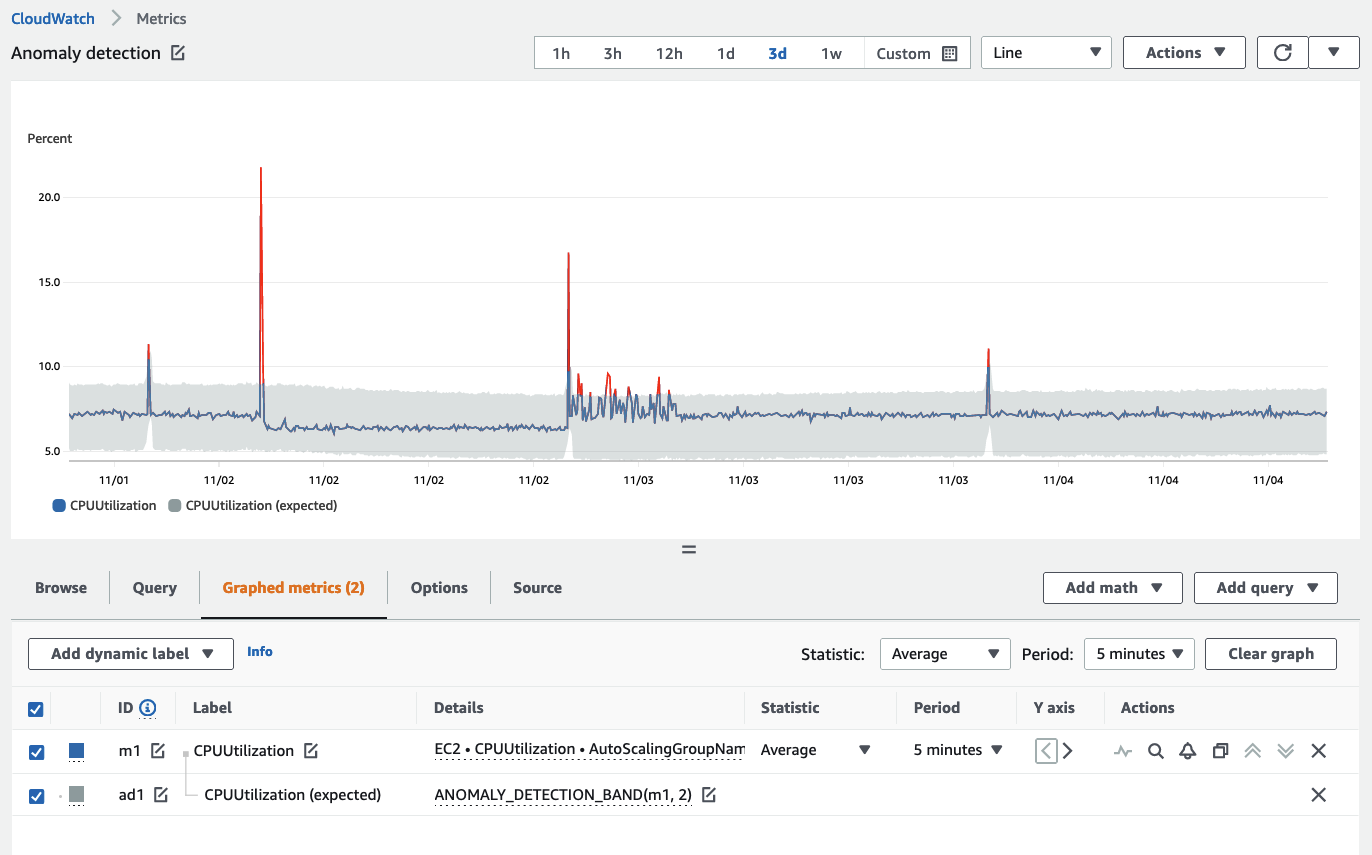
Key considerations:
- The model only trains forward from creation — it does not analyze historical data retroactively.
- It knows what normal is, not what good is. A consistently unhealthy metric will have an unhealthy baseline.
- Exclude known abnormal periods (nights, weekends, maintenance windows) from training.
Use anomaly detection for metrics where manually defining thresholds is impractical — especially in microservices architectures with hundreds of metrics.
Embedded Metric Format (EMF)
Embedded Metric Format lets you embed metric definitions inside structured JSON log entries. CloudWatch Logs automatically extracts the metrics — no PutMetricData calls, no separate instrumentation path.
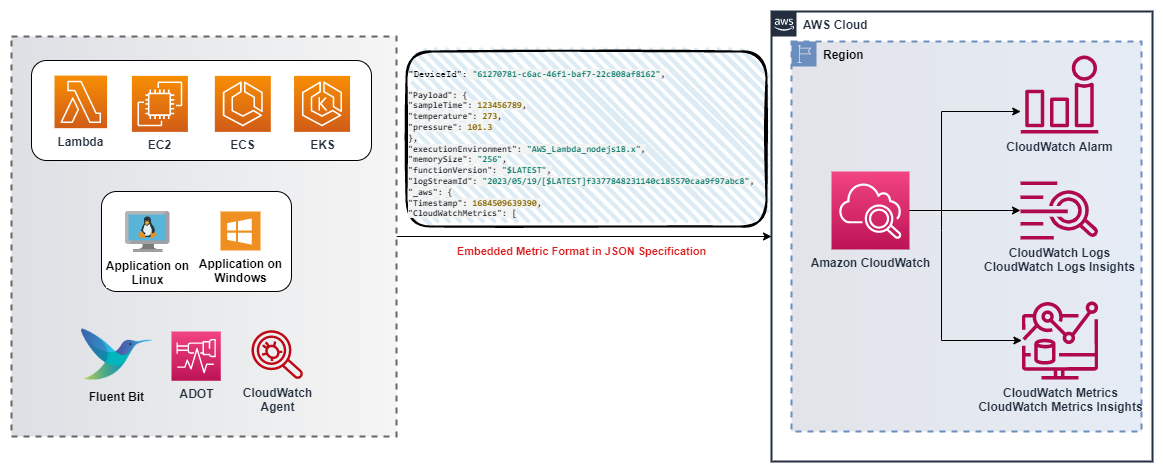
When to use EMF
- You need custom metrics from Lambda functions, containers, or other ephemeral compute where maintaining a metrics agent is impractical.
- You want high-cardinality context (device IDs, request IDs, account IDs) queryable in logs alongside extracted metrics.
- You are already emitting structured logs and want metrics without additional API calls or billing from
PutMetricData. - You need to correlate a metric anomaly with the specific log events that contributed to it.
How EMF works
Emit a JSON log entry with an _aws block specifying the namespace, dimensions, and metric definitions:
{
  "_aws": {
    "Timestamp": 1574109732004,
    "CloudWatchMetrics": [
      {
        "Namespace": "MyApplication",
        "Dimensions": [["Service", "Environment"]],
        "Metrics": [
          { "Name": "ProcessingLatency", "Unit": "Milliseconds" }
        ]
      }
    ]
  },
  "Service": "OrderProcessor",
  "Environment": "Production",
  "RequestId": "abc-123",
  "ProcessingLatency": 47
}
CloudWatch extracts ProcessingLatency as a metric with dimensions Service and Environment. The full log entry — including RequestId and any other fields — remains queryable in CloudWatch Logs Insights.
Generating EMF logs
- Client libraries — available for Node.js, Python, Java, and C#.
- ADOT Collector — the AWS EMF Exporter converts OpenTelemetry metrics to EMF format.
- Manual JSON — construct logs conforming to the EMF specification and send via CloudWatch Agent, Fluent Bit, or
PutLogEventsAPI.
High-resolution EMF
EMF supports an optional StorageResolution parameter (value 1 or 60) to extract high-resolution metrics at 1-second granularity from structured logs.
Viewing and alarming on EMF metrics
Extracted metrics appear in the CloudWatch Metrics console under the namespace you specified. You can create alarms on them identically to any other metric. Since EMF metric generation depends on log publishing flow, ensure logs are published promptly so datapoints are created within alarm evaluation periods.
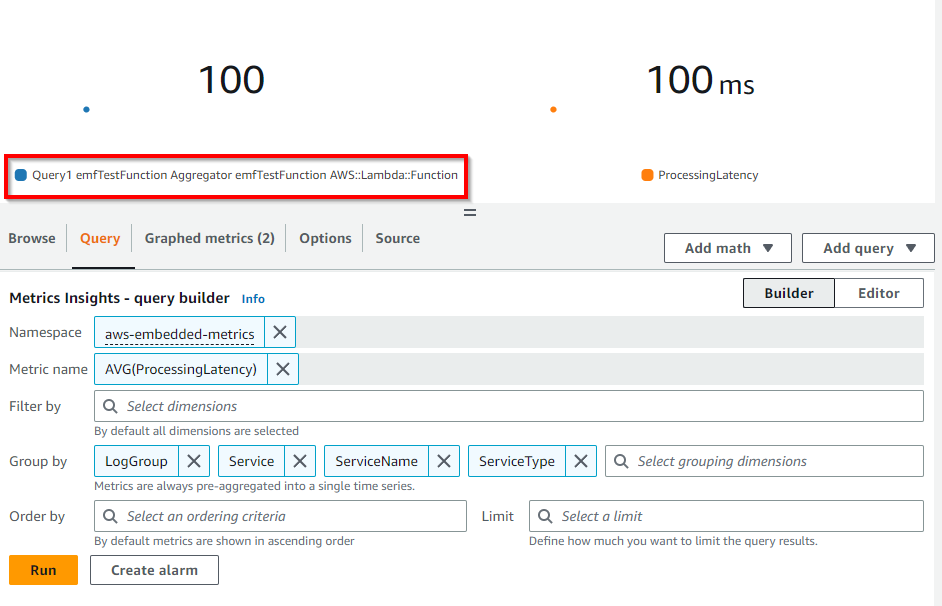
Batching PutMetricData calls
If you use PutMetricData directly (not EMF), batch your data:
- The API supports up to 150 values per metric in a single request using the
ValuesandCountsmethod. - Batching reduces both cost (fewer API calls) and the risk of throttling.
When using PutMetricData, always batch datapoints into single PUT operations. For large volumes of metrics, consider EMF instead — it does not use or charge for PutMetricData.
Related
- CloudWatch Dashboards — visualizing metrics effectively
- Alarms and Alerting — creating alarms on metrics and derived values
- Rust Custom Metrics — emitting custom metrics from Rust applications
- CloudWatch Metrics documentation
- EMF Specification