Alarms and Alerting
Related Events
Overview
An alarm reflects the current state of a metric — OK, ALARM, or INSUFFICIENT_DATA. When a threshold is breached, the alarm can trigger notifications, auto-scaling actions, or automated remediation. The challenge is not creating alarms — it is creating the right alarms that lead to action without overwhelming operators.
This guide covers alarm design principles for both CloudWatch native alarms and Prometheus Alertmanager on Amazon Managed Service for Prometheus (AMP). It addresses threshold selection, composite alarms, fighting alarm fatigue, alarming on OpenTelemetry metrics with PromQL, SLO burn-rate alarms, and alert routing to the right destinations. Cross-cutting technique lives here; the specific metrics to alarm on for a given service live in that service's monitoring solution and in the AWS Recommended Alarms documentation.
When to use this
- You are setting up monitoring for a new workload and need to decide which metrics deserve alarms.
- Your team suffers from alarm fatigue — too many notifications with too little signal.
- You need to choose between static thresholds and anomaly detection for a given metric.
- You want to aggregate related alarms using composite alarms to reduce noise.
- You are running Prometheus workloads on AMP and need to configure Alertmanager rules and routing.
- You want to alarm on OpenTelemetry metrics in CloudWatch using PromQL, or on SLO burn rate via Application Signals.
- You need per-service alarm baselines and want to know where the specific metrics for each AWS service live.
Guidance
Alert on things that are actionable
Alarm fatigue occurs when teams receive so many alerts that they learn to ignore them. This is an anti-pattern, not a sign of thorough monitoring.
Create alarms for things that are actionable, and work backwards from your business objectives. If an alarm does not require human attention or trigger an automated process, remove the notification — visualize it on a dashboard instead.
For example, if slow response times endanger your SLO and high CPU utilization causes slow responses, alert on CPU proactively before it becomes a customer-facing issue. But do not alert on CPU utilization everywhere if it does not endanger your outcomes.
Beware the "everything is OK" alarm
A dangerous pattern emerges when operators grow so accustomed to constant alerts that they only notice when things go silent. This makes self-healing architectures impossible because the alarm state requires human interpretation.
If your team relies on the absence of alerts as a signal, your alarm strategy needs redesign.
Choosing threshold types
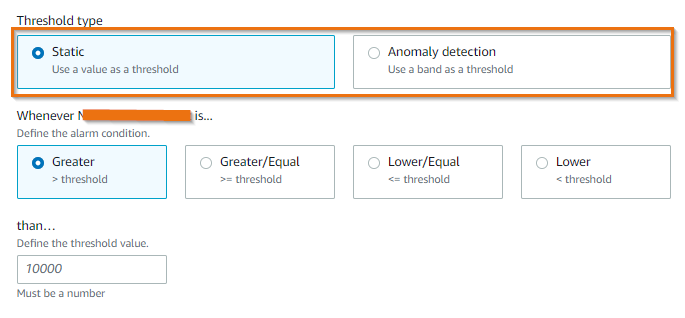
CloudWatch supports two approaches to metric alarms:
Static thresholds
Define a hard limit the metric should not violate. You must understand the normal operating range to set meaningful upper and lower bounds.
Static thresholds are best for metrics where you have firm understanding — identified performance breakpoints, infrastructure limits, or SLO boundaries.
Anomaly detection
CloudWatch analyzes past metric data and builds a model of expected values, accounting for hourly, daily, and weekly patterns. Alarms fire when metrics fall outside the expected band.
Use anomaly detection when you do not have visibility into a metric's performance over time, or when the metric has not been observed under load-testing or anomalous traffic previously.
Composite alarms to fight alarm fatigue
Consider five web servers backed by a single database. If the database goes down, you get at least six alerts — five from the web servers and one from the database. But only two alerts make sense:
- The web site is down.
- The database is the cause.
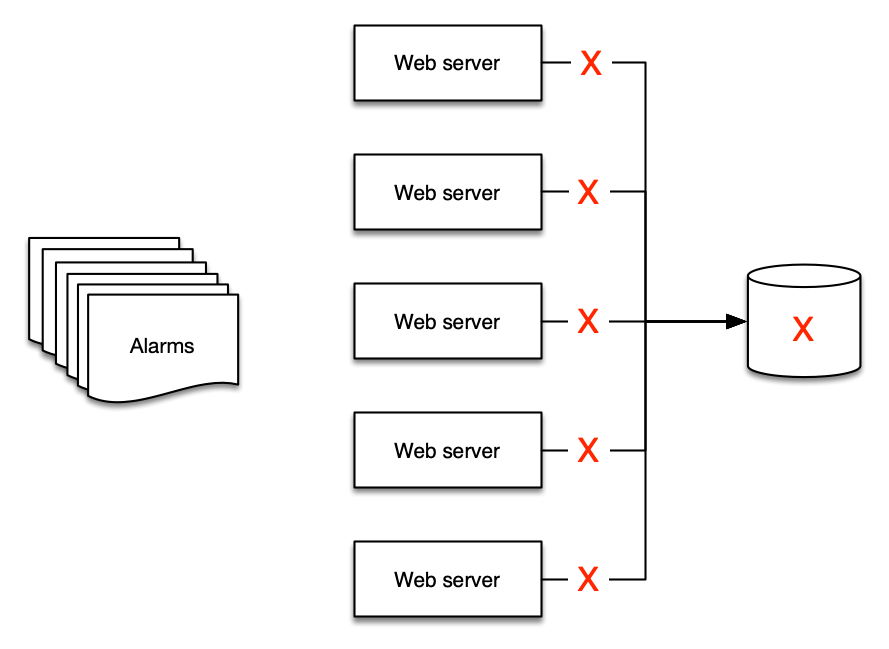
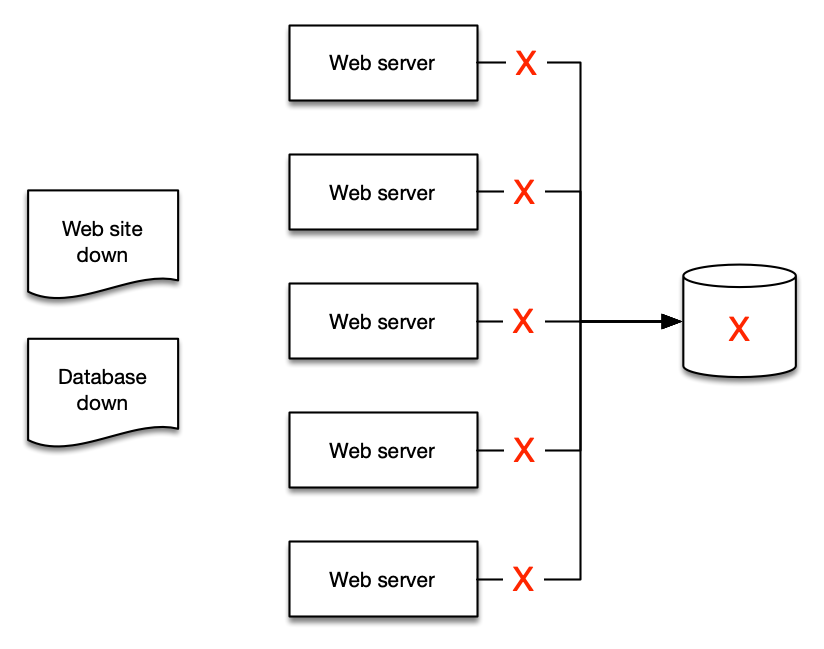
Composite alarms include a rule expression that evaluates the states of other alarms. The composite alarm enters ALARM state only when all conditions are met. This distills multiple signals into a single actionable notification.
Distilling alerts into aggregates makes it easier for people to understand, and easier to create runbooks and automation.
Metric math based alarms
Metric math expressions let you combine multiple metrics into a more meaningful KPI and alarm on the derived value. For example, alarm on error rate (errors / requests) rather than raw error count, which varies with traffic volume.
Alarms from CloudWatch Logs
You can create alarms based on log data using metric filters. Metric filters turn log patterns into numerical CloudWatch metrics, which can then use static or anomaly-based alarms.
This is useful for alerting on application-level events that do not have a native metric — error messages, specific status codes, or business-logic exceptions.
Scheduling alarm suppression
When resources are intentionally shut down outside business hours for cost optimization, alarms continue firing and create unnecessary noise. Use EventBridge Schedules and Lambda to programmatically enable and disable alarms based on tags, aligning alarm state with resource schedules.
Tag alarms with a suppression key (e.g., suppress: true) and configure cron schedules for enable/disable cycles. Metric collection continues uninterrupted during suppression — only notifications are paused.
Prometheus Alertmanager on AMP
For workloads using Amazon Managed Service for Prometheus, alerting rules use PromQL expressions and route through the managed Alertmanager.
Alerting rules format
Rules are defined in YAML and follow the same format as standalone Prometheus:
groups:
  - name: alert-test
    rules:
    - alert: HostHighCpuLoad
      expr: 100 - (avg(rate(node_cpu_seconds_total{mode="idle"}[2m])) * 100) > 60
      for: 5m
      labels:
        severity: warning
      annotations:
        summary: "Host high CPU load (instance {{ $labels.instance }})"
        description: "CPU load is > 60%\n  VALUE = {{ $value }}"
Key Alertmanager concepts
- Grouping — Collect similar alerts into a single notification. Configure via the
routeblock. Useful when a failure affects many systems simultaneously. - Inhibition — Suppress notifications for alerts that are consequences of an already-firing alert. Configure via
inhibit_rules. - Silencing — Mute alerts for a specified duration (maintenance windows, planned outages). Use the
PutAlertManagerSilencesAPI.
Routing alerts
AMP Alertmanager supports Amazon SNS as a receiver. From SNS you can route to:
- Email — direct SNS subscription
- Slack — via email-to-channel or Lambda rewriting
- PagerDuty — customized template in the
template_filesblock - Webhooks — HTTP endpoints for SIEM or incident management tools
- Lambda — process alerts in JSON format for custom routing logic
Visualizing AMP alerts in Managed Grafana
Enable Grafana alerting in your Amazon Managed Grafana workspace configuration to visualize all alert and recording rules configured in your AMP workspace directly in the Grafana alerting page.
Set TreatMissingData deliberately
Every alarm decides how to treat periods with no data. Choose it per metric based on whether missing data is itself a signal:
notBreaching— missing data is benign. Use for sparse or low-traffic metrics, such as error counts that are only emitted when non-zero.breaching— absence of data is itself an incident. For a resource that should always receive traffic, a metric that goes silent (for example an endpoint's invocation count dropping to no data) means it stopped serving — page on it.missing/ignore— keep the previous state; use when gaps are expected and neither good nor bad.
The default (missing) hides outages where a resource stops emitting entirely, so set this explicitly rather than accepting the default.
Composite alarms for redundant infrastructure
For resilient designs, a single-component alarm pages on routine maintenance rather than real impact. Build a composite alarm that fires only when all redundant members are unhealthy:
- Two or more Direct Connect connections, or Direct Connect plus a Site-to-Site VPN backup.
- Both tunnels on a Site-to-Site VPN connection.
- Brokers or nodes spread across Availability Zones (Amazon MQ, MSK, ElastiCache, OpenSearch).
Alarm on the individual members for diagnosis, and page on the composite for customer impact.
Alarm on OpenTelemetry metrics with PromQL
CloudWatch natively ingests OpenTelemetry metrics over OTLP and stores them with their resource, scope, and datapoint attributes as queryable labels. Instrument your application with an OpenTelemetry SDK (for example the ADOT SDK) and send OTLP to the CloudWatch agent's OTLP endpoint; the metrics are then addressed by metric name and labels rather than an AWS/* namespace.
You can query these metrics with PromQL in CloudWatch (Query Studio) and create PromQL-based alarms, which is convenient for ratio and quantile expressions:
# Error ratio above 5% over 5 minutes
sum(rate(http_server_request_errors_total[5m]))
  / sum(rate(http_server_requests_total[5m])) > 0.05
The same PromQL works against Amazon Managed Service for Prometheus when you scrape metrics there instead.
SLO burn-rate alarms with Application Signals
For services that front an application (API Gateway, load balancers, ECS, EKS, Lambda), define Service Level Objectives in CloudWatch Application Signals and alarm on burn rate rather than raw counters. Burn-rate alarms tie directly to a customer-facing objective (availability or latency): they fire fast on severe regressions while tolerating small, brief deviations, which reduces noise compared with a static error-count threshold.
Golden-signal alarm patterns
Independent of the specific AWS service, most workloads are well covered by alarms across four signal classes. Use these as a design checklist:
| Signal class | What to alarm on | Recommended technique |
|---|---|---|
| Errors | Server-error rate (5xx) as a percentage of total requests | Metric-math ratio with a static threshold (for example, above 5%) |
| Latency | p90/p99 response time against your SLO | Percentile statistic or SLO burn rate; anomaly detection for variable traffic |
| Traffic | Request or throughput volume | Anomaly-detection band; breaching on an unexpected drop to zero |
| Saturation | CPU, memory, connections, queue depth, capacity units | Static threshold near the resource limit (for example, above 80%) |
Per-service recommended alarms
For the specific metrics worth alarming on per AWS service, use two sources rather than a long list here:
- AWS documentation — Recommended alarms for AWS services enumerates the metric, statistic, and threshold guidance per service.
- This catalog — the per-service monitoring solutions carry concrete, tested alarm steps: RDS & Aurora, ECS, EKS Infrastructure, Lambda, MSK, OpenSearch, and Network Observability.
Recommended baseline alerts
The table below is a Kubernetes/Prometheus example; see Golden-signal alarm patterns above for a service-agnostic checklist and Per-service recommended alarms for specific AWS service metrics.
| Condition | Threshold example | Severity |
|---|---|---|
| Node memory usage exceeds limit | > 80% allocated | warning |
| Node CPU usage exceeds limit | > 80% allocated | warning |
| Node disk space usage high | > 90% allocated | critical |
| Container in pod exceeds CPU limit | > 80% of limit | warning |
| Container in pod exceeds memory limit | > 80% of limit | warning |
| Container excessive restarts | > 3 in 15 minutes | warning |
| Persistent Volume disk usage high | > 75% | warning |
| Deployment has zero active pods | == 0 | critical |
| HPA running at max capacity | replicas == maxReplicas | warning |
Adjust expressions and thresholds based on your workload's characteristics. These are starting points, not universal truths.
Integrate with existing ITSM processes
Regardless of your alerting platform, alerts must integrate into your existing support toolchain:
Create trouble tickets and issues programmatically from alerts. This removes human effort, streamlines processes, and enables you to derive operational data such as DORA metrics.
Related
- CloudWatch Dashboards — dashboard design for visualizing alarm states and metrics
- CloudWatch Metrics and EMF — metrics design that underpins effective alarms
- CloudWatch Alarms documentation
- AMP Alert Manager documentation
- Recommended alarms for AWS services — per-service metric, statistic, and threshold guidance
- Query CloudWatch metrics with PromQL