AWS पर AI वर्कलोड की मॉनिटरिंग और ऑडिटिंग
परिचय
AWS पर आधुनिक AI वर्कलोड तीन स्वतंत्र पाइपलाइनों में टेलीमेट्री जनरेट करते हैं — CloudTrail (किसने क्या कॉल किया), Bedrock Model Invocation Logging (मॉडल ने क्या कहा), और ADOT SDK द्वारा एकत्रित Agent Telemetry (एजेंट ने कैसा प्रदर्शन किया)। प्रत्येक पाइपलाइन आवश्यक है। CloudTrail अकेले आपको बता सकता है कि एक IAM role ने InvokeModel कॉल किया, लेकिन यह नहीं कि उस role ने मॉडल से क्या पूछा या एजेंट ने कैसे प्रतिक्रिया दी। Model Invocation Logging सामग्री कैप्चर करता है लेकिन agent orchestration नहीं। ADOT orchestration कैप्चर करता है लेकिन inference parameters या IAM identity नहीं। सुरक्षा और परिचालन जांच में लगभग हमेशा कम से कम दो को correlate करने की आवश्यकता होती है।
यह गाइड आपको दिखाती है कि AI वर्कलोड के लिए एक पूर्ण मॉनिटरिंग और ऑडिटिंग कहानी कैसे बनाएं:
- तीनों टेलीमेट्री पाइपलाइनों को सक्षम करना — इस गाइड में संक्षिप्त सेटअप के साथ companion guides के deep links।
- CloudTrail पर detection rules बनाना — Bedrock और AgentCore data events दोनों को कवर करते हुए metric filters, alarms और Contributor Insights rules।
- Cross-pipeline correlation queries चलाना — CloudTrail को Bedrock Model Invocation Logging और ADOT spans के साथ join करना ताकि उन सवालों का जवाब दिया जा सके जो कोई एकल पाइपलाइन अकेले नहीं दे सकती।
The Generative AI Security Scoping Matrix and the Agentic AI Security Scoping Matrix define the security dimensions organizations need to address when building AI applications, including audit and logging, identity context, agency perimeters, and data protection. This guide provides the concrete implementation for those dimensions using CloudTrail, CloudWatch, and cross-pipeline correlation. The tabs below map each matrix dimension to the guide sections that implement it.
- Agentic AI
- Generative AI
| Dimension | Guide Sections |
|---|---|
| Governance & Compliance — data sovereignty, audit | Model Invocation Logging, Query 18, Query 25, Metric Filter 5, Metric Filter 23 |
| Risk Management — threat modeling, guardrails | Bedrock Guardrail monitoring, Query 8, Query 21, Query 27, Metric Filter 4, Metric Filter 25 |
| Controls — identity, access management, least privilege | Management Events, Query 1, Query 2, Query 4, Metric Filter 1, Metric Filter 7 |
AWS is responsible for the security of the cloud infrastructure running CloudTrail, CloudWatch, and Bedrock services. Customers are responsible for security in the cloud, including configuring event selectors, creating detection rules, setting alarm thresholds, and responding to security events. This guide focuses on customer configuration and monitoring responsibilities for AI workloads. For more information, see the AWS Shared Responsibility Model.
तीन संयुक्त चुनौतियां
मात्रा — AI model invocations उच्च event volumes जनरेट कर सकते हैं। सटीक event selectors और aggregation के बिना, रुचि के events को उच्च मात्रा में अलग करना कठिन है और सब कुछ कैप्चर करने की लागत निषेधात्मक है।
गति — Agent-initiated activity sequences में सेकंड के भीतर कई API calls, tool invocations और model interactions शामिल हो सकते हैं। Near-real-time detection rules परिचालन विसंगतियों को तेजी से सामने लाने में मदद करते हैं।
जटिलता — AI वर्कलोड गतिविधि कई AWS सेवाओं में फैली होती है। कोई एकल log source पूर्ण दृश्यता प्रदान नहीं करता। Cross-pipeline correlation वह जगह है जहां जांच वास्तव में होती है।
यह गाइड क्या कवर करती है
- तीन टेलीमेट्री पाइपलाइन और प्रत्येक क्या uniquely कैप्चर करती है
- तीनों के लिए enablement (CloudTrail विस्तार से; अन्य दो संक्षिप्त चरणों + deep links के साथ)
- CloudTrail-specific detection: Bedrock और AgentCore data events दोनों के लिए metric filters, alarms, Contributor Insights
- AgentCore data events: gateway traffic, built-in tool usage, credential access, memory operations, और runtime activity
- जांच के लिए cross-pipeline correlation queries
- तीनों data sources को मिलाने वाला एक unified dashboard
GenAI टेलीमेट्री परिदृश्य: तीन पूरक पाइपलाइन
CloudTrail is one of three telemetry pipelines that together provide full observability for AI workloads on AWS. Each captures different data, serves different purposes, and is enabled differently. Security investigations almost always require correlating at least two.
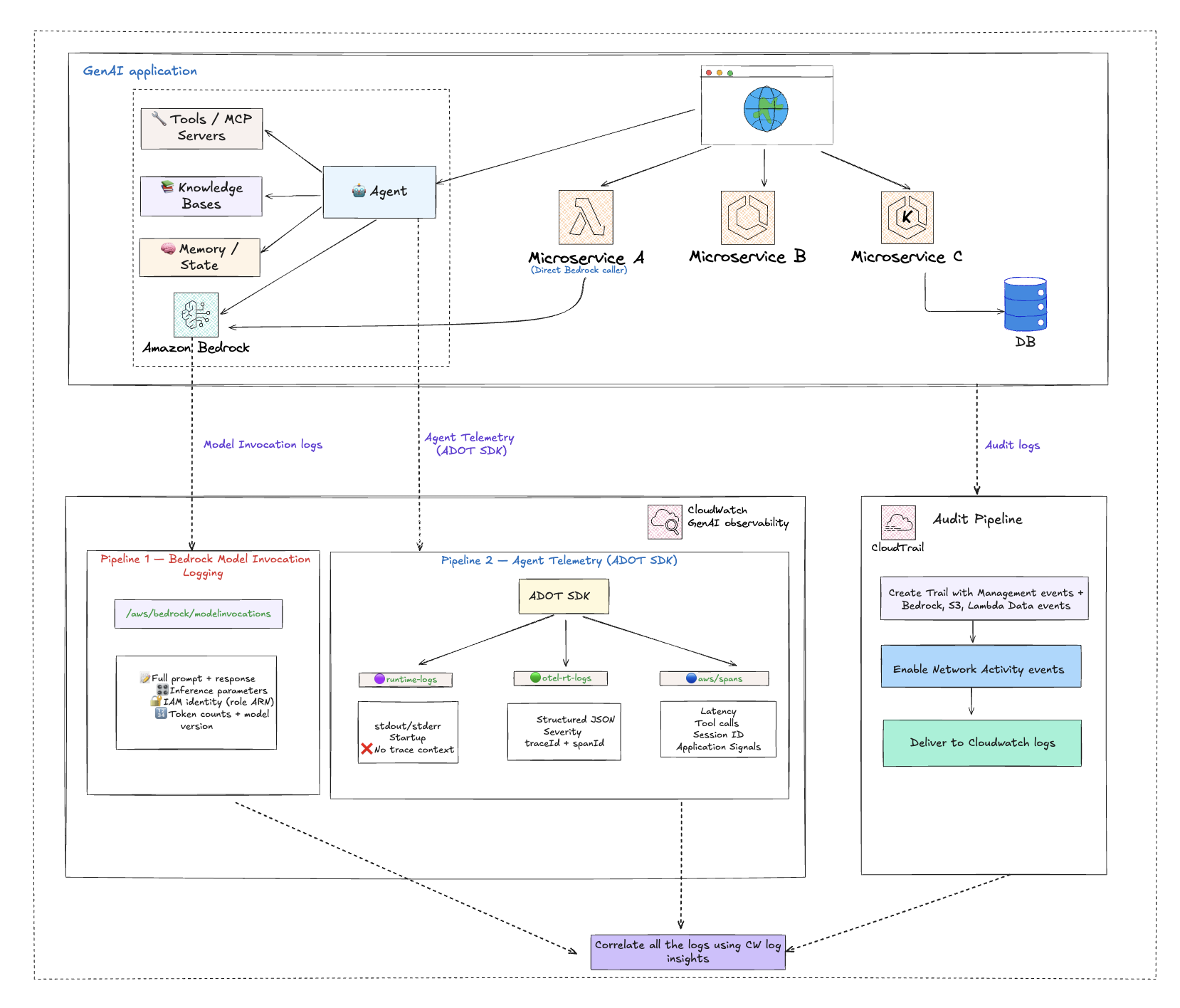
| Pipeline | Captures | Log Group | Primary Use |
|---|---|---|---|
| CloudTrail | Who did what — every API call, caller ARN, source IP, error codes, access denials, control-plane changes | YOUR_CLOUDTRAIL_LOG_GROUP | Security audit, access investigation, configuration change tracking |
| Bedrock Model Invocation Logging | What the model said — full prompt, full response, inference parameters (temperature, max_tokens), caller IAM identity, token counts | bedrock-model-invocation-logging | Content audit, compliance, prompt quality debugging, cost attribution |
| Agent Telemetry (collected by AWS Distro for OpenTelemetry — ADOT) | How the agent performed — model call latency, tool execution, distributed trace correlation, session tracking | aws/spans, /aws/bedrock-agentcore/runtimes/<agent> | Operational monitoring, performance debugging, agent workflow observability |
What Each Pipeline Answers on Its Own
CloudTrail alone tells you:
- Which IAM identity called
InvokeModel? - What was the source IP, user agent, and region?
- Was the call denied (AccessDenied, UnauthorizedOperation)?
- Did someone modify a guardrail, stop logging, or escalate IAM permissions?
- Which VPC endpoint blocked the call?
Model Invocation Logging alone tells you:
- What prompt was sent to the model?
- What did the model return?
- What temperature and max_tokens were used?
- How many input and output tokens did the call consume?
- Was the response truncated (stop_reason = max_tokens)?
Agent Telemetry (ADOT SDK) alone tells you:
- How long did the model call take (client-side latency)?
- Which tools did the agent call, in what order?
- Did a tool fail, and which component caused the error?
- How is the agent session chained across multiple model calls?
Where Correlation Unlocks Investigation
Questions only correlation can answer
| Investigation Question | Pipelines to Join | Join Key |
|---|---|---|
| Who asked the model this question, and what did it say? | CloudTrail (caller) + Model Invocation Logging (prompt/response) | requestId |
| Did the agent fail because of a model issue, a tool issue, or a permission issue? | ADOT spans (component latency/errors) + CloudTrail (AccessDenied events) | session + time |
| Was a guardrail weakened just before these unsafe model responses? | CloudTrail (UpdateGuardrail events) + Model Invocation Logging (response content) | timestamp |
| Is the agent role making Bedrock calls that violate least privilege? | CloudTrail (cross-service AccessDenied from assumed role) + ADOT (agent session ID) | session + time |
| Which external caller triggered this agent through the Gateway, and what credentials did the agent use? | CloudTrail Gateway data events (JWT subject, source IP) + CloudTrail credential data events (TokenVault/OAuth2 access) | time + agent runtime ARN |
| Is an agent executing code or browsing websites outside its intended scope? | CloudTrail AgentCore tool data events (CodeInterpreter/Browser) + ADOT spans (agent session context) | session + time |
The Cross-Pipeline Correlation Queries section gives you the actual JOIN queries for these scenarios. :::
कार्यान्वयन अवलोकन
एक चरणबद्ध रोलआउट जो तीनों पाइपलाइनों को सक्षम करता है, फिर detection और correlation को ऊपर लेयर करता है।
Phase 1: Enable Observability Pipelines
Start with the two observability pipelines (Bedrock Model Invocation Logging and Agent Telemetry collected by the ADOT SDK). They're quick to enable and they're what makes the correlation queries possible. CloudTrail setup follows in Phase 2.
Pipeline A: Bedrock Model Invocation Logging
Captures full prompt, response, inference parameters, and caller IAM identity for every Bedrock model call. Manual opt-in only. (Implements the Generative AI Security Scoping Matrix Governance & Compliance dimension by capturing model interactions to support data sovereignty requirements and compliance audit workflows.)
- Open the Amazon Bedrock console
- Choose Settings → Model invocation logging
- Enable logging and choose CloudWatch Logs (and/or S3) as the destination
- Configure the log group name (default:
bedrock-model-invocation-logging) and service role
For detailed configuration, PII masking, and dashboard setup, see GenAI Observability on AWS.
Pipeline B: Agent Telemetry (collected by ADOT SDK)
Captures agent orchestration, distributed traces, and tool execution.
- AgentCore: No action required because the ADOT SDK is included in the runtime by default, and telemetry flows automatically to
aws/spansand/aws/bedrock-agentcore/runtimes/<agent> - EKS/ECS/self-hosted: Attach the ADOT auto-instrumentation agent to your workload. No code changes needed
Enable CloudWatch Transaction Search to unlock the full Application Signals experience.
For detailed enablement steps, see GenAI Observability on AWS — Enabling Observability for Agentic Workloads and the AgentCore Observability Quickstart.
Phase 2: Enable CloudTrail — Start with Bedrock, Expand Coverage, Ingest to CloudWatch
Configure CloudTrail to capture the full AI workload audit surface, starting with the highest-value resource (Bedrock) and expanding outward. Deliver everything to CloudWatch Logs so it can be joined with Pipelines A and B.
Step 1: Bedrock and AgentCore data events and management events
Enable Bedrock Data Events on your trail using advanced event selectors. These operations are not logged by default. See Amazon Bedrock Data Events.
| Category | Resource Types |
|---|---|
| Agent & Orchestration | AWS::Bedrock::AgentAlias, AWS::Bedrock::InlineAgent, AWS::Bedrock::FlowAlias, AWS::Bedrock::FlowExecution, AWS::Bedrock::Session |
| Model Invocation | AWS::Bedrock::Model, AWS::Bedrock::AsyncInvoke, AWS::Bedrock::PromptVersion, AWS::Bedrock::AdvancedOptimizePromptJob |
| Safety & Guardrails | AWS::Bedrock::Guardrail, AWS::Bedrock::AutomatedReasoningPolicy, AWS::Bedrock::AutomatedReasoningPolicyVersion |
| Knowledge & RAG | AWS::Bedrock::KnowledgeBase, AWS::Bedrock::Tool |
| Data Automation | AWS::Bedrock::DataAutomationProject, AWS::Bedrock::DataAutomationInvocation, AWS::Bedrock::DataAutomationProfile, AWS::Bedrock::Blueprint |
Enable AgentCore Data Events using advanced event selectors. See Amazon Bedrock AgentCore Data Events.
| Category | Resource Types |
|---|---|
| Runtime & Gateway | AWS::BedrockAgentCore::Gateway, AWS::BedrockAgentCore::Runtime, AWS::BedrockAgentCore::RuntimeEndpoint |
| Built-in Tools | AWS::BedrockAgentCore::CodeInterpreter, AWS::BedrockAgentCore::Browser |
| Identity & Credentials | AWS::BedrockAgentCore::WorkloadIdentity, AWS::BedrockAgentCore::TokenVault, AWS::BedrockAgentCore::OAuth2CredentialProvider, AWS::BedrockAgentCore::APIKeyCredentialProvider |
| Memory & Evaluation | AWS::BedrockAgentCore::Memory, AWS::BedrockAgentCore::Evaluator |
Plus any remaining AgentCore resource types as they become available.
Verify Management Events (Read and Write) are enabled in all regions — this captures InvokeModel and Converse as management events automatically, and AgentCore management events like CreateGateway, CreateGatewayTarget, etc. See CloudTrail Management Events.
Enable CloudTrail Insights (ApiCallRateInsight and ApiErrorRateInsight) for anomaly detection. See CloudTrail Insights Events.
Step 2: Expand to S3, Lambda, and network activity
- Enable Amazon S3 Data Events (write-only) for training data, model artifacts, and CI/CD pipeline buckets. See Amazon S3 and Lambda Data Events.
- Enable Lambda Data Events for production AI pipeline functions, excluding dev/test. See Amazon S3 and Lambda Data Events.
- Enable Network Activity Events for Bedrock, S3, and Lambda VPC endpoints, targeting
VpceAccessDenied. See CloudTrail Network Activity Events.
Step 3: Deliver to CloudWatch Logs
- Configure your CloudTrail trail to deliver to a CloudWatch Logs log group.
Phase 3: Build Detection Rules on CloudTrail
- Create metric filters for CloudTrail events (unauthorized Bedrock access, guardrail changes, logging disruption). See Metric Filters.
- Create CloudWatch Alarms on each metric filter with SNS notification targets. See CloudWatch Alarms.
- Create Contributor Insights rules to identify top IAM identities and source IPs. See Contributor Insights Rules.
Phase 4: Build Cross-Pipeline Correlation Queries
- Develop CloudWatch Logs Insights queries for standard CloudTrail detection. See Security Analytics.
- Build cross-pipeline JOIN queries that combine CloudTrail with Bedrock Model Invocation Logging and ADOT spans. See Cross-Pipeline Correlation Queries.
- Save validated queries for recurring use by security and operations analysts.
Phase 5: Optimize with Event Aggregation
- Enable CloudTrail Event Aggregation (
API_ACTIVITY,RESOURCE_ACCESS,USER_ACTIONStemplates) for 5-minute summaries alongside raw data events. See CloudTrail Data Event Aggregation. - Use CloudWatch Subscription Filters to forward only management and aggregated events to downstream SIEM, reducing ingestion volume.
Phase 6: Assemble the Unified Dashboard
- Build a CloudWatch Dashboard combining CloudTrail alarms, Contributor Insights widgets, Model Invocation Log cost widgets, ADOT performance widgets, and correlation query results into a single pane. See Unified Audit & Monitoring Dashboard.
Amazon Bedrock Data Events
By default, CloudTrail logs management events for your account, which already captures common Bedrock runtime calls like InvokeModel, Converse, and ConverseStream. Many key AI workload operations are logged as data events, including agent invocations, knowledge base retrievals, flow executions, guardrail applications, bidirectional streaming, async invocations, and prompt rendering. These operations require advanced event selectors on your trail. Data events provide your security team with visibility into model invocations. See Advanced Event Selectors for Bedrock below for the specific selectors to apply.
Key APIs to Monitor
The table below shows which Bedrock APIs are captured automatically and which require advanced event selector configuration on your trail.
- Management Events (captured by default)
- Data Events (require advanced event selectors)
| API | Event Name | Why It Matters |
|---|---|---|
| InvokeModel | InvokeModel | Tracks which IAM identities are calling foundation models and when. |
| Streaming Invocation | InvokeModelWithResponseStream | Captures streaming model interactions for long-form generation tasks. |
| Conversational AI | Converse / ConverseStream | Records multi-turn conversational AI activity against foundation models. |
| Async Invocation Listing | ListAsyncInvokes | Monitors listing of asynchronous invocation jobs. |
Data events require advanced event selectors to be configured.
| API | Event Name | Resource Type | Why It Matters |
|---|---|---|---|
| Bidirectional Streaming | InvokeModelWithBidirectionalStream | AWS::Bedrock::Model | Captures bidirectional streaming model interactions. |
| Async Invocations | GetAsyncInvoke / StartAsyncInvoke | AWS::Bedrock::Model, AWS::Bedrock::AsyncInvoke | Monitors asynchronous model invocation jobs. Requires selectors for both resource types. |
| Agent Invocation | InvokeAgent | AWS::Bedrock::AgentAlias | Tracks invocations of deployed Bedrock agent aliases. |
| Inline Agent | InvokeInlineAgent | AWS::Bedrock::InlineAgent | Captures inline agent invocations. |
| RAG Activity | Retrieve / RetrieveAndGenerate | AWS::Bedrock::KnowledgeBase | Monitors Retrieval-Augmented Generation calls against Bedrock Knowledge Bases. |
| Flow Invocation | InvokeFlow | AWS::Bedrock::FlowAlias | Tracks invocations of Bedrock Prompt Flows. |
| Guardrail Application | ApplyGuardrail | AWS::Bedrock::Guardrail | Captures apply-guardrail operations. |
| Prompt Rendering | RenderPrompt | AWS::Bedrock::PromptVersion | Captures prompt rendering operations for prompts created using Prompt management. |
| Session Activity | Session API operations | AWS::Bedrock::Session | Captures session-level API activity for multi-turn Bedrock conversations. |
| Flow Execution | Flow execution API operations | AWS::Bedrock::FlowExecution | Captures Bedrock flow execution activity for monitoring prompt flow runs. |
| Automated Reasoning | Automated reasoning policy API operations | AWS::Bedrock::AutomatedReasoningPolicy | Captures activity on automated reasoning policies used for verifiable AI outputs. |
| Automated Reasoning Version | Automated reasoning policy version API operations | AWS::Bedrock::AutomatedReasoningPolicyVersion | Captures activity on specific versions of automated reasoning policies. |
| Data Automation Project | Data automation project API operations | AWS::Bedrock::DataAutomationProject | Captures Bedrock data automation project activity for document and media processing. |
| Data Automation Invocation | Data automation invocation API operations | AWS::Bedrock::DataAutomationInvocation | Captures Bedrock data automation invocation activity. |
| Data Automation Profile | Data automation profile API operations | AWS::Bedrock::DataAutomationProfile | Captures Bedrock data automation profile activity. |
| Blueprint | Blueprint API operations | AWS::Bedrock::Blueprint | Captures Bedrock blueprint activity for data automation configurations. |
| Advanced Prompt Optimization | Advanced optimize prompt job API operations | AWS::Bedrock::AdvancedOptimizePromptJob | Captures advanced prompt optimization job activity. |
| Tool Activity | Tool API operations | AWS::Bedrock::Tool | Captures Bedrock tool API activity for tool-use operations. |
Because InvokeModel, Converse, and ConverseStream are logged as management events, they are captured by default on any trail with management event logging enabled. However, agent invocations, knowledge base retrievals, flow invocations, guardrail applications, prompt rendering, async invocations, bidirectional streaming, session activity, flow executions, automated reasoning, data automation, blueprint operations, advanced prompt optimization, and tool operations are only logged when you configure advanced event selectors for the corresponding Bedrock resource types on your trail. See Advanced Event Selectors for Bedrock for the configuration, and the Amazon Bedrock CloudTrail documentation for the full list of supported resource types.
Advanced Event Selectors for Bedrock
Use the following advanced event selectors to capture Bedrock data events on your CloudTrail trail. Each Bedrock resource type requires its own selector, and each selector should scope logging to your specific resources using resources.ARN prefixes. This configures eighteen separate selectors — one per resource type. Most filter on eventCategory = Data with a resources.ARN prefix scoped to your account. The Model and AsyncInvoke selectors use eventName filtering instead because foundation model ARNs are AWS-owned and don't contain your account ID.
The selectors below are examples. Applying them without replacing placeholders will capture no events.
| Placeholder | Replace With | Where to Find |
|---|---|---|
ACCOUNT_ID | Your 12-digit AWS account ID | AWS Console top-right menu |
REGION | Your AWS region (e.g., us-east-1) | Region selector in console |
AGENT_ID / ALIAS_ID | Agent and alias IDs | Bedrock console → Agents |
KB_ID | Knowledge Base ID | Bedrock console → Knowledge bases |
FLOW_ID | Flow ID | Bedrock console → Prompt flows |
GUARDRAIL_ID | Guardrail ID | Bedrock console → Guardrails |
PROMPT_ID | Prompt ID | Bedrock console → Prompt management |
POLICY_ID | Automated Reasoning Policy ID | Bedrock console → Automated reasoning |
PROJECT_ID | Data Automation Project ID | Bedrock console → Data automation |
TOOL_ID | Bedrock Tool ID | Bedrock console → Tools |
BEDROCK_EXECUTION_ROLE_NAME | IAM role name for Bedrock calls | IAM console → Roles |
YOUR_CLOUDTRAIL_LOG_GROUP | CloudWatch Logs log group for your CloudTrail trail | CloudTrail console → trail → CloudWatch Logs |
To log all resources of a given type, remove the resource ID from the ARN prefix (e.g., agent-alias/AGENT_ID/ALIAS_ID → agent-alias/) — this increases event volume and cost. If you use readOnly or eventName filters, verify they match the operations you need.
View all 18 Bedrock advanced event selectors (JSON)
[
  {
    "Name": "Bedrock-AgentAlias-DataEvents",
    "FieldSelectors": [
      {
        "Field": "eventCategory",
        "Equals": ["Data"]
      },
      {
        "Field": "resources.type",
        "Equals": ["AWS::Bedrock::AgentAlias"]
      },
      {
        "Field": "resources.ARN",
        "StartsWith": [
          "arn:aws:bedrock:REGION:ACCOUNT_ID:agent-alias/AGENT_ID/ALIAS_ID"
        ]
      }
    ]
  },
  {
    "Name": "Bedrock-InlineAgent-DataEvents",
    "FieldSelectors": [
      {
        "Field": "eventCategory",
        "Equals": ["Data"]
      },
      {
        "Field": "resources.type",
        "Equals": ["AWS::Bedrock::InlineAgent"]
      },
      {
        "Field": "eventName",
        "Equals": ["InvokeInlineAgent"]
      },
      {
        "Field": "userIdentity.arn",
        "StartsWith": [
          "arn:aws:sts::ACCOUNT_ID:assumed-role/BEDROCK_EXECUTION_ROLE_NAME"
        ]
      }
    ]
  },
  {
    "Name": "Bedrock-KnowledgeBase-DataEvents",
    "FieldSelectors": [
      {
        "Field": "eventCategory",
        "Equals": ["Data"]
      },
      {
        "Field": "resources.type",
        "Equals": ["AWS::Bedrock::KnowledgeBase"]
      },
      {
        "Field": "resources.ARN",
        "StartsWith": [
          "arn:aws:bedrock:REGION:ACCOUNT_ID:knowledge-base/KB_ID"
        ]
      }
    ]
  },
  {
    "Name": "Bedrock-FlowAlias-DataEvents",
    "FieldSelectors": [
      {
        "Field": "eventCategory",
        "Equals": ["Data"]
      },
      {
        "Field": "resources.type",
        "Equals": ["AWS::Bedrock::FlowAlias"]
      },
      {
        "Field": "resources.ARN",
        "StartsWith": [
          "arn:aws:bedrock:REGION:ACCOUNT_ID:flow/FLOW_ID/alias/"
        ]
      }
    ]
  },
  {
    "Name": "Bedrock-Guardrail-DataEvents",
    "FieldSelectors": [
      {
        "Field": "eventCategory",
        "Equals": ["Data"]
      },
      {
        "Field": "resources.type",
        "Equals": ["AWS::Bedrock::Guardrail"]
      },
      {
        "Field": "resources.ARN",
        "StartsWith": [
          "arn:aws:bedrock:REGION:ACCOUNT_ID:guardrail/GUARDRAIL_ID"
        ]
      }
    ]
  },
  {
    "Name": "Bedrock-Model-DataEvents",
    "FieldSelectors": [
      {
        "Field": "eventCategory",
        "Equals": ["Data"]
      },
      {
        "Field": "resources.type",
        "Equals": ["AWS::Bedrock::Model"]
      },
      {
        "Field": "eventName",
        "Equals": ["InvokeModelWithBidirectionalStream"]
      }
    ]
  },
  {
    "Name": "Bedrock-AsyncInvoke-DataEvents",
    "FieldSelectors": [
      {
        "Field": "eventCategory",
        "Equals": ["Data"]
      },
      {
        "Field": "resources.type",
        "Equals": ["AWS::Bedrock::AsyncInvoke"]
      },
      {
        "Field": "eventName",
        "Equals": ["GetAsyncInvoke", "StartAsyncInvoke"]
      }
    ]
  },
  {
    "Name": "Bedrock-Prompt-DataEvents",
    "FieldSelectors": [
      {
        "Field": "eventCategory",
        "Equals": ["Data"]
      },
      {
        "Field": "resources.type",
        "Equals": ["AWS::Bedrock::PromptVersion"]
      },
      {
        "Field": "resources.ARN",
        "StartsWith": [
          "arn:aws:bedrock:REGION:ACCOUNT_ID:prompt/PROMPT_ID"
        ]
      }
    ]
  },
  {
    "Name": "Bedrock-Session-DataEvents",
    "FieldSelectors": [
      {
        "Field": "eventCategory",
        "Equals": ["Data"]
      },
      {
        "Field": "resources.type",
        "Equals": ["AWS::Bedrock::Session"]
      },
      {
        "Field": "resources.ARN",
        "StartsWith": [
          "arn:aws:bedrock:REGION:ACCOUNT_ID:session/"
        ]
      },
      {
        "Field": "readOnly",
        "Equals": ["false"]
      }
    ]
  },
  {
    "Name": "Bedrock-FlowExecution-DataEvents",
    "FieldSelectors": [
      {
        "Field": "eventCategory",
        "Equals": ["Data"]
      },
      {
        "Field": "resources.type",
        "Equals": ["AWS::Bedrock::FlowExecution"]
      },
      {
        "Field": "resources.ARN",
        "StartsWith": [
          "arn:aws:bedrock:REGION:ACCOUNT_ID:flow/FLOW_ID/alias/"
        ]
      }
    ]
  },
  {
    "Name": "Bedrock-AutomatedReasoningPolicy-DataEvents",
    "FieldSelectors": [
      {
        "Field": "eventCategory",
        "Equals": ["Data"]
      },
      {
        "Field": "resources.type",
        "Equals": ["AWS::Bedrock::AutomatedReasoningPolicy"]
      },
      {
        "Field": "resources.ARN",
        "StartsWith": [
          "arn:aws:bedrock:REGION:ACCOUNT_ID:automated-reasoning-policy/POLICY_ID"
        ]
      }
    ]
  },
  {
    "Name": "Bedrock-AutomatedReasoningPolicyVersion-DataEvents",
    "FieldSelectors": [
      {
        "Field": "eventCategory",
        "Equals": ["Data"]
      },
      {
        "Field": "resources.type",
        "Equals": ["AWS::Bedrock::AutomatedReasoningPolicyVersion"]
      },
      {
        "Field": "resources.ARN",
        "StartsWith": [
          "arn:aws:bedrock:REGION:ACCOUNT_ID:automated-reasoning-policy/POLICY_ID"
        ]
      }
    ]
  },
  {
    "Name": "Bedrock-DataAutomationProject-DataEvents",
    "FieldSelectors": [
      {
        "Field": "eventCategory",
        "Equals": ["Data"]
      },
      {
        "Field": "resources.type",
        "Equals": ["AWS::Bedrock::DataAutomationProject"]
      },
      {
        "Field": "resources.ARN",
        "StartsWith": [
          "arn:aws:bedrock:REGION:ACCOUNT_ID:data-automation-project/PROJECT_ID"
        ]
      }
    ]
  },
  {
    "Name": "Bedrock-DataAutomationInvocation-DataEvents",
    "FieldSelectors": [
      {
        "Field": "eventCategory",
        "Equals": ["Data"]
      },
      {
        "Field": "resources.type",
        "Equals": ["AWS::Bedrock::DataAutomationInvocation"]
      },
      {
        "Field": "resources.ARN",
        "StartsWith": [
          "arn:aws:bedrock:REGION:ACCOUNT_ID:data-automation-invocation/"
        ]
      },
      {
        "Field": "readOnly",
        "Equals": ["false"]
      }
    ]
  },
  {
    "Name": "Bedrock-DataAutomationProfile-DataEvents",
    "FieldSelectors": [
      {
        "Field": "eventCategory",
        "Equals": ["Data"]
      },
      {
        "Field": "resources.type",
        "Equals": ["AWS::Bedrock::DataAutomationProfile"]
      },
      {
        "Field": "resources.ARN",
        "StartsWith": [
          "arn:aws:bedrock:REGION:ACCOUNT_ID:data-automation-profile/"
        ]
      },
      {
        "Field": "readOnly",
        "Equals": ["false"]
      }
    ]
  },
  {
    "Name": "Bedrock-Blueprint-DataEvents",
    "FieldSelectors": [
      {
        "Field": "eventCategory",
        "Equals": ["Data"]
      },
      {
        "Field": "resources.type",
        "Equals": ["AWS::Bedrock::Blueprint"]
      },
      {
        "Field": "resources.ARN",
        "StartsWith": [
          "arn:aws:bedrock:REGION:ACCOUNT_ID:blueprint/"
        ]
      },
      {
        "Field": "readOnly",
        "Equals": ["false"]
      }
    ]
  },
  {
    "Name": "Bedrock-AdvancedOptimizePromptJob-DataEvents",
    "FieldSelectors": [
      {
        "Field": "eventCategory",
        "Equals": ["Data"]
      },
      {
        "Field": "resources.type",
        "Equals": ["AWS::Bedrock::AdvancedOptimizePromptJob"]
      },
      {
        "Field": "resources.ARN",
        "StartsWith": [
          "arn:aws:bedrock:REGION:ACCOUNT_ID:advanced-optimize-prompt-job/"
        ]
      },
      {
        "Field": "readOnly",
        "Equals": ["false"]
      }
    ]
  },
  {
    "Name": "Bedrock-Tool-DataEvents",
    "FieldSelectors": [
      {
        "Field": "eventCategory",
        "Equals": ["Data"]
      },
      {
        "Field": "resources.type",
        "Equals": ["AWS::Bedrock::Tool"]
      },
      {
        "Field": "resources.ARN",
        "StartsWith": [
          "arn:aws:bedrock:REGION:ACCOUNT_ID:tool/TOOL_ID"
        ]
      }
    ]
  }
]
Bedrock Data Event Resource Types
CloudTrail is designed to support data events for the following Bedrock resource types, providing full visibility into your AI pipeline:
Agent & Orchestration
| Resource Type | Key APIs | Description |
|---|---|---|
AWS::Bedrock::AgentAlias | InvokeAgent | Track invocations of deployed Bedrock agent aliases |
AWS::Bedrock::InlineAgent | InvokeInlineAgent | Capture inline agent invocations |
AWS::Bedrock::FlowAlias | InvokeFlow | Track Bedrock Prompt Flow invocations |
AWS::Bedrock::FlowExecution | Flow execution APIs | Capture flow execution activity for monitoring prompt flow runs |
AWS::Bedrock::Session | Session APIs | Capture session-level API activity for multi-turn conversations |
Selector notes for Agent & Orchestration resources
- FlowExecution — Narrow
resources.ARNto a specific flow ID (e.g.,flow/FLOW_ID/alias/) since flow execution ARNs share theflow/prefix with flow aliases. - Session — Uses
readOnly = falseto focus on write operations (session creation and updates) and reduce volume from high-frequency read operations.
Model Invocation
| Resource Type | Key APIs | Description |
|---|---|---|
AWS::Bedrock::Model | InvokeModelWithBidirectionalStream | Log bidirectional streaming invocations |
AWS::Bedrock::AsyncInvoke | GetAsyncInvoke, StartAsyncInvoke | Log asynchronous invocation operations |
AWS::Bedrock::PromptVersion | RenderPrompt | Capture prompt rendering operations |
AWS::Bedrock::AdvancedOptimizePromptJob | Advanced optimize prompt APIs | Capture advanced prompt optimization job activity |
Selector notes for Model Invocation resources
- Model — Foundation model ARNs are AWS-owned (e.g.,
arn:aws:bedrock:REGION::foundation-model/...) and do not contain your account ID, so this selector useseventNamefiltering instead ofresources.ARN. - AsyncInvoke — Uses
eventNamefiltering to scope to specific async operations. Async invocations require selectors for bothAWS::Bedrock::ModelandAWS::Bedrock::AsyncInvoke. - AdvancedOptimizePromptJob — Uses
readOnly = falseto focus on write operations (job starts).
Safety & Guardrails
| Resource Type | Key APIs | Description |
|---|---|---|
AWS::Bedrock::Guardrail | ApplyGuardrail | Capture apply-guardrail operations |
AWS::Bedrock::AutomatedReasoningPolicy | Automated reasoning APIs | Capture activity on automated reasoning policies for verifiable AI outputs |
AWS::Bedrock::AutomatedReasoningPolicyVersion | Automated reasoning version APIs | Capture activity on specific versions of automated reasoning policies |
Selector notes for Safety & Guardrails resources
- AutomatedReasoningPolicy — Narrow to a specific policy ID to avoid capturing all policies in the account.
- AutomatedReasoningPolicyVersion — Uses the same policy ID prefix as the policy selector.
Knowledge & RAG
| Resource Type | Key APIs | Description |
|---|---|---|
AWS::Bedrock::KnowledgeBase | Retrieve, RetrieveAndGenerate | Monitor data source retrieval and ingestion activity |
AWS::Bedrock::Tool | Tool APIs | Capture tool API activity for tool-use operations |
Selector notes for Knowledge & RAG resources
- Tool — Narrow to a specific tool ID to avoid capturing all tool activity in the account.
Data Automation
| Resource Type | Key APIs | Description |
|---|---|---|
AWS::Bedrock::DataAutomationProject | Data automation project APIs | Capture project activity for document and media processing |
AWS::Bedrock::DataAutomationInvocation | Data automation invocation APIs | Capture data automation invocation activity |
AWS::Bedrock::DataAutomationProfile | Data automation profile APIs | Capture data automation profile activity |
AWS::Bedrock::Blueprint | Blueprint APIs | Capture blueprint activity for data automation configurations |
Selector notes for Data Automation resources
- DataAutomationProject — Narrow to a specific project ID.
- DataAutomationInvocation, DataAutomationProfile, Blueprint — All use
readOnly = falseto focus on write operations.
The AWS::Bedrock::InlineAgent selector does not include a resources.ARN filter because inline agents don't have persistent resource ARNs. To reduce volume and cost, the selector uses an eventName filter (scoped to InvokeInlineAgent) and a userIdentity.arn filter to scope logging to specific IAM roles. Replace BEDROCK_EXECUTION_ROLE_NAME with your actual role name. If you don't use inline agents, remove this selector entirely. See Inline Agent: Filter by IAM Identity for the complete selector JSON.
Configuring the advanced event selectors above across all relevant resource types is the critical first step for enabling AI workload visibility in this guide. Do not enable data events without specifying advanced event selectors — unfiltered data event logging can generate high volume and cost. For the latest supported resource types, see Amazon Bedrock data events in CloudTrail.
Amazon Bedrock AgentCore Data Events
Amazon Bedrock AgentCore provides managed infrastructure for running, securing, and connecting AI agents — including hosted runtimes, built-in tools (code interpreters, browsers), identity and credential management, API gateways, and persistent memory. Each of these components generates data-plane activity that CloudTrail can capture as data events, giving you visibility into how your agents execute code, browse the web, authenticate to third-party services, and interact with users through gateways.
AgentCore data events provide runtime visibility into agent behavior, including code runs, tool usage, memory operations — which tools they're invoking, which credentials they're fetching, which gateways are receiving traffic, or whether unrecognized callers are accessing your agent infrastructure.
Why AgentCore Data Events Matter for AI Security
AgentCore components represent the operational surface of your AI agents — the layer where agents take real-world actions. While Bedrock data events (covered above) capture what the agent is asked to do (invoke a model, retrieve from a knowledge base), AgentCore data events capture what the agent actually does. The Agentic AI Security Scoping Matrix defines six critical security dimensions for agentic systems — the bullets below map each AgentCore capability to the matrix dimension it addresses:
- Code runs — Agents running user-provided code through CodeInterpreter can access files, make network calls, and produce side effects. Monitoring these invocations detects unintended code runs or agents operating outside their intended scope. (Agentic Matrix: Guardrails — sandboxing and isolation mechanisms)
- Web browsing — Agents using the Browser tool navigate external websites, potentially accessing sensitive URLs or verify data transfer stays within intended boundaries. Logging browser activity provides an audit trail of every page an agent visits. (Agentic Matrix: Guardrails — behavioral monitoring)
- Credential access — Agents authenticate to third-party APIs using OAuth2 tokens, API keys, and workload identity tokens stored in TokenVault. Unexpected credential access patterns may indicate anomalous agent activity or permission escalation. (Agentic Matrix: Identity — identity delegation and credential management)
- Gateway traffic — AgentCore Gateways expose agents to external callers via MCP protocol with JWT-based authentication. Gateway data events capture every inbound request, including authentication failures — key for detecting unintended access attempts from outside your AWS environment. (Agentic Matrix: Scope — clear operational boundaries)
- Agent runtime activity — Runtime and RuntimeEndpoint events track agent lifecycle operations, session management, and endpoint invocations. Anomalous patterns here indicate agents being started, stopped, or accessed outside normal operational windows. (Agentic Matrix: Orchestration — agent-to-system interaction management)
- Memory operations — Agents with persistent memory store and retrieve conversation context across sessions. Unintended memory access may allow retrieval of conversation history or modification of agent context. Monitoring memory operations helps verify access stays within authorized scope. (Agentic Matrix: Data — persistent memory and state security)
- Agent evaluation — Evaluator events track automated quality and safety assessments of agent outputs. Monitoring these helps verify your evaluation pipeline remains configured as intended. (Agentic Matrix: Audit & Logging — action-level agent action tracking)
AgentCore Data Event Resource Types
CloudTrail supports data events for the following AgentCore resource types:
- Built-in Tools
- Identity & Credentials
- Runtime & Gateway
- Memory & Evaluation
| Resource Type | resources.type | Security Relevance |
|---|---|---|
| Code Interpreter | AWS::BedrockAgentCore::CodeInterpreter | Detect unintended code runs, sandbox boundary issues |
| Code Interpreter (Custom) | AWS::BedrockAgentCore::CodeInterpreterCustom | Detect unauthorized custom code runs |
| Browser | AWS::BedrockAgentCore::Browser | Audit agent web navigation, detect unintended data transfer via URLs |
| Browser (Custom) | AWS::BedrockAgentCore::BrowserCustom | Audit custom browser tool usage |
| Resource Type | resources.type | Security Relevance |
|---|---|---|
| Workload Identity | AWS::BedrockAgentCore::WorkloadIdentity | Detect unauthorized identity token requests |
| Workload Identity Directory | AWS::BedrockAgentCore::WorkloadIdentityDirectory | Monitor identity directory enumeration or modification |
| Token Vault | AWS::BedrockAgentCore::TokenVault | Detect unauthorized credential access or data transfer |
| OAuth2 Credential Provider | AWS::BedrockAgentCore::OAuth2CredentialProvider | Monitor OAuth2 token retrieval for unauthorized access |
| API Key Credential Provider | AWS::BedrockAgentCore::APIKeyCredentialProvider | Monitor API key retrieval patterns for anomalies |
| Resource Type | resources.type | Security Relevance |
|---|---|---|
| Runtime | AWS::BedrockAgentCore::Runtime | Detect unauthorized agent starts, stops, or configuration changes |
| Runtime Endpoint | AWS::BedrockAgentCore::RuntimeEndpoint | Monitor agent endpoint access patterns |
| Gateway | AWS::BedrockAgentCore::Gateway | Detect unauthorized external access, authentication failures |
| Resource Type | resources.type | Security Relevance |
|---|---|---|
| Memory | AWS::BedrockAgentCore::Memory | Detect unauthorized memory reads or context modification |
| Evaluator | AWS::BedrockAgentCore::Evaluator | Monitor evaluation pipeline integrity |
Advanced Event Selectors for AgentCore
Use the following advanced event selectors to capture AgentCore data events on your CloudTrail trail. These selectors are organized into four groups based on security function: built-in tools, identity and credentials, runtime and gateway, and memory and evaluation. Each selector scopes logging using resources.ARN prefixes. For AWS-managed built-in tools (CodeInterpreter and Browser), the resources.ARN filter is omitted because these use AWS-owned ARNs — the resources.type filter alone is sufficient.
The selectors below are examples. Applying them without replacing placeholders will capture no events. Replace ACCOUNT_ID and REGION with your values (see the Bedrock placeholder table above). AgentCore-specific placeholders are listed below.
| Placeholder | Replace With | Where to Find |
|---|---|---|
GATEWAY_ID | AgentCore Gateway ID | AgentCore console or ListGateways API |
RUNTIME_ID | AgentCore Runtime ID | ListRuntimes API |
DIRECTORY_ID | Workload Identity Directory ID | AgentCore console |
PROVIDER_NAME | OAuth2 or APIKey credential provider name | AgentCore console |
MEMORY_ID | AgentCore Memory ID | AgentCore console |
EVALUATOR_ID | AgentCore Evaluator ID | AgentCore console |
CUSTOM_TOOL_ID / CUSTOM_BROWSER_ID | Custom tool or browser configuration IDs | AgentCore console |
To log all resources of a given type, remove the resource ID from the ARN prefix (e.g., gateway/GATEWAY_ID → gateway/) — this increases event volume and cost.
- Group 1: Built-in Tools
- Group 2: Identity & Credentials
- Group 3: Runtime & Gateway
- Group 4: Memory & Evaluation
These selectors capture agent tool usage — the actions agents take in the real world. Code interpreter events reveal what code agents execute; browser events reveal what websites agents visit. (Implements the Agentic AI Security Scoping Matrix Guardrails dimension — sandboxing, isolation mechanisms, and behavioral monitoring for agent actions.)
AWS-managed built-in tools (CodeInterpreter and Browser) use AWS-owned resource ARNs with the account segment set to aws (e.g., arn:aws:bedrock-agentcore:REGION:aws:code-interpreter/), not your account ID. Custom tools (CodeInterpreterCustom and BrowserCustom) use your account ID. The selectors below reflect this distinction. If you only use the managed tools, you can omit the custom tool selectors.
[
  {
    "Name": "AgentCore-CodeInterpreter-DataEvents",
    "FieldSelectors": [
      { "Field": "eventCategory", "Equals": ["Data"] },
      { "Field": "resources.type", "Equals": ["AWS::BedrockAgentCore::CodeInterpreter"] }
    ]
  },
  {
    "Name": "AgentCore-CodeInterpreterCustom-DataEvents",
    "FieldSelectors": [
      { "Field": "eventCategory", "Equals": ["Data"] },
      { "Field": "resources.type", "Equals": ["AWS::BedrockAgentCore::CodeInterpreterCustom"] },
      { "Field": "resources.ARN", "StartsWith": ["arn:aws:bedrock-agentcore:REGION:ACCOUNT_ID:code-interpreter-custom/CUSTOM_TOOL_ID"] }
    ]
  },
  {
    "Name": "AgentCore-Browser-DataEvents",
    "FieldSelectors": [
      { "Field": "eventCategory", "Equals": ["Data"] },
      { "Field": "resources.type", "Equals": ["AWS::BedrockAgentCore::Browser"] }
    ]
  },
  {
    "Name": "AgentCore-BrowserCustom-DataEvents",
    "FieldSelectors": [
      { "Field": "eventCategory", "Equals": ["Data"] },
      { "Field": "resources.type", "Equals": ["AWS::BedrockAgentCore::BrowserCustom"] },
      { "Field": "resources.ARN", "StartsWith": ["arn:aws:bedrock-agentcore:REGION:ACCOUNT_ID:browser-custom/CUSTOM_BROWSER_ID"] }
    ]
  }
]
These selectors capture how agents authenticate to third-party services and manage credentials. Unexpected credential access patterns may indicate unauthorized agent access. (Implements the Agentic AI Security Scoping Matrix Identity dimension — identity delegation, credential management, and avoiding the Confused Deputy Problem.)
[
  {
    "Name": "AgentCore-WorkloadIdentity-DataEvents",
    "FieldSelectors": [
      { "Field": "eventCategory", "Equals": ["Data"] },
      { "Field": "resources.type", "Equals": ["AWS::BedrockAgentCore::WorkloadIdentity"] },
      { "Field": "resources.ARN", "StartsWith": ["arn:aws:bedrock-agentcore:REGION:ACCOUNT_ID:workload-identity-directory/DIRECTORY_ID"] }
    ]
  },
  {
    "Name": "AgentCore-WorkloadIdentityDirectory-DataEvents",
    "FieldSelectors": [
      { "Field": "eventCategory", "Equals": ["Data"] },
      { "Field": "resources.type", "Equals": ["AWS::BedrockAgentCore::WorkloadIdentityDirectory"] },
      { "Field": "resources.ARN", "StartsWith": ["arn:aws:bedrock-agentcore:REGION:ACCOUNT_ID:workload-identity-directory/DIRECTORY_ID"] }
    ]
  },
  {
    "Name": "AgentCore-TokenVault-DataEvents",
    "FieldSelectors": [
      { "Field": "eventCategory", "Equals": ["Data"] },
      { "Field": "resources.type", "Equals": ["AWS::BedrockAgentCore::TokenVault"] },
      { "Field": "resources.ARN", "StartsWith": ["arn:aws:bedrock-agentcore:REGION:ACCOUNT_ID:token-vault/default"] }
    ]
  },
  {
    "Name": "AgentCore-APIKeyCredentialProvider-DataEvents",
    "FieldSelectors": [
      { "Field": "eventCategory", "Equals": ["Data"] },
      { "Field": "resources.type", "Equals": ["AWS::BedrockAgentCore::APIKeyCredentialProvider"] },
      { "Field": "resources.ARN", "StartsWith": ["arn:aws:bedrock-agentcore:REGION:ACCOUNT_ID:token-vault/default/apikeycredentialprovider/PROVIDER_NAME"] }
    ]
  },
  {
    "Name": "AgentCore-OAuth2CredentialProvider-DataEvents",
    "FieldSelectors": [
      { "Field": "eventCategory", "Equals": ["Data"] },
      { "Field": "resources.type", "Equals": ["AWS::BedrockAgentCore::OAuth2CredentialProvider"] },
      { "Field": "resources.ARN", "StartsWith": ["arn:aws:bedrock-agentcore:REGION:ACCOUNT_ID:token-vault/default/oauth2credentialprovider/PROVIDER_NAME"] }
    ]
  }
]
These selectors capture agent lifecycle and external access patterns. Runtime events show when agents start, stop, and process requests. Gateway events capture every inbound MCP request, including JWT authentication failures. (Implements the Agentic AI Security Scoping Matrix Orchestration dimension — agent-to-system interaction management, execution flow control, and the Scope dimension — clear operational boundaries.)
AgentCore Gateway data events use JWT-based authentication rather than SigV4. This means identity information is captured in the additionalEventData.jwt.claims field rather than the standard userIdentity fields. Error information appears in responseElements rather than top-level errorCode and errorMessage fields. Your queries and metric filters for Gateway events must account for this difference. See Gateway Data Event Queries for examples.
[
  {
    "Name": "AgentCore-Runtime-DataEvents",
    "FieldSelectors": [
      { "Field": "eventCategory", "Equals": ["Data"] },
      { "Field": "resources.type", "Equals": ["AWS::BedrockAgentCore::Runtime"] },
      { "Field": "resources.ARN", "StartsWith": ["arn:aws:bedrock-agentcore:REGION:ACCOUNT_ID:runtime/RUNTIME_ID"] }
    ]
  },
  {
    "Name": "AgentCore-RuntimeEndpoint-DataEvents",
    "FieldSelectors": [
      { "Field": "eventCategory", "Equals": ["Data"] },
      { "Field": "resources.type", "Equals": ["AWS::BedrockAgentCore::RuntimeEndpoint"] },
      { "Field": "resources.ARN", "StartsWith": ["arn:aws:bedrock-agentcore:REGION:ACCOUNT_ID:runtime/RUNTIME_ID"] }
    ]
  },
  {
    "Name": "AgentCore-Gateway-DataEvents",
    "FieldSelectors": [
      { "Field": "eventCategory", "Equals": ["Data"] },
      { "Field": "resources.type", "Equals": ["AWS::BedrockAgentCore::Gateway"] },
      { "Field": "resources.ARN", "StartsWith": ["arn:aws:bedrock-agentcore:REGION:ACCOUNT_ID:gateway/GATEWAY_ID"] }
    ]
  }
]
These selectors capture agent memory operations and evaluation activity. Memory events reveal when agents store or retrieve conversation context. Evaluator events track automated quality assessments. (Implements the Agentic AI Security Scoping Matrix Data dimension — persistent memory and state security with memory integrity verification.)
[
  {
    "Name": "AgentCore-Memory-DataEvents",
    "FieldSelectors": [
      { "Field": "eventCategory", "Equals": ["Data"] },
      { "Field": "resources.type", "Equals": ["AWS::BedrockAgentCore::Memory"] },
      { "Field": "resources.ARN", "StartsWith": ["arn:aws:bedrock-agentcore:REGION:ACCOUNT_ID:memory/MEMORY_ID"] }
    ]
  },
  {
    "Name": "AgentCore-Evaluator-DataEvents",
    "FieldSelectors": [
      { "Field": "eventCategory", "Equals": ["Data"] },
      { "Field": "resources.type", "Equals": ["AWS::BedrockAgentCore::Evaluator"] },
      { "Field": "resources.ARN", "StartsWith": ["arn:aws:bedrock-agentcore:REGION:ACCOUNT_ID:evaluator/EVALUATOR_ID"] }
    ]
  }
]
AgentCore data events can generate significant volume, especially for Gateway (every inbound MCP request) and Runtime (every agent session operation).
Recommended rollout order:
- Start with Group 2 (credentials) and Group 3 (gateway) — these are typically the highest security priority.
- Expand to Groups 1 and 4 after establishing baseline volume and cost.
Narrowing selectors by resource ID: Use specific resources.ARN values to target individual resources — for example, arn:aws:bedrock-agentcore:REGION:ACCOUNT_ID:gateway/PROD_GATEWAY_ID for a single gateway. For managed built-in tools (CodeInterpreter and Browser), the resources.ARN filter is omitted because these use AWS-owned ARNs — the resources.type filter alone is sufficient.
CloudTrail Insights Events
CloudTrail Insights is designed to identify unusual API activity by continuously analyzing your account's operational baseline. For AI workloads, where legitimate usage can itself involve high call volumes, Insights provides a way to detect anomalous spikes that deviate from the established norm — even when the absolute call volume appears reasonable in isolation.
Insight Types
| Insight Type | Detection Purpose |
|---|---|
| ApiCallRateInsight | Detects spikes in API call volume that deviate from the baseline. |
| ApiErrorRateInsight | Detects unusual error rate patterns. A sudden increase in AccessDenied or ThrottlingException errors can indicate repeated access attempts to credentials, repeated unintended access attempts, or an automated agent hitting rate limits. |
Configuration Guidance
Enable Insights on your CloudTrail trail by navigating to the trail in the CloudTrail console, selecting Edit, and enabling both Insights event types under the Insights section.
For trails, you can enable Insights for both management events and data events. Select the event type (management events, data events, or both) and then choose the Insights types (API call rate, API error rate, or both). Your trail must be logging Write management or data events to enable API call rate Insights, and must be logging Read or Write management or data events to enable API error rate Insights.
CloudTrail Insights events are delivered to the same Amazon S3 bucket and CloudWatch Logs log group as your standard events, under an Insights prefix. You can create metric filters and alarms directly on Insights events to trigger automated responses when anomalous activity is detected. CloudTrail may take up to 36 hours to begin delivering Insights events after enablement, provided unusual activity is detected during that time.
CloudTrail Management Events
CloudTrail Management events are designed to record control-plane operations in your AWS environment: creating and deleting resources, modifying configurations, and changing permissions. For AI workload security, these events surface unexpected access patterns for review — disabling logging, redirecting audit trails, or weakening AI service guardrails.
Verify that both Read and Write management events are logged on all regions. The default CloudTrail trail provides one free copy of management events per region; additional copies incur charges. See CloudTrail pricing for details.
Key Management Events for AI Security
- Bedrock Configuration
- Bedrock Invocation
- AgentCore
- Audit Trail & IAM
| Event Name | Why It Matters |
|---|---|
UpdateAccountSettings | Detects changes to account-level Bedrock configurations. |
PutModelInvocationLoggingConfiguration | Detects configuration changes with Bedrock invocation logging settings. |
DeleteModelInvocationLoggingConfiguration | Detects removal of Bedrock logging configuration entirely. |
CreateGuardrail / UpdateGuardrail / DeleteGuardrail | Detects changes to Bedrock content filtering and safety controls. |
| Event Name | Why It Matters |
|---|---|
InvokeModel / InvokeModelWithResponseStream | Logged as management events by default — tracks which IAM identities are calling foundation models. |
Converse / ConverseStream | Logged as management events by default — records multi-turn conversational AI activity. |
ListAsyncInvokes | Logged as a management event by default — monitors listing of asynchronous invocation jobs. |
| Event Name | Why It Matters |
|---|---|
CreateGateway / UpdateGateway / DeleteGateway | Detects creation, modification, or deletion of AgentCore Gateways that expose agents to external callers. |
CreateGatewayTarget / UpdateGatewayTarget / DeleteGatewayTarget | Detects changes to gateway routing targets — an unintended redirection of agent traffic to an unintended endpoint. |
| Event Name | Service | Why It Matters |
|---|---|---|
DeleteTrail / StopLogging | CloudTrail | Detects attempts to disable the audit trail entirely. |
PutBucketPolicy / DeleteBucketPolicy | S3 | Detects bucket policy changes on log destination buckets. |
AttachRolePolicy / DetachRolePolicy / PutRolePolicy | IAM | Detects IAM permission escalation that could expand AI workload access. |
A common unintended access pattern involves changes to logging configurations, such as disabling trails or redirecting logs to an externally controlled bucket, before conducting further activity. Monitoring for StopLogging, DeleteTrail, and PutModelInvocationLoggingConfiguration is recommended to protect the integrity of your audit trail.
Amazon S3 and Lambda Data Events
AI workloads frequently interact with Amazon S3 buckets (for training data, model artifacts, and CI/CD pipeline assets) and Lambda functions (for AI inference, data preprocessing, and agent orchestration). Monitoring these resource types at the data event level gives you visibility into the object-level and function-invocation-level activity that management events do not capture.
Amazon S3 Target Buckets and Event Types
Enable Amazon S3 data events for buckets containing:
- AI training datasets and fine-tuning data
- Model artifacts and configuration files
- CI/CD pipeline artifacts and code repositories
Key Amazon S3 operations to monitor:
- PutObject — Detects unauthorized write access or data staging for unauthorized data access
- GetObject — Detects bulk downloads of training data or model artifacts
- DeleteObject — Detects data deletion or log modification activity
- CopyObject — Detects unintended data movement across buckets
Amazon S3 Write-Only Selector
The following selector reduces Amazon S3 data event volume by logging only write operations on specifically named AI-related buckets:
The bucket name prefixes below (ai-training-data-, model-artifacts-, cicd-pipeline-) are examples. Replace them with the actual names or naming prefixes of your S3 buckets that contain AI training data, model artifacts, and pipeline assets. You can find your bucket names in the S3 console or by running aws s3 ls. If your buckets use a different naming convention, adjust the StartsWith values accordingly.
Filters Amazon S3 data events to capture only write operations (readOnly = false) on buckets whose names start with ai-training-data-, model-artifacts-, or cicd-pipeline-. This avoids logging high-volume read operations (like GetObject) while still detecting unauthorized writes, deletions, and data staging.
[
  {
    "Name": "S3-AI-Sensitive-WriteOnly",
    "FieldSelectors": [
      {
        "Field": "eventCategory",
        "Equals": ["Data"]
      },
      {
        "Field": "resources.type",
        "Equals": ["AWS::S3::Object"]
      },
      {
        "Field": "readOnly",
        "Equals": ["false"]
      },
      {
        "Field": "resources.ARN",
        "StartsWith": [
          "arn:aws:s3:::ai-training-data-",
          "arn:aws:s3:::model-artifacts-",
          "arn:aws:s3:::cicd-pipeline-"
        ]
      }
    ]
  }
]
Lambda AI Pipeline Functions
Enable Lambda data events to log InvokeFunction calls for:
- AI inference pipeline functions
- Data preprocessing and feature engineering workflows
- Bedrock agent orchestration functions
An unexpected spike in Lambda invocations, especially from an unfamiliar IAM role, is an early indicator that an unintended access to your Lambda-based AI pipeline functions.
Lambda Production-Only Selector
This selector excludes development and test functions to focus logging on production AI workloads:
The function name prefixes below (prod-, ai-agent-) are examples. Replace them with the actual naming prefixes your organization uses for production AI Lambda functions. Also replace ACCOUNT_ID with your AWS account ID and REGION with your region. You can find your function names in the Lambda console or by running aws lambda list-functions.
Logs Lambda Invoke data events only for functions whose ARN starts with prod- or ai-agent-. Because StartsWith already scopes to these specific prefixes, development and test functions are excluded by definition — CloudTrail does not allow two field selectors on the same field (resources.ARN) within a single selector, even with different operators. Replace ACCOUNT_ID and region with your values.
[
  {
    "Name": "Lambda-AI-Production-Invocations",
    "FieldSelectors": [
      {
        "Field": "eventCategory",
        "Equals": ["Data"]
      },
      {
        "Field": "resources.type",
        "Equals": ["AWS::Lambda::Function"]
      },
      {
        "Field": "resources.ARN",
        "StartsWith": [
          "arn:aws:lambda:REGION:ACCOUNT_ID:function:prod-",
          "arn:aws:lambda:REGION:ACCOUNT_ID:function:ai-agent-"
        ]
      }
    ]
  }
]
CloudTrail Network Activity Events
CloudTrail Network Activity Events are designed to enable VPC endpoint owners to record AWS API calls made through VPC endpoints from a private VPC to AWS services. For AI workloads, this provides visibility into whether your Bedrock-integrated VPCs are making unexpected outbound calls or whether VPC endpoint access controls are being violated. (Implements the Agentic AI Security Scoping Matrix Scope dimension — enforcing clear operational boundaries and detecting agents operating outside their intended network perimeter.)
AI Workload VPC Endpoints
CloudTrail Network activity events support Amazon Bedrock (bedrock.amazonaws.com), Amazon S3 (s3.amazonaws.com), and AWS Lambda (lambda.amazonaws.com) as event sources. Enable these events on your VPC endpoints to capture API calls routed through each endpoint, including both permitted and denied access attempts. For AI workloads, this is particularly important because Bedrock agents operating within a VPC access downstream services — Amazon S3 for knowledge base data sources, Lambda for action group handlers — through VPC endpoints. Denied access at the VPC endpoint level indicates either a misconfigured endpoint policy or an unauthorized workload attempting to reach AI resources from within your private network.
Additional event sources to consider enabling:
| Event Source | Monitoring Purpose |
|---|---|
| bedrock.amazonaws.com | Monitor AI model access and detect unauthorized invocations through VPC endpoints. |
| s3.amazonaws.com | Detect unauthorized Amazon S3 access to training data buckets through VPC endpoints. |
| kms.amazonaws.com | Monitor encryption key access patterns for AI model encryption operations. |
| lambda.amazonaws.com | Track Lambda invocations through VPC endpoints from AI pipeline functions. |
| sagemaker.amazonaws.com | Track SageMaker endpoint activity in AI workload environments. |
Advanced event selector fields for network activity events
For initial deployment, focus on capturing VpceAccessDenied errors across all AI-relevant VPC endpoints to detect violations of your VPC endpoint policies with minimal additional data volume. The selectors below cover Bedrock, Amazon S3, and Lambda — the three services most commonly accessed by AI agents through VPC endpoints.
Logs network activity events where Bedrock, Amazon S3, or Lambda returned a VpceAccessDenied error, indicating traffic from within your VPC was blocked by a VPC endpoint policy. This captures denied access across the full AI workload surface without the volume of logging all successful network activity. Amazon S3 denials detect agents blocked from reaching training data or model artifact buckets. Lambda denials detect agents blocked from invoking action group handlers or AI pipeline functions.
View Network Activity VpceAccessDenied selectors (JSON)
[
  {
    "Name": "Bedrock-NetworkActivity-VpceAccessDenied",
    "FieldSelectors": [
      {
        "Field": "eventCategory",
        "Equals": ["NetworkActivity"]
      },
      {
        "Field": "eventSource",
        "Equals": ["bedrock.amazonaws.com"]
      },
      {
        "Field": "errorCode",
        "Equals": ["VpceAccessDenied"]
      }
    ]
  },
  {
    "Name": "S3-NetworkActivity-VpceAccessDenied",
    "FieldSelectors": [
      {
        "Field": "eventCategory",
        "Equals": ["NetworkActivity"]
      },
      {
        "Field": "eventSource",
        "Equals": ["s3.amazonaws.com"]
      },
      {
        "Field": "errorCode",
        "Equals": ["VpceAccessDenied"]
      }
    ]
  },
  {
    "Name": "Lambda-NetworkActivity-VpceAccessDenied",
    "FieldSelectors": [
      {
        "Field": "eventCategory",
        "Equals": ["NetworkActivity"]
      },
      {
        "Field": "eventSource",
        "Equals": ["lambda.amazonaws.com"]
      },
      {
        "Field": "errorCode",
        "Equals": ["VpceAccessDenied"]
      }
    ]
  }
]
Implementation Priority Checklist
The following table presents the recommended implementation order for enabling CloudTrail event types in your AI workload environment. Each step builds on the previous, starting with the high-impact changes and progressing to more targeted monitoring configurations.
| Step | Event Type | What to Enable | Details |
|---|---|---|---|
| 1 | Management Events | All services, all regions (Read + Write) | Captures InvokeModel, Converse, ListAsyncInvokes, and AgentCore management events by default |
| 2 | Data Events | All 18 Bedrock resource types | Agent invocations, RAG, flows, guardrails, sessions, data automation, tools, and more. See Bedrock selectors |
| 3 | Data Events | All 14 AgentCore resource types | Gateway traffic, runtime operations, built-in tools, credentials, memory, evaluation. See AgentCore selectors |
| 4 | Insights Events | Account-wide | ApiCallRateInsight and ApiErrorRateInsight for management and data events |
| 5 | Data Events | AWS::S3::Object (AI buckets) | Write-only on ai-training-data, model-artifacts, and cicd-pipeline prefixed buckets |
| 6 | Data Events | AWS::Lambda::Function | Production AI functions only; exclude dev and test function name prefixes |
| 7 | Network Activity Events | Bedrock, S3, and Lambda VPC endpoints | VpceAccessDenied on bedrock.amazonaws.com, s3.amazonaws.com, and lambda.amazonaws.com |
Optimizing Data Event Collection
Advanced event selectors enable precise filtering to control both costs and log volume. The following strategies show how to narrow each major resource type to only the events of security interest.
Bedrock: Narrow to Production Resources
The advanced event selectors above already scope Bedrock data events to specific resources by ARN. To further reduce volume, narrow the ARN prefixes to only production agents and knowledge bases, excluding non-production or experimental resources:
The resource IDs below (PROD_AGENT_ID, PROD_KB_ID) are examples. Replace them with the actual agent and knowledge base IDs from your production environment. You can find these IDs in the Bedrock console under Agents and Knowledge bases, or by running aws bedrock list-agents and aws bedrock list-knowledge-bases.
Restricts Bedrock data event logging to only agent aliases and knowledge bases whose ARNs match specific resource ID prefixes. Use this when you have identified the exact agent and knowledge base IDs used in production and want to exclude all others. Replace ACCOUNT_ID and the resource IDs with your values.
[
  {
    "Name": "Bedrock-Production-Agents-Only",
    "FieldSelectors": [
      {
        "Field": "eventCategory",
        "Equals": ["Data"]
      },
      {
        "Field": "resources.type",
        "Equals": ["AWS::Bedrock::AgentAlias"]
      },
      {
        "Field": "resources.ARN",
        "StartsWith": [
          "arn:aws:bedrock:REGION:ACCOUNT_ID:agent-alias/PROD_AGENT_ID"
        ]
      }
    ]
  },
  {
    "Name": "Bedrock-Production-KnowledgeBases-Only",
    "FieldSelectors": [
      {
        "Field": "eventCategory",
        "Equals": ["Data"]
      },
      {
        "Field": "resources.type",
        "Equals": ["AWS::Bedrock::KnowledgeBase"]
      },
      {
        "Field": "resources.ARN",
        "StartsWith": [
          "arn:aws:bedrock:REGION:ACCOUNT_ID:knowledge-base/PROD_KB_ID"
        ]
      }
    ]
  }
]
Amazon S3: Write-Only on AI Buckets
Reduce Amazon S3 data event volume by logging only write operations on AI-specific buckets. Read operations can be added later for high-value buckets if unauthorized data transfer detection is prioritized.
Refer to Section 6.2 for the complete Amazon S3 write-only advanced event selector JSON.
Inline Agent: Filter by IAM Identity
The AWS::Bedrock::InlineAgent selector does not support resources.ARN filtering because inline agents do not have persistent resource ARNs. Without additional filtering, this selector captures all InvokeInlineAgent calls across the account, which can generate high data event volume and cost. Use the userIdentity.arn field to scope logging to specific IAM roles — for example, your production Bedrock execution roles — while excluding development or automated service roles that generate high-volume inline agent calls.
The role names below (BEDROCK_EXECUTION_ROLE_NAME, dev-, test-) are examples. Replace ACCOUNT_ID with your AWS account ID and BEDROCK_EXECUTION_ROLE_NAME with the actual name of the IAM role your application uses to call InvokeInlineAgent. You can find your role names in the IAM console under Roles, or check the execution role configured on your Bedrock agents. In the "Exclude Dev Roles" tab, replace dev- and test- with the actual naming prefixes your organization uses for non-production roles.
Restricts InlineAgent data event logging to only invocations made by IAM roles matching a specific ARN prefix. The eventName filter restricts capture to only InvokeInlineAgent calls are captured, and the userIdentity.arn filter scopes to your production roles. Replace ACCOUNT_ID with your AWS account ID and BEDROCK_EXECUTION_ROLE_NAME with the actual name of the IAM role your application uses to call InvokeInlineAgent.
- Include Production Roles
- Exclude Dev Roles
[
  {
    "Name": "Bedrock-InlineAgent-ProductionRolesOnly",
    "FieldSelectors": [
      {
        "Field": "eventCategory",
        "Equals": ["Data"]
      },
      {
        "Field": "resources.type",
        "Equals": ["AWS::Bedrock::InlineAgent"]
      },
      {
        "Field": "eventName",
        "Equals": ["InvokeInlineAgent"]
      },
      {
        "Field": "userIdentity.arn",
        "StartsWith": [
          "arn:aws:sts::ACCOUNT_ID:assumed-role/BEDROCK_EXECUTION_ROLE_NAME"
        ]
      }
    ]
  }
]
[
  {
    "Name": "Bedrock-InlineAgent-ExcludeDevRoles",
    "FieldSelectors": [
      {
        "Field": "eventCategory",
        "Equals": ["Data"]
      },
      {
        "Field": "resources.type",
        "Equals": ["AWS::Bedrock::InlineAgent"]
      },
      {
        "Field": "eventName",
        "Equals": ["InvokeInlineAgent"]
      },
      {
        "Field": "userIdentity.arn",
        "NotStartsWith": [
          "arn:aws:sts::ACCOUNT_ID:assumed-role/dev-",
          "arn:aws:sts::ACCOUNT_ID:assumed-role/test-"
        ]
      }
    ]
  }
]
The userIdentity.arn field is supported on all advanced event selectors, not just InlineAgent. You can apply the same filtering technique to any high-volume data event selector where resources.ARN filtering is insufficient. For the full list of supported fields and operators, see Filtering data events by using advanced event selectors.
Lambda: Production Functions Only
Focus data event logging on production AI workloads by scoping the StartsWith operator to only production function prefixes (prod-, ai-agent-). Development and test functions are excluded by definition because their prefixes do not match.
Refer to Section 6.4 for the complete Lambda production-only advanced event selector JSON.
CloudTrail Network Activity Events: VpceAccessDenied Only
For network activity events, logging only denied access across Bedrock, Amazon S3, and Lambda VPC endpoints captures the key security events while reducing the volume compared to logging all network activity.
Refer to Advanced event selector fields for network activity events for the complete Bedrock, Amazon S3, and Lambda VpceAccessDenied network activity event selector JSON.
AgentCore: Phased Enablement by Security Priority
AgentCore data events span fourteen resource types. Enable them in phases based on security priority:
- Phase 1 (Highest priority): Gateway (
AWS::BedrockAgentCore::Gateway) and credential access (TokenVault,OAuth2CredentialProvider,APIKeyCredentialProvider) — these capture external access and credential retrieval, the two most security-sensitive surfaces. - Phase 2: Runtime and RuntimeEndpoint — captures agent lifecycle and session management.
- Phase 3: Built-in tools (
CodeInterpreter,Browserand their Custom variants) — captures agent actions in the real world. - Phase 4: Memory, WorkloadIdentity, WorkloadIdentityDirectory, and Evaluator — captures agent state and identity management.
To narrow Gateway data events to specific gateways, replace the broad gateway/ prefix with the specific gateway ID:
{
  "Field": "resources.ARN",
  "StartsWith": ["arn:aws:bedrock-agentcore:REGION:ACCOUNT_ID:gateway/PROD_GATEWAY_ID"]
}
Similarly, to narrow Runtime data events to a specific agent runtime:
{
  "Field": "resources.ARN",
  "StartsWith": ["arn:aws:bedrock-agentcore:REGION:ACCOUNT_ID:runtime/PROD_RUNTIME_ID"]
}
CloudTrail Advanced Event Selectors for Organization Level Trail
For an AWS Organizations trail covering multiple accounts, combine all AI workload selectors into a single trail configuration. This defines a complete set of advanced event selectors combining Bedrock data events, AgentCore data events, S3 write-only filtering, Lambda production function logging, and Bedrock network activity denied-access detection — all in one trail.
The selectors below are examples that combine all service selectors into a single organization trail. Every placeholder must be replaced with your actual resource identifiers before applying.
See the Bedrock and AgentCore sections above for the full placeholder reference tables. For organization trails spanning multiple accounts, you may need to duplicate selectors with different ACCOUNT_ID values or use broader ARN prefixes scoped to each member account.
View complete Organization Trail selectors (34 selectors — JSON)
[
  {
    "Name": "OrgTrail-Bedrock-AgentInvocations",
    "FieldSelectors": [
      { "Field": "eventCategory", "Equals": ["Data"] },
      { "Field": "resources.type", "Equals": ["AWS::Bedrock::AgentAlias"] },
      { "Field": "resources.ARN", "StartsWith": ["arn:aws:bedrock:REGION:ACCOUNT_ID:agent-alias/AGENT_ID/"] }
    ]
  },
  {
    "Name": "OrgTrail-Bedrock-InlineAgent",
    "FieldSelectors": [
      { "Field": "eventCategory", "Equals": ["Data"] },
      { "Field": "resources.type", "Equals": ["AWS::Bedrock::InlineAgent"] },
      { "Field": "eventName", "Equals": ["InvokeInlineAgent"] },
      { "Field": "userIdentity.arn", "StartsWith": ["arn:aws:sts::ACCOUNT_ID:assumed-role/BEDROCK_EXECUTION_ROLE_NAME"] }
    ]
  },
  {
    "Name": "OrgTrail-Bedrock-KnowledgeBase",
    "FieldSelectors": [
      { "Field": "eventCategory", "Equals": ["Data"] },
      { "Field": "resources.type", "Equals": ["AWS::Bedrock::KnowledgeBase"] },
      { "Field": "resources.ARN", "StartsWith": ["arn:aws:bedrock:REGION:ACCOUNT_ID:knowledge-base/KB_ID"] }
    ]
  },
  {
    "Name": "OrgTrail-Bedrock-FlowAlias",
    "FieldSelectors": [
      { "Field": "eventCategory", "Equals": ["Data"] },
      { "Field": "resources.type", "Equals": ["AWS::Bedrock::FlowAlias"] },
      { "Field": "resources.ARN", "StartsWith": ["arn:aws:bedrock:REGION:ACCOUNT_ID:flow/FLOW_ID/alias/"] }
    ]
  },
  {
    "Name": "OrgTrail-Bedrock-Guardrail",
    "FieldSelectors": [
      { "Field": "eventCategory", "Equals": ["Data"] },
      { "Field": "resources.type", "Equals": ["AWS::Bedrock::Guardrail"] },
      { "Field": "resources.ARN", "StartsWith": ["arn:aws:bedrock:REGION:ACCOUNT_ID:guardrail/GUARDRAIL_ID"] }
    ]
  },
  {
    "Name": "OrgTrail-Bedrock-Model",
    "FieldSelectors": [
      { "Field": "eventCategory", "Equals": ["Data"] },
      { "Field": "resources.type", "Equals": ["AWS::Bedrock::Model"] },
      { "Field": "eventName", "Equals": ["InvokeModelWithBidirectionalStream"] }
    ]
  },
  {
    "Name": "OrgTrail-Bedrock-AsyncInvoke",
    "FieldSelectors": [
      { "Field": "eventCategory", "Equals": ["Data"] },
      { "Field": "resources.type", "Equals": ["AWS::Bedrock::AsyncInvoke"] },
      { "Field": "eventName", "Equals": ["GetAsyncInvoke", "StartAsyncInvoke"] }
    ]
  },
  {
    "Name": "OrgTrail-Bedrock-Prompt",
    "FieldSelectors": [
      { "Field": "eventCategory", "Equals": ["Data"] },
      { "Field": "resources.type", "Equals": ["AWS::Bedrock::PromptVersion"] },
      { "Field": "resources.ARN", "StartsWith": ["arn:aws:bedrock:REGION:ACCOUNT_ID:prompt/PROMPT_ID"] }
    ]
  },
  {
    "Name": "OrgTrail-Bedrock-Session",
    "FieldSelectors": [
      { "Field": "eventCategory", "Equals": ["Data"] },
      { "Field": "resources.type", "Equals": ["AWS::Bedrock::Session"] },
      { "Field": "resources.ARN", "StartsWith": ["arn:aws:bedrock:REGION:ACCOUNT_ID:session/"] },
      { "Field": "readOnly", "Equals": ["false"] }
    ]
  },
  {
    "Name": "OrgTrail-Bedrock-FlowExecution",
    "FieldSelectors": [
      { "Field": "eventCategory", "Equals": ["Data"] },
      { "Field": "resources.type", "Equals": ["AWS::Bedrock::FlowExecution"] },
      { "Field": "resources.ARN", "StartsWith": ["arn:aws:bedrock:REGION:ACCOUNT_ID:flow/FLOW_ID/alias/"] }
    ]
  },
  {
    "Name": "OrgTrail-Bedrock-AutomatedReasoningPolicy",
    "FieldSelectors": [
      { "Field": "eventCategory", "Equals": ["Data"] },
      { "Field": "resources.type", "Equals": ["AWS::Bedrock::AutomatedReasoningPolicy"] },
      { "Field": "resources.ARN", "StartsWith": ["arn:aws:bedrock:REGION:ACCOUNT_ID:automated-reasoning-policy/POLICY_ID"] }
    ]
  },
  {
    "Name": "OrgTrail-Bedrock-AutomatedReasoningPolicyVersion",
    "FieldSelectors": [
      { "Field": "eventCategory", "Equals": ["Data"] },
      { "Field": "resources.type", "Equals": ["AWS::Bedrock::AutomatedReasoningPolicyVersion"] },
      { "Field": "resources.ARN", "StartsWith": ["arn:aws:bedrock:REGION:ACCOUNT_ID:automated-reasoning-policy/POLICY_ID"] }
    ]
  },
  {
    "Name": "OrgTrail-Bedrock-DataAutomationProject",
    "FieldSelectors": [
      { "Field": "eventCategory", "Equals": ["Data"] },
      { "Field": "resources.type", "Equals": ["AWS::Bedrock::DataAutomationProject"] },
      { "Field": "resources.ARN", "StartsWith": ["arn:aws:bedrock:REGION:ACCOUNT_ID:data-automation-project/PROJECT_ID"] }
    ]
  },
  {
    "Name": "OrgTrail-Bedrock-DataAutomationInvocation",
    "FieldSelectors": [
      { "Field": "eventCategory", "Equals": ["Data"] },
      { "Field": "resources.type", "Equals": ["AWS::Bedrock::DataAutomationInvocation"] },
      { "Field": "resources.ARN", "StartsWith": ["arn:aws:bedrock:REGION:ACCOUNT_ID:data-automation-invocation/"] },
      { "Field": "readOnly", "Equals": ["false"] }
    ]
  },
  {
    "Name": "OrgTrail-Bedrock-DataAutomationProfile",
    "FieldSelectors": [
      { "Field": "eventCategory", "Equals": ["Data"] },
      { "Field": "resources.type", "Equals": ["AWS::Bedrock::DataAutomationProfile"] },
      { "Field": "resources.ARN", "StartsWith": ["arn:aws:bedrock:REGION:ACCOUNT_ID:data-automation-profile/"] },
      { "Field": "readOnly", "Equals": ["false"] }
    ]
  },
  {
    "Name": "OrgTrail-Bedrock-Blueprint",
    "FieldSelectors": [
      { "Field": "eventCategory", "Equals": ["Data"] },
      { "Field": "resources.type", "Equals": ["AWS::Bedrock::Blueprint"] },
      { "Field": "resources.ARN", "StartsWith": ["arn:aws:bedrock:REGION:ACCOUNT_ID:blueprint/"] },
      { "Field": "readOnly", "Equals": ["false"] }
    ]
  },
  {
    "Name": "OrgTrail-Bedrock-AdvancedOptimizePromptJob",
    "FieldSelectors": [
      { "Field": "eventCategory", "Equals": ["Data"] },
      { "Field": "resources.type", "Equals": ["AWS::Bedrock::AdvancedOptimizePromptJob"] },
      { "Field": "resources.ARN", "StartsWith": ["arn:aws:bedrock:REGION:ACCOUNT_ID:advanced-optimize-prompt-job/"] },
      { "Field": "readOnly", "Equals": ["false"] }
    ]
  },
  {
    "Name": "OrgTrail-Bedrock-Tool",
    "FieldSelectors": [
      { "Field": "eventCategory", "Equals": ["Data"] },
      { "Field": "resources.type", "Equals": ["AWS::Bedrock::Tool"] },
      { "Field": "resources.ARN", "StartsWith": ["arn:aws:bedrock:REGION:ACCOUNT_ID:tool/TOOL_ID"] }
    ]
  },
  {
    "Name": "OrgTrail-AgentCore-Gateway",
    "FieldSelectors": [
      { "Field": "eventCategory", "Equals": ["Data"] },
      { "Field": "resources.type", "Equals": ["AWS::BedrockAgentCore::Gateway"] },
      { "Field": "resources.ARN", "StartsWith": ["arn:aws:bedrock-agentcore:REGION:ACCOUNT_ID:gateway/GATEWAY_ID"] }
    ]
  },
  {
    "Name": "OrgTrail-AgentCore-Runtime",
    "FieldSelectors": [
      { "Field": "eventCategory", "Equals": ["Data"] },
      { "Field": "resources.type", "Equals": ["AWS::BedrockAgentCore::Runtime"] },
      { "Field": "resources.ARN", "StartsWith": ["arn:aws:bedrock-agentcore:REGION:ACCOUNT_ID:runtime/RUNTIME_ID"] }
    ]
  },
  {
    "Name": "OrgTrail-AgentCore-RuntimeEndpoint",
    "FieldSelectors": [
      { "Field": "eventCategory", "Equals": ["Data"] },
      { "Field": "resources.type", "Equals": ["AWS::BedrockAgentCore::RuntimeEndpoint"] },
      { "Field": "resources.ARN", "StartsWith": ["arn:aws:bedrock-agentcore:REGION:ACCOUNT_ID:runtime/RUNTIME_ID"] }
    ]
  },
  {
    "Name": "OrgTrail-AgentCore-CodeInterpreter",
    "FieldSelectors": [
      { "Field": "eventCategory", "Equals": ["Data"] },
      { "Field": "resources.type", "Equals": ["AWS::BedrockAgentCore::CodeInterpreter"] }
    ]
  },
  {
    "Name": "OrgTrail-AgentCore-Browser",
    "FieldSelectors": [
      { "Field": "eventCategory", "Equals": ["Data"] },
      { "Field": "resources.type", "Equals": ["AWS::BedrockAgentCore::Browser"] }
    ]
  },
  {
    "Name": "OrgTrail-AgentCore-WorkloadIdentity",
    "FieldSelectors": [
      { "Field": "eventCategory", "Equals": ["Data"] },
      { "Field": "resources.type", "Equals": ["AWS::BedrockAgentCore::WorkloadIdentity"] },
      { "Field": "resources.ARN", "StartsWith": ["arn:aws:bedrock-agentcore:REGION:ACCOUNT_ID:workload-identity-directory/DIRECTORY_ID"] }
    ]
  },
  {
    "Name": "OrgTrail-AgentCore-TokenVault",
    "FieldSelectors": [
      { "Field": "eventCategory", "Equals": ["Data"] },
      { "Field": "resources.type", "Equals": ["AWS::BedrockAgentCore::TokenVault"] },
      { "Field": "resources.ARN", "StartsWith": ["arn:aws:bedrock-agentcore:REGION:ACCOUNT_ID:token-vault/default"] }
    ]
  },
  {
    "Name": "OrgTrail-AgentCore-OAuth2CredentialProvider",
    "FieldSelectors": [
      { "Field": "eventCategory", "Equals": ["Data"] },
      { "Field": "resources.type", "Equals": ["AWS::BedrockAgentCore::OAuth2CredentialProvider"] },
      { "Field": "resources.ARN", "StartsWith": ["arn:aws:bedrock-agentcore:REGION:ACCOUNT_ID:token-vault/default/oauth2credentialprovider/PROVIDER_NAME"] }
    ]
  },
  {
    "Name": "OrgTrail-AgentCore-APIKeyCredentialProvider",
    "FieldSelectors": [
      { "Field": "eventCategory", "Equals": ["Data"] },
      { "Field": "resources.type", "Equals": ["AWS::BedrockAgentCore::APIKeyCredentialProvider"] },
      { "Field": "resources.ARN", "StartsWith": ["arn:aws:bedrock-agentcore:REGION:ACCOUNT_ID:token-vault/default/apikeycredentialprovider/PROVIDER_NAME"] }
    ]
  },
  {
    "Name": "OrgTrail-AgentCore-Memory",
    "FieldSelectors": [
      { "Field": "eventCategory", "Equals": ["Data"] },
      { "Field": "resources.type", "Equals": ["AWS::BedrockAgentCore::Memory"] },
      { "Field": "resources.ARN", "StartsWith": ["arn:aws:bedrock-agentcore:REGION:ACCOUNT_ID:memory/MEMORY_ID"] }
    ]
  },
  {
    "Name": "OrgTrail-AgentCore-Evaluator",
    "FieldSelectors": [
      { "Field": "eventCategory", "Equals": ["Data"] },
      { "Field": "resources.type", "Equals": ["AWS::BedrockAgentCore::Evaluator"] },
      { "Field": "resources.ARN", "StartsWith": ["arn:aws:bedrock-agentcore:REGION:ACCOUNT_ID:evaluator/EVALUATOR_ID"] }
    ]
  },
  {
    "Name": "OrgTrail-S3-AI-WriteOnly",
    "FieldSelectors": [
      { "Field": "eventCategory", "Equals": ["Data"] },
      { "Field": "resources.type", "Equals": ["AWS::S3::Object"] },
      { "Field": "readOnly", "Equals": ["false"] },
      {
        "Field": "resources.ARN",
        "StartsWith": [
          "arn:aws:s3:::ai-",
          "arn:aws:s3:::model-",
          "arn:aws:s3:::training-"
        ]
      }
    ]
  },
  {
    "Name": "OrgTrail-Lambda-ProdAI",
    "FieldSelectors": [
      { "Field": "eventCategory", "Equals": ["Data"] },
      { "Field": "resources.type", "Equals": ["AWS::Lambda::Function"] },
      {
        "Field": "resources.ARN",
        "StartsWith": ["arn:aws:lambda:REGION:ACCOUNT_ID:function:prod-"]
      }
    ]
  },
  {
    "Name": "OrgTrail-Network-BedrockDenied",
    "FieldSelectors": [
      { "Field": "eventCategory", "Equals": ["NetworkActivity"] },
      { "Field": "eventSource", "Equals": ["bedrock.amazonaws.com"] },
      { "Field": "errorCode", "Equals": ["VpceAccessDenied"] }
    ]
  },
  {
    "Name": "OrgTrail-Network-S3Denied",
    "FieldSelectors": [
      { "Field": "eventCategory", "Equals": ["NetworkActivity"] },
      { "Field": "eventSource", "Equals": ["s3.amazonaws.com"] },
      { "Field": "errorCode", "Equals": ["VpceAccessDenied"] }
    ]
  },
  {
    "Name": "OrgTrail-Network-LambdaDenied",
    "FieldSelectors": [
      { "Field": "eventCategory", "Equals": ["NetworkActivity"] },
      { "Field": "eventSource", "Equals": ["lambda.amazonaws.com"] },
      { "Field": "errorCode", "Equals": ["VpceAccessDenied"] }
    ]
  }
]
Security Analytics for Your AI Workloads
The previous sections configured what CloudTrail captures — event selectors, resource types, and delivery to CloudWatch Logs. This section shifts from enablement to detection: the queries below surface the security signals buried in those events, from unintended access attempts and guardrail modification to agent credential access and gateway authentication failures.
CloudWatch Logs Insights supports OpenSearch SQL syntax, enabling complex JOINs across log groups, sub-queries for cross-service correlation, and a rich set of SQL functions for time-based and aggregation analysis. All queries below are specifically scoped to the AI workload use case. The queries cover management events, data events (agent invocations, knowledge base retrievals, flow invocations, AgentCore gateway traffic, built-in tool usage, credential access, memory operations), network activity events (VPC endpoint denials), and cross-service correlation for agent-to-resource access patterns.
All queries use YOUR_CLOUDTRAIL_LOG_GROUP as a placeholder. Replace it with the name of the CloudWatch Logs log group where your CloudTrail trail delivers events (e.g., aws-cloudtrail-logs/management-events). You can find this in the CloudTrail console under your trail's CloudWatch Logs configuration. Cross-pipeline queries also reference bedrock-model-invocation-logging and aws/spans — replace those if your log groups use different names.
When using OpenSearch SQL syntax in CloudWatch Logs Insights, enclose fields with special characters in backticks. For example: `userIdentity.arn`, `responseElements.ConsoleLogin`. Set the query language to SQL when creating these query widgets in your dashboard.
- Access & Identity
- Configuration Changes
- Network & VPC
- AgentCore
Query 1: Detect Unauthorized Bedrock Access (Management and Data Events)
Surfaces all IAM identities receiving AccessDenied or UnauthorizedOperation errors against Bedrock APIs
Surfaces all IAM identities receiving AccessDenied or UnauthorizedOperation errors against Bedrock APIs across both management events (model invocations) and data events (agent, knowledge base, flow, guardrail operations), ranked by frequency. A high count from an unfamiliar identity is an indicator of unintended access attempts.
GROUP BY `userIdentity.arn`, eventName, errorCode, errorMessage, sourceIPAddress
ORDER BY attempt_count DESC
Query 2: Monitor Bedrock Agent Invocations by IAM Identity
Tracks which IAM identities are triggering Bedrock agent and inline agent invocations
Tracks which IAM identities are triggering Bedrock agent and inline agent invocations. Agents chain multiple downstream API calls per invocation — an unfamiliar identity or volume spike here has a high scope of access. This query targets data events captured by the AWS::Bedrock::AgentAlias and AWS::Bedrock::InlineAgent advanced event selectors.
SELECT `userIdentity.arn` AS iam_identity,
       eventName,
       sourceIPAddress,
       awsRegion,
       COUNT(*) AS agent_invocation_count
FROM `YOUR_CLOUDTRAIL_LOG_GROUP`
WHERE eventSource = 'bedrock.amazonaws.com'
  AND eventName IN ('InvokeAgent', 'InvokeInlineAgent')
GROUP BY `userIdentity.arn`, eventName, sourceIPAddress, awsRegion
ORDER BY agent_invocation_count DESC
Query 3: Monitor Knowledge Base Retrieval Activity by IAM Identity
Ranks which IAM identities are making Retrieve and RetrieveAndGenerate calls against Bedrock Knowledge Bases
Ranks which IAM identities are making Retrieve and RetrieveAndGenerate calls against Bedrock Knowledge Bases. Knowledge bases contain your organization's proprietary data — an unfamiliar identity or unexpected volume spike may indicate anomalous data access. This query targets data events captured by the AWS::Bedrock::KnowledgeBase advanced event selector.
SELECT `userIdentity.arn` AS iam_identity,
       eventName,
       sourceIPAddress,
       COUNT(*) AS retrieval_count
FROM `YOUR_CLOUDTRAIL_LOG_GROUP`
WHERE eventSource = 'bedrock.amazonaws.com'
  AND eventName IN ('Retrieve', 'RetrieveAndGenerate')
GROUP BY `userIdentity.arn`, eventName, sourceIPAddress
ORDER BY retrieval_count DESC
Query 4: Detect Agent Cross-Service Access Denied
Surfaces assumed roles being denied access to downstream services like S3, Lambda, KMS, Secrets Manager, or SageMaker
Surfaces assumed roles — typically Bedrock agent execution roles — that are being denied access when attempting to reach Amazon S3, Lambda, KMS, Secrets Manager, or SageMaker. This is the key query for detecting agent-to-resource access control exceptions. A high count from a single role indicates either a misconfigured agent permission boundary or an agent accessing resources outside its intended scope. (Implements the Agentic AI Security Scoping Matrix Identity dimension — detecting the Confused Deputy Problem — and the Scope dimension — enforcing operational boundaries. Also implements the Generative AI Security Scoping Matrix Controls dimension — least privilege access enforcement.)
SELECT `userIdentity.arn` AS iam_identity,
       eventSource,
       eventName,
       errorCode,
       errorMessage,
       sourceIPAddress,
       COUNT(*) AS denied_count
FROM `YOUR_CLOUDTRAIL_LOG_GROUP`
WHERE errorCode IN ('AccessDenied', 'UnauthorizedOperation')
  AND `userIdentity.type` = 'AssumedRole'
  AND eventSource IN (
    's3.amazonaws.com',
    'lambda.amazonaws.com',
    'kms.amazonaws.com',
    'secretsmanager.amazonaws.com',
    'sagemaker.amazonaws.com'
  )
GROUP BY `userIdentity.arn`, eventSource, eventName, errorCode, errorMessage, sourceIPAddress
ORDER BY denied_count DESC
Query 6: Detect Bedrock Calls from Unexpected Source IPs
Lists all unique source IP addresses making Bedrock and AgentCore calls
Lists all unique source IP addresses making Bedrock and AgentCore calls — including model invocations, agent invocations, knowledge base retrievals, flow invocations, async invocations, guardrail applications, and AgentCore gateway invocations. If your AI workloads should only originate from specific CIDR ranges (VPC NAT gateway, corporate network), an unfamiliar IP address should be investigated to confirm it is authorized.
SELECT sourceIPAddress,
       `userIdentity.arn` AS iam_identity,
       eventSource,
       eventName,
       COUNT(*) AS call_count
FROM `YOUR_CLOUDTRAIL_LOG_GROUP`
WHERE eventSource IN ('bedrock.amazonaws.com', 'bedrock-agentcore.amazonaws.com')
  AND eventName IN ('InvokeModel', 'InvokeModelWithResponseStream',
                    'Converse', 'ConverseStream',
                    'InvokeAgent', 'InvokeInlineAgent',
                    'Retrieve', 'RetrieveAndGenerate',
                    'InvokeFlow', 'ApplyGuardrail',
                    'InvokeModelWithBidirectionalStream',
                    'GetAsyncInvoke', 'StartAsyncInvoke',
                    'RenderPrompt', 'InvokeGateway')
GROUP BY sourceIPAddress, `userIdentity.arn`, eventSource, eventName
ORDER BY call_count DESC
Query 10: Root Account Activity Detection
Returns all non-login events performed by the root account
Returns all non-login events performed by the root account. Root usage outside of emergency access scenarios is a key security event.
SELECT eventTime,
       eventName,
       eventSource,
       sourceIPAddress,
       awsRegion,
       errorCode
FROM `YOUR_CLOUDTRAIL_LOG_GROUP`
WHERE `userIdentity.type` = 'Root'
  AND eventName != 'ConsoleLogin'
ORDER BY eventTime DESC
Query 23: Monitor Bedrock Session Activity
Tracks session-level API activity for multi-turn Bedrock conversations
Surfaces all session operations across Bedrock, including session creation, updates, and retrievals. Sessions maintain state across multi-turn conversations — an unfamiliar identity creating or accessing sessions may indicate anomalous use of conversational AI resources. (Implements the Agentic AI Security Scoping Matrix Orchestration dimension — agent-to-system interaction management and session flow control.)
SELECT `userIdentity.arn` AS iam_identity,
       eventName,
       `resources.0.ARN` AS sessionArn,
       sourceIPAddress,
       awsRegion,
       COUNT(*) AS session_operation_count
FROM `YOUR_CLOUDTRAIL_LOG_GROUP`
WHERE eventSource = 'bedrock.amazonaws.com'
  AND `resources.0.type` = 'AWS::Bedrock::Session'
GROUP BY `userIdentity.arn`, eventName, `resources.0.ARN`, sourceIPAddress, awsRegion
ORDER BY session_operation_count DESC
Query 24: Monitor Bedrock Flow Execution Activity
Tracks flow execution operations for monitoring prompt flow runs
Flow executions represent active runs of Bedrock Prompt Flows — multi-step AI pipelines that chain model calls, data transformations, and conditional logic. An unexpected flow execution from an unfamiliar identity or a volume spike may indicate anomalous orchestration activity. (Implements the Agentic AI Security Scoping Matrix Orchestration dimension — execution flow control and agent-to-system interaction management.)
SELECT `userIdentity.arn` AS iam_identity,
       eventName,
       `resources.0.ARN` AS flowExecutionArn,
       sourceIPAddress,
       awsRegion,
       errorCode,
       COUNT(*) AS execution_count
FROM `YOUR_CLOUDTRAIL_LOG_GROUP`
WHERE eventSource = 'bedrock.amazonaws.com'
  AND `resources.0.type` = 'AWS::Bedrock::FlowExecution'
GROUP BY `userIdentity.arn`, eventName, `resources.0.ARN`, sourceIPAddress, awsRegion, errorCode
ORDER BY execution_count DESC
Query 25: Monitor Bedrock Data Automation Activity
Tracks data automation project and invocation activity for document and media processing
Bedrock Data Automation processes documents, images, and media through AI pipelines. Unintended invocations may process documents or move data outside intended boundaries through automation workflows. This query surfaces all data automation activity across projects and invocations. (Implements the Generative AI Security Scoping Matrix Governance & Compliance dimension — audit trail for data processing operations and data sovereignty.)
SELECT `userIdentity.arn` AS iam_identity,
       eventName,
       `resources.0.type` AS resourceType,
       `resources.0.ARN` AS resourceArn,
       sourceIPAddress,
       errorCode,
       COUNT(*) AS automation_count
FROM `YOUR_CLOUDTRAIL_LOG_GROUP`
WHERE eventSource = 'bedrock.amazonaws.com'
  AND `resources.0.type` IN (
    'AWS::Bedrock::DataAutomationProject',
    'AWS::Bedrock::DataAutomationInvocation',
    'AWS::Bedrock::DataAutomationProfile'
  )
GROUP BY `userIdentity.arn`, eventName, `resources.0.type`, `resources.0.ARN`, sourceIPAddress, errorCode
ORDER BY automation_count DESC
Query 26: Monitor Bedrock Tool Invocations
Tracks Bedrock tool API activity for tool-use operations
Bedrock Tool events capture when models invoke tools during conversations — these are the actions models take in the real world through tool-use. An unexpected tool invocation pattern or unfamiliar caller indicates a model operating outside its intended scope. (Implements the Agentic AI Security Scoping Matrix Guardrails dimension — behavioral monitoring for tool-use actions — and the Scope dimension — enforcing operational boundaries on what tools models can invoke.)
SELECT `userIdentity.arn` AS iam_identity,
       eventName,
       `resources.0.ARN` AS toolArn,
       sourceIPAddress,
       COUNT(*) AS tool_invocation_count
FROM `YOUR_CLOUDTRAIL_LOG_GROUP`
WHERE eventSource = 'bedrock.amazonaws.com'
  AND `resources.0.type` = 'AWS::Bedrock::Tool'
GROUP BY `userIdentity.arn`, eventName, `resources.0.ARN`, sourceIPAddress
ORDER BY tool_invocation_count DESC
Query 5: Detect Logging Configuration Changes
Returns all events where someone attempted to stop logging, delete a trail, or modify Bedrock invocation logging
Returns all events where someone attempted to stop logging, delete a trail, or modify Bedrock invocation logging configurations. A single event from an unexpected identity should be reviewed by your security team.
SELECT eventTime,
       `userIdentity.arn` AS user,
       eventName,
       awsRegion,
       sourceIPAddress,
       errorCode
FROM `YOUR_CLOUDTRAIL_LOG_GROUP`
WHERE eventName IN (
  'StopLogging', 'DeleteTrail', 'UpdateTrail',
  'PutModelInvocationLoggingConfiguration',
  'DeleteModelInvocationLoggingConfiguration',
  'PutBucketPolicy', 'DeleteBucketPolicy'
)
ORDER BY eventTime DESC
Query 7: Track All Security-Relevant Configuration Changes to AI Infrastructure
Shows all configuration changes that could weaken your AI workload security posture
Shows all configuration changes that could weaken your AI workload security posture — disabling CloudTrail, modifying Bedrock guardrails, escalating IAM permissions, or modifying AgentCore gateway configurations.
SELECT eventTime,
       `userIdentity.arn` AS user,
       eventName,
       eventSource,
       awsRegion,
       sourceIPAddress,
       errorCode
FROM `YOUR_CLOUDTRAIL_LOG_GROUP`
WHERE eventName IN (
  'StopLogging', 'DeleteTrail', 'UpdateTrail',
  'PutModelInvocationLoggingConfiguration',
  'DeleteModelInvocationLoggingConfiguration',
  'CreateGuardrail', 'UpdateGuardrail', 'DeleteGuardrail',
  'CreateGuardrailVersion', 'DeleteGuardrailVersion',
  'PutBucketPolicy', 'DeleteBucketPolicy',
  'CreateRole', 'DeleteRole', 'AttachRolePolicy',
  'DetachRolePolicy', 'PutRolePolicy', 'DeleteRolePolicy',
  'CreateGateway', 'UpdateGateway', 'DeleteGateway',
  'CreateGatewayTarget', 'UpdateGatewayTarget', 'DeleteGatewayTarget'
)
ORDER BY eventTime DESC
Query 8: Monitor Bedrock Guardrail Changes
Tracks create, update, and delete operations against Bedrock Guardrail resources
Tracks create, update, and delete operations against Bedrock Guardrail resources. Changes to guardrails modify content filtering scope and safety controls, making this a key security event. (Implements the Agentic AI Security Scoping Matrix Guardrails dimension and the Generative AI Security Scoping Matrix Risk Management dimension — detecting when guardrail protections are weakened or removed.)
SELECT eventTime,
       `userIdentity.arn` AS user,
       eventName,
       `requestParameters.name` AS guardrail_name,
       sourceIPAddress,
       awsRegion
FROM `YOUR_CLOUDTRAIL_LOG_GROUP`
WHERE eventSource = 'bedrock.amazonaws.com'
  AND eventName IN ('CreateGuardrail', 'UpdateGuardrail', 'DeleteGuardrail',
                    'CreateGuardrailVersion', 'DeleteGuardrailVersion')
ORDER BY eventTime DESC
Query 27: Monitor Automated Reasoning Policy Changes
Tracks activity on automated reasoning policies and their versions
Automated reasoning policies support verifiable AI outputs through formal logic — they are a guardrail mechanism that helps verify model responses against mathematical correctness criteria. Changes to these policies or their versions may reduce the scope of verification coverage, potentially allowing model outputs to proceed without the same level of formal validation. (Implements the Generative AI Security Scoping Matrix Risk Management dimension — guardrail integrity monitoring — and the Agentic AI Security Scoping Matrix Guardrails dimension — detecting when verification mechanisms are modified or bypassed.)
SELECT `userIdentity.arn` AS iam_identity,
       eventName,
       `resources.0.type` AS resourceType,
       `resources.0.ARN` AS policyArn,
       sourceIPAddress,
       awsRegion,
       errorCode,
       COUNT(*) AS policy_operation_count
FROM `YOUR_CLOUDTRAIL_LOG_GROUP`
WHERE eventSource = 'bedrock.amazonaws.com'
  AND `resources.0.type` IN (
    'AWS::Bedrock::AutomatedReasoningPolicy',
    'AWS::Bedrock::AutomatedReasoningPolicyVersion'
  )
GROUP BY `userIdentity.arn`, eventName, `resources.0.type`, `resources.0.ARN`, sourceIPAddress, awsRegion, errorCode
ORDER BY policy_operation_count DESC
Query 9: VPC Endpoint Access Denied Across AI Services
Surfaces VPC endpoint access denials for Bedrock, Amazon S3, and Lambda API calls
Surfaces VPC endpoint access denials for Bedrock, Amazon S3, and Lambda API calls — traffic from within a VPC that was blocked by an endpoint policy. Bedrock denials indicate unauthorized model or agent access attempts. Amazon S3 denials indicate agents blocked from reaching knowledge base data sources or training data. Lambda denials indicate agents blocked from invoking action group handlers.
SELECT `userIdentity.arn` AS iam_identity,
       eventSource,
       eventName,
       errorMessage,
       vpcEndpointId,
       sourceIPAddress,
       COUNT(*) AS denied_count
FROM `YOUR_CLOUDTRAIL_LOG_GROUP`
WHERE eventCategory = 'NetworkActivity'
  AND errorCode = 'VpceAccessDenied'
  AND eventSource IN (
    'bedrock.amazonaws.com',
    's3.amazonaws.com',
    'lambda.amazonaws.com'
  )
GROUP BY `userIdentity.arn`, eventSource, eventName, errorMessage, vpcEndpointId, sourceIPAddress
ORDER BY denied_count DESC
AgentCore Gateway data events differ from standard CloudTrail events in two important ways: (1) identity is captured via JWT claims in additionalEventData.jwt.claims rather than standard userIdentity fields, because Gateway uses JWT-based authentication instead of SigV4, and (2) error information appears in responseElements rather than top-level errorCode/errorMessage fields. The queries below account for these differences.
Query 11: Detect AgentCore Gateway Authentication Failures
Surfaces all Gateway invocations that returned a non-200 status code
Surfaces all Gateway invocations that returned a non-200 status code, including invalid JWT tokens, expired tokens, and unintended access attempts. Since Gateway errors are in responseElements rather than top-level errorCode, this query filters on the HTTP status code. A spike in 401/403 responses indicates repeated token attempts or misconfigured client authentication.
SELECT eventTime,
       sourceIPAddress,
       `responseElements.statusCode` AS httpStatus,
       `responseElements.body.error.message` AS errorMessage,
       `requestParameters.body.method` AS mcpMethod,
       `additionalEventData.jwt.claims.sub` AS jwtSubject,
       `additionalEventData.jwt.claims.iss` AS jwtIssuer,
       `resources.0.ARN` AS gatewayArn
FROM `YOUR_CLOUDTRAIL_LOG_GROUP`
WHERE eventSource = 'bedrock-agentcore.amazonaws.com'
  AND eventName = 'InvokeGateway'
  AND `responseElements.statusCode` >= 400
ORDER BY eventTime DESC
Query 12: Monitor AgentCore Gateway Traffic by JWT Subject
Ranks which JWT subjects (external callers) are making the most Gateway requests
Ranks which JWT subjects (external callers) are making the most Gateway requests. Since Gateway uses JWT authentication, the sub claim is the primary identity field. An unfamiliar subject or unexpected volume spike indicates unauthorized external access to your agent infrastructure.
SELECT `additionalEventData.jwt.claims.sub` AS jwtSubject,
       `additionalEventData.jwt.claims.iss` AS jwtIssuer,
       `additionalEventData.jwt.claims.scope` AS jwtScope,
       `resources.0.ARN` AS gatewayArn,
       sourceIPAddress,
       COUNT(*) AS request_count
FROM `YOUR_CLOUDTRAIL_LOG_GROUP`
WHERE eventSource = 'bedrock-agentcore.amazonaws.com'
  AND eventName = 'InvokeGateway'
GROUP BY `additionalEventData.jwt.claims.sub`,
         `additionalEventData.jwt.claims.iss`,
         `additionalEventData.jwt.claims.scope`,
         `resources.0.ARN`,
         sourceIPAddress
ORDER BY request_count DESC
Query 13: Monitor AgentCore Built-in Tool Usage (CodeInterpreter and Browser)
Tracks code runs and web browsing activity by agents
Tracks code runs and web browsing activity by agents. These are the high-impact agent actions — code interpreters can execute user-provided code and browsers can navigate to external URLs. An unexpected spike or unfamiliar caller indicates an agent operating outside its intended scope.
SELECT `userIdentity.arn` AS iam_identity,
       eventName,
       `resources.0.type` AS resourceType,
       `resources.0.ARN` AS resourceArn,
       sourceIPAddress,
       COUNT(*) AS tool_invocation_count
FROM `YOUR_CLOUDTRAIL_LOG_GROUP`
WHERE eventSource = 'bedrock-agentcore.amazonaws.com'
  AND `resources.0.type` IN (
    'AWS::BedrockAgentCore::CodeInterpreter',
    'AWS::BedrockAgentCore::CodeInterpreterCustom',
    'AWS::BedrockAgentCore::Browser',
    'AWS::BedrockAgentCore::BrowserCustom'
  )
GROUP BY `userIdentity.arn`, eventName, `resources.0.type`, `resources.0.ARN`, sourceIPAddress
ORDER BY tool_invocation_count DESC
Query 14: Detect Unauthorized Credential Access (TokenVault, OAuth2, APIKey)
Surfaces all credential retrieval activity across AgentCore's identity and credential management services
Surfaces all credential retrieval activity across AgentCore's identity and credential management services. Unexpected credential access patterns may indicate anomalous use of third-party API tokens. Review the IAM identity and credential ARN to verify the access was authorized.
SELECT `userIdentity.arn` AS iam_identity,
       eventName,
       `resources.0.type` AS credentialType,
       `resources.0.ARN` AS credentialArn,
       sourceIPAddress,
       errorCode,
       COUNT(*) AS access_count
FROM `YOUR_CLOUDTRAIL_LOG_GROUP`
WHERE eventSource = 'bedrock-agentcore.amazonaws.com'
  AND `resources.0.type` IN (
    'AWS::BedrockAgentCore::TokenVault',
    'AWS::BedrockAgentCore::OAuth2CredentialProvider',
    'AWS::BedrockAgentCore::APIKeyCredentialProvider',
    'AWS::BedrockAgentCore::WorkloadIdentity',
    'AWS::BedrockAgentCore::WorkloadIdentityDirectory'
  )
GROUP BY `userIdentity.arn`, eventName, `resources.0.type`, `resources.0.ARN`, sourceIPAddress, errorCode
ORDER BY access_count DESC
Query 15: Monitor AgentCore Runtime and Endpoint Activity
Tracks agent runtime lifecycle operations and endpoint invocations
Tracks agent runtime lifecycle operations and endpoint invocations. Anomalous patterns — agents being started outside business hours, unexpected endpoint access, or unfamiliar IAM identities — indicate anomalous agent infrastructure access.
SELECT `userIdentity.arn` AS iam_identity,
       eventName,
       `resources.0.type` AS resourceType,
       `resources.0.ARN` AS resourceArn,
       sourceIPAddress,
       awsRegion,
       COUNT(*) AS operation_count
FROM `YOUR_CLOUDTRAIL_LOG_GROUP`
WHERE eventSource = 'bedrock-agentcore.amazonaws.com'
  AND `resources.0.type` IN (
    'AWS::BedrockAgentCore::Runtime',
    'AWS::BedrockAgentCore::RuntimeEndpoint'
  )
GROUP BY `userIdentity.arn`, eventName, `resources.0.type`, `resources.0.ARN`, sourceIPAddress, awsRegion
ORDER BY operation_count DESC
Query 16: Monitor AgentCore Memory Operations
Tracks read and write operations against agent persistent memory
Tracks read and write operations against agent persistent memory. Memory operations outside expected patterns may indicate unintended access to conversation context or unintended modification of agent state in subsequent sessions. Review the IAM identity and memory ARN to verify the operation was authorized.
SELECT `userIdentity.arn` AS iam_identity,
       eventName,
       `resources.0.ARN` AS memoryArn,
       sourceIPAddress,
       readOnly,
       COUNT(*) AS memory_operation_count
FROM `YOUR_CLOUDTRAIL_LOG_GROUP`
WHERE eventSource = 'bedrock-agentcore.amazonaws.com'
  AND `resources.0.type` = 'AWS::BedrockAgentCore::Memory'
GROUP BY `userIdentity.arn`, eventName, `resources.0.ARN`, sourceIPAddress, readOnly
ORDER BY memory_operation_count DESC
Query 17: AgentCore Gateway Traffic Joined with Runtime Sessions
Correlates inbound Gateway requests with AgentCore Runtime activity to trace external requests to agents
Correlates inbound Gateway requests (external callers via JWT) with AgentCore Runtime activity (internal agent execution) to trace an external request through to the agent that processed it. This is the key query for answering "which external caller triggered which agent, and what did the agent do?" (Implements the Agentic AI Security Scoping Matrix Orchestration dimension — agent-to-system interaction management with execution flow control.)
SELECT gw.eventTime AS gatewayTime,
       gw.sourceIPAddress AS externalIP,
       gw.`additionalEventData.jwt.claims.sub` AS externalCaller,
       gw.`requestParameters.body.method` AS mcpMethod,
       gw.`responseElements.statusCode` AS httpStatus,
       gw.`resources.0.ARN` AS gatewayArn,
       rt.eventName AS runtimeAction,
       rt.`userIdentity.arn` AS runtimeRole,
       rt.`resources.0.ARN` AS runtimeArn
FROM `YOUR_CLOUDTRAIL_LOG_GROUP` AS gw
LEFT OUTER JOIN `YOUR_CLOUDTRAIL_LOG_GROUP` AS rt
  ON rt.eventSource = 'bedrock-agentcore.amazonaws.com'
  AND rt.`resources.0.type` IN ('AWS::BedrockAgentCore::Runtime', 'AWS::BedrockAgentCore::RuntimeEndpoint')
  AND rt.eventTime >= gw.eventTime
WHERE gw.eventSource = 'bedrock-agentcore.amazonaws.com'
  AND gw.eventName = 'InvokeGateway'
ORDER BY gw.eventTime DESC
LIMIT 50
Cross-Pipeline Correlation Queries
The queries above operate on CloudTrail alone. The queries below join CloudTrail with Bedrock Model Invocation Logging and ADOT spans to answer questions that no single pipeline can answer on its own.
These queries require all three pipelines enabled:
- CloudTrail delivering to
YOUR_CLOUDTRAIL_LOG_GROUPwith Bedrock and AgentCore management and data events - Bedrock Model Invocation Logging enabled, delivering to
bedrock-model-invocation-logging - Agent Telemetry (ADOT SDK) flowing to
aws/spans - Query language set to SQL when creating these widgets (all correlation queries use OpenSearch SQL)
Correlation Keys
| Join | Key Field | Notes |
|---|---|---|
| CloudTrail ↔ Model Invocation Logging | requestID (CT) = requestId (Invocation Log) | Same Bedrock API call, different views |
| CloudTrail ↔ ADOT spans | requestID (CT) = attributes.aws.request_id (span) | Both reference the same Bedrock request |
| ADOT spans ↔ Model Invocation Logging | attributes.aws.request_id (span) = requestId (Invocation Log) | Same model call, spans include latency, MIL includes content |
| Across agent sessions | attributes.session.id (spans) | Agent framework sets session; not in CloudTrail or MIL |
Click on any query title below to expand it and view the full description, metadata, and SQL statement.
Query 18: Who Asked What, and What Did the Model Say?
Joins CloudTrail caller identity with Bedrock Model Invocation Logging prompt and response content
- Purpose: Joins CloudTrail (caller identity, source IP) with Bedrock Model Invocation Logging (prompt and response content) on
requestId. This is a frequently used query for answering "who asked the model what, and what did it say?" — the foundation for security audit, compliance reviews, and hallucination investigations. Example: a customer reports an offensive model response; this query gives you the caller's IAM role, source IP, the exact prompt sent, the inference parameters used, and the response in one row. (Implements the Generative AI Security Scoping Matrix Governance & Compliance dimension — audit trail to support your data sovereignty and compliance review processes — and the Agentic AI Security Scoping Matrix Audit & Logging dimension — action-level action tracking with identity context.) - Source:
YOUR_CLOUDTRAIL_LOG_GROUP+bedrock-model-invocation-logging - View: Table
- Query Language: OpenSearch SQL
SELECT
  ct.eventTime AS timestamp,
  ct.`userIdentity.arn` AS caller,
  ct.sourceIPAddress AS sourceIP,
  ct.eventName AS api,
  ct.`userIdentity.inScopeOf.credentialsIssuedTo` AS lambdaFunction,
  ct.requestID AS requestId,
  ct.`additionalEventData.inputTokens` AS inputTokens,
  ct.`additionalEventData.outputTokens` AS outputTokens,
  inv.`input.inputBodyJson.messages.0.content.0.text` AS prompt,
  inv.`input.inputBodyJson.inferenceConfig.temperature` AS temperature,
  inv.`input.inputBodyJson.inferenceConfig.maxTokens` AS maxTokens,
  inv.`output.outputBodyJson.stopReason` AS stopReason,
  inv.`output.outputBodyJson.output.message.content.0.text` AS response,
  inv.`output.outputBodyJson.usage.cacheReadInputTokens` AS cacheReadTokens,
  inv.`output.outputBodyJson.usage.cacheCreationInputTokens` AS cacheWriteTokens,
  inv.inferenceRegion
FROM `YOUR_CLOUDTRAIL_LOG_GROUP` AS ct
LEFT OUTER JOIN `bedrock-model-invocation-logging` AS inv
  ON ct.requestID = inv.requestId
WHERE ct.eventSource = 'bedrock.amazonaws.com'
  AND ct.eventName IN ('InvokeModel', 'InvokeModelWithResponseStream',
                        'Converse', 'ConverseStream')
ORDER BY ct.eventTime DESC
LIMIT 20
Query 19: Agent Session Performance with Caller Identity
Joins ADOT spans with CloudTrail to link agent session performance to caller identity
- Purpose: Joins ADOT spans (session.id, latency, token counts) with CloudTrail (caller IAM role, source IP) by
requestId. Answers "which IAM identity is behind this agent session, and how is it performing?" Example: the ADOT dashboard shows a slow agent session with p95 latency of 12s; this query reveals it's being triggered by a specific Lambda function or AgentCore runtime calling an expensive model — now you can tune the caller's model selection. - Source:
aws/spans+YOUR_CLOUDTRAIL_LOG_GROUP - View: Table
- Query Language: OpenSearch SQL
SELECT
  spans.`attributes.session.id` AS sessionId,
  spans.traceId,
  spans.`attributes.gen_ai.request.model` AS model,
  spans.durationNano / 1000000 AS latencyMs,
  spans.`attributes.gen_ai.usage.input_tokens` AS inputTokens,
  spans.`attributes.gen_ai.usage.output_tokens` AS outputTokens,
  ct.`userIdentity.arn` AS caller,
  ct.sourceIPAddress AS sourceIP,
  ct.`userIdentity.inScopeOf.issuerType` AS callerType,
  ct.`userIdentity.inScopeOf.credentialsIssuedTo` AS callerResource
FROM `aws/spans` AS spans
LEFT OUTER JOIN `YOUR_CLOUDTRAIL_LOG_GROUP` AS ct
  ON spans.`attributes.aws.request_id` = ct.requestID
WHERE spans.`resource.attributes.aws.service.type` = 'gen_ai_agent'
  AND spans.`attributes.gen_ai.system` = 'aws.bedrock'
ORDER BY spans.`attributes.session.id`, spans.startTimeUnixNano DESC
LIMIT 50
Query 20: Full Three-Pipeline Join — Session, Content, and Performance
Joins all three log groups on requestId for a unified view of a single model invocation
- Purpose: Joins all three log groups on
requestIdto give a single row containing agent session (ADOT), model call content (Model Invocation Logging), and caller identity (CloudTrail). This is a unified view of a single model invocation across the entire telemetry stack. Use for deep event investigations where you need everything — who called, what they asked, what the model said, how long it took, and which agent session it belonged to. - Source:
YOUR_CLOUDTRAIL_LOG_GROUP+bedrock-model-invocation-logging+aws/spans - View: Table
- Query Language: OpenSearch SQL
SELECT
  ct.eventTime AS timestamp,
  ct.`userIdentity.arn` AS caller,
  ct.sourceIPAddress AS sourceIP,
  spans.`attributes.session.id` AS sessionId,
  spans.traceId,
  spans.durationNano / 1000000 AS latencyMs,
  inv.modelId,
  inv.`input.inputBodyJson.inferenceConfig.temperature` AS temperature,
  inv.`input.inputBodyJson.messages.0.content.0.text` AS prompt,
  inv.`output.outputBodyJson.output.message.content.0.text` AS response,
  inv.`output.outputBodyJson.stopReason` AS stopReason,
  inv.`input.inputTokenCount` AS inputTokens,
  inv.`output.outputTokenCount` AS outputTokens
FROM `YOUR_CLOUDTRAIL_LOG_GROUP` AS ct
LEFT OUTER JOIN `bedrock-model-invocation-logging` AS inv
  ON ct.requestID = inv.requestId
LEFT OUTER JOIN `aws/spans` AS spans
  ON ct.requestID = spans.`attributes.aws.request_id`
WHERE ct.eventSource = 'bedrock.amazonaws.com'
  AND ct.eventName IN ('InvokeModel', 'Converse', 'ConverseStream')
ORDER BY ct.eventTime DESC
LIMIT 20
Query 21: Guardrail Modification Correlated with Downstream Model Content
Finds guardrail changes in CloudTrail and correlates them with model responses after the change
- Purpose: Finds
UpdateGuardrailorDeleteGuardrailevents in CloudTrail and correlates them with model responses in the window after the change. Detects whether a guardrail modification preceded unvalidated or off-policy model output. Example: a security alert triggers onUpdateGuardrail; this query immediately shows the model responses produced under the weakened guardrail for review. (Implements the Agentic AI Security Scoping Matrix Guardrails dimension — dynamic behavioral monitoring — and the Generative AI Security Scoping Matrix Risk Management dimension — detecting guardrail modification and its downstream impact.) - Source:
YOUR_CLOUDTRAIL_LOG_GROUP+bedrock-model-invocation-logging - View: Table
- Query Language: OpenSearch SQL
SELECT
  ct.eventTime AS guardrailChangeTime,
  ct.`userIdentity.arn` AS whoChangedGuardrail,
  ct.eventName AS changeType,
  inv.timestamp AS modelCallTime,
  inv.`identity.arn` AS modelCaller,
  inv.modelId,
  inv.`output.outputBodyJson.stopReason` AS stopReason,
  inv.`output.outputBodyJson.output.message.content.0.text` AS response
FROM `YOUR_CLOUDTRAIL_LOG_GROUP` AS ct
LEFT OUTER JOIN `bedrock-model-invocation-logging` AS inv
  ON inv.timestamp >= ct.eventTime
WHERE ct.eventSource = 'bedrock.amazonaws.com'
  AND ct.eventName IN ('UpdateGuardrail', 'DeleteGuardrail', 'DeleteGuardrailVersion')
ORDER BY ct.eventTime DESC
LIMIT 50
Query 22: Agent Session with Cross-Service Access Denied
Correlates ADOT agent sessions with CloudTrail AccessDenied events from the same assumed role
- Purpose: Correlates ADOT agent sessions with CloudTrail AccessDenied events from the same assumed role. Answers "which agent sessions triggered a permission error on a downstream service?" Example: your agent returns 5xx responses from a tool; this query shows whether the root cause is IAM denial at the downstream service rather than the tool itself — often a misconfigured agent permission boundary.
- Source:
aws/spans+YOUR_CLOUDTRAIL_LOG_GROUP - View: Table
- Query Language: OpenSearch SQL
SELECT
  spans.`attributes.session.id` AS sessionId,
  spans.`resource.attributes.service.name` AS agentService,
  ct.eventTime AS denialTime,
  ct.`userIdentity.arn` AS agentRole,
  ct.eventSource AS blockedService,
  ct.eventName AS blockedAction,
  ct.errorCode,
  ct.errorMessage
FROM `aws/spans` AS spans
LEFT OUTER JOIN `YOUR_CLOUDTRAIL_LOG_GROUP` AS ct
  ON ct.`userIdentity.arn` = spans.`attributes.aws.local.service`
WHERE spans.`resource.attributes.aws.service.type` = 'gen_ai_agent'
  AND ct.errorCode IN ('AccessDenied', 'UnauthorizedOperation')
  AND ct.`userIdentity.type` = 'AssumedRole'
  AND ct.eventSource IN (
    's3.amazonaws.com', 'lambda.amazonaws.com',
    'kms.amazonaws.com', 'secretsmanager.amazonaws.com',
    'sagemaker.amazonaws.com'
  )
ORDER BY ct.eventTime DESC
LIMIT 50
Cross-log-group JOINs in CloudWatch Logs Insights SQL may be slow on large datasets. Test with narrow time windows (last 15 minutes, last hour) before scheduling these as dashboard widgets with long time ranges. For continuous correlation, consider exporting all three log groups to a single destination (S3, OpenSearch) and running the joins there.
Metric Filters
Metric filters are designed to extract values from CloudTrail log events and create custom CloudWatch metrics, enabling near real-time alerting without continuous querying. The filter pattern syntax uses JSON property selectors to match specific fields in CloudTrail event records. The filters below are scoped specifically to AI workload security events — detecting unauthorized access to Bedrock resources, agent activity anomalies, guardrail modification, and AI infrastructure configuration changes.
- Bedrock Access & Activity
- Guardrails & Configuration
- Network & Cross-Service
- AgentCore
Metric Filter 1: Unauthorized Access to Bedrock Services
Captures AccessDenied and UnauthorizedOperation errors against Bedrock APIs
A sudden increase in denied Bedrock calls from a single identity often indicates repeated unintended access attempts or an agent attempting to access models or knowledge bases outside its authorized scope.
Filter Pattern:
{ ($.eventSource = "bedrock.amazonaws.com") && (($.errorCode = "AccessDenied") || ($.errorCode = "UnauthorizedOperation")) }
- Metric Namespace:
AIWorkloadMetrics - Metric Name:
BedrockUnauthorizedAccess
Metric Filter 2: Bedrock Agent Invocations
Counts invocations of Bedrock agents and inline agents
Agents can chain multiple API calls across services within a single invocation, making them a high-impact surface. Track this metric to detect unexpected agent activity or volume spikes that may indicate an agent is being triggered by an unrecognized caller.
Filter Pattern:
{ ($.eventSource = "bedrock.amazonaws.com") && ($.eventName = "InvokeAgent" || $.eventName = "InvokeInlineAgent") }
- Metric Namespace:
AIWorkloadMetrics - Metric Name:
BedrockAgentInvocations
Metric Filter 3: Bedrock Knowledge Base Retrieval Activity
Tracks Retrieve and RetrieveAndGenerate calls against Knowledge Bases
Knowledge bases contain your organization's proprietary data — anomalous retrieval activity may indicate unauthorized data access. Monitor for unexpected identities or volume spikes.
Filter Pattern:
{ ($.eventSource = "bedrock.amazonaws.com") && ($.eventName = "Retrieve" || $.eventName = "RetrieveAndGenerate") }
- Metric Namespace:
AIWorkloadMetrics - Metric Name:
BedrockKnowledgeBaseRetrievals
Metric Filter 6: Bedrock Model Invocation Volume
Counts all Bedrock model invocation calls for baseline and spike detection
Use this metric to establish a baseline of normal AI model usage and detect volume spikes that may indicate unintended automated activity, unintended credential use, or an agent in an unintended recursive cycle.
Filter Pattern:
{ ($.eventSource = "bedrock.amazonaws.com") && ($.eventName = "InvokeModel" || $.eventName = "InvokeModelWithResponseStream" || $.eventName = "Converse" || $.eventName = "ConverseStream" || $.eventName = "InvokeModelWithBidirectionalStream" || $.eventName = "GetAsyncInvoke" || $.eventName = "StartAsyncInvoke") }
- Metric Namespace:
AIWorkloadMetrics - Metric Name:
BedrockModelInvocations
Metric Filter 8: Bedrock Flow Invocations
Tracks InvokeFlow calls against Bedrock Prompt Flow aliases
Flows orchestrate multi-step AI pipelines — an unexpected flow invocation from an unfamiliar identity or a unexpected volume change may indicate that an unrecognized identity is triggering your orchestration logic. This is a data event captured by the AWS::Bedrock::FlowAlias advanced event selector.
Filter Pattern:
{ ($.eventSource = "bedrock.amazonaws.com") && ($.eventName = "InvokeFlow") }
- Metric Namespace:
AIWorkloadMetrics - Metric Name:
BedrockFlowInvocations
Metric Filter 21: Bedrock Session Activity
Counts session-level API operations for multi-turn Bedrock conversations
Sessions maintain state across multi-turn conversations. Track this metric to detect unexpected session creation or access patterns that may indicate unintended use of conversational AI resources. (Implements the Agentic AI Security Scoping Matrix Orchestration dimension — agent-to-system interaction management and session flow control.)
Filter Pattern:
{ ($.eventSource = "bedrock.amazonaws.com") && ($.resources[0].type = "AWS::Bedrock::Session") }
- Metric Namespace:
AIWorkloadMetrics - Metric Name:
BedrockSessionOperations
Metric Filter 22: Bedrock Flow Execution Activity
Counts flow execution operations for monitoring prompt flow runs
Flow executions represent active runs of multi-step AI pipelines. An unexpected volume change indicates unintended orchestration of your AI pipeline or a flow stuck in a retry loop. (Implements the Agentic AI Security Scoping Matrix Orchestration dimension — execution flow control and agent-to-system interaction management.)
Filter Pattern:
{ ($.eventSource = "bedrock.amazonaws.com") && ($.resources[0].type = "AWS::Bedrock::FlowExecution") }
- Metric Namespace:
AIWorkloadMetrics - Metric Name:
BedrockFlowExecutions
Metric Filter 23: Bedrock Data Automation Invocations
Counts data automation invocations for document and media processing
Data automation processes documents, images, and media through AI pipelines. Unintended invocations may process documents or move data outside intended boundaries through automation workflows. (Implements the Generative AI Security Scoping Matrix Governance & Compliance dimension — audit trail for data processing operations.)
Filter Pattern:
{ ($.eventSource = "bedrock.amazonaws.com") && ($.resources[0].type = "AWS::Bedrock::DataAutomationInvocation" || $.resources[0].type = "AWS::Bedrock::DataAutomationProject") }
- Metric Namespace:
AIWorkloadMetrics - Metric Name:
BedrockDataAutomationInvocations
Metric Filter 24: Bedrock Tool Invocations
Counts Bedrock tool API activity for tool-use operations
Tool events capture when models invoke tools during conversations — these are the actions models take in the real world. An unexpected spike indicates a model operating outside its intended scope or an unrecognized caller triggering tool-use. (Implements the Agentic AI Security Scoping Matrix Guardrails dimension — behavioral monitoring for tool-use actions.)
Filter Pattern:
{ ($.eventSource = "bedrock.amazonaws.com") && ($.resources[0].type = "AWS::Bedrock::Tool") }
- Metric Namespace:
AIWorkloadMetrics - Metric Name:
BedrockToolInvocations
Metric Filter 4: Bedrock Guardrail Modifications
Captures create, update, and delete operations against Bedrock Guardrails
Guardrails enforce content filtering, topic restrictions, and safety controls on your AI workloads. Any modification — especially a deletion — reduces the effectiveness of your AI safety controls and should trigger prompt review.
Filter Pattern:
{ ($.eventSource = "bedrock.amazonaws.com") && ($.eventName = "CreateGuardrail" || $.eventName = "UpdateGuardrail" || $.eventName = "DeleteGuardrail" || $.eventName = "DeleteGuardrailVersion") }
- Metric Namespace:
AIWorkloadMetrics - Metric Name:
BedrockGuardrailChanges
Metric Filter 5: Bedrock Model Invocation Logging Configuration Changes
Detects changes to or deletion of Bedrock's model invocation logging configuration
Disabling invocation logging means prompt and response content is no longer captured for audit. Re-enabling logging restores this telemetry. A non-zero value should trigger prioritized review.
Filter Pattern:
{ ($.eventSource = "bedrock.amazonaws.com") && ($.eventName = "PutModelInvocationLoggingConfiguration" || $.eventName = "DeleteModelInvocationLoggingConfiguration") }
- Metric Namespace:
AIWorkloadMetrics - Metric Name:
BedrockLoggingConfigChanges
Metric Filter 7: IAM Permission Changes on AI Service Roles
Captures IAM policy changes that could escalate AI service role permissions
Monitor IAM permission changes on AI service roles to help verify least privilege is maintained.
Filter Pattern:
{ ($.eventSource = "iam.amazonaws.com") && ($.eventName = "AttachRolePolicy" || $.eventName = "DetachRolePolicy" || $.eventName = "PutRolePolicy" || $.eventName = "DeleteRolePolicy") }
- Metric Namespace:
AIWorkloadMetrics - Metric Name:
AIRolePermissionChanges
Metric Filter 13: CloudTrail Insights Anomaly Events
Captures CloudTrail Insights events indicating anomalous API patterns
Since Insights is enabled for both management and data events, this filter surfaces anomalies across your entire AI workload surface.
Filter Pattern:
{ ($.eventCategory = "Insight") }
- Metric Namespace:
AIWorkloadMetrics - Metric Name:
CloudTrailInsightsAnomalies
Metric Filter 14: CloudTrail Logging Disruption
Captures attempts to stop logging, delete a trail, or modify trail configuration
Disabling the audit trail means this activity is no longer captured in your telemetry against your AI infrastructure. Any non-zero value warrants prompt investigation.
Filter Pattern:
{ ($.eventName = "StopLogging") || ($.eventName = "DeleteTrail") || ($.eventName = "UpdateTrail") }
- Metric Namespace:
AIWorkloadMetrics - Metric Name:
CloudTrailLoggingDisruption
Metric Filter 25: Automated Reasoning Policy Changes
Captures activity on automated reasoning policies and their versions
Automated reasoning policies provide verifiable AI outputs through formal logic. Changes to these policies may reduce the scope of verification coverage — any modification should trigger review. (Implements the Generative AI Security Scoping Matrix Risk Management dimension — guardrail integrity monitoring.)
Filter Pattern:
{ ($.eventSource = "bedrock.amazonaws.com") && ($.resources[0].type = "AWS::Bedrock::AutomatedReasoningPolicy" || $.resources[0].type = "AWS::Bedrock::AutomatedReasoningPolicyVersion") }
- Metric Namespace:
AIWorkloadMetrics - Metric Name:
BedrockAutomatedReasoningChanges
Metric Filter 9: VPC Endpoint Access Denied Across AI Services
Captures VpceAccessDenied errors for Bedrock, S3, and Lambda
These indicate that traffic from within your VPC was blocked by a VPC endpoint policy — either a misconfigured agent trying to reach a service through the wrong endpoint, or an unauthorized workload attempting to access AI resources from within your private network.
Filter Pattern:
{ ($.errorCode = "VpceAccessDenied") && ($.eventSource = "bedrock.amazonaws.com" || $.eventSource = "s3.amazonaws.com" || $.eventSource = "lambda.amazonaws.com") }
- Metric Namespace:
AIWorkloadMetrics - Metric Name:
AIServicesVpceAccessDenied
Metric Filter 10: Agent Cross-Service Access Denied
Captures AccessDenied errors from agent execution roles on downstream services
Captures AccessDenied errors from Bedrock agent execution roles when they attempt to access Amazon S3, Lambda, KMS, or SageMaker resources. Bedrock agents assume IAM roles to interact with action groups and knowledge base data sources — when those roles are denied access to downstream resources, it indicates either a misconfigured agent permission boundary or an agent accessing resources outside its intended scope. This is a key detection for agent-to-resource access control exceptions.
Filter Pattern:
{ ($.errorCode = "AccessDenied") && ($.userIdentity.type = "AssumedRole") && ($.eventSource = "s3.amazonaws.com" || $.eventSource = "lambda.amazonaws.com" || $.eventSource = "kms.amazonaws.com" || $.eventSource = "sagemaker.amazonaws.com" || $.eventSource = "secretsmanager.amazonaws.com") }
- Metric Namespace:
AIWorkloadMetrics - Metric Name:
AgentCrossServiceAccessDenied
This filter captures all AssumedRole access denials against AI-adjacent services. If your environment has non-AI assumed roles generating noise, narrow the filter by adding a condition on $.userIdentity.sessionContext.sessionIssuer.userName to match only your Bedrock agent execution role names (e.g., roles prefixed with AmazonBedrockExecutionRole).
Metric Filter 11: Amazon S3 AI Training Data Write Operations
Counts write operations against S3 AI training data buckets
When combined with the S3 write-only data event selector, this metric tracks unauthorized or unexpected modifications to your AI training data, model artifacts, and pipeline assets.
Filter Pattern:
{ ($.eventSource = "s3.amazonaws.com") && ($.eventName = "PutObject" || $.eventName = "DeleteObject" || $.eventName = "CopyObject") && ($.readOnly IS FALSE) }
- Metric Namespace:
AIWorkloadMetrics - Metric Name:
S3AIDataWriteOperations
Metric Filter 12: Lambda AI Pipeline Invocation Volume
Counts Lambda Invoke events for AI pipeline functions
When combined with the Lambda production-only data event selector, this metric detects invocation spikes that may indicate unauthorized access to a Lambda-based AI inference endpoint or agent action group handler.
Filter Pattern:
{ ($.eventSource = "lambda.amazonaws.com") && ($.eventName = "Invoke" || $.eventName = "Invoke20150331") }
- Metric Namespace:
AIWorkloadMetrics - Metric Name:
LambdaAIPipelineInvocations
Metric Filter 15: AgentCore Gateway Invocations
Counts all InvokeGateway events against AgentCore Gateways
Every inbound MCP request from an external caller generates this event. Track this metric to detect unexpected gateway traffic volume or unauthorized external access.
Filter Pattern:
{ ($.eventSource = "bedrock-agentcore.amazonaws.com") && ($.eventName = "InvokeGateway") }
- Metric Namespace:
AIWorkloadMetrics - Metric Name:
AgentCoreGatewayInvocations
Metric Filter 16: AgentCore Gateway Authentication Failures
Captures Gateway invocations returning HTTP 401 or 403 status codes
Since Gateway errors appear in responseElements rather than top-level errorCode, this filter matches on the response status code field. A spike indicates repeated token attempts or misconfigured client authentication.
Filter Pattern:
{ ($.eventSource = "bedrock-agentcore.amazonaws.com") && ($.eventName = "InvokeGateway") && ($.responseElements.statusCode = 401 || $.responseElements.statusCode = 403) }
- Metric Namespace:
AIWorkloadMetrics - Metric Name:
AgentCoreGatewayAuthFailures
Metric Filter 17: AgentCore Built-in Tool Invocations (CodeInterpreter and Browser)
Counts invocations of AgentCore's built-in tools — code interpreters and browsers
These are the high-impact agent actions: code interpreters execute user-provided code in sandboxed environments, and browsers navigate external websites. An unexpected spike indicates an agent operating outside its intended scope.
Filter Pattern:
{ ($.eventSource = "bedrock-agentcore.amazonaws.com") && ($.resources[0].type = "AWS::BedrockAgentCore::CodeInterpreter" || $.resources[0].type = "AWS::BedrockAgentCore::CodeInterpreterCustom" || $.resources[0].type = "AWS::BedrockAgentCore::Browser" || $.resources[0].type = "AWS::BedrockAgentCore::BrowserCustom") }
- Metric Namespace:
AIWorkloadMetrics - Metric Name:
AgentCoreToolInvocations
Metric Filter 18: AgentCore Credential Access (TokenVault, OAuth2, APIKey)
Captures all credential retrieval activity across AgentCore's identity services
Unexpected credential access patterns may indicate inappropriate agent activity or permission escalation — an unintended access to third-party service tokens through your agent infrastructure.
Filter Pattern:
{ ($.eventSource = "bedrock-agentcore.amazonaws.com") && ($.resources[0].type = "AWS::BedrockAgentCore::TokenVault" || $.resources[0].type = "AWS::BedrockAgentCore::OAuth2CredentialProvider" || $.resources[0].type = "AWS::BedrockAgentCore::APIKeyCredentialProvider") }
- Metric Namespace:
AIWorkloadMetrics - Metric Name:
AgentCoreCredentialAccess
Metric Filter 19: AgentCore Memory Operations
Counts read and write operations against agent persistent memory
Unauthorized memory access could allow unintended access to conversation history or allow unauthorized context modification.
Filter Pattern:
{ ($.eventSource = "bedrock-agentcore.amazonaws.com") && ($.resources[0].type = "AWS::BedrockAgentCore::Memory") }
- Metric Namespace:
AIWorkloadMetrics - Metric Name:
AgentCoreMemoryOperations
Metric Filter 20: AgentCore Gateway Configuration Changes
Captures management events for AgentCore Gateway creation, modification, and deletion
Gateway changes affect how external callers access your agents — an unintended gateway creation may allow external access to agent infrastructure.
Filter Pattern:
{ ($.eventSource = "bedrock-agentcore.amazonaws.com") && ($.eventName = "CreateGateway" || $.eventName = "UpdateGateway" || $.eventName = "DeleteGateway" || $.eventName = "CreateGatewayTarget" || $.eventName = "UpdateGatewayTarget" || $.eventName = "DeleteGatewayTarget") }
- Metric Namespace:
AIWorkloadMetrics - Metric Name:
AgentCoreGatewayConfigChanges
CloudWatch Alarms
Create CloudWatch Alarms on each of the metric filters defined in Section 11. Route alarm notifications through Amazon SNS to your security operations team with appropriate severity tiers. The table below provides recommended thresholds and evaluation periods for each alarm.
- Security Team Alarms
- AI Ops Team Alarms
These alarms trigger on configuration changes, unauthorized access, and authentication failures — route to your security team via SNS.
| Alarm Name | Metric | Threshold | Period |
|---|---|---|---|
| Bedrock Unauthorized Access | BedrockUnauthorizedAccess | > 5 | 5 min |
| Bedrock Guardrail Modification | BedrockGuardrailChanges | > 0 | 1 min |
| Bedrock Logging Config Change | BedrockLoggingConfigChanges | > 0 | 1 min |
| AI Role Permission Escalation | AIRolePermissionChanges | > 0 | 1 min |
| AI Services VPC Endpoint Access Denied | AIServicesVpceAccessDenied | > 0 | 5 min |
| Agent Cross-Service Access Denied | AgentCrossServiceAccessDenied | > 10 | 5 min |
| CloudTrail Insights Anomaly | CloudTrailInsightsAnomalies | > 0 | 5 min |
| CloudTrail Logging Disruption | CloudTrailLoggingDisruption | > 0 | 1 min |
| AgentCore Gateway Auth Failures | AgentCoreGatewayAuthFailures | > 5 | 5 min |
| AgentCore Credential Access Anomaly | AgentCoreCredentialAccess | > 50 | 5 min |
| AgentCore Gateway Config Change | AgentCoreGatewayConfigChanges | > 0 | 1 min |
| Automated Reasoning Policy Change | BedrockAutomatedReasoningChanges | > 0 | 1 min |
These alarms trigger on volume spikes and operational anomalies — route to your AI operations team via SNS.
| Alarm Name | Metric | Threshold | Period |
|---|---|---|---|
| Bedrock Agent Invocation Spike | BedrockAgentInvocations | > 500 | 5 min |
| Bedrock Knowledge Base Retrieval Spike | BedrockKnowledgeBaseRetrievals | > 500 | 5 min |
| Bedrock Model Invocation Spike | BedrockModelInvocations | > 1,000 | 5 min |
| Bedrock Flow Invocation Spike | BedrockFlowInvocations | > 200 | 5 min |
| Amazon S3 AI Data Write Operations | S3AIDataWriteOperations | > 50 | 5 min |
| Lambda AI Pipeline Invocation Spike | LambdaAIPipelineInvocations | > 1,000 | 5 min |
| AgentCore Gateway Invocation Spike | AgentCoreGatewayInvocations | > 1,000 | 5 min |
| AgentCore Tool Invocation Spike | AgentCoreToolInvocations | > 500 | 5 min |
| AgentCore Memory Operations Spike | AgentCoreMemoryOperations | > 200 | 5 min |
| Bedrock Session Activity Spike | BedrockSessionOperations | > 500 | 5 min |
| Bedrock Flow Execution Spike | BedrockFlowExecutions | > 200 | 5 min |
| Bedrock Data Automation Invocation Spike | BedrockDataAutomationInvocations | > 100 | 5 min |
| Bedrock Tool Invocation Spike | BedrockToolInvocations | > 500 | 5 min |
Contributor Insights Rules
CloudWatch Contributor Insights is designed to analyze time-series data in near real time to surface the top contributors influencing activity patterns in your CloudWatch Logs log groups. Applied to your CloudTrail log group, Contributor Insights rules continuously identify the top IAM identities, resources, and source IPs driving activity across your AI workload — without requiring manual query execution. The rules below cover every event category the guide captures: management events, data events, network activity events, and security configuration changes.
Contributor Insights rules can only be applied to CloudWatch Logs Standard log class log groups. Verify your CloudTrail delivery log group is set to the Standard class.
- Bedrock Activity
- Access Denied & Security
- S3 & Lambda
- AgentCore
Rule 1: Top IAM Identities Invoking Bedrock Models
Ranks which IAM principals are making the most Bedrock model invocation calls
A sudden new identity appearing as a top contributor, or an existing identity with a significant increase, warrants prioritized response.
Rule Name: AI-TopBedrockModelCallers
{
  "Schema": { "Name": "CloudWatchLogRule", "Version": 1 },
  "AggregateOn": "Count",
  "Contribution": {
    "Filters": [
      { "Match": "$.eventSource", "In": ["bedrock.amazonaws.com"] },
      {
        "Match": "$.eventName",
        "In": ["InvokeModel", "InvokeModelWithResponseStream",
               "Converse", "ConverseStream",
               "InvokeModelWithBidirectionalStream",
               "GetAsyncInvoke", "StartAsyncInvoke",
               "ListAsyncInvokes"]
      }
    ],
    "Keys": ["$.userIdentity.arn", "$.eventName"]
  },
  "LogFormat": "JSON",
  "LogGroupNames": ["YOUR_CLOUDTRAIL_LOG_GROUP"]
}
Rule 2: Top IAM Identities Invoking Bedrock Agents
Surfaces which IAM principals are triggering Bedrock agent invocations
Rule Name: AI-TopBedrockAgentCallers
{
  "Schema": { "Name": "CloudWatchLogRule", "Version": 1 },
  "AggregateOn": "Count",
  "Contribution": {
    "Filters": [
      { "Match": "$.eventSource", "In": ["bedrock.amazonaws.com"] },
      {
        "Match": "$.eventName",
        "In": ["InvokeAgent", "InvokeInlineAgent"]
      }
    ],
    "Keys": ["$.userIdentity.arn", "$.eventName", "$.sourceIPAddress"]
  },
  "LogFormat": "JSON",
  "LogGroupNames": ["YOUR_CLOUDTRAIL_LOG_GROUP"]
}
Rule 3: Top IAM Identities Retrieving from Knowledge Bases
Ranks which IAM principals are retrieving from Bedrock Knowledge Bases
Rule Name: AI-TopKnowledgeBaseCallers
{
  "Schema": { "Name": "CloudWatchLogRule", "Version": 1 },
  "AggregateOn": "Count",
  "Contribution": {
    "Filters": [
      { "Match": "$.eventSource", "In": ["bedrock.amazonaws.com"] },
      {
        "Match": "$.eventName",
        "In": ["Retrieve", "RetrieveAndGenerate"]
      }
    ],
    "Keys": ["$.userIdentity.arn", "$.eventName", "$.sourceIPAddress"]
  },
  "LogFormat": "JSON",
  "LogGroupNames": ["YOUR_CLOUDTRAIL_LOG_GROUP"]
}
Rule 4: Top IAM Identities Invoking Bedrock Flows
Tracks which IAM principals are triggering Bedrock Prompt Flow invocations
Rule Name: AI-TopBedrockFlowCallers
{
  "Schema": { "Name": "CloudWatchLogRule", "Version": 1 },
  "AggregateOn": "Count",
  "Contribution": {
    "Filters": [
      { "Match": "$.eventSource", "In": ["bedrock.amazonaws.com"] },
      { "Match": "$.eventName", "In": ["InvokeFlow"] }
    ],
    "Keys": ["$.userIdentity.arn", "$.sourceIPAddress"]
  },
  "LogFormat": "JSON",
  "LogGroupNames": ["YOUR_CLOUDTRAIL_LOG_GROUP"]
}
Rule 19: Top IAM Identities by Bedrock Session Activity
Surfaces which IAM principals are creating and accessing Bedrock sessions
Rule Name: AI-TopBedrockSessionCallers
{
  "Schema": { "Name": "CloudWatchLogRule", "Version": 1 },
  "AggregateOn": "Count",
  "Contribution": {
    "Filters": [
      { "Match": "$.eventSource", "In": ["bedrock.amazonaws.com"] },
      { "Match": "$.resources[0].type", "In": ["AWS::Bedrock::Session"] }
    ],
    "Keys": ["$.userIdentity.arn", "$.eventName", "$.sourceIPAddress"]
  },
  "LogFormat": "JSON",
  "LogGroupNames": ["YOUR_CLOUDTRAIL_LOG_GROUP"]
}
Rule 20: Top IAM Identities by Bedrock Flow Execution Activity
Surfaces which IAM principals are running Bedrock flow executions
Rule Name: AI-TopBedrockFlowExecutionCallers
{
  "Schema": { "Name": "CloudWatchLogRule", "Version": 1 },
  "AggregateOn": "Count",
  "Contribution": {
    "Filters": [
      { "Match": "$.eventSource", "In": ["bedrock.amazonaws.com"] },
      { "Match": "$.resources[0].type", "In": ["AWS::Bedrock::FlowExecution"] }
    ],
    "Keys": ["$.userIdentity.arn", "$.eventName", "$.sourceIPAddress"]
  },
  "LogFormat": "JSON",
  "LogGroupNames": ["YOUR_CLOUDTRAIL_LOG_GROUP"]
}
Rule 21: Top IAM Identities by Bedrock Data Automation Activity
Surfaces which IAM principals are invoking Bedrock data automation for document and media processing
Rule Name: AI-TopBedrockDataAutomationCallers
{
  "Schema": { "Name": "CloudWatchLogRule", "Version": 1 },
  "AggregateOn": "Count",
  "Contribution": {
    "Filters": [
      { "Match": "$.eventSource", "In": ["bedrock.amazonaws.com"] },
      {
        "Match": "$.resources[0].type",
        "In": [
          "AWS::Bedrock::DataAutomationProject",
          "AWS::Bedrock::DataAutomationInvocation",
          "AWS::Bedrock::DataAutomationProfile"
        ]
      }
    ],
    "Keys": ["$.userIdentity.arn", "$.resources[0].type", "$.eventName"]
  },
  "LogFormat": "JSON",
  "LogGroupNames": ["YOUR_CLOUDTRAIL_LOG_GROUP"]
}
Rule 22: Top IAM Identities by Bedrock Tool Invocations
Surfaces which IAM principals are triggering Bedrock tool-use operations
Rule Name: AI-TopBedrockToolCallers
{
  "Schema": { "Name": "CloudWatchLogRule", "Version": 1 },
  "AggregateOn": "Count",
  "Contribution": {
    "Filters": [
      { "Match": "$.eventSource", "In": ["bedrock.amazonaws.com"] },
      { "Match": "$.resources[0].type", "In": ["AWS::Bedrock::Tool"] }
    ],
    "Keys": ["$.userIdentity.arn", "$.eventName", "$.sourceIPAddress"]
  },
  "LogFormat": "JSON",
  "LogGroupNames": ["YOUR_CLOUDTRAIL_LOG_GROUP"]
}
Rule 5: Top IAM Identities with AccessDenied on Bedrock
Surfaces IAM principals repeatedly denied access to Bedrock resources
Rule Name: AI-BedrockAccessDenied-TopIdentities
{
  "Schema": { "Name": "CloudWatchLogRule", "Version": 1 },
  "AggregateOn": "Count",
  "Contribution": {
    "Filters": [
      { "Match": "$.eventSource", "In": ["bedrock.amazonaws.com"] },
      { "Match": "$.errorCode", "In": ["AccessDenied", "UnauthorizedOperation"] }
    ],
    "Keys": ["$.userIdentity.arn", "$.eventName", "$.sourceIPAddress"]
  },
  "LogFormat": "JSON",
  "LogGroupNames": ["YOUR_CLOUDTRAIL_LOG_GROUP"]
}
Rule 6: Top Agent Roles Denied Access to Downstream Services
Identifies assumed roles denied access to S3, Lambda, KMS, Secrets Manager, or SageMaker
Rule Name: AI-AgentCrossServiceAccessDenied
{
  "Schema": { "Name": "CloudWatchLogRule", "Version": 1 },
  "AggregateOn": "Count",
  "Contribution": {
    "Filters": [
      {
        "Match": "$.eventSource",
        "In": ["s3.amazonaws.com", "lambda.amazonaws.com",
               "kms.amazonaws.com", "secretsmanager.amazonaws.com",
               "sagemaker.amazonaws.com"]
      },
      { "Match": "$.errorCode", "In": ["AccessDenied", "UnauthorizedOperation"] },
      { "Match": "$.userIdentity.type", "In": ["AssumedRole"] }
    ],
    "Keys": ["$.userIdentity.arn", "$.eventSource", "$.eventName", "$.sourceIPAddress"]
  },
  "LogFormat": "JSON",
  "LogGroupNames": ["YOUR_CLOUDTRAIL_LOG_GROUP"]
}
Rule 7: Top VPC Endpoint Access Denials Across AI Services
Surfaces top identities and VPC endpoints generating VpceAccessDenied errors
Rule Name: AI-VpceAccessDenied-AllAIServices
{
  "Schema": { "Name": "CloudWatchLogRule", "Version": 1 },
  "AggregateOn": "Count",
  "Contribution": {
    "Filters": [
      {
        "Match": "$.eventSource",
        "In": ["bedrock.amazonaws.com", "s3.amazonaws.com", "lambda.amazonaws.com"]
      },
      { "Match": "$.errorCode", "In": ["VpceAccessDenied"] }
    ],
    "Keys": ["$.userIdentity.arn", "$.eventSource", "$.vpcEndpointId", "$.eventName"]
  },
  "LogFormat": "JSON",
  "LogGroupNames": ["YOUR_CLOUDTRAIL_LOG_GROUP"]
}
Rule 10: Top Bedrock Guardrail Modifications by Identity
Surfaces which IAM principals are modifying Bedrock Guardrails
Rule Name: AI-BedrockGuardrailChanges-TopIdentities
{
  "Schema": { "Name": "CloudWatchLogRule", "Version": 1 },
  "AggregateOn": "Count",
  "Contribution": {
    "Filters": [
      { "Match": "$.eventSource", "In": ["bedrock.amazonaws.com"] },
      {
        "Match": "$.eventName",
        "In": ["CreateGuardrail", "UpdateGuardrail", "DeleteGuardrail",
               "CreateGuardrailVersion", "DeleteGuardrailVersion"]
      }
    ],
    "Keys": ["$.userIdentity.arn", "$.eventName", "$.sourceIPAddress"]
  },
  "LogFormat": "JSON",
  "LogGroupNames": ["YOUR_CLOUDTRAIL_LOG_GROUP"]
}
Rule 23: Top Automated Reasoning Policy Changes by Identity
Surfaces which IAM principals are modifying automated reasoning policies
Rule Name: AI-AutomatedReasoningChanges-TopIdentities
{
  "Schema": { "Name": "CloudWatchLogRule", "Version": 1 },
  "AggregateOn": "Count",
  "Contribution": {
    "Filters": [
      { "Match": "$.eventSource", "In": ["bedrock.amazonaws.com"] },
      {
        "Match": "$.resources[0].type",
        "In": [
          "AWS::Bedrock::AutomatedReasoningPolicy",
          "AWS::Bedrock::AutomatedReasoningPolicyVersion"
        ]
      }
    ],
    "Keys": ["$.userIdentity.arn", "$.eventName", "$.sourceIPAddress"]
  },
  "LogFormat": "JSON",
  "LogGroupNames": ["YOUR_CLOUDTRAIL_LOG_GROUP"]
}
Rule 11: Logging and Security Configuration Changes
Monitors attempts to disable logging, modify Bedrock configs, or alter bucket policies
Rule Name: AI-SecurityConfigurationChanges
{
  "Schema": { "Name": "CloudWatchLogRule", "Version": 1 },
  "AggregateOn": "Count",
  "Contribution": {
    "Filters": [
      {
        "Match": "$.eventName",
        "In": ["StopLogging", "DeleteTrail", "UpdateTrail",
               "PutModelInvocationLoggingConfiguration",
               "DeleteModelInvocationLoggingConfiguration",
               "PutBucketPolicy", "DeleteBucketPolicy", "PutBucketAcl"]
      }
    ],
    "Keys": ["$.userIdentity.arn", "$.eventName", "$.sourceIPAddress"]
  },
  "LogFormat": "JSON",
  "LogGroupNames": ["YOUR_CLOUDTRAIL_LOG_GROUP"]
}
AgentCore gateway configuration changes (CreateGateway, UpdateGateway, DeleteGateway, CreateGatewayTarget, UpdateGatewayTarget, DeleteGatewayTarget) are covered by Rule 18: AgentCore Gateway Configuration Changes rather than this rule. Contributor Insights limits In arrays to 10 elements, so these are tracked in a dedicated rule.
Rule 12: Top API Calls Across All AI Services
Account-wide view of most frequent API calls across Bedrock, AgentCore, S3, Lambda, and SageMaker
Rule Name: AI-TopAPICalls-AllAIServices
{
  "Schema": { "Name": "CloudWatchLogRule", "Version": 1 },
  "AggregateOn": "Count",
  "Contribution": {
    "Filters": [
      {
        "Match": "$.eventSource",
        "In": ["bedrock.amazonaws.com", "bedrock-agentcore.amazonaws.com",
               "s3.amazonaws.com", "lambda.amazonaws.com",
               "sagemaker.amazonaws.com"]
      },
      { "Match": "$.eventName", "NotIn": ["AssumeRole"] }
    ],
    "Keys": ["$.eventSource", "$.eventName"]
  },
  "LogFormat": "JSON",
  "LogGroupNames": ["YOUR_CLOUDTRAIL_LOG_GROUP"]
}
Rule 8: Top Amazon S3 Buckets Accessed for AI Training Data
Identifies which S3 buckets are being accessed most frequently and by whom
Rule Name: AI-TopS3TrainingDataAccess
{
  "Schema": { "Name": "CloudWatchLogRule", "Version": 1 },
  "AggregateOn": "Count",
  "Contribution": {
    "Filters": [
      { "Match": "$.eventSource", "In": ["s3.amazonaws.com"] },
      {
        "Match": "$.eventName",
        "In": ["GetObject", "PutObject", "DeleteObject", "CopyObject"]
      }
    ],
    "Keys": ["$.userIdentity.arn", "$.requestParameters.bucketName"]
  },
  "LogFormat": "JSON",
  "LogGroupNames": ["YOUR_CLOUDTRAIL_LOG_GROUP"]
}
Rule 9: Top Lambda AI Pipeline Functions by Invocation Volume
Tracks which Lambda functions in AI pipelines are invoked most frequently
Rule Name: AI-TopLambdaAIPipelineInvocations
{
  "Schema": { "Name": "CloudWatchLogRule", "Version": 1 },
  "AggregateOn": "Count",
  "Contribution": {
    "Filters": [
      { "Match": "$.eventSource", "In": ["lambda.amazonaws.com"] },
      { "Match": "$.eventName", "In": ["Invoke", "Invoke20150331"] }
    ],
    "Keys": ["$.userIdentity.arn", "$.requestParameters.functionName"]
  },
  "LogFormat": "JSON",
  "LogGroupNames": ["YOUR_CLOUDTRAIL_LOG_GROUP"]
}
Rule 13: Top AgentCore Gateway Callers by JWT Subject
Surfaces which external callers (JWT sub claim) are making the most Gateway requests
Rule Name: AI-TopGatewayCallers
{
  "Schema": { "Name": "CloudWatchLogRule", "Version": 1 },
  "AggregateOn": "Count",
  "Contribution": {
    "Filters": [
      { "Match": "$.eventSource", "In": ["bedrock-agentcore.amazonaws.com"] },
      { "Match": "$.eventName", "In": ["InvokeGateway"] }
    ],
    "Keys": ["$.additionalEventData.jwt.claims.sub", "$.sourceIPAddress", "$.resources[0].ARN"]
  },
  "LogFormat": "JSON",
  "LogGroupNames": ["YOUR_CLOUDTRAIL_LOG_GROUP"]
}
Rule 14: Top AgentCore Gateway Authentication Failures
Ranks source IPs and JWT subjects generating the most auth failures
Rule Name: AI-GatewayAuthFailures-TopSources
{
  "Schema": { "Name": "CloudWatchLogRule", "Version": 1 },
  "AggregateOn": "Count",
  "Contribution": {
    "Filters": [
      { "Match": "$.eventSource", "In": ["bedrock-agentcore.amazonaws.com"] },
      { "Match": "$.eventName", "In": ["InvokeGateway"] },
      { "Match": "$.responseElements.statusCode", "In": [401, 403] }
    ],
    "Keys": ["$.sourceIPAddress", "$.additionalEventData.jwt.claims.sub", "$.resources[0].ARN"]
  },
  "LogFormat": "JSON",
  "LogGroupNames": ["YOUR_CLOUDTRAIL_LOG_GROUP"]
}
Rule 15: Top AgentCore Built-in Tool Users
Identifies which IAM principals are invoking CodeInterpreter and Browser tools
Rule Name: AI-TopAgentCoreToolUsers
{
  "Schema": { "Name": "CloudWatchLogRule", "Version": 1 },
  "AggregateOn": "Count",
  "Contribution": {
    "Filters": [
      { "Match": "$.eventSource", "In": ["bedrock-agentcore.amazonaws.com"] },
      {
        "Match": "$.resources[0].type",
        "In": [
          "AWS::BedrockAgentCore::CodeInterpreter",
          "AWS::BedrockAgentCore::CodeInterpreterCustom",
          "AWS::BedrockAgentCore::Browser",
          "AWS::BedrockAgentCore::BrowserCustom"
        ]
      }
    ],
    "Keys": ["$.userIdentity.arn", "$.resources[0].type", "$.eventName"]
  },
  "LogFormat": "JSON",
  "LogGroupNames": ["YOUR_CLOUDTRAIL_LOG_GROUP"]
}
Rule 16: Top AgentCore Credential Accessors
Surfaces which IAM principals are accessing credentials through TokenVault, OAuth2, and APIKey
Rule Name: AI-TopAgentCoreCredentialAccessors
{
  "Schema": { "Name": "CloudWatchLogRule", "Version": 1 },
  "AggregateOn": "Count",
  "Contribution": {
    "Filters": [
      { "Match": "$.eventSource", "In": ["bedrock-agentcore.amazonaws.com"] },
      {
        "Match": "$.resources[0].type",
        "In": [
          "AWS::BedrockAgentCore::TokenVault",
          "AWS::BedrockAgentCore::OAuth2CredentialProvider",
          "AWS::BedrockAgentCore::APIKeyCredentialProvider"
        ]
      }
    ],
    "Keys": ["$.userIdentity.arn", "$.resources[0].type", "$.eventName", "$.sourceIPAddress"]
  },
  "LogFormat": "JSON",
  "LogGroupNames": ["YOUR_CLOUDTRAIL_LOG_GROUP"]
}
Rule 17: Top AgentCore Memory Accessors
Tracks which IAM principals are reading from and writing to agent persistent memory
Rule Name: AI-TopAgentCoreMemoryAccessors
{
  "Schema": { "Name": "CloudWatchLogRule", "Version": 1 },
  "AggregateOn": "Count",
  "Contribution": {
    "Filters": [
      { "Match": "$.eventSource", "In": ["bedrock-agentcore.amazonaws.com"] },
      { "Match": "$.resources[0].type", "In": ["AWS::BedrockAgentCore::Memory"] }
    ],
    "Keys": ["$.userIdentity.arn", "$.eventName", "$.resources[0].ARN"]
  },
  "LogFormat": "JSON",
  "LogGroupNames": ["YOUR_CLOUDTRAIL_LOG_GROUP"]
}
Rule 18: AgentCore Gateway Configuration Changes
Monitors creation, modification, and deletion of AgentCore Gateways and targets
Rule Name: AI-AgentCoreGatewayConfigChanges
{
  "Schema": { "Name": "CloudWatchLogRule", "Version": 1 },
  "AggregateOn": "Count",
  "Contribution": {
    "Filters": [
      { "Match": "$.eventSource", "In": ["bedrock-agentcore.amazonaws.com"] },
      {
        "Match": "$.eventName",
        "In": ["CreateGateway", "UpdateGateway", "DeleteGateway",
               "CreateGatewayTarget", "UpdateGatewayTarget", "DeleteGatewayTarget"]
      }
    ],
    "Keys": ["$.userIdentity.arn", "$.eventName", "$.sourceIPAddress"]
  },
  "LogFormat": "JSON",
  "LogGroupNames": ["YOUR_CLOUDTRAIL_LOG_GROUP"]
}
CloudTrail Data Event Aggregation
Event Aggregation is designed to consolidate data events into 5-minute summaries, providing visibility into key trends such as access frequency, error rates, and most frequently used API actions. This significantly reduces the volume of data transmitted to downstream analysis systems while preserving the recommended insights needed for security monitoring and trend analysis. Aggregated events use the eventCategory = Aggregated and eventType = AwsAggregatedEvent fields in the aggregated event record.
Enabling Aggregation
Navigate to the CloudTrail console and select your trail. Under the Aggregated Events section, choose Edit and enable the following aggregation templates:
- API Activity — 5-minute summary of data events based on API calls made, including frequency, top callers, and source IP distribution
- Resource Access — Activity patterns on your AWS resources showing who is accessing which resources and how many times
- User Actions — Activity patterns based on IAM principals making API calls, useful for identifying behavioral anomalies
Querying CloudTrail Aggregated Events
Aggregated events are delivered alongside standard events in your CloudWatch Logs log group with eventCategory = 'Aggregated'. Use the following OpenSearch SQL query to surface aggregated Bedrock API activity summaries:
SELECT eventTime,
       eventSource,
       `summary.primaryDimension.dimension` AS primary_dimension,
       `timeWindow.windowStart` AS window_start,
       `timeWindow.windowEnd` AS window_end
FROM `YOUR_CLOUDTRAIL_LOG_GROUP`
WHERE eventCategory = 'Aggregated'
  AND eventSource = 'bedrock.amazonaws.com'
ORDER BY eventTime DESC
Subscription Filter for Downstream Efficiency
To reduce the volume sent to downstream systems such as a SIEM or Kinesis Data Firehose, create a CloudWatch Logs Subscription Filter that forwards only management events and aggregated summaries instead of raw data events. This reduces downstream ingestion volume while maintaining recommended security insights from the 5-minute aggregated summaries.
Subscription Filter Pattern (management + aggregated events only):
{ ($.eventCategory = "Management") || ($.eventCategory = "Aggregated") }
Unified Audit & Monitoring Dashboard
Build a unified CloudWatch dashboard that combines the security/audit surface (CloudTrail) with operational monitoring (Bedrock Model Invocation Logging and Agent Telemetry (ADOT SDK)) into a centralized view. The layout below organizes widgets by audience — security/audit on the left, operational monitoring in the middle, cost/FinOps on the right — and tiers them from high-level status indicators to detailed investigation queries.
Dashboard Name
Create the dashboard with the name AI-Workload-Security-Dashboard in your primary monitoring region.
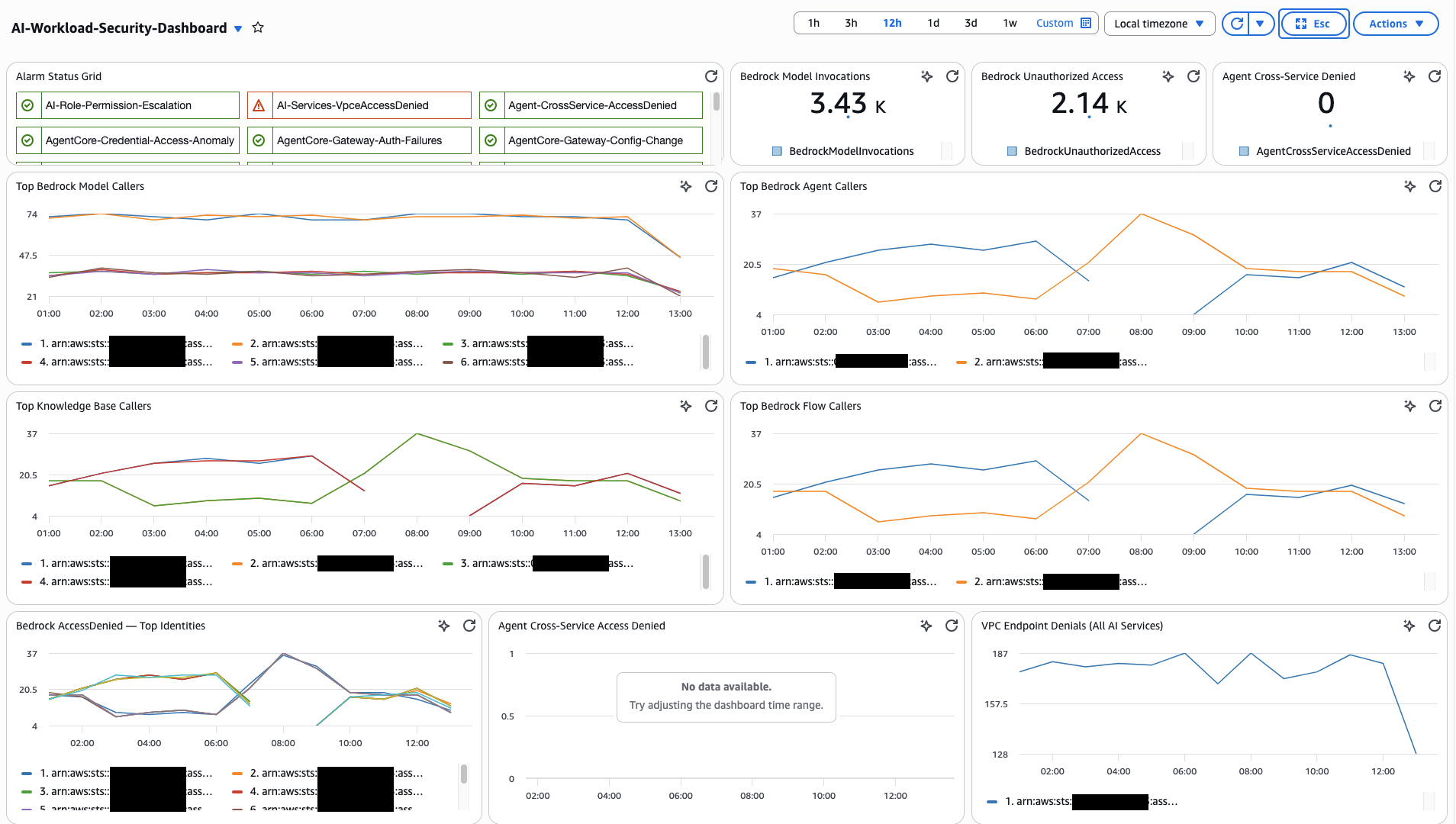
Recommended Widget Layout
For Logs Insights widgets, select SQL or CWLI as the query language depending on the query source. Cross-log-group JOIN queries (from Cross-Pipeline Correlation Queries) must use SQL. Single-log-group queries can use either.
- Status Overview
- Audit — Bedrock
- Audit — AgentCore
- Monitoring & Cost
- Investigation & Correlation
Row 1 — High-level health and key counters.
| Widget | Widget Type | Data Source |
|---|---|---|
| Alarm Status Grid | Alarm Status | All metric filter alarms from CloudWatch Alarms |
| Bedrock Model Invocations Count | Number (Metric) | AIWorkloadMetrics/BedrockModelInvocations |
| Total Bedrock Spend | Single value (Logs) | Model Invocation Log — total cost query (FinOps dashboard) |
| Agent Cross-Service Denied Count | Number (Metric) | AIWorkloadMetrics/AgentCrossServiceAccessDenied |
Row 2 — Model & Agent Activity
| Widget | Widget Type | Data Source |
|---|---|---|
| Top Bedrock Model Callers | Contributor Insights | Rule 1: AI-TopBedrockModelCallers |
| Top Bedrock Agent Callers | Contributor Insights | Rule 2: AI-TopBedrockAgentCallers |
Row 3 — Data & Access Denied
| Widget | Widget Type | Data Source |
|---|---|---|
| Top Knowledge Base Callers | Contributor Insights | Rule 3: AI-TopKnowledgeBaseCallers |
| Bedrock AccessDenied Identities | Contributor Insights | Rule 5: AI-BedrockAccessDenied-TopIdentities |
| Agent Cross-Service Access Denied | Contributor Insights | Rule 6: AI-AgentCrossServiceAccessDenied |
Row 4 — Security Config
| Widget | Widget Type | Data Source |
|---|---|---|
| Guardrail Modification Events | Contributor Insights | Rule 10: AI-BedrockGuardrailChanges-TopIdentities |
| Logging & Security Config Changes | Contributor Insights | Rule 11: AI-SecurityConfigurationChanges |
| VPC Endpoint Denials | Contributor Insights | Rule 7: AI-VpceAccessDenied-AllAIServices |
Row 4.6 — Bedrock Extended
| Widget | Widget Type | Data Source |
|---|---|---|
| Session Activity | Contributor Insights | Rule 19: AI-TopBedrockSessionCallers |
| Flow Execution Activity | Contributor Insights | Rule 20: AI-TopBedrockFlowExecutionCallers |
| Data Automation Activity | Contributor Insights | Rule 21: AI-TopBedrockDataAutomationCallers |
| Bedrock Tool Invocations | Contributor Insights | Rule 22: AI-TopBedrockToolCallers |
| Automated Reasoning Changes | Contributor Insights | Rule 23: AI-AutomatedReasoningChanges-TopIdentities |
Row 4.5 — AgentCore Activity
| Widget | Widget Type | Data Source |
|---|---|---|
| Gateway Traffic by JWT Subject | Contributor Insights | Rule 13: AI-TopGatewayCallers |
| Gateway Auth Failures | Contributor Insights | Rule 14: AI-GatewayAuthFailures-TopSources |
| AgentCore Tool Usage | Contributor Insights | Rule 15: AI-TopAgentCoreToolUsers |
| Credential Access Patterns | Contributor Insights | Rule 16: AI-TopAgentCoreCredentialAccessors |
| Memory Access Patterns | Contributor Insights | Rule 17: AI-TopAgentCoreMemoryAccessors |
| Gateway Config Changes | Contributor Insights | Rule 18: AI-AgentCoreGatewayConfigChanges |
Row 5 — Model Performance
| Widget | Widget Type | Data Source |
|---|---|---|
| Completion Rate (ok vs truncated) | Time series (Logs) | Model Invocation Log — DevOps query (DevOps dashboard) |
| Cross-Region Latency by Model | Table (Logs) | Model Invocation Log — latency query |
Row 6 — Agent Workflow
| Widget | Widget Type | Data Source |
|---|---|---|
| Agent Traces vs Errors | Time series (Logs) | ADOT aws/spans — agent error query |
| Component Performance (P95) | Table (Logs) | ADOT aws/spans — component breakdown |
Row 7 — Cost (FinOps)
| Widget | Widget Type | Data Source |
|---|---|---|
| Cost Distribution by Model | Pie (Logs) | Model Invocation Log — cost by model |
| Top 10 Spenders by Role | Table (Logs) | Model Invocation Log — top spenders |
Row 8 — Investigation
| Widget | Widget Type | Data Source |
|---|---|---|
| Config Change Log Table | Logs Insights (SQL) | Query 7: All AI Infrastructure Config Changes |
| Bedrock Calls by Source IP | Logs Insights (SQL) | Query 6: Bedrock and AgentCore Calls from Unexpected IPs |
| AgentCore Credential Access | Logs Insights (SQL) | Query 14: Detect Unauthorized Credential Access |
| AgentCore Gateway Auth Failures | Logs Insights (SQL) | Query 11: Gateway Authentication Failures |
| Bedrock Session & Flow Execution Activity | Logs Insights (SQL) | Query 23: Bedrock Session Activity |
| Data Automation & Tool Activity | Logs Insights (SQL) | Query 25: Bedrock Data Automation Activity |
| Automated Reasoning Policy Changes | Logs Insights (SQL) | Query 27: Automated Reasoning Policy Activity |
Row 9 — Cross-Pipeline Correlation
| Widget | Widget Type | Data Source |
|---|---|---|
| Who Asked What, Model Response | Logs Insights (SQL) | Query 18: CloudTrail + Invocation Log join |
| Agent Session with Identity | Logs Insights (SQL) | Query 19: ADOT + CloudTrail join |
| Full Three-Pipeline View | Logs Insights (SQL) | Query 20: All three joined |
Rows 5-7 use queries from the companion Custom Dashboards for GenAI Telemetry guide. Use those queries directly rather than duplicating them here.
Conclusion and Next Steps
This guide covered the end-to-end monitoring and auditing architecture for AI workloads on AWS — the three telemetry pipelines, enablement for each, CloudTrail-specific detection (metric filters, alarms, Contributor Insights) for both Bedrock and AgentCore data events, cross-pipeline correlation queries that join CloudTrail with Bedrock Model Invocation Logging and ADOT spans, and a unified CloudWatch dashboard. Each section is designed to be implemented incrementally following the phased roadmap in the Implementation Overview.
The core idea: CloudTrail alone shows who did what, Model Invocation Logging shows what the model said, and ADOT shows how the agent performed. With AgentCore data events, CloudTrail now also shows what the agent actually did — which tools it invoked, which credentials it accessed, which gateways received traffic, and what it stored in memory. The value comes from joining these signals during investigations — no single pipeline answers every question.
Together, these capabilities provide concrete implementation for the security dimensions defined in the Generative AI Security Scoping Matrix and the Agentic AI Security Scoping Matrix.
Next Steps
- Start with Phase 1. Enable all three telemetry pipelines. The other two (Model Invocation Logging, ADOT) which makes the correlation queries possible.
- Enable CloudTrail Bedrock data events. A critical step for auditing AI workloads.
- Enable CloudTrail AgentCore data events. Start with Gateway and credential access (Groups 2 and 3), then expand to built-in tools and memory (Groups 1 and 4) after establishing baseline volume.
- Validate your baseline. Run Queries 2 and 4 from Security Analytics and Queries 12-14 from the AgentCore tab in Security Analytics to establish normal usage before setting alarm thresholds.
- Automate response. Connect your CloudWatch Alarms to Amazon SNS topics, AWS Lambda functions, or Systems Manager runbooks to close the gap between detection and remediation.
- Integrate with GuardDuty. Amazon GuardDuty provides managed threat detection that complements the custom monitoring here. GuardDuty analyzes CloudTrail events for known threat patterns without requiring you to maintain detection rules.
- Review costs. Data events, Insights analysis, and network activity events all incur charges. Use the CloudTrail pricing page and the volume reduction strategies in Optimizing Data Event Collection.
Companion Guides
- Generative AI Security Scoping Matrix — Security dimensions for generative AI workloads (Governance & Compliance, Legal & Privacy, Risk Management, Controls, Resilience)
- Agentic AI Security Scoping Matrix — Security dimensions for agentic AI systems (Identity, Data, Audit & Logging, Guardrails, Scope, Orchestration)
- GenAI Observability on AWS — Deep dive on Bedrock Model Invocation Logging and Agent Telemetry (ADOT SDK) pipelines
- Custom Dashboards for GenAI Telemetry — Persona-based dashboards (DevOps, FinOps) with ready-to-use queries