在 AWS 上监控和审计 AI 工作负载
简介
AWS 上的现代 AI 工作负载跨三个独立管道生成遥测数据 — CloudTrail(谁调用了什么)、Bedrock Model Invocation Logging(模型说了什么)和 ADOT SDK 收集的 Agent Telemetry(Agent 表现如何)。每个管道都必不可少。CloudTrail 本身可以告诉您某个 IAM 角色调用了 InvokeModel,但无法告诉您该角色向模型提了什么问题或 Agent 如何响应。Model Invocation Logging 捕获内容但不捕获 Agent 编排。ADOT 捕获编排但不捕获推理参数或 IAM 身份。安全和运营调查几乎总是需要关联至少两个管道。
本指南向您展示如何通过以下方式为 AI 工作负载构建完整的监控和审计方案:
- 启用所有三个遥测管道 — 本指南中提供简要设置,并附有指向配套指南的深层链接以了解详情。
- 在 CloudTrail 上构建检测规则 — 用于安全和审计面的 metric 过滤器、告警和 Contributor Insights 规则,涵盖 Bedrock 和 AgentCore 数据事件。
- 运行跨管道关联查询 — 将 CloudTrail 与 Bedrock Model Invocation Logging 和 ADOT spans 连接,以回答单个管道无法独自回答的问题。
Generative AI Security Scoping Matrix 和 Agentic AI Security Scoping Matrix 定义了组织在构建 AI 应用程序时需要解决的安全维度,包括审计和日志记录、身份上下文、Agent 权限边界和数据保护。本指南使用 CloudTrail、CloudWatch 和跨管道关联为这些维度提供具体实现。下面的标签页将每个矩阵维度映射到实现它的指南章节。
- Agentic AI
- Generative AI
| Dimension | Guide Sections |
|---|---|
| Governance & Compliance — data sovereignty, audit | Model Invocation Logging, Query 18, Query 25, Metric Filter 5, Metric Filter 23 |
| Risk Management — threat modeling, guardrails | Bedrock Guardrail monitoring, Query 8, Query 21, Query 27, Metric Filter 4, Metric Filter 25 |
| Controls — identity, access management, least privilege | Management Events, Query 1, Query 2, Query 4, Metric Filter 1, Metric Filter 7 |
AWS 负责运行 CloudTrail、CloudWatch 和 Bedrock 服务的云基础设施的安全性。客户负责云中的安全性,包括配置事件选择器、创建检测规则、设置告警阈值以及响应安全事件。本指南重点介绍 AI 工作负载的客户配置和监控职责。有关更多信息,请参阅 AWS Shared Responsibility Model。
三重叠加挑战
数据量 — AI 模型调用可能产生大量事件。如果没有精确的事件选择器和聚合,在高数据量下很难隔离感兴趣的事件,而且捕获所有事件的成本过高。
速度 — Agent 发起的活动序列可能在几秒钟内涉及多个 API 调用、工具调用和模型交互。近实时检测规则有助于在异常发生时更快地浮现运营异常,支持更快的分类和更短的平均调查时间。
复杂性 — AI 工作负载活动跨越多个 AWS 服务。没有任何单一 log 源能提供完整的可见性。跨管道关联才是调查真正发生的地方。
本指南涵盖的内容
- 三个遥测管道及其各自独特捕获的内容
- 所有三个管道的启用方法(CloudTrail 深入讲解;其他两个提供简要步骤和深层链接)
- CloudTrail 专属检测:metric 过滤器、告警、Contributor Insights,涵盖 Bedrock 和 AgentCore 数据事件
- AgentCore 数据事件:网关流量、内置工具使用、凭证访问、内存操作和运行时活动
- 用于调查的跨管道关联查询
- 结合所有三个数据源的统一 dashboard
GenAI 遥测全景:三条互补管道
CloudTrail 是三条遥测管道之一,它们共同为 AWS 上的 AI 工作负载提供完整的可观测性。每条管道捕获不同的数据,服务于不同的目的,并以不同的方式启用。安全调查几乎总是需要关联至少两条管道。
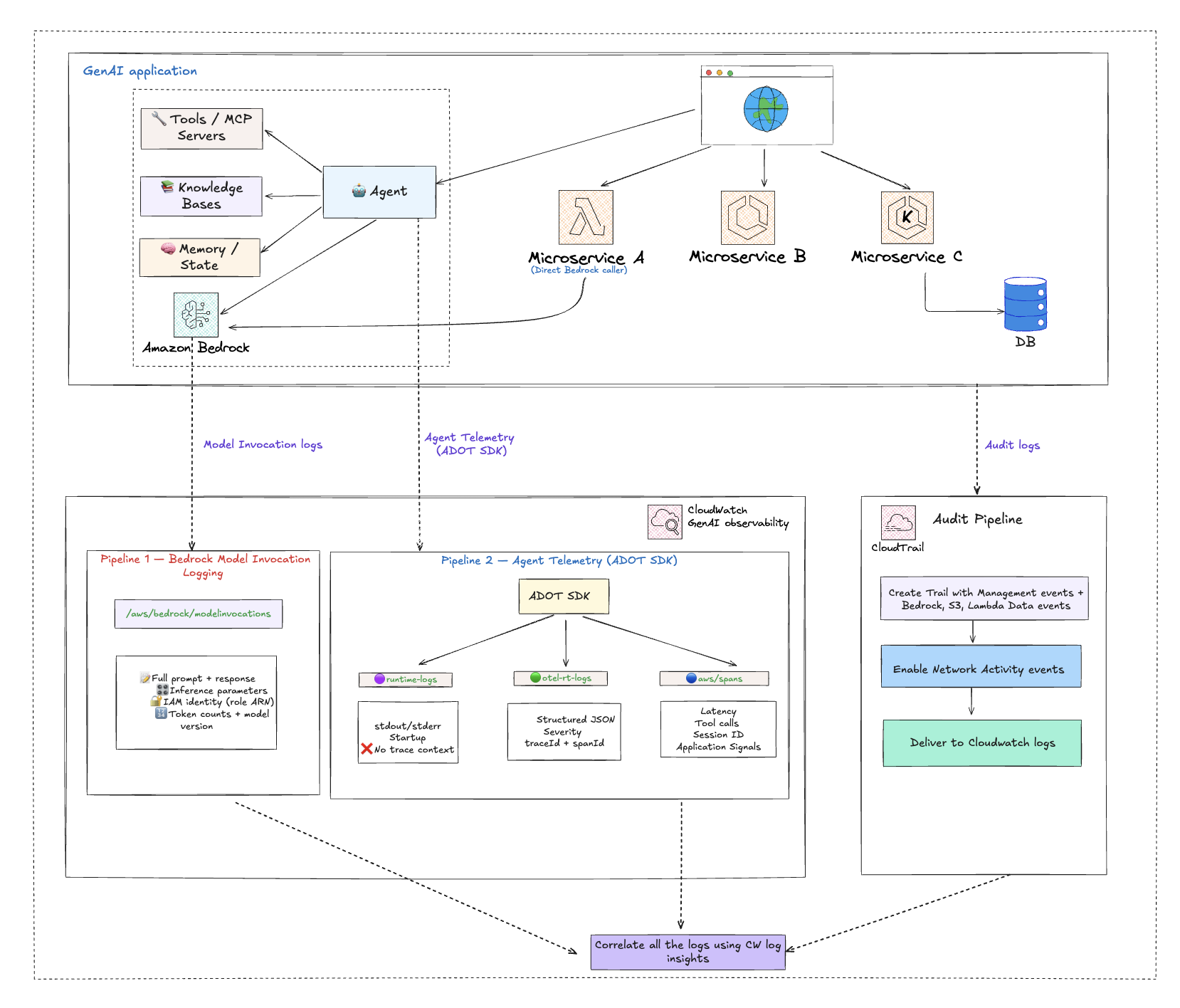
| Pipeline | Captures | Log Group | Primary Use |
|---|---|---|---|
| CloudTrail | Who did what — every API call, caller ARN, source IP, error codes, access denials, control-plane changes | YOUR_CLOUDTRAIL_LOG_GROUP | Security audit, access investigation, configuration change tracking |
| Bedrock Model Invocation Logging | What the model said — full prompt, full response, inference parameters (temperature, max_tokens), caller IAM identity, token counts | bedrock-model-invocation-logging | Content audit, compliance, prompt quality debugging, cost attribution |
| Agent Telemetry (collected by AWS Distro for OpenTelemetry — ADOT) | How the agent performed — model call latency, tool execution, distributed trace correlation, session tracking | aws/spans, /aws/bedrock-agentcore/runtimes/<agent> | Operational monitoring, performance debugging, agent workflow 可观测性 |
每条管道独自能回答什么
CloudTrail 单独告诉您:
- 哪个 IAM 身份调用了
InvokeModel? - 源 IP、用户代理和区域是什么?
- 调用是否被拒绝(AccessDenied、UnauthorizedOperation)?
- 是否有人修改了 Guardrail、停止了日志记录或提升了 IAM 权限?
- 哪个 VPC 端点阻止了调用?
Model Invocation Logging 单独告诉您:
- 向模型发送了什么 prompt?
- 模型返回了什么?
- 使用了什么 temperature 和 max_tokens?
- 调用消耗了多少输入和输出 token?
- 响应是否被截断(stop_reason = max_tokens)?
Agent Telemetry(ADOT SDK)单独告诉您:
- 模型调用花了多长时间(客户端延迟)?
- Agent 调用了哪些工具,顺序是什么?
- 工具是否失败了,哪个组件导致了错误?
- Agent 会话如何在多次模型调用之间链接?
关联如何解锁调查
只有关联才能回答的问题
| Investigation Question | Pipelines to Join | Join Key |
|---|---|---|
| Who asked the model this question, and what did it say? | CloudTrail (caller) + Model Invocation Logging (prompt/response) | requestId |
| Did the agent fail because of a model issue, a tool issue, or a permission issue? | ADOT spans (component latency/errors) + CloudTrail (AccessDenied events) | session + time |
| Was a guardrail weakened just before these unsafe model responses? | CloudTrail (UpdateGuardrail events) + Model Invocation Logging (response content) | timestamp |
| Is the agent role making Bedrock calls that violate least privilege? | CloudTrail (cross-service AccessDenied from assumed role) + ADOT (agent session ID) | session + time |
| Which external caller triggered this agent through the Gateway, and what credentials did the agent use? | CloudTrail Gateway data events (JWT subject, source IP) + CloudTrail credential data events (TokenVault/OAuth2 access) | time + agent runtime ARN |
| Is an agent executing code or browsing websites outside its intended scope? | CloudTrail AgentCore tool data events (CodeInterpreter/Browser) + ADOT spans (agent session context) | session + time |
跨管道关联查询章节为您提供这些场景的实际 JOIN 查询。 :::
实施概述
分阶段推出,先启用所有三条管道,然后在其上叠加检测和关联。
第 1 阶段:启用可观测性管道
首先启用两条可观测性管道(Bedrock Model Invocation Logging 和 ADOT SDK 收集的 Agent Telemetry)。它们启用速度快,而且是关联查询得以实现的基础。CloudTrail 设置在第 2 阶段进行。
管道 A:Bedrock Model Invocation Logging
捕获每次 Bedrock 模型调用的完整 prompt、响应、推理参数和调用者 IAM 身份。需要手动选择启用。(通过捕获模型交互来支持数据主权要求和合规审计工作流,实现 Generative AI Security Scoping Matrix 的 Governance & Compliance 维度。)
- 打开 Amazon Bedrock 控制台
- 选择 Settings → Model invocation logging
- 启用日志记录并选择 CloudWatch Logs(和/或 S3)作为目标
- 配置 log group 名称(默认:
bedrock-model-invocation-logging)和服务角色
有关详细配置、PII 脱敏和 dashboard 设置,请参阅 GenAI 可观测性 on AWS。
管道 B:Agent Telemetry(由 ADOT SDK 收集)
捕获 Agent 编排、分布式 traces 和工具执行。
- AgentCore: 无需操作,因为 ADOT SDK 默认包含在运行时中,遥测数据自动流向
aws/spans和/aws/bedrock-agentcore/runtimes/<agent> - EKS/ECS/自托管: 将 ADOT 自动插桩 Agent 附加到您的工作负载。无需代码更改
启用 CloudWatch Transaction Search 以解锁完整的 Application Signals 体验。
有关详细启用步骤,请参阅 GenAI 可观测性 on AWS — 为 Agentic 工作负载启用可观测性 和 AgentCore 可观测性快速入门。
第 2 阶段:启用 CloudTrail — 从 Bedrock 开始,扩大覆盖范围,导入 CloudWatch
配置 CloudTrail 以捕获完整的 AI 工作负载审计面,从最高价值的资源(Bedrock)开始向外扩展。将所有数据传送到 CloudWatch Logs,以便与管道 A 和 B 进行关联。
步骤 1:Bedrock 和 AgentCore 数据事件及管理事件
使用高级事件选择器在您的 trail 上启用 Bedrock 数据事件。这些操作默认不会被记录。请参阅 Amazon Bedrock 数据事件。
| Category | Resource Types |
|---|---|
| Agent & Orchestration | AWS::Bedrock::AgentAlias, AWS::Bedrock::InlineAgent, AWS::Bedrock::FlowAlias, AWS::Bedrock::FlowExecution, AWS::Bedrock::Session |
| Model Invocation | AWS::Bedrock::Model, AWS::Bedrock::AsyncInvoke, AWS::Bedrock::PromptVersion, AWS::Bedrock::AdvancedOptimizePromptJob |
| Safety & Guardrails | AWS::Bedrock::Guardrail, AWS::Bedrock::AutomatedReasoningPolicy, AWS::Bedrock::AutomatedReasoningPolicyVersion |
| Knowledge & RAG | AWS::Bedrock::KnowledgeBase, AWS::Bedrock::Tool |
| Data Automation | AWS::Bedrock::DataAutomationProject, AWS::Bedrock::DataAutomationInvocation, AWS::Bedrock::DataAutomationProfile, AWS::Bedrock::Blueprint |
使用高级事件选择器启用 AgentCore 数据事件。请参阅 Amazon Bedrock AgentCore 数据事件。
| Category | Resource Types |
|---|---|
| Runtime & Gateway | AWS::BedrockAgentCore::Gateway, AWS::BedrockAgentCore::Runtime, AWS::BedrockAgentCore::RuntimeEndpoint |
| Built-in Tools | AWS::BedrockAgentCore::CodeInterpreter, AWS::BedrockAgentCore::Browser |
| Identity & Credentials | AWS::BedrockAgentCore::WorkloadIdentity, AWS::BedrockAgentCore::TokenVault, AWS::BedrockAgentCore::OAuth2CredentialProvider, AWS::BedrockAgentCore::APIKeyCredentialProvider |
| Memory & Evaluation | AWS::BedrockAgentCore::Memory, AWS::BedrockAgentCore::Evaluator |
以及其他 AgentCore 资源类型(随着其可用性增加)。
验证管理事件(读和写)已在所有区域启用 — 这会自动将 InvokeModel 和 Converse 作为管理事件捕获,以及 AgentCore 管理事件如 CreateGateway、CreateGatewayTarget 等。请参阅 CloudTrail 管理事件。
启用 CloudTrail Insights(ApiCallRateInsight 和 ApiErrorRateInsight)以进行异常检测。请参阅 CloudTrail Insights 事件。
步骤 2:扩展到 S3、Lambda 和网络活动
- 为训练数据、模型制品和 CI/CD 管道存储桶启用 Amazon S3 数据事件(仅写入)。请参阅 Amazon S3 和 Lambda 数据事件。
- 为生产 AI 管道函数启用 Lambda 数据事件,排除开发/测试函数。请参阅 Amazon S3 和 Lambda 数据事件。
- 为 Bedrock、S3 和 Lambda VPC 端点启用网络活动事件,针对
VpceAccessDenied。请参阅 CloudTrail 网络活动事件。
步骤 3:传送到 CloudWatch Logs
- 配置您的 CloudTrail trail 以传送到 CloudWatch Logs log group。
第 3 阶段:在 CloudTrail 上构建检测规则
- 为 CloudTrail 事件创建 metric 过滤器(未授权的 Bedrock 访问、Guardrail 变更、日志中断)。请参阅 Metric 过滤器。
- 在每个 metric 过滤器上创建 CloudWatch Alarms 并配置 SNS 通知目标。请参阅 CloudWatch Alarms。
- 创建 Contributor Insights 规则以识别排名靠前的 IAM 身份和源 IP。请参阅 Contributor Insights 规则。
第 4 阶段:构建跨管道关联查询
- 开发 CloudWatch Logs Insights 查询用于标准 CloudTrail 检测。请参阅安全分析。
- 构建跨管道 JOIN 查询,将 CloudTrail 与 Bedrock Model Invocation Logging 和 ADOT spans 结合。请参阅跨管道关联查询。
- 保存经过验证的查询,供安全和运营分析师反复使用。
第 5 阶段:通过事件聚合进行优化
- 启用 CloudTrail 事件聚合(
API_ACTIVITY、RESOURCE_ACCESS、USER_ACTIONS模板)以在原始数据事件旁提供 5 分钟摘要。请参阅 CloudTrail 数据事件聚合。 - 使用 CloudWatch Subscription Filters 仅将管理事件和聚合事件转发到下游 SIEM,减少摄入量。
第 6 阶段:组装统一 Dashboard
- 构建一个 CloudWatch Dashboard,将 CloudTrail 告警、Contributor Insights 小组件、Model Invocation Log 成本小组件、ADOT 性能小组件和关联查询结果整合到单一视图中。请参阅统一审计和监控 Dashboard。
Amazon Bedrock 数据事件
默认情况下,CloudTrail 为您的账户记录管理事件,这已经捕获了常见的 Bedrock 运行时调用,如 InvokeModel、Converse 和 ConverseStream。许多关键的 AI 工作负载操作被记录为数据事件,包括 Agent 调用、知识库检索、Flow 执行、Guardrail 应用、双向流式传输、异步调用和 Prompt 渲染。这些操作需要在您的 trail 上配置高级事件选择器。数据事件为您的安全团队提供了对模型调用的可见性。请参阅下面的Bedrock 高级事件选择器了解要应用的具体选择器。
需要监控的关键 API
下表显示了哪些 Bedrock API 会被自动捕获,哪些需要在您的 trail 上配置高级事件选择器。
- Management Events (captured by default)
- Data Events (require advanced event selectors)
| API | Event Name | Why It Matters |
|---|---|---|
| InvokeModel | InvokeModel | Tracks which IAM identities are calling foundation models and when. |
| Streaming Invocation | InvokeModelWithResponseStream | Captures streaming model interactions for long-form generation tasks. |
| Conversational AI | Converse / ConverseStream | Records multi-turn conversational AI activity against foundation models. |
| Async Invocation Listing | ListAsyncInvokes | Monitors listing of asynchronous invocation jobs. |
数据事件需要配置高级事件选择器。
| API | Event Name | Resource Type | Why It Matters |
|---|---|---|---|
| Bidirectional Streaming | InvokeModelWithBidirectionalStream | AWS::Bedrock::Model | Captures bidirectional streaming model interactions. |
| Async Invocations | GetAsyncInvoke / StartAsyncInvoke | AWS::Bedrock::Model, AWS::Bedrock::AsyncInvoke | Monitors asynchronous model invocation jobs. Requires selectors for both resource types. |
| Agent Invocation | InvokeAgent | AWS::Bedrock::AgentAlias | Tracks invocations of deployed Bedrock agent aliases. |
| Inline Agent | InvokeInlineAgent | AWS::Bedrock::InlineAgent | Captures inline agent invocations. |
| RAG Activity | Retrieve / RetrieveAndGenerate | AWS::Bedrock::KnowledgeBase | Monitors Retrieval-Augmented Generation calls against Bedrock Knowledge Bases. |
| Flow Invocation | InvokeFlow | AWS::Bedrock::FlowAlias | Tracks invocations of Bedrock Prompt Flows. |
| Guardrail Application | ApplyGuardrail | AWS::Bedrock::Guardrail | Captures apply-guardrail operations. |
| Prompt Rendering | RenderPrompt | AWS::Bedrock::PromptVersion | Captures prompt rendering operations for prompts created using Prompt management. |
| Session Activity | Session API operations | AWS::Bedrock::Session | Captures session-level API activity for multi-turn Bedrock conversations. |
| Flow Execution | Flow execution API operations | AWS::Bedrock::FlowExecution | Captures Bedrock flow execution activity for monitoring prompt flow runs. |
| Automated Reasoning | Automated reasoning policy API operations | AWS::Bedrock::AutomatedReasoningPolicy | Captures activity on automated reasoning policies used for verifiable AI outputs. |
| Automated Reasoning Version | Automated reasoning policy version API operations | AWS::Bedrock::AutomatedReasoningPolicyVersion | Captures activity on specific versions of automated reasoning policies. |
| Data Automation Project | Data automation project API operations | AWS::Bedrock::DataAutomationProject | Captures Bedrock data automation project activity for document and media processing. |
| Data Automation Invocation | Data automation invocation API operations | AWS::Bedrock::DataAutomationInvocation | Captures Bedrock data automation invocation activity. |
| Data Automation Profile | Data automation profile API operations | AWS::Bedrock::DataAutomationProfile | Captures Bedrock data automation profile activity. |
| Blueprint | Blueprint API operations | AWS::Bedrock::Blueprint | Captures Bedrock blueprint activity for data automation configurations. |
| Advanced Prompt Optimization | Advanced optimize prompt job API operations | AWS::Bedrock::AdvancedOptimizePromptJob | Captures advanced prompt optimization job activity. |
| Tool Activity | Tool API operations | AWS::Bedrock::Tool | Captures Bedrock tool API activity for tool-use operations. |
由于 InvokeModel、Converse 和 ConverseStream 作为管理事件记录,它们在启用了管理事件日志的任何 trail 上都会被默认捕获。但是,Agent 调用、知识库检索、Flow 调用、Guardrail 应用、Prompt 渲染、异步调用、双向流式传输、会话活动、Flow 执行、自动推理、数据自动化、蓝图操作、高级 Prompt 优化和工具操作仅在您为 trail 上相应的 Bedrock 资源类型配置高级事件选择器时才会被记录。请参阅Bedrock 高级事件选择器了解配置方法,以及 Amazon Bedrock CloudTrail 文档了解支持的完整资源类型列表。
Bedrock 高级事件选择器
使用以下高级事件选择器在您的 CloudTrail trail 上捕获 Bedrock 数据事件。每个 Bedrock 资源类型需要自己的选择器,每个选择器应使用 resources.ARN 前缀将日志范围限定到您的特定资源。这配置了十八个独立的选择器 — 每种资源类型一个。大多数过滤器基于 eventCategory = Data 并使用范围限定到您账户的 resources.ARN 前缀。Model 和 AsyncInvoke 选择器改用 eventName 过滤,因为基础模型的 ARN 是 AWS 拥有的,不包含您的账户 ID。
以下选择器是示例。在不替换占位符的情况下应用它们将不会捕获任何事件。
| Placeholder | Replace With | Where to Find |
|---|---|---|
ACCOUNT_ID | Your 12-digit AWS account ID | AWS Console top-right menu |
REGION | Your AWS region (e.g., us-east-1) | Region selector in console |
AGENT_ID / ALIAS_ID | Agent and alias IDs | Bedrock console → Agents |
KB_ID | Knowledge Base ID | Bedrock console → Knowledge bases |
FLOW_ID | Flow ID | Bedrock console → Prompt flows |
GUARDRAIL_ID | Guardrail ID | Bedrock console → Guardrails |
PROMPT_ID | Prompt ID | Bedrock console → Prompt management |
POLICY_ID | Automated Reasoning Policy ID | Bedrock console → Automated reasoning |
PROJECT_ID | Data Automation Project ID | Bedrock console → Data automation |
TOOL_ID | Bedrock Tool ID | Bedrock console → Tools |
BEDROCK_EXECUTION_ROLE_NAME | IAM role name for Bedrock calls | IAM console → Roles |
YOUR_CLOUDTRAIL_LOG_GROUP | CloudWatch Logs log group for your CloudTrail trail | CloudTrail console → trail → CloudWatch Logs |
要记录给定类型的所有资源,请从 ARN 前缀中删除资源 ID(例如,agent-alias/AGENT_ID/ALIAS_ID → agent-alias/)— 这会增加事件量和成本。如果您使用 readOnly 或 eventName 过滤器,请验证它们是否与您需要的操作匹配。
View all 18 Bedrock advanced event selectors (JSON)
[
  {
    "Name": "Bedrock-AgentAlias-DataEvents",
    "FieldSelectors": [
      {
        "Field": "eventCategory",
        "Equals": ["Data"]
      },
      {
        "Field": "resources.type",
        "Equals": ["AWS::Bedrock::AgentAlias"]
      },
      {
        "Field": "resources.ARN",
        "StartsWith": [
          "arn:aws:bedrock:REGION:ACCOUNT_ID:agent-alias/AGENT_ID/ALIAS_ID"
        ]
      }
    ]
  },
  {
    "Name": "Bedrock-InlineAgent-DataEvents",
    "FieldSelectors": [
      {
        "Field": "eventCategory",
        "Equals": ["Data"]
      },
      {
        "Field": "resources.type",
        "Equals": ["AWS::Bedrock::InlineAgent"]
      },
      {
        "Field": "eventName",
        "Equals": ["InvokeInlineAgent"]
      },
      {
        "Field": "userIdentity.arn",
        "StartsWith": [
          "arn:aws:sts::ACCOUNT_ID:assumed-role/BEDROCK_EXECUTION_ROLE_NAME"
        ]
      }
    ]
  },
  {
    "Name": "Bedrock-KnowledgeBase-DataEvents",
    "FieldSelectors": [
      {
        "Field": "eventCategory",
        "Equals": ["Data"]
      },
      {
        "Field": "resources.type",
        "Equals": ["AWS::Bedrock::KnowledgeBase"]
      },
      {
        "Field": "resources.ARN",
        "StartsWith": [
          "arn:aws:bedrock:REGION:ACCOUNT_ID:knowledge-base/KB_ID"
        ]
      }
    ]
  },
  {
    "Name": "Bedrock-FlowAlias-DataEvents",
    "FieldSelectors": [
      {
        "Field": "eventCategory",
        "Equals": ["Data"]
      },
      {
        "Field": "resources.type",
        "Equals": ["AWS::Bedrock::FlowAlias"]
      },
      {
        "Field": "resources.ARN",
        "StartsWith": [
          "arn:aws:bedrock:REGION:ACCOUNT_ID:flow/FLOW_ID/alias/"
        ]
      }
    ]
  },
  {
    "Name": "Bedrock-Guardrail-DataEvents",
    "FieldSelectors": [
      {
        "Field": "eventCategory",
        "Equals": ["Data"]
      },
      {
        "Field": "resources.type",
        "Equals": ["AWS::Bedrock::Guardrail"]
      },
      {
        "Field": "resources.ARN",
        "StartsWith": [
          "arn:aws:bedrock:REGION:ACCOUNT_ID:guardrail/GUARDRAIL_ID"
        ]
      }
    ]
  },
  {
    "Name": "Bedrock-Model-DataEvents",
    "FieldSelectors": [
      {
        "Field": "eventCategory",
        "Equals": ["Data"]
      },
      {
        "Field": "resources.type",
        "Equals": ["AWS::Bedrock::Model"]
      },
      {
        "Field": "eventName",
        "Equals": ["InvokeModelWithBidirectionalStream"]
      }
    ]
  },
  {
    "Name": "Bedrock-AsyncInvoke-DataEvents",
    "FieldSelectors": [
      {
        "Field": "eventCategory",
        "Equals": ["Data"]
      },
      {
        "Field": "resources.type",
        "Equals": ["AWS::Bedrock::AsyncInvoke"]
      },
      {
        "Field": "eventName",
        "Equals": ["GetAsyncInvoke", "StartAsyncInvoke"]
      }
    ]
  },
  {
    "Name": "Bedrock-Prompt-DataEvents",
    "FieldSelectors": [
      {
        "Field": "eventCategory",
        "Equals": ["Data"]
      },
      {
        "Field": "resources.type",
        "Equals": ["AWS::Bedrock::PromptVersion"]
      },
      {
        "Field": "resources.ARN",
        "StartsWith": [
          "arn:aws:bedrock:REGION:ACCOUNT_ID:prompt/PROMPT_ID"
        ]
      }
    ]
  },
  {
    "Name": "Bedrock-Session-DataEvents",
    "FieldSelectors": [
      {
        "Field": "eventCategory",
        "Equals": ["Data"]
      },
      {
        "Field": "resources.type",
        "Equals": ["AWS::Bedrock::Session"]
      },
      {
        "Field": "resources.ARN",
        "StartsWith": [
          "arn:aws:bedrock:REGION:ACCOUNT_ID:session/"
        ]
      },
      {
        "Field": "readOnly",
        "Equals": ["false"]
      }
    ]
  },
  {
    "Name": "Bedrock-FlowExecution-DataEvents",
    "FieldSelectors": [
      {
        "Field": "eventCategory",
        "Equals": ["Data"]
      },
      {
        "Field": "resources.type",
        "Equals": ["AWS::Bedrock::FlowExecution"]
      },
      {
        "Field": "resources.ARN",
        "StartsWith": [
          "arn:aws:bedrock:REGION:ACCOUNT_ID:flow/FLOW_ID/alias/"
        ]
      }
    ]
  },
  {
    "Name": "Bedrock-AutomatedReasoningPolicy-DataEvents",
    "FieldSelectors": [
      {
        "Field": "eventCategory",
        "Equals": ["Data"]
      },
      {
        "Field": "resources.type",
        "Equals": ["AWS::Bedrock::AutomatedReasoningPolicy"]
      },
      {
        "Field": "resources.ARN",
        "StartsWith": [
          "arn:aws:bedrock:REGION:ACCOUNT_ID:automated-reasoning-policy/POLICY_ID"
        ]
      }
    ]
  },
  {
    "Name": "Bedrock-AutomatedReasoningPolicyVersion-DataEvents",
    "FieldSelectors": [
      {
        "Field": "eventCategory",
        "Equals": ["Data"]
      },
      {
        "Field": "resources.type",
        "Equals": ["AWS::Bedrock::AutomatedReasoningPolicyVersion"]
      },
      {
        "Field": "resources.ARN",
        "StartsWith": [
          "arn:aws:bedrock:REGION:ACCOUNT_ID:automated-reasoning-policy/POLICY_ID"
        ]
      }
    ]
  },
  {
    "Name": "Bedrock-DataAutomationProject-DataEvents",
    "FieldSelectors": [
      {
        "Field": "eventCategory",
        "Equals": ["Data"]
      },
      {
        "Field": "resources.type",
        "Equals": ["AWS::Bedrock::DataAutomationProject"]
      },
      {
        "Field": "resources.ARN",
        "StartsWith": [
          "arn:aws:bedrock:REGION:ACCOUNT_ID:data-automation-project/PROJECT_ID"
        ]
      }
    ]
  },
  {
    "Name": "Bedrock-DataAutomationInvocation-DataEvents",
    "FieldSelectors": [
      {
        "Field": "eventCategory",
        "Equals": ["Data"]
      },
      {
        "Field": "resources.type",
        "Equals": ["AWS::Bedrock::DataAutomationInvocation"]
      },
      {
        "Field": "resources.ARN",
        "StartsWith": [
          "arn:aws:bedrock:REGION:ACCOUNT_ID:data-automation-invocation/"
        ]
      },
      {
        "Field": "readOnly",
        "Equals": ["false"]
      }
    ]
  },
  {
    "Name": "Bedrock-DataAutomationProfile-DataEvents",
    "FieldSelectors": [
      {
        "Field": "eventCategory",
        "Equals": ["Data"]
      },
      {
        "Field": "resources.type",
        "Equals": ["AWS::Bedrock::DataAutomationProfile"]
      },
      {
        "Field": "resources.ARN",
        "StartsWith": [
          "arn:aws:bedrock:REGION:ACCOUNT_ID:data-automation-profile/"
        ]
      },
      {
        "Field": "readOnly",
        "Equals": ["false"]
      }
    ]
  },
  {
    "Name": "Bedrock-Blueprint-DataEvents",
    "FieldSelectors": [
      {
        "Field": "eventCategory",
        "Equals": ["Data"]
      },
      {
        "Field": "resources.type",
        "Equals": ["AWS::Bedrock::Blueprint"]
      },
      {
        "Field": "resources.ARN",
        "StartsWith": [
          "arn:aws:bedrock:REGION:ACCOUNT_ID:blueprint/"
        ]
      },
      {
        "Field": "readOnly",
        "Equals": ["false"]
      }
    ]
  },
  {
    "Name": "Bedrock-AdvancedOptimizePromptJob-DataEvents",
    "FieldSelectors": [
      {
        "Field": "eventCategory",
        "Equals": ["Data"]
      },
      {
        "Field": "resources.type",
        "Equals": ["AWS::Bedrock::AdvancedOptimizePromptJob"]
      },
      {
        "Field": "resources.ARN",
        "StartsWith": [
          "arn:aws:bedrock:REGION:ACCOUNT_ID:advanced-optimize-prompt-job/"
        ]
      },
      {
        "Field": "readOnly",
        "Equals": ["false"]
      }
    ]
  },
  {
    "Name": "Bedrock-Tool-DataEvents",
    "FieldSelectors": [
      {
        "Field": "eventCategory",
        "Equals": ["Data"]
      },
      {
        "Field": "resources.type",
        "Equals": ["AWS::Bedrock::Tool"]
      },
      {
        "Field": "resources.ARN",
        "StartsWith": [
          "arn:aws:bedrock:REGION:ACCOUNT_ID:tool/TOOL_ID"
        ]
      }
    ]
  }
]
Bedrock 数据事件资源类型
CloudTrail 设计支持以下 Bedrock 资源类型的数据事件,为您的 AI 管道提供完整可见性:
Agent & Orchestration
| Resource Type | Key APIs | Description |
|---|---|---|
AWS::Bedrock::AgentAlias | InvokeAgent | Track invocations of deployed Bedrock agent aliases |
AWS::Bedrock::InlineAgent | InvokeInlineAgent | Capture inline agent invocations |
AWS::Bedrock::FlowAlias | InvokeFlow | Track Bedrock Prompt Flow invocations |
AWS::Bedrock::FlowExecution | Flow execution APIs | Capture flow execution activity for monitoring prompt flow runs |
AWS::Bedrock::Session | Session APIs | Capture session-level API activity for multi-turn conversations |
Selector notes for Agent & Orchestration resources
- FlowExecution — 将
resources.ARN缩小到特定的 Flow ID(例如,flow/FLOW_ID/alias/),因为 Flow 执行的 ARN 与 Flow 别名共享flow/前缀。 - Session — 使用
readOnly = false聚焦于写操作(会话创建和更新),减少高频读操作的数据量。
Model Invocation
| Resource Type | Key APIs | Description |
|---|---|---|
AWS::Bedrock::Model | InvokeModelWithBidirectionalStream | Log bidirectional streaming invocations |
AWS::Bedrock::AsyncInvoke | GetAsyncInvoke, StartAsyncInvoke | Log asynchronous invocation operations |
AWS::Bedrock::PromptVersion | RenderPrompt | Capture prompt rendering operations |
AWS::Bedrock::AdvancedOptimizePromptJob | Advanced optimize prompt APIs | Capture advanced prompt optimization job activity |
Selector notes for Model Invocation resources
- Model — 基础模型的 ARN 是 AWS 拥有的(例如,
arn:aws:bedrock:REGION::foundation-model/...),不包含您的账户 ID,因此此选择器使用eventName过滤而非resources.ARN。 - AsyncInvoke — 使用
eventName过滤来限定特定的异步操作。异步调用需要为AWS::Bedrock::Model和AWS::Bedrock::AsyncInvoke两者配置选择器。 - AdvancedOptimizePromptJob — 使用
readOnly = false聚焦于写操作(作业启动)。
Safety & Guardrails
| Resource Type | Key APIs | Description |
|---|---|---|
AWS::Bedrock::Guardrail | ApplyGuardrail | Capture apply-guardrail operations |
AWS::Bedrock::AutomatedReasoningPolicy | Automated reasoning APIs | Capture activity on automated reasoning policies for verifiable AI outputs |
AWS::Bedrock::AutomatedReasoningPolicyVersion | Automated reasoning version APIs | Capture activity on specific versions of automated reasoning policies |
Selector notes for Safety & Guardrails resources
- AutomatedReasoningPolicy — 缩小到特定的策略 ID,避免捕获账户中的所有策略。
- AutomatedReasoningPolicyVersion — 使用与策略选择器相同的策略 ID 前缀。
Knowledge & RAG
| Resource Type | Key APIs | Description |
|---|---|---|
AWS::Bedrock::KnowledgeBase | Retrieve, RetrieveAndGenerate | Monitor data source retrieval and ingestion activity |
AWS::Bedrock::Tool | Tool APIs | Capture tool API activity for tool-use operations |
Selector notes for Knowledge & RAG resources
- Tool — 缩小到特定的工具 ID,避免捕获账户中的所有工具活动。
Data Automation
| Resource Type | Key APIs | Description |
|---|---|---|
AWS::Bedrock::DataAutomationProject | Data automation project APIs | Capture project activity for document and media processing |
AWS::Bedrock::DataAutomationInvocation | Data automation invocation APIs | Capture data automation invocation activity |
AWS::Bedrock::DataAutomationProfile | Data automation profile APIs | Capture data automation profile activity |
AWS::Bedrock::Blueprint | Blueprint APIs | Capture blueprint activity for data automation configurations |
Selector notes for Data Automation resources
- DataAutomationProject — 缩小到特定的项目 ID。
- DataAutomationInvocation、DataAutomationProfile、Blueprint — 均使用
readOnly = false聚焦于写操作。
AWS::Bedrock::InlineAgent 选择器不包含 resources.ARN 过滤器,因为内联 Agent 没有持久的资源 ARN。为了减少数据量和成本,该选择器使用 eventName 过滤器(范围限定为 InvokeInlineAgent)和 userIdentity.arn 过滤器将日志范围限定到特定的 IAM 角色。请将 BEDROCK_EXECUTION_ROLE_NAME 替换为您的实际角色名称。如果您不使用内联 Agent,请完全删除此选择器。请参阅 Inline Agent: Filter by IAM Identity 了解完整的选择器 JSON。
在所有相关资源类型上配置上述高级事件选择器是本指南中启用 AI 工作负载可见性的关键第一步。不要在未指定高级事件选择器的情况下启用数据事件 — 未过滤的数据事件日志可能产生大量数据和高成本。有关最新支持的资源类型,请参阅 Amazon Bedrock data events in CloudTrail。
Amazon Bedrock AgentCore 数据事件
Amazon Bedrock AgentCore 提供用于运行、保护和连接 AI Agent 的托管基础设施 — 包括托管运行时、内置工具(代码解释器、浏览器)、身份和凭证管理、API 网关和持久内存。这些组件中的每一个都会生成数据面活动,CloudTrail 可以将其作为数据事件捕获,让您了解 Agent 如何执行代码、浏览网页、向第三方服务认证以及通过网关与用户交互。
AgentCore 数据事件提供对 Agent 行为的运行时可见性,包括代码执行、工具使用、内存操作 — 它们正在调用哪些工具、获取哪些凭证、哪些网关正在接收流量,或者是否有未识别的调用者正在访问您的 Agent 基础设施。
为什么 AgentCore 数据事件对 AI 安全至关重要
AgentCore 组件代表您 AI Agent 的操作面 — 即 Agent 采取实际行动的层。Bedrock 数据事件(上面已介绍)捕获的是 Agent 被要求做什么(调用模型、从知识库检索),而 AgentCore 数据事件捕获的是 Agent 实际做了什么。Agentic AI Security Scoping Matrix 为 Agent 系统定义了六个关键安全维度 — 以下要点将每个 AgentCore 功能映射到它所对应的矩阵维度:
- 代码执行 — Agent 通过 CodeInterpreter 运行用户提供的代码时可以访问文件、进行网络调用并产生副作用。监控这些调用可以检测到意外的代码运行或 Agent 在预期范围之外操作。(Agentic Matrix:Guardrails — 沙箱和隔离机制)
- 网页浏览 — 使用 Browser 工具的 Agent 会浏览外部网站,可能访问敏感 URL 或验证数据传输是否在预期范围内。记录浏览器活动为 Agent 访问的每个页面提供审计跟踪。(Agentic Matrix:Guardrails — 行为监控)
- 凭证访问 — Agent 使用存储在 TokenVault 中的 OAuth2 token、API 密钥和工作负载身份 token 向第三方 API 进行认证。意外的凭证访问模式可能表明异常的 Agent 活动或权限提升。(Agentic Matrix:Identity — 身份委托和凭证管理)
- 网关流量 — AgentCore Gateway 通过 MCP 协议和基于 JWT 的认证将 Agent 暴露给外部调用者。Gateway 数据事件捕获每个入站请求,包括认证失败 — 这对于检测来自 AWS 环境外部的意外访问尝试至关重要。(Agentic Matrix:Scope — 明确的操作边界)
- Agent 运行时活动 — Runtime 和 RuntimeEndpoint 事件跟踪 Agent 生命周期操作、会话管理和端点调用。此处的异常模式表明 Agent 在正常操作窗口之外被启动、停止或访问。(Agentic Matrix:Orchestration — Agent 到系统的交互管理)
- 内存操作 — 具有持久内存的 Agent 跨会话存储和检索对话上下文。意外的内存访问可能允许检索对话历史或修改 Agent 上下文。监控内存操作有助于验证访问是否在授权范围内。(Agentic Matrix:Data — 持久内存和状态安全)
- Agent 评估 — Evaluator 事件跟踪对 Agent 输出的自动化质量和安全评估。监控这些事件有助于验证您的评估管道是否保持按预期配置。(Agentic Matrix:Audit & Logging — 操作级别的 Agent 行为跟踪)
AgentCore 数据事件资源类型
CloudTrail 支持以下 AgentCore 资源类型的数据事件:
- Built-in Tools
- Identity & Credentials
- Runtime & Gateway
- Memory & Evaluation
| Resource Type | resources.type | Security Relevance |
|---|---|---|
| Code Interpreter | AWS::BedrockAgentCore::CodeInterpreter | Detect unintended code runs, sandbox boundary issues |
| Code Interpreter (Custom) | AWS::BedrockAgentCore::CodeInterpreterCustom | Detect unauthorized custom code runs |
| Browser | AWS::BedrockAgentCore::Browser | Audit agent web navigation, detect unintended data transfer via URLs |
| Browser (Custom) | AWS::BedrockAgentCore::BrowserCustom | Audit custom browser tool usage |
| Resource Type | resources.type | Security Relevance |
|---|---|---|
| Workload Identity | AWS::BedrockAgentCore::WorkloadIdentity | Detect unauthorized identity token requests |
| Workload Identity Directory | AWS::BedrockAgentCore::WorkloadIdentityDirectory | Monitor identity directory enumeration or modification |
| Token Vault | AWS::BedrockAgentCore::TokenVault | Detect unauthorized credential access or data transfer |
| OAuth2 Credential Provider | AWS::BedrockAgentCore::OAuth2CredentialProvider | Monitor OAuth2 token retrieval for unauthorized access |
| API Key Credential Provider | AWS::BedrockAgentCore::APIKeyCredentialProvider | Monitor API key retrieval patterns for anomalies |
| Resource Type | resources.type | Security Relevance |
|---|---|---|
| Runtime | AWS::BedrockAgentCore::Runtime | Detect unauthorized agent starts, stops, or configuration changes |
| Runtime Endpoint | AWS::BedrockAgentCore::RuntimeEndpoint | Monitor agent endpoint access patterns |
| Gateway | AWS::BedrockAgentCore::Gateway | Detect unauthorized external access, authentication failures |
| Resource Type | resources.type | Security Relevance |
|---|---|---|
| Memory | AWS::BedrockAgentCore::Memory | Detect unauthorized memory reads or context modification |
| Evaluator | AWS::BedrockAgentCore::Evaluator | Monitor evaluation pipeline integrity |
AgentCore 高级事件选择器
使用以下高级事件选择器在您的 CloudTrail trail 上捕获 AgentCore 数据事件。这些选择器按安全功能分为四组:内置工具、身份和凭证、运行时和网关、以及内存和评估。每个选择器使用 resources.ARN 前缀来限定日志范围。对于 AWS 托管的内置工具(CodeInterpreter 和 Browser),省略了 resources.ARN 过滤器,因为它们使用 AWS 拥有的 ARN — 仅 resources.type 过滤器就足够了。
以下选择器是示例。在不替换占位符的情况下应用它们将不会捕获任何事件。 Replace ACCOUNT_ID and REGION with your values (see the Bedrock placeholder table above). AgentCore-specific placeholders are listed below.
| Placeholder | Replace With | Where to Find |
|---|---|---|
GATEWAY_ID | AgentCore Gateway ID | AgentCore console or ListGateways API |
RUNTIME_ID | AgentCore Runtime ID | ListRuntimes API |
DIRECTORY_ID | Workload Identity Directory ID | AgentCore console |
PROVIDER_NAME | OAuth2 or APIKey credential provider name | AgentCore console |
MEMORY_ID | AgentCore Memory ID | AgentCore console |
EVALUATOR_ID | AgentCore Evaluator ID | AgentCore console |
CUSTOM_TOOL_ID / CUSTOM_BROWSER_ID | Custom tool or browser configuration IDs | AgentCore console |
要记录给定类型的所有资源,请从 ARN 前缀中删除资源 ID(例如,gateway/GATEWAY_ID → gateway/)— 这会增加事件量和成本。
- Group 1: Built-in Tools
- Group 2: Identity & Credentials
- Group 3: Runtime & Gateway
- Group 4: Memory & Evaluation
这些选择器捕获 Agent 工具使用情况 — Agent 在现实世界中采取的行动。代码解释器事件揭示 Agent 执行了什么代码;浏览器事件揭示 Agent 访问了哪些网站。(实现 Agentic AI Security Scoping Matrix 的 Guardrails 维度 — Agent 操作的沙箱、隔离机制和行为监控。)
AWS 托管的内置工具(CodeInterpreter 和 Browser)使用账户段设置为 aws 的 AWS 拥有的资源 ARN(例如,arn:aws:bedrock-agentcore:REGION:aws:code-interpreter/),而不是您的账户 ID。自定义工具(CodeInterpreterCustom 和 BrowserCustom)使用您的账户 ID。以下选择器反映了这种区别。如果您只使用托管工具,可以省略自定义工具选择器。
[
  {
    "Name": "AgentCore-CodeInterpreter-DataEvents",
    "FieldSelectors": [
      { "Field": "eventCategory", "Equals": ["Data"] },
      { "Field": "resources.type", "Equals": ["AWS::BedrockAgentCore::CodeInterpreter"] }
    ]
  },
  {
    "Name": "AgentCore-CodeInterpreterCustom-DataEvents",
    "FieldSelectors": [
      { "Field": "eventCategory", "Equals": ["Data"] },
      { "Field": "resources.type", "Equals": ["AWS::BedrockAgentCore::CodeInterpreterCustom"] },
      { "Field": "resources.ARN", "StartsWith": ["arn:aws:bedrock-agentcore:REGION:ACCOUNT_ID:code-interpreter-custom/CUSTOM_TOOL_ID"] }
    ]
  },
  {
    "Name": "AgentCore-Browser-DataEvents",
    "FieldSelectors": [
      { "Field": "eventCategory", "Equals": ["Data"] },
      { "Field": "resources.type", "Equals": ["AWS::BedrockAgentCore::Browser"] }
    ]
  },
  {
    "Name": "AgentCore-BrowserCustom-DataEvents",
    "FieldSelectors": [
      { "Field": "eventCategory", "Equals": ["Data"] },
      { "Field": "resources.type", "Equals": ["AWS::BedrockAgentCore::BrowserCustom"] },
      { "Field": "resources.ARN", "StartsWith": ["arn:aws:bedrock-agentcore:REGION:ACCOUNT_ID:browser-custom/CUSTOM_BROWSER_ID"] }
    ]
  }
]
这些选择器捕获 Agent 如何向第三方服务认证和管理凭证。意外的凭证访问模式可能表明未授权的 Agent 访问。(实现 Agentic AI Security Scoping Matrix 的 Identity 维度 — 身份委托、凭证管理和避免混淆代理问题。)
[
  {
    "Name": "AgentCore-WorkloadIdentity-DataEvents",
    "FieldSelectors": [
      { "Field": "eventCategory", "Equals": ["Data"] },
      { "Field": "resources.type", "Equals": ["AWS::BedrockAgentCore::WorkloadIdentity"] },
      { "Field": "resources.ARN", "StartsWith": ["arn:aws:bedrock-agentcore:REGION:ACCOUNT_ID:workload-identity-directory/DIRECTORY_ID"] }
    ]
  },
  {
    "Name": "AgentCore-WorkloadIdentityDirectory-DataEvents",
    "FieldSelectors": [
      { "Field": "eventCategory", "Equals": ["Data"] },
      { "Field": "resources.type", "Equals": ["AWS::BedrockAgentCore::WorkloadIdentityDirectory"] },
      { "Field": "resources.ARN", "StartsWith": ["arn:aws:bedrock-agentcore:REGION:ACCOUNT_ID:workload-identity-directory/DIRECTORY_ID"] }
    ]
  },
  {
    "Name": "AgentCore-TokenVault-DataEvents",
    "FieldSelectors": [
      { "Field": "eventCategory", "Equals": ["Data"] },
      { "Field": "resources.type", "Equals": ["AWS::BedrockAgentCore::TokenVault"] },
      { "Field": "resources.ARN", "StartsWith": ["arn:aws:bedrock-agentcore:REGION:ACCOUNT_ID:token-vault/default"] }
    ]
  },
  {
    "Name": "AgentCore-APIKeyCredentialProvider-DataEvents",
    "FieldSelectors": [
      { "Field": "eventCategory", "Equals": ["Data"] },
      { "Field": "resources.type", "Equals": ["AWS::BedrockAgentCore::APIKeyCredentialProvider"] },
      { "Field": "resources.ARN", "StartsWith": ["arn:aws:bedrock-agentcore:REGION:ACCOUNT_ID:token-vault/default/apikeycredentialprovider/PROVIDER_NAME"] }
    ]
  },
  {
    "Name": "AgentCore-OAuth2CredentialProvider-DataEvents",
    "FieldSelectors": [
      { "Field": "eventCategory", "Equals": ["Data"] },
      { "Field": "resources.type", "Equals": ["AWS::BedrockAgentCore::OAuth2CredentialProvider"] },
      { "Field": "resources.ARN", "StartsWith": ["arn:aws:bedrock-agentcore:REGION:ACCOUNT_ID:token-vault/default/oauth2credentialprovider/PROVIDER_NAME"] }
    ]
  }
]
这些选择器捕获 Agent 生命周期和外部访问模式。Runtime 事件显示 Agent 何时启动、停止和处理请求。Gateway 事件捕获每个入站 MCP 请求,包括 JWT 认证失败。(实现 Agentic AI Security Scoping Matrix 的 Orchestration 维度 — Agent 到系统的交互管理、执行流控制,以及 Scope 维度 — 明确的操作边界。)
AgentCore Gateway 数据事件使用基于 JWT 的认证而非 SigV4。这意味着身份信息被捕获在 additionalEventData.jwt.claims 字段中,而不是标准的 userIdentity 字段中。错误信息出现在 responseElements 中,而不是顶级的 errorCode 和 errorMessage 字段中。您的 Gateway 事件查询和 metric 过滤器必须考虑这种差异。请参阅 Gateway 数据事件查询了解示例。
[
  {
    "Name": "AgentCore-Runtime-DataEvents",
    "FieldSelectors": [
      { "Field": "eventCategory", "Equals": ["Data"] },
      { "Field": "resources.type", "Equals": ["AWS::BedrockAgentCore::Runtime"] },
      { "Field": "resources.ARN", "StartsWith": ["arn:aws:bedrock-agentcore:REGION:ACCOUNT_ID:runtime/RUNTIME_ID"] }
    ]
  },
  {
    "Name": "AgentCore-RuntimeEndpoint-DataEvents",
    "FieldSelectors": [
      { "Field": "eventCategory", "Equals": ["Data"] },
      { "Field": "resources.type", "Equals": ["AWS::BedrockAgentCore::RuntimeEndpoint"] },
      { "Field": "resources.ARN", "StartsWith": ["arn:aws:bedrock-agentcore:REGION:ACCOUNT_ID:runtime/RUNTIME_ID"] }
    ]
  },
  {
    "Name": "AgentCore-Gateway-DataEvents",
    "FieldSelectors": [
      { "Field": "eventCategory", "Equals": ["Data"] },
      { "Field": "resources.type", "Equals": ["AWS::BedrockAgentCore::Gateway"] },
      { "Field": "resources.ARN", "StartsWith": ["arn:aws:bedrock-agentcore:REGION:ACCOUNT_ID:gateway/GATEWAY_ID"] }
    ]
  }
]
这些选择器捕获 Agent 内存操作和评估活动。内存事件揭示 Agent 何时存储或检索对话上下文。Evaluator 事件跟踪自动化质量评估。(实现 Agentic AI Security Scoping Matrix 的 Data 维度 — 具有内存完整性验证的持久内存和状态安全。)
[
  {
    "Name": "AgentCore-Memory-DataEvents",
    "FieldSelectors": [
      { "Field": "eventCategory", "Equals": ["Data"] },
      { "Field": "resources.type", "Equals": ["AWS::BedrockAgentCore::Memory"] },
      { "Field": "resources.ARN", "StartsWith": ["arn:aws:bedrock-agentcore:REGION:ACCOUNT_ID:memory/MEMORY_ID"] }
    ]
  },
  {
    "Name": "AgentCore-Evaluator-DataEvents",
    "FieldSelectors": [
      { "Field": "eventCategory", "Equals": ["Data"] },
      { "Field": "resources.type", "Equals": ["AWS::BedrockAgentCore::Evaluator"] },
      { "Field": "resources.ARN", "StartsWith": ["arn:aws:bedrock-agentcore:REGION:ACCOUNT_ID:evaluator/EVALUATOR_ID"] }
    ]
  }
]
AgentCore 数据事件可能产生大量数据,尤其是 Gateway(每个入站 MCP 请求)和 Runtime(每个 Agent 会话操作)。
Recommended rollout order:
- 从第 2 组(凭证)和第 3 组(网关)开始 — 这些通常是最高安全优先级。
- 在建立基线数据量和成本后扩展到第 1 组和第 4 组。
按资源 ID 缩小选择器范围: 使用特定的 resources.ARN 值来针对单个资源 — 例如,arn:aws:bedrock-agentcore:REGION:ACCOUNT_ID:gateway/PROD_GATEWAY_ID 用于单个网关。对于 AWS 托管的内置工具(CodeInterpreter 和 Browser),省略了 resources.ARN 过滤器,因为它们使用 AWS 拥有的 ARN — 仅 resources.type 过滤器就足够了。
CloudTrail Insights 事件
CloudTrail Insights 旨在通过持续分析您账户的运营基线来识别异常 API 活动。对于 AI 工作负载,合法使用本身可能涉及大量调用,Insights 提供了一种检测偏离既定基线的异常激增的方法 — 即使绝对调用量在单独来看时似乎合理。
Insight 类型
| Insight Type | Detection Purpose |
|---|---|
| ApiCallRateInsight | Detects spikes in API call volume that deviate from the baseline. |
| ApiErrorRateInsight | Detects unusual error rate patterns. A sudden increase in AccessDenied or ThrottlingException errors can indicate repeated access attempts to credentials, repeated unintended access attempts, or an automated agent hitting rate limits. |
配置指导
在 CloudTrail 控制台中导航到您的 trail,选择 Edit,并在 Insights 部分下启用两种 Insights 事件类型,即可在 CloudTrail trail 上启用 Insights。
对于 trail,您可以为管理事件和数据事件都启用 Insights。选择事件类型(管理事件、数据事件或两者)然后选择 Insights 类型(API 调用率、API 错误率或两者)。您的 trail 必须正在记录 Write 管理或数据事件才能启用 API call rate Insights,必须正在记录 Read 或 Write 管理或数据事件才能启用 API error rate Insights。
CloudTrail Insights 事件被传送到与标准事件相同的 Amazon S3 存储桶和 CloudWatch Logs log group,位于 Insights 前缀下。您可以直接在 Insights 事件上创建 metric 过滤器和告警,以在检测到异常活动时触发自动响应。CloudTrail 在启用后可能需要最多 36 小时才能开始传送 Insights 事件(前提是在此期间检测到异常活动)。
CloudTrail 管理事件
CloudTrail 管理事件旨在记录 AWS 环境中的控制面操作:创建和删除资源、修改配置以及更改权限。对于 AI 工作负载安全,这些事件可以浮现需要审查的意外访问模式 — 如禁用日志记录、重定向审计跟踪或削弱 AI 服务的 Guardrail。
验证读取和写入管理事件在所有区域都已启用日志记录。默认的 CloudTrail trail 为每个区域提供一份免费的管理事件副本;额外副本会产生费用。详情请参阅 CloudTrail 定价。
AI 安全的关键管理事件
- Bedrock Configuration
- Bedrock Invocation
- AgentCore
- Audit Trail & IAM
| Event Name | Why It Matters |
|---|---|
UpdateAccountSettings | Detects changes to account-level Bedrock configurations. |
PutModelInvocationLoggingConfiguration | Detects configuration changes with Bedrock invocation logging settings. |
DeleteModelInvocationLoggingConfiguration | Detects removal of Bedrock logging configuration entirely. |
CreateGuardrail / UpdateGuardrail / DeleteGuardrail | Detects changes to Bedrock content filtering and safety controls. |
| Event Name | Why It Matters |
|---|---|
InvokeModel / InvokeModelWithResponseStream | Logged as management events by default — tracks which IAM identities are calling foundation models. |
Converse / ConverseStream | Logged as management events by default — records multi-turn conversational AI activity. |
ListAsyncInvokes | Logged as a management event by default — monitors listing of asynchronous invocation jobs. |
| Event Name | Why It Matters |
|---|---|
CreateGateway / UpdateGateway / DeleteGateway | Detects creation, modification, or deletion of AgentCore Gateways that expose agents to external callers. |
CreateGatewayTarget / UpdateGatewayTarget / DeleteGatewayTarget | Detects changes to gateway routing targets — an unintended redirection of agent traffic to an unintended endpoint. |
| Event Name | Service | Why It Matters |
|---|---|---|
DeleteTrail / StopLogging | CloudTrail | Detects attempts to disable the audit trail entirely. |
PutBucketPolicy / DeleteBucketPolicy | S3 | Detects bucket policy changes on log destination buckets. |
AttachRolePolicy / DetachRolePolicy / PutRolePolicy | IAM | Detects IAM permission escalation that could expand AI workload access. |
一种常见的意外访问模式涉及在进行进一步活动之前更改日志配置,例如禁用 trail 或将 log 重定向到外部控制的存储桶。建议监控 StopLogging、DeleteTrail 和 PutModelInvocationLoggingConfiguration 以保护审计跟踪的完整性。
Amazon S3 和 Lambda 数据事件
AI 工作负载频繁与 Amazon S3 存储桶(用于训练数据、模型制品和 CI/CD 管道资产)和 Lambda 函数(用于 AI 推理、数据预处理和 Agent 编排)交互。在数据事件级别监控这些资源类型,可以让您了解管理事件无法捕获的对象级别和函数调用级别的活动。
Amazon S3 目标存储桶和事件类型
为包含以下内容的存储桶启用 Amazon S3 数据事件:
- AI 训练数据集和微调数据
- 模型制品和配置文件
- CI/CD 管道制品和代码仓库
需要监控的关键 Amazon S3 操作:
- PutObject — 检测未授权的写入访问或为未授权数据访问进行的数据暂存
- GetObject — 检测训练数据或模型制品的批量下载
- DeleteObject — 检测数据删除或日志修改活动
- CopyObject — 检测跨存储桶的意外数据移动
Amazon S3 仅写入选择器
以下选择器通过仅记录特定命名的 AI 相关存储桶上的写入操作来减少 Amazon S3 数据事件量:
以下存储桶名称前缀(ai-training-data-、model-artifacts-、cicd-pipeline-)是示例。请将它们替换为包含 AI 训练数据、模型制品和管道资产的 S3 存储桶的实际名称或命名前缀。您可以在 S3 控制台中找到存储桶名称,或运行 aws s3 ls。如果您的存储桶使用不同的命名约定,请相应调整 StartsWith 值。
过滤 Amazon S3 数据事件,仅捕获名称以 ai-training-data-、model-artifacts- 或 cicd-pipeline- 开头的存储桶上的写入操作(readOnly = false)。这避免了记录高流量读取操作(如 GetObject),同时仍能检测未授权的写入、删除和数据暂存。
[
  {
    "Name": "S3-AI-Sensitive-WriteOnly",
    "FieldSelectors": [
      {
        "Field": "eventCategory",
        "Equals": ["Data"]
      },
      {
        "Field": "resources.type",
        "Equals": ["AWS::S3::Object"]
      },
      {
        "Field": "readOnly",
        "Equals": ["false"]
      },
      {
        "Field": "resources.ARN",
        "StartsWith": [
          "arn:aws:s3:::ai-training-data-",
          "arn:aws:s3:::model-artifacts-",
          "arn:aws:s3:::cicd-pipeline-"
        ]
      }
    ]
  }
]
Lambda AI 管道函数
启用 Lambda 数据事件以记录以下函数的 InvokeFunction 调用:
- AI 推理管道函数
- 数据预处理和特征工程工作流
- Bedrock Agent 编排函数
Lambda 调用的意外激增,特别是来自不熟悉的 IAM 角色的调用,是您基于 Lambda 的 AI 管道函数遭受意外访问的早期指标。
Lambda 仅生产环境选择器
此选择器排除开发和测试函数,将日志记录集中在生产 AI 工作负载上:
以下函数名称前缀(prod-、ai-agent-)是示例。请将它们替换为您组织用于生产 AI Lambda 函数的实际命名前缀。同时将 ACCOUNT_ID 替换为您的 AWS 账户 ID,将 REGION 替换为您的区域。您可以在 Lambda 控制台中找到函数名称,或运行 aws lambda list-functions。
仅记录 ARN 以 prod- 或 ai-agent- 开头的函数的 Lambda Invoke 数据事件。由于 StartsWith 已将范围限定到这些特定前缀,开发和测试函数按定义被排除 — CloudTrail 不允许在单个选择器中对同一字段(resources.ARN)使用两个字段选择器,即使使用不同的运算符。请将 ACCOUNT_ID 和区域替换为您的值。
[
  {
    "Name": "Lambda-AI-Production-Invocations",
    "FieldSelectors": [
      {
        "Field": "eventCategory",
        "Equals": ["Data"]
      },
      {
        "Field": "resources.type",
        "Equals": ["AWS::Lambda::Function"]
      },
      {
        "Field": "resources.ARN",
        "StartsWith": [
          "arn:aws:lambda:REGION:ACCOUNT_ID:function:prod-",
          "arn:aws:lambda:REGION:ACCOUNT_ID:function:ai-agent-"
        ]
      }
    ]
  }
]
CloudTrail 网络活动事件
CloudTrail 网络活动事件旨在让 VPC 端点所有者记录从私有 VPC 通过 VPC 端点到 AWS 服务的 API 调用。对于 AI 工作负载,这提供了对您的 Bedrock 集成 VPC 是否正在进行意外出站调用或 VPC 端点访问控制是否被违反的可见性。(实现 Agentic AI Security Scoping Matrix 的 Scope 维度 — 强制明确的操作边界并检测在预期网络边界之外操作的 Agent。)
AI 工作负载 VPC 端点
CloudTrail 网络活动事件支持 Amazon Bedrock(bedrock.amazonaws.com)、Amazon S3(s3.amazonaws.com)和 AWS Lambda(lambda.amazonaws.com)作为事件源。在您的 VPC 端点上启用这些事件,以捕获通过每个端点路由的 API 调用,包括允许和拒绝的访问尝试。对于 AI 工作负载,这特别重要,因为在 VPC 内运行的 Bedrock Agent 通过 VPC 端点访问下游服务 — Amazon S3 用于知识库数据源,Lambda 用于操作组处理程序。VPC 端点级别的拒绝访问表明端点策略配置错误或未授权的工作负载试图从您的私有网络内访问 AI 资源。
可考虑启用的其他事件源:
| Event Source | Monitoring Purpose |
|---|---|
| bedrock.amazonaws.com | Monitor AI model access and detect unauthorized invocations through VPC endpoints. |
| s3.amazonaws.com | Detect unauthorized Amazon S3 access to training data buckets through VPC endpoints. |
| kms.amazonaws.com | Monitor encryption key access patterns for AI model encryption operations. |
| lambda.amazonaws.com | Track Lambda invocations through VPC endpoints from AI pipeline functions. |
| sagemaker.amazonaws.com | Track SageMaker endpoint activity in AI workload environments. |
网络活动事件的高级事件选择器字段
对于初始部署,重点捕获所有 AI 相关 VPC 端点上的 VpceAccessDenied 错误,以最小的额外数据量检测 VPC 端点策略违规。以下选择器覆盖 Bedrock、Amazon S3 和 Lambda — AI Agent 通过 VPC 端点最常访问的三种服务。
记录 Bedrock、Amazon S3 或 Lambda 返回 VpceAccessDenied 错误的网络活动事件,表明来自 VPC 内部的流量被 VPC 端点策略阻止。这捕获了整个 AI 工作负载面上的拒绝访问,而无需记录所有成功网络活动的数据量。Amazon S3 拒绝检测 Agent 被阻止访问训练数据或模型制品存储桶。Lambda 拒绝检测 Agent 被阻止调用操作组处理程序或 AI 管道函数。
View Network Activity VpceAccessDenied selectors (JSON)
[
  {
    "Name": "Bedrock-NetworkActivity-VpceAccessDenied",
    "FieldSelectors": [
      {
        "Field": "eventCategory",
        "Equals": ["NetworkActivity"]
      },
      {
        "Field": "eventSource",
        "Equals": ["bedrock.amazonaws.com"]
      },
      {
        "Field": "errorCode",
        "Equals": ["VpceAccessDenied"]
      }
    ]
  },
  {
    "Name": "S3-NetworkActivity-VpceAccessDenied",
    "FieldSelectors": [
      {
        "Field": "eventCategory",
        "Equals": ["NetworkActivity"]
      },
      {
        "Field": "eventSource",
        "Equals": ["s3.amazonaws.com"]
      },
      {
        "Field": "errorCode",
        "Equals": ["VpceAccessDenied"]
      }
    ]
  },
  {
    "Name": "Lambda-NetworkActivity-VpceAccessDenied",
    "FieldSelectors": [
      {
        "Field": "eventCategory",
        "Equals": ["NetworkActivity"]
      },
      {
        "Field": "eventSource",
        "Equals": ["lambda.amazonaws.com"]
      },
      {
        "Field": "errorCode",
        "Equals": ["VpceAccessDenied"]
      }
    ]
  }
]
实施优先级清单
下表展示了在 AI 工作负载环境中启用 CloudTrail 事件类型的推荐实施顺序。每个步骤都建立在前一步的基础上,从高影响力的变更开始,逐步推进到更有针对性的监控配置。
| Step | Event Type | What to Enable | Details |
|---|---|---|---|
| 1 | Management Events | All services, all regions (Read + Write) | Captures InvokeModel, Converse, ListAsyncInvokes, and AgentCore management events by default |
| 2 | Data Events | All 18 Bedrock resource types | Agent invocations, RAG, flows, guardrails, sessions, data automation, tools, and more. See Bedrock selectors |
| 3 | Data Events | All 14 AgentCore resource types | Gateway traffic, runtime operations, built-in tools, credentials, memory, evaluation. See AgentCore selectors |
| 4 | Insights Events | Account-wide | ApiCallRateInsight and ApiErrorRateInsight for management and data events |
| 5 | Data Events | AWS::S3::Object (AI buckets) | Write-only on ai-training-data, model-artifacts, and cicd-pipeline prefixed buckets |
| 6 | Data Events | AWS::Lambda::Function | Production AI functions only; exclude dev and test function name prefixes |
| 7 | Network Activity Events | Bedrock, S3, and Lambda VPC endpoints | VpceAccessDenied on bedrock.amazonaws.com, s3.amazonaws.com, and lambda.amazonaws.com |
优化数据事件收集
高级事件选择器支持精确过滤以控制成本和 log 数据量。以下策略展示了如何将每种主要资源类型缩小到仅包含安全关注的事件。
Bedrock:缩小到生产资源
上述高级事件选择器已经通过 ARN 将 Bedrock 数据事件范围限定到特定资源。要进一步减少数据量,请将 ARN 前缀缩小到仅生产 Agent 和知识库,排除非生产或实验性资源:
以下资源 ID(PROD_AGENT_ID、PROD_KB_ID)是示例。请将它们替换为您生产环境中的实际 Agent 和知识库 ID。您可以在 Bedrock 控制台的 Agents 和 Knowledge bases 下找到这些 ID,或运行 aws bedrock list-agents 和 aws bedrock list-knowledge-bases。
将 Bedrock 数据事件日志限制为仅记录 ARN 匹配特定资源 ID 前缀的 Agent 别名和知识库。当您已确定生产中使用的确切 Agent 和知识库 ID 并希望排除所有其他资源时使用此选择器。请将 ACCOUNT_ID 和资源 ID 替换为您的值。
[
  {
    "Name": "Bedrock-Production-Agents-Only",
    "FieldSelectors": [
      {
        "Field": "eventCategory",
        "Equals": ["Data"]
      },
      {
        "Field": "resources.type",
        "Equals": ["AWS::Bedrock::AgentAlias"]
      },
      {
        "Field": "resources.ARN",
        "StartsWith": [
          "arn:aws:bedrock:REGION:ACCOUNT_ID:agent-alias/PROD_AGENT_ID"
        ]
      }
    ]
  },
  {
    "Name": "Bedrock-Production-KnowledgeBases-Only",
    "FieldSelectors": [
      {
        "Field": "eventCategory",
        "Equals": ["Data"]
      },
      {
        "Field": "resources.type",
        "Equals": ["AWS::Bedrock::KnowledgeBase"]
      },
      {
        "Field": "resources.ARN",
        "StartsWith": [
          "arn:aws:bedrock:REGION:ACCOUNT_ID:knowledge-base/PROD_KB_ID"
        ]
      }
    ]
  }
]
Amazon S3:AI 存储桶仅写入
通过仅记录 AI 专用存储桶上的写入操作来减少 Amazon S3 数据事件量。如果优先考虑检测未授权数据传输,可以稍后为高价值存储桶添加读取操作。
请参阅 6.2 节了解完整的 Amazon S3 仅写入高级事件选择器 JSON。
内联 Agent:按 IAM 身份过滤
AWS::Bedrock::InlineAgent 选择器不支持 resources.ARN 过滤,因为内联 Agent 没有持久的资源 ARN。如果没有额外的过滤,此选择器会捕获账户中所有的 InvokeInlineAgent 调用,这可能产生大量数据事件和高成本。使用 userIdentity.arn 字段将日志范围限定到特定的 IAM 角色 — 例如,您的生产 Bedrock 执行角色 — 同时排除产生大量内联 Agent 调用的开发或自动化服务角色。
以下角色名称(BEDROCK_EXECUTION_ROLE_NAME、dev-、test-)是示例。请将 ACCOUNT_ID 替换为您的 AWS 账户 ID,将 BEDROCK_EXECUTION_ROLE_NAME 替换为您的应用程序用于调用 InvokeInlineAgent 的实际 IAM 角色名称。您可以在 IAM 控制台的 Roles 下找到角色名称,或检查 Bedrock Agent 上配置的执行角色。在 "Exclude Dev Roles" 标签页中,将 dev- 和 test- 替换为您组织用于非生产角色的实际命名前缀。
将 InlineAgent 数据事件日志限制为仅记录由匹配特定 ARN 前缀的 IAM 角色发起的调用。eventName 过滤器限制仅捕获 InvokeInlineAgent 调用,userIdentity.arn 过滤器将范围限定到您的生产角色。请将 ACCOUNT_ID 替换为您的 AWS 账户 ID,将 BEDROCK_EXECUTION_ROLE_NAME 替换为您的应用程序用于调用 InvokeInlineAgent 的实际 IAM 角色名称。
- Include Production Roles
- Exclude Dev Roles
[
  {
    "Name": "Bedrock-InlineAgent-ProductionRolesOnly",
    "FieldSelectors": [
      {
        "Field": "eventCategory",
        "Equals": ["Data"]
      },
      {
        "Field": "resources.type",
        "Equals": ["AWS::Bedrock::InlineAgent"]
      },
      {
        "Field": "eventName",
        "Equals": ["InvokeInlineAgent"]
      },
      {
        "Field": "userIdentity.arn",
        "StartsWith": [
          "arn:aws:sts::ACCOUNT_ID:assumed-role/BEDROCK_EXECUTION_ROLE_NAME"
        ]
      }
    ]
  }
]
[
  {
    "Name": "Bedrock-InlineAgent-ExcludeDevRoles",
    "FieldSelectors": [
      {
        "Field": "eventCategory",
        "Equals": ["Data"]
      },
      {
        "Field": "resources.type",
        "Equals": ["AWS::Bedrock::InlineAgent"]
      },
      {
        "Field": "eventName",
        "Equals": ["InvokeInlineAgent"]
      },
      {
        "Field": "userIdentity.arn",
        "NotStartsWith": [
          "arn:aws:sts::ACCOUNT_ID:assumed-role/dev-",
          "arn:aws:sts::ACCOUNT_ID:assumed-role/test-"
        ]
      }
    ]
  }
]
userIdentity.arn 字段支持所有高级事件选择器,不仅仅是 InlineAgent。您可以将相同的过滤技术应用于任何 resources.ARN 过滤不足的高流量数据事件选择器。有关支持的字段和运算符的完整列表,请参阅使用高级事件选择器过滤数据事件。
Lambda:仅生产函数
通过将 StartsWith 运算符限定到仅生产函数前缀(prod-、ai-agent-),将数据事件日志集中在生产 AI 工作负载上。开发和测试函数由于前缀不匹配而按定义被排除。
请参阅 6.4 节了解完整的 Lambda 仅生产环境高级事件选择器 JSON。
CloudTrail 网络活动事件:仅 VpceAccessDenied
对于网络活动事件,仅记录 Bedrock、Amazon S3 和 Lambda VPC 端点上的拒绝访问,即可捕获关键安全事件,同时相比记录所有网络活动减少了数据量。
请参阅网络活动事件的高级事件选择器字段了解完整的 Bedrock、Amazon S3 和 Lambda VpceAccessDenied 网络活动事件选择器 JSON。
AgentCore:按安全优先级分阶段启用
AgentCore 数据事件涵盖十四种资源类型。根据安全优先级分阶段启用:
- 第 1 阶段(最高优先级): Gateway(
AWS::BedrockAgentCore::Gateway)和凭证访问(TokenVault、OAuth2CredentialProvider、APIKeyCredentialProvider)— 捕获外部访问和凭证检索,这是两个最敏感的安全面。 - 第 2 阶段: Runtime 和 RuntimeEndpoint — 捕获 Agent 生命周期和会话管理。
- 第 3 阶段: 内置工具(
CodeInterpreter、Browser及其 Custom 变体)— 捕获 Agent 在现实世界中的行动。 - 第 4 阶段: Memory、WorkloadIdentity、WorkloadIdentityDirectory 和 Evaluator — 捕获 Agent 状态和身份管理。
要将 Gateway 数据事件缩小到特定网关,请将宽泛的 gateway/ 前缀替换为特定的网关 ID:
{
  "Field": "resources.ARN",
  "StartsWith": ["arn:aws:bedrock-agentcore:REGION:ACCOUNT_ID:gateway/PROD_GATEWAY_ID"]
}
类似地,要将 Runtime 数据事件缩小到特定的 Agent 运行时:
{
  "Field": "resources.ARN",
  "StartsWith": ["arn:aws:bedrock-agentcore:REGION:ACCOUNT_ID:runtime/PROD_RUNTIME_ID"]
}
组织级别 Trail 的 CloudTrail 高级事件选择器
对于覆盖多个账户的 AWS Organizations trail,将所有 AI 工作负载选择器组合到单个 trail 配置中。这定义了一套完整的高级事件选择器,组合了 Bedrock 数据事件、AgentCore 数据事件、S3 仅写入过滤、Lambda 生产函数日志记录和 Bedrock 网络活动拒绝访问检测 — 全部在一个 trail 中。
View complete Organization Trail selectors (34 selectors — JSON)
[
  {
    "Name": "OrgTrail-Bedrock-AgentInvocations",
    "FieldSelectors": [
      { "Field": "eventCategory", "Equals": ["Data"] },
      { "Field": "resources.type", "Equals": ["AWS::Bedrock::AgentAlias"] },
      { "Field": "resources.ARN", "StartsWith": ["arn:aws:bedrock:REGION:ACCOUNT_ID:agent-alias/AGENT_ID/"] }
    ]
  },
  {
    "Name": "OrgTrail-Bedrock-InlineAgent",
    "FieldSelectors": [
      { "Field": "eventCategory", "Equals": ["Data"] },
      { "Field": "resources.type", "Equals": ["AWS::Bedrock::InlineAgent"] },
      { "Field": "eventName", "Equals": ["InvokeInlineAgent"] },
      { "Field": "userIdentity.arn", "StartsWith": ["arn:aws:sts::ACCOUNT_ID:assumed-role/BEDROCK_EXECUTION_ROLE_NAME"] }
    ]
  },
  {
    "Name": "OrgTrail-Bedrock-KnowledgeBase",
    "FieldSelectors": [
      { "Field": "eventCategory", "Equals": ["Data"] },
      { "Field": "resources.type", "Equals": ["AWS::Bedrock::KnowledgeBase"] },
      { "Field": "resources.ARN", "StartsWith": ["arn:aws:bedrock:REGION:ACCOUNT_ID:knowledge-base/KB_ID"] }
    ]
  },
  {
    "Name": "OrgTrail-Bedrock-FlowAlias",
    "FieldSelectors": [
      { "Field": "eventCategory", "Equals": ["Data"] },
      { "Field": "resources.type", "Equals": ["AWS::Bedrock::FlowAlias"] },
      { "Field": "resources.ARN", "StartsWith": ["arn:aws:bedrock:REGION:ACCOUNT_ID:flow/FLOW_ID/alias/"] }
    ]
  },
  {
    "Name": "OrgTrail-Bedrock-Guardrail",
    "FieldSelectors": [
      { "Field": "eventCategory", "Equals": ["Data"] },
      { "Field": "resources.type", "Equals": ["AWS::Bedrock::Guardrail"] },
      { "Field": "resources.ARN", "StartsWith": ["arn:aws:bedrock:REGION:ACCOUNT_ID:guardrail/GUARDRAIL_ID"] }
    ]
  },
  {
    "Name": "OrgTrail-Bedrock-Model",
    "FieldSelectors": [
      { "Field": "eventCategory", "Equals": ["Data"] },
      { "Field": "resources.type", "Equals": ["AWS::Bedrock::Model"] },
      { "Field": "eventName", "Equals": ["InvokeModelWithBidirectionalStream"] }
    ]
  },
  {
    "Name": "OrgTrail-Bedrock-AsyncInvoke",
    "FieldSelectors": [
      { "Field": "eventCategory", "Equals": ["Data"] },
      { "Field": "resources.type", "Equals": ["AWS::Bedrock::AsyncInvoke"] },
      { "Field": "eventName", "Equals": ["GetAsyncInvoke", "StartAsyncInvoke"] }
    ]
  },
  {
    "Name": "OrgTrail-Bedrock-Prompt",
    "FieldSelectors": [
      { "Field": "eventCategory", "Equals": ["Data"] },
      { "Field": "resources.type", "Equals": ["AWS::Bedrock::PromptVersion"] },
      { "Field": "resources.ARN", "StartsWith": ["arn:aws:bedrock:REGION:ACCOUNT_ID:prompt/PROMPT_ID"] }
    ]
  },
  {
    "Name": "OrgTrail-Bedrock-Session",
    "FieldSelectors": [
      { "Field": "eventCategory", "Equals": ["Data"] },
      { "Field": "resources.type", "Equals": ["AWS::Bedrock::Session"] },
      { "Field": "resources.ARN", "StartsWith": ["arn:aws:bedrock:REGION:ACCOUNT_ID:session/"] },
      { "Field": "readOnly", "Equals": ["false"] }
    ]
  },
  {
    "Name": "OrgTrail-Bedrock-FlowExecution",
    "FieldSelectors": [
      { "Field": "eventCategory", "Equals": ["Data"] },
      { "Field": "resources.type", "Equals": ["AWS::Bedrock::FlowExecution"] },
      { "Field": "resources.ARN", "StartsWith": ["arn:aws:bedrock:REGION:ACCOUNT_ID:flow/FLOW_ID/alias/"] }
    ]
  },
  {
    "Name": "OrgTrail-Bedrock-AutomatedReasoningPolicy",
    "FieldSelectors": [
      { "Field": "eventCategory", "Equals": ["Data"] },
      { "Field": "resources.type", "Equals": ["AWS::Bedrock::AutomatedReasoningPolicy"] },
      { "Field": "resources.ARN", "StartsWith": ["arn:aws:bedrock:REGION:ACCOUNT_ID:automated-reasoning-policy/POLICY_ID"] }
    ]
  },
  {
    "Name": "OrgTrail-Bedrock-AutomatedReasoningPolicyVersion",
    "FieldSelectors": [
      { "Field": "eventCategory", "Equals": ["Data"] },
      { "Field": "resources.type", "Equals": ["AWS::Bedrock::AutomatedReasoningPolicyVersion"] },
      { "Field": "resources.ARN", "StartsWith": ["arn:aws:bedrock:REGION:ACCOUNT_ID:automated-reasoning-policy/POLICY_ID"] }
    ]
  },
  {
    "Name": "OrgTrail-Bedrock-DataAutomationProject",
    "FieldSelectors": [
      { "Field": "eventCategory", "Equals": ["Data"] },
      { "Field": "resources.type", "Equals": ["AWS::Bedrock::DataAutomationProject"] },
      { "Field": "resources.ARN", "StartsWith": ["arn:aws:bedrock:REGION:ACCOUNT_ID:data-automation-project/PROJECT_ID"] }
    ]
  },
  {
    "Name": "OrgTrail-Bedrock-DataAutomationInvocation",
    "FieldSelectors": [
      { "Field": "eventCategory", "Equals": ["Data"] },
      { "Field": "resources.type", "Equals": ["AWS::Bedrock::DataAutomationInvocation"] },
      { "Field": "resources.ARN", "StartsWith": ["arn:aws:bedrock:REGION:ACCOUNT_ID:data-automation-invocation/"] },
      { "Field": "readOnly", "Equals": ["false"] }
    ]
  },
  {
    "Name": "OrgTrail-Bedrock-DataAutomationProfile",
    "FieldSelectors": [
      { "Field": "eventCategory", "Equals": ["Data"] },
      { "Field": "resources.type", "Equals": ["AWS::Bedrock::DataAutomationProfile"] },
      { "Field": "resources.ARN", "StartsWith": ["arn:aws:bedrock:REGION:ACCOUNT_ID:data-automation-profile/"] },
      { "Field": "readOnly", "Equals": ["false"] }
    ]
  },
  {
    "Name": "OrgTrail-Bedrock-Blueprint",
    "FieldSelectors": [
      { "Field": "eventCategory", "Equals": ["Data"] },
      { "Field": "resources.type", "Equals": ["AWS::Bedrock::Blueprint"] },
      { "Field": "resources.ARN", "StartsWith": ["arn:aws:bedrock:REGION:ACCOUNT_ID:blueprint/"] },
      { "Field": "readOnly", "Equals": ["false"] }
    ]
  },
  {
    "Name": "OrgTrail-Bedrock-AdvancedOptimizePromptJob",
    "FieldSelectors": [
      { "Field": "eventCategory", "Equals": ["Data"] },
      { "Field": "resources.type", "Equals": ["AWS::Bedrock::AdvancedOptimizePromptJob"] },
      { "Field": "resources.ARN", "StartsWith": ["arn:aws:bedrock:REGION:ACCOUNT_ID:advanced-optimize-prompt-job/"] },
      { "Field": "readOnly", "Equals": ["false"] }
    ]
  },
  {
    "Name": "OrgTrail-Bedrock-Tool",
    "FieldSelectors": [
      { "Field": "eventCategory", "Equals": ["Data"] },
      { "Field": "resources.type", "Equals": ["AWS::Bedrock::Tool"] },
      { "Field": "resources.ARN", "StartsWith": ["arn:aws:bedrock:REGION:ACCOUNT_ID:tool/TOOL_ID"] }
    ]
  },
  {
    "Name": "OrgTrail-AgentCore-Gateway",
    "FieldSelectors": [
      { "Field": "eventCategory", "Equals": ["Data"] },
      { "Field": "resources.type", "Equals": ["AWS::BedrockAgentCore::Gateway"] },
      { "Field": "resources.ARN", "StartsWith": ["arn:aws:bedrock-agentcore:REGION:ACCOUNT_ID:gateway/GATEWAY_ID"] }
    ]
  },
  {
    "Name": "OrgTrail-AgentCore-Runtime",
    "FieldSelectors": [
      { "Field": "eventCategory", "Equals": ["Data"] },
      { "Field": "resources.type", "Equals": ["AWS::BedrockAgentCore::Runtime"] },
      { "Field": "resources.ARN", "StartsWith": ["arn:aws:bedrock-agentcore:REGION:ACCOUNT_ID:runtime/RUNTIME_ID"] }
    ]
  },
  {
    "Name": "OrgTrail-AgentCore-RuntimeEndpoint",
    "FieldSelectors": [
      { "Field": "eventCategory", "Equals": ["Data"] },
      { "Field": "resources.type", "Equals": ["AWS::BedrockAgentCore::RuntimeEndpoint"] },
      { "Field": "resources.ARN", "StartsWith": ["arn:aws:bedrock-agentcore:REGION:ACCOUNT_ID:runtime/RUNTIME_ID"] }
    ]
  },
  {
    "Name": "OrgTrail-AgentCore-CodeInterpreter",
    "FieldSelectors": [
      { "Field": "eventCategory", "Equals": ["Data"] },
      { "Field": "resources.type", "Equals": ["AWS::BedrockAgentCore::CodeInterpreter"] }
    ]
  },
  {
    "Name": "OrgTrail-AgentCore-Browser",
    "FieldSelectors": [
      { "Field": "eventCategory", "Equals": ["Data"] },
      { "Field": "resources.type", "Equals": ["AWS::BedrockAgentCore::Browser"] }
    ]
  },
  {
    "Name": "OrgTrail-AgentCore-WorkloadIdentity",
    "FieldSelectors": [
      { "Field": "eventCategory", "Equals": ["Data"] },
      { "Field": "resources.type", "Equals": ["AWS::BedrockAgentCore::WorkloadIdentity"] },
      { "Field": "resources.ARN", "StartsWith": ["arn:aws:bedrock-agentcore:REGION:ACCOUNT_ID:workload-identity-directory/DIRECTORY_ID"] }
    ]
  },
  {
    "Name": "OrgTrail-AgentCore-TokenVault",
    "FieldSelectors": [
      { "Field": "eventCategory", "Equals": ["Data"] },
      { "Field": "resources.type", "Equals": ["AWS::BedrockAgentCore::TokenVault"] },
      { "Field": "resources.ARN", "StartsWith": ["arn:aws:bedrock-agentcore:REGION:ACCOUNT_ID:token-vault/default"] }
    ]
  },
  {
    "Name": "OrgTrail-AgentCore-OAuth2CredentialProvider",
    "FieldSelectors": [
      { "Field": "eventCategory", "Equals": ["Data"] },
      { "Field": "resources.type", "Equals": ["AWS::BedrockAgentCore::OAuth2CredentialProvider"] },
      { "Field": "resources.ARN", "StartsWith": ["arn:aws:bedrock-agentcore:REGION:ACCOUNT_ID:token-vault/default/oauth2credentialprovider/PROVIDER_NAME"] }
    ]
  },
  {
    "Name": "OrgTrail-AgentCore-APIKeyCredentialProvider",
    "FieldSelectors": [
      { "Field": "eventCategory", "Equals": ["Data"] },
      { "Field": "resources.type", "Equals": ["AWS::BedrockAgentCore::APIKeyCredentialProvider"] },
      { "Field": "resources.ARN", "StartsWith": ["arn:aws:bedrock-agentcore:REGION:ACCOUNT_ID:token-vault/default/apikeycredentialprovider/PROVIDER_NAME"] }
    ]
  },
  {
    "Name": "OrgTrail-AgentCore-Memory",
    "FieldSelectors": [
      { "Field": "eventCategory", "Equals": ["Data"] },
      { "Field": "resources.type", "Equals": ["AWS::BedrockAgentCore::Memory"] },
      { "Field": "resources.ARN", "StartsWith": ["arn:aws:bedrock-agentcore:REGION:ACCOUNT_ID:memory/MEMORY_ID"] }
    ]
  },
  {
    "Name": "OrgTrail-AgentCore-Evaluator",
    "FieldSelectors": [
      { "Field": "eventCategory", "Equals": ["Data"] },
      { "Field": "resources.type", "Equals": ["AWS::BedrockAgentCore::Evaluator"] },
      { "Field": "resources.ARN", "StartsWith": ["arn:aws:bedrock-agentcore:REGION:ACCOUNT_ID:evaluator/EVALUATOR_ID"] }
    ]
  },
  {
    "Name": "OrgTrail-S3-AI-WriteOnly",
    "FieldSelectors": [
      { "Field": "eventCategory", "Equals": ["Data"] },
      { "Field": "resources.type", "Equals": ["AWS::S3::Object"] },
      { "Field": "readOnly", "Equals": ["false"] },
      {
        "Field": "resources.ARN",
        "StartsWith": [
          "arn:aws:s3:::ai-",
          "arn:aws:s3:::model-",
          "arn:aws:s3:::training-"
        ]
      }
    ]
  },
  {
    "Name": "OrgTrail-Lambda-ProdAI",
    "FieldSelectors": [
      { "Field": "eventCategory", "Equals": ["Data"] },
      { "Field": "resources.type", "Equals": ["AWS::Lambda::Function"] },
      {
        "Field": "resources.ARN",
        "StartsWith": ["arn:aws:lambda:REGION:ACCOUNT_ID:function:prod-"]
      }
    ]
  },
  {
    "Name": "OrgTrail-Network-BedrockDenied",
    "FieldSelectors": [
      { "Field": "eventCategory", "Equals": ["NetworkActivity"] },
      { "Field": "eventSource", "Equals": ["bedrock.amazonaws.com"] },
      { "Field": "errorCode", "Equals": ["VpceAccessDenied"] }
    ]
  },
  {
    "Name": "OrgTrail-Network-S3Denied",
    "FieldSelectors": [
      { "Field": "eventCategory", "Equals": ["NetworkActivity"] },
      { "Field": "eventSource", "Equals": ["s3.amazonaws.com"] },
      { "Field": "errorCode", "Equals": ["VpceAccessDenied"] }
    ]
  },
  {
    "Name": "OrgTrail-Network-LambdaDenied",
    "FieldSelectors": [
      { "Field": "eventCategory", "Equals": ["NetworkActivity"] },
      { "Field": "eventSource", "Equals": ["lambda.amazonaws.com"] },
      { "Field": "errorCode", "Equals": ["VpceAccessDenied"] }
    ]
  }
]
AI 工作负载的安全分析
前面的章节配置了 CloudTrail 捕获的内容 — 事件选择器、资源类型和传送到 CloudWatch Logs。本节从启用转向检测:以下查询从这些事件中浮现安全信号,从意外访问尝试和 Guardrail 修改到 Agent 凭证访问和网关认证失败。
CloudWatch Logs Insights 支持 OpenSearch SQL 语法,支持跨 log group 的复杂 JOIN、用于跨服务关联的子查询,以及丰富的 SQL 函数用于基于时间的分析和聚合分析。以下所有查询都专门针对 AI 工作负载用例。这些查询涵盖管理事件、数据事件(Agent 调用、知识库检索、Flow 调用、AgentCore 网关流量、内置工具使用、凭证访问、内存操作)、网络活动事件(VPC 端点拒绝)以及 Agent 到资源访问模式的跨服务关联。
所有查询使用 YOUR_CLOUDTRAIL_LOG_GROUP 作为占位符。请将其替换为您的 CloudTrail trail 传送事件的 CloudWatch Logs log group 的名称(例如,aws-cloudtrail-logs/management-events)。您可以在 CloudTrail 控制台中您的 trail 的 CloudWatch Logs 配置下找到它。跨管道查询还引用了 bedrock-model-invocation-logging 和 aws/spans — 如果您的 log group 使用不同的名称,请相应替换。
在 CloudWatch Logs Insights 中使用 OpenSearch SQL 语法时,请使用反引号括起包含特殊字符的字段。例如:`userIdentity.arn`、`responseElements.ConsoleLogin`。在 dashboard 中创建这些查询小组件时,请将查询语言设置为 SQL。
- Access & Identity
- Configuration Changes
- Network & VPC
- AgentCore
查询 1:检测未授权的 Bedrock 访问(管理事件和数据事件)
Surfaces all IAM identities receiving AccessDenied or UnauthorizedOperation errors against Bedrock APIs
浮现所有在 Bedrock API 上收到 AccessDenied 或 UnauthorizedOperation 错误的 IAM 身份,涵盖管理事件(模型调用)和数据事件(Agent、知识库、Flow、Guardrail 操作),按频率排序。来自不熟悉身份的高计数是意外访问尝试的指标。
GROUP BY `userIdentity.arn`, eventName, errorCode, errorMessage, sourceIPAddress
ORDER BY attempt_count DESC
查询 2:按 IAM 身份监控 Bedrock Agent 调用
Tracks which IAM identities are triggering Bedrock agent and inline agent invocations
跟踪哪些 IAM 身份正在触发 Bedrock Agent 和内联 Agent 调用。Agent 每次调用会链接多个下游 API 调用 — 此处不熟悉的身份或数据量激增具有较高的访问范围。此查询针对 AWS::Bedrock::AgentAlias 和 AWS::Bedrock::InlineAgent 高级事件选择器捕获的数据事件。
SELECT `userIdentity.arn` AS iam_identity,
       eventName,
       sourceIPAddress,
       awsRegion,
       COUNT(*) AS agent_invocation_count
FROM `YOUR_CLOUDTRAIL_LOG_GROUP`
WHERE eventSource = 'bedrock.amazonaws.com'
  AND eventName IN ('InvokeAgent', 'InvokeInlineAgent')
GROUP BY `userIdentity.arn`, eventName, sourceIPAddress, awsRegion
ORDER BY agent_invocation_count DESC
查询 3:按 IAM 身份监控知识库检索活动
Ranks which IAM identities are making Retrieve and RetrieveAndGenerate calls against Bedrock Knowledge Bases
排列哪些 IAM 身份正在对 Bedrock Knowledge Bases 进行 Retrieve 和 RetrieveAndGenerate 调用。知识库包含您组织的专有数据 — 不熟悉的身份或意外的数据量激增可能表明异常数据访问。此查询针对 AWS::Bedrock::KnowledgeBase 高级事件选择器捕获的数据事件。
SELECT `userIdentity.arn` AS iam_identity,
       eventName,
       sourceIPAddress,
       COUNT(*) AS retrieval_count
FROM `YOUR_CLOUDTRAIL_LOG_GROUP`
WHERE eventSource = 'bedrock.amazonaws.com'
  AND eventName IN ('Retrieve', 'RetrieveAndGenerate')
GROUP BY `userIdentity.arn`, eventName, sourceIPAddress
ORDER BY retrieval_count DESC
查询 4:检测 Agent 跨服务访问被拒绝
Surfaces assumed roles being denied access to downstream services like S3, Lambda, KMS, Secrets Manager, or SageMaker
浮现被拒绝访问的 assumed role — 通常是 Bedrock Agent 执行角色 — 它们在尝试访问 Amazon S3、Lambda、KMS、Secrets Manager 或 SageMaker 时被拒绝。这是检测 Agent 到资源访问控制异常的关键查询。来自单个角色的高计数表明 Agent 权限边界配置错误或 Agent 正在访问其预期范围之外的资源。(实现 Agentic AI Security Scoping Matrix 的 Identity 维度 — 检测混淆代理问题 — 以及 Scope 维度 — 强制操作边界。同时实现 Generative AI Security Scoping Matrix 的 Controls 维度 — 最小权限访问强制执行。)
SELECT `userIdentity.arn` AS iam_identity,
       eventSource,
       eventName,
       errorCode,
       errorMessage,
       sourceIPAddress,
       COUNT(*) AS denied_count
FROM `YOUR_CLOUDTRAIL_LOG_GROUP`
WHERE errorCode IN ('AccessDenied', 'UnauthorizedOperation')
  AND `userIdentity.type` = 'AssumedRole'
  AND eventSource IN (
    's3.amazonaws.com',
    'lambda.amazonaws.com',
    'kms.amazonaws.com',
    'secretsmanager.amazonaws.com',
    'sagemaker.amazonaws.com'
  )
GROUP BY `userIdentity.arn`, eventSource, eventName, errorCode, errorMessage, sourceIPAddress
ORDER BY denied_count DESC
查询 6:检测来自意外源 IP 的 Bedrock 调用
Lists all unique source IP addresses making Bedrock and AgentCore calls
列出所有进行 Bedrock 和 AgentCore 调用的唯一源 IP 地址 — 包括模型调用、Agent 调用、知识库检索、Flow 调用、异步调用、Guardrail 应用和 AgentCore 网关调用。如果您的 AI 工作负载应仅来自特定的 CIDR 范围(VPC NAT 网关、企业网络),则应调查不熟悉的 IP 地址以确认其是否经过授权。
SELECT sourceIPAddress,
       `userIdentity.arn` AS iam_identity,
       eventSource,
       eventName,
       COUNT(*) AS call_count
FROM `YOUR_CLOUDTRAIL_LOG_GROUP`
WHERE eventSource IN ('bedrock.amazonaws.com', 'bedrock-agentcore.amazonaws.com')
  AND eventName IN ('InvokeModel', 'InvokeModelWithResponseStream',
                    'Converse', 'ConverseStream',
                    'InvokeAgent', 'InvokeInlineAgent',
                    'Retrieve', 'RetrieveAndGenerate',
                    'InvokeFlow', 'ApplyGuardrail',
                    'InvokeModelWithBidirectionalStream',
                    'GetAsyncInvoke', 'StartAsyncInvoke',
                    'RenderPrompt', 'InvokeGateway')
GROUP BY sourceIPAddress, `userIdentity.arn`, eventSource, eventName
ORDER BY call_count DESC
查询 10:Root 账户活动检测
Returns all non-login events performed by the root account
返回 root 账户执行的所有非登录事件。紧急访问场景之外的 root 使用是关键安全事件。
SELECT eventTime,
       eventName,
       eventSource,
       sourceIPAddress,
       awsRegion,
       errorCode
FROM `YOUR_CLOUDTRAIL_LOG_GROUP`
WHERE `userIdentity.type` = 'Root'
  AND eventName != 'ConsoleLogin'
ORDER BY eventTime DESC
查询 23:监控 Bedrock 会话活动
Tracks session-level API activity for multi-turn Bedrock conversations
浮现 Bedrock 上的所有会话操作,包括会话创建、更新和检索。会话跨多轮对话维护状态 — 不熟悉的身份创建或访问会话可能表明对对话式 AI 资源的异常使用。(实现 Agentic AI Security Scoping Matrix 的 Orchestration 维度 — Agent 到系统的交互管理和会话流控制。)
SELECT `userIdentity.arn` AS iam_identity,
       eventName,
       `resources.0.ARN` AS sessionArn,
       sourceIPAddress,
       awsRegion,
       COUNT(*) AS session_operation_count
FROM `YOUR_CLOUDTRAIL_LOG_GROUP`
WHERE eventSource = 'bedrock.amazonaws.com'
  AND `resources.0.type` = 'AWS::Bedrock::Session'
GROUP BY `userIdentity.arn`, eventName, `resources.0.ARN`, sourceIPAddress, awsRegion
ORDER BY session_operation_count DESC
查询 24:监控 Bedrock Flow 执行活动
Tracks flow execution operations for monitoring prompt flow runs
Flow 执行代表 Bedrock Prompt Flow 的活跃运行 — 链接模型调用、数据转换和条件逻辑的多步 AI 管道。来自不熟悉身份的意外 Flow 执行或数据量激增可能表明异常的编排活动。(实现 Agentic AI Security Scoping Matrix 的 Orchestration 维度 — 执行流控制和 Agent 到系统的交互管理。)
SELECT `userIdentity.arn` AS iam_identity,
       eventName,
       `resources.0.ARN` AS flowExecutionArn,
       sourceIPAddress,
       awsRegion,
       errorCode,
       COUNT(*) AS execution_count
FROM `YOUR_CLOUDTRAIL_LOG_GROUP`
WHERE eventSource = 'bedrock.amazonaws.com'
  AND `resources.0.type` = 'AWS::Bedrock::FlowExecution'
GROUP BY `userIdentity.arn`, eventName, `resources.0.ARN`, sourceIPAddress, awsRegion, errorCode
ORDER BY execution_count DESC
查询 25:监控 Bedrock 数据自动化活动
Tracks data automation project and invocation activity for document and media processing
Bedrock Data Automation 通过 AI 管道处理文档、图像和媒体。意外的调用可能通过自动化工作流处理文档或将数据移动到预期边界之外。此查询浮现所有项目和调用中的数据自动化活动。(实现 Generative AI Security Scoping Matrix 的 Governance & Compliance 维度 — 数据处理操作的审计跟踪和数据主权。)
SELECT `userIdentity.arn` AS iam_identity,
       eventName,
       `resources.0.type` AS resourceType,
       `resources.0.ARN` AS resourceArn,
       sourceIPAddress,
       errorCode,
       COUNT(*) AS automation_count
FROM `YOUR_CLOUDTRAIL_LOG_GROUP`
WHERE eventSource = 'bedrock.amazonaws.com'
  AND `resources.0.type` IN (
    'AWS::Bedrock::DataAutomationProject',
    'AWS::Bedrock::DataAutomationInvocation',
    'AWS::Bedrock::DataAutomationProfile'
  )
GROUP BY `userIdentity.arn`, eventName, `resources.0.type`, `resources.0.ARN`, sourceIPAddress, errorCode
ORDER BY automation_count DESC
查询 26:监控 Bedrock 工具调用
Tracks Bedrock tool API activity for tool-use operations
Bedrock Tool 事件捕获模型在对话期间调用工具的情况 — 这些是模型通过工具使用在现实世界中采取的行动。意外的工具调用模式或不熟悉的调用者表明模型在其预期范围之外运行。(实现 Agentic AI Security Scoping Matrix 的 Guardrails 维度 — 工具使用操作的行为监控 — 以及 Scope 维度 — 强制模型可调用工具的操作边界。)
SELECT `userIdentity.arn` AS iam_identity,
       eventName,
       `resources.0.ARN` AS toolArn,
       sourceIPAddress,
       COUNT(*) AS tool_invocation_count
FROM `YOUR_CLOUDTRAIL_LOG_GROUP`
WHERE eventSource = 'bedrock.amazonaws.com'
  AND `resources.0.type` = 'AWS::Bedrock::Tool'
GROUP BY `userIdentity.arn`, eventName, `resources.0.ARN`, sourceIPAddress
ORDER BY tool_invocation_count DESC
查询 5:检测日志配置变更
Returns all events where someone attempted to stop logging, delete a trail, or modify Bedrock invocation logging
返回所有尝试停止日志记录、删除 trail 或修改 Bedrock 调用日志配置的事件。来自意外身份的任何单个事件都应由您的安全团队审查。
SELECT eventTime,
       `userIdentity.arn` AS user,
       eventName,
       awsRegion,
       sourceIPAddress,
       errorCode
FROM `YOUR_CLOUDTRAIL_LOG_GROUP`
WHERE eventName IN (
  'StopLogging', 'DeleteTrail', 'UpdateTrail',
  'PutModelInvocationLoggingConfiguration',
  'DeleteModelInvocationLoggingConfiguration',
  'PutBucketPolicy', 'DeleteBucketPolicy'
)
ORDER BY eventTime DESC
查询 7:跟踪 AI 基础设施所有安全相关配置变更
Shows all configuration changes that could weaken your AI workload security posture
显示所有可能削弱 AI 工作负载安全态势的配置变更 — 禁用 CloudTrail、修改 Bedrock Guardrail、提升 IAM 权限或修改 AgentCore 网关配置。
SELECT eventTime,
       `userIdentity.arn` AS user,
       eventName,
       eventSource,
       awsRegion,
       sourceIPAddress,
       errorCode
FROM `YOUR_CLOUDTRAIL_LOG_GROUP`
WHERE eventName IN (
  'StopLogging', 'DeleteTrail', 'UpdateTrail',
  'PutModelInvocationLoggingConfiguration',
  'DeleteModelInvocationLoggingConfiguration',
  'CreateGuardrail', 'UpdateGuardrail', 'DeleteGuardrail',
  'CreateGuardrailVersion', 'DeleteGuardrailVersion',
  'PutBucketPolicy', 'DeleteBucketPolicy',
  'CreateRole', 'DeleteRole', 'AttachRolePolicy',
  'DetachRolePolicy', 'PutRolePolicy', 'DeleteRolePolicy',
  'CreateGateway', 'UpdateGateway', 'DeleteGateway',
  'CreateGatewayTarget', 'UpdateGatewayTarget', 'DeleteGatewayTarget'
)
ORDER BY eventTime DESC
查询 8:监控 Bedrock Guardrail 变更
Tracks create, update, and delete operations against Bedrock Guardrail resources
跟踪对 Bedrock Guardrail 资源的创建、更新和删除操作。对 Guardrail 的更改会修改内容过滤范围和安全控制,使其成为关键安全事件。(实现 Agentic AI Security Scoping Matrix 的 Guardrails 维度和 Generative AI Security Scoping Matrix 的 Risk Management 维度 — 检测 Guardrail 保护被削弱或移除的情况。)
SELECT eventTime,
       `userIdentity.arn` AS user,
       eventName,
       `requestParameters.name` AS guardrail_name,
       sourceIPAddress,
       awsRegion
FROM `YOUR_CLOUDTRAIL_LOG_GROUP`
WHERE eventSource = 'bedrock.amazonaws.com'
  AND eventName IN ('CreateGuardrail', 'UpdateGuardrail', 'DeleteGuardrail',
                    'CreateGuardrailVersion', 'DeleteGuardrailVersion')
ORDER BY eventTime DESC
查询 27:监控自动推理策略变更
Tracks activity on automated reasoning policies and their versions
自动推理策略通过形式逻辑支持可验证的 AI 输出 — 它们是一种 Guardrail 机制,帮助根据数学正确性标准验证模型响应。对这些策略或其版本的更改可能会减少验证覆盖范围,可能允许模型输出在没有相同级别的形式化验证的情况下继续。(实现 Generative AI Security Scoping Matrix 的 Risk Management 维度 — Guardrail 完整性监控 — 以及 Agentic AI Security Scoping Matrix 的 Guardrails 维度 — 检测验证机制何时被修改或绕过。)
SELECT `userIdentity.arn` AS iam_identity,
       eventName,
       `resources.0.type` AS resourceType,
       `resources.0.ARN` AS policyArn,
       sourceIPAddress,
       awsRegion,
       errorCode,
       COUNT(*) AS policy_operation_count
FROM `YOUR_CLOUDTRAIL_LOG_GROUP`
WHERE eventSource = 'bedrock.amazonaws.com'
  AND `resources.0.type` IN (
    'AWS::Bedrock::AutomatedReasoningPolicy',
    'AWS::Bedrock::AutomatedReasoningPolicyVersion'
  )
GROUP BY `userIdentity.arn`, eventName, `resources.0.type`, `resources.0.ARN`, sourceIPAddress, awsRegion, errorCode
ORDER BY policy_operation_count DESC
查询 9:AI 服务的 VPC 端点访问拒绝
Surfaces VPC endpoint access denials for Bedrock, Amazon S3, and Lambda API calls
浮现 Bedrock、Amazon S3 和 Lambda API 调用的 VPC 端点访问拒绝 — 来自 VPC 内部被端点策略阻止的流量。Bedrock 拒绝表明未授权的模型或 Agent 访问尝试。Amazon S3 拒绝表明 Agent 被阻止访问知识库数据源或训练数据。Lambda 拒绝表明 Agent 被阻止调用操作组处理程序。
SELECT `userIdentity.arn` AS iam_identity,
       eventSource,
       eventName,
       errorMessage,
       vpcEndpointId,
       sourceIPAddress,
       COUNT(*) AS denied_count
FROM `YOUR_CLOUDTRAIL_LOG_GROUP`
WHERE eventCategory = 'NetworkActivity'
  AND errorCode = 'VpceAccessDenied'
  AND eventSource IN (
    'bedrock.amazonaws.com',
    's3.amazonaws.com',
    'lambda.amazonaws.com'
  )
GROUP BY `userIdentity.arn`, eventSource, eventName, errorMessage, vpcEndpointId, sourceIPAddress
ORDER BY denied_count DESC
AgentCore Gateway 数据事件与标准 CloudTrail 事件有两个重要区别:(1)身份通过 additionalEventData.jwt.claims 中的 JWT 声明捕获,而不是标准的 userIdentity 字段,因为 Gateway 使用基于 JWT 的认证而非 SigV4;(2)错误信息出现在 responseElements 中,而不是顶级的 errorCode/errorMessage 字段中。以下查询考虑了这些差异。
查询 11:检测 AgentCore Gateway 认证失败
Surfaces all Gateway invocations that returned a non-200 status code
浮现所有返回非 200 状态码的 Gateway 调用,包括无效的 JWT token、过期的 token 和意外的访问尝试。由于 Gateway 错误在 responseElements 中而非顶级 errorCode,此查询按 HTTP 状态码过滤。401/403 响应的激增表明重复的 token 尝试或客户端认证配置错误。
SELECT eventTime,
       sourceIPAddress,
       `responseElements.statusCode` AS httpStatus,
       `responseElements.body.error.message` AS errorMessage,
       `requestParameters.body.method` AS mcpMethod,
       `additionalEventData.jwt.claims.sub` AS jwtSubject,
       `additionalEventData.jwt.claims.iss` AS jwtIssuer,
       `resources.0.ARN` AS gatewayArn
FROM `YOUR_CLOUDTRAIL_LOG_GROUP`
WHERE eventSource = 'bedrock-agentcore.amazonaws.com'
  AND eventName = 'InvokeGateway'
  AND `responseElements.statusCode` >= 400
ORDER BY eventTime DESC
查询 12:按 JWT 主体监控 AgentCore Gateway 流量
Ranks which JWT subjects (external callers) are making the most Gateway requests
排列哪些 JWT 主体(外部调用者)发出了最多的 Gateway 请求。由于 Gateway 使用 JWT 认证,sub 声明是主要的身份字段。不熟悉的主体或意外的数据量激增表明对您的 Agent 基础设施的未授权外部访问。
SELECT `additionalEventData.jwt.claims.sub` AS jwtSubject,
       `additionalEventData.jwt.claims.iss` AS jwtIssuer,
       `additionalEventData.jwt.claims.scope` AS jwtScope,
       `resources.0.ARN` AS gatewayArn,
       sourceIPAddress,
       COUNT(*) AS request_count
FROM `YOUR_CLOUDTRAIL_LOG_GROUP`
WHERE eventSource = 'bedrock-agentcore.amazonaws.com'
  AND eventName = 'InvokeGateway'
GROUP BY `additionalEventData.jwt.claims.sub`,
         `additionalEventData.jwt.claims.iss`,
         `additionalEventData.jwt.claims.scope`,
         `resources.0.ARN`,
         sourceIPAddress
ORDER BY request_count DESC
查询 13:监控 AgentCore 内置工具使用(CodeInterpreter 和 Browser)
Tracks code runs and web browsing activity by agents
跟踪 Agent 的代码执行和网页浏览活动。这些是高影响的 Agent 操作 — 代码解释器可以执行用户提供的代码,浏览器可以导航到外部 URL。意外的激增或不熟悉的调用者表明 Agent 在其预期范围之外运行。
SELECT `userIdentity.arn` AS iam_identity,
       eventName,
       `resources.0.type` AS resourceType,
       `resources.0.ARN` AS resourceArn,
       sourceIPAddress,
       COUNT(*) AS tool_invocation_count
FROM `YOUR_CLOUDTRAIL_LOG_GROUP`
WHERE eventSource = 'bedrock-agentcore.amazonaws.com'
  AND `resources.0.type` IN (
    'AWS::BedrockAgentCore::CodeInterpreter',
    'AWS::BedrockAgentCore::CodeInterpreterCustom',
    'AWS::BedrockAgentCore::Browser',
    'AWS::BedrockAgentCore::BrowserCustom'
  )
GROUP BY `userIdentity.arn`, eventName, `resources.0.type`, `resources.0.ARN`, sourceIPAddress
ORDER BY tool_invocation_count DESC
查询 14:检测未授权的凭证访问(TokenVault、OAuth2、APIKey)
Surfaces all credential retrieval activity across AgentCore's identity and credential management services
浮现 AgentCore 身份和凭证管理服务中的所有凭证检索活动。意外的凭证访问模式可能表明第三方 API token 的异常使用。请审查 IAM 身份和凭证 ARN 以验证访问是否经过授权。
SELECT `userIdentity.arn` AS iam_identity,
       eventName,
       `resources.0.type` AS credentialType,
       `resources.0.ARN` AS credentialArn,
       sourceIPAddress,
       errorCode,
       COUNT(*) AS access_count
FROM `YOUR_CLOUDTRAIL_LOG_GROUP`
WHERE eventSource = 'bedrock-agentcore.amazonaws.com'
  AND `resources.0.type` IN (
    'AWS::BedrockAgentCore::TokenVault',
    'AWS::BedrockAgentCore::OAuth2CredentialProvider',
    'AWS::BedrockAgentCore::APIKeyCredentialProvider',
    'AWS::BedrockAgentCore::WorkloadIdentity',
    'AWS::BedrockAgentCore::WorkloadIdentityDirectory'
  )
GROUP BY `userIdentity.arn`, eventName, `resources.0.type`, `resources.0.ARN`, sourceIPAddress, errorCode
ORDER BY access_count DESC
查询 15:监控 AgentCore Runtime 和端点活动
Tracks agent runtime lifecycle operations and endpoint invocations
跟踪 Agent 运行时生命周期操作和端点调用。异常模式 — Agent 在工作时间之外启动、意外的端点访问或不熟悉的 IAM 身份 — 表明异常的 Agent 基础设施访问。
SELECT `userIdentity.arn` AS iam_identity,
       eventName,
       `resources.0.type` AS resourceType,
       `resources.0.ARN` AS resourceArn,
       sourceIPAddress,
       awsRegion,
       COUNT(*) AS operation_count
FROM `YOUR_CLOUDTRAIL_LOG_GROUP`
WHERE eventSource = 'bedrock-agentcore.amazonaws.com'
  AND `resources.0.type` IN (
    'AWS::BedrockAgentCore::Runtime',
    'AWS::BedrockAgentCore::RuntimeEndpoint'
  )
GROUP BY `userIdentity.arn`, eventName, `resources.0.type`, `resources.0.ARN`, sourceIPAddress, awsRegion
ORDER BY operation_count DESC
查询 16:监控 AgentCore 内存操作
Tracks read and write operations against agent persistent memory
跟踪对 Agent 持久内存的读写操作。超出预期模式的内存操作可能表明对对话上下文的意外访问或对后续会话中 Agent 状态的意外修改。请审查 IAM 身份和内存 ARN 以验证操作是否经过授权。
SELECT `userIdentity.arn` AS iam_identity,
       eventName,
       `resources.0.ARN` AS memoryArn,
       sourceIPAddress,
       readOnly,
       COUNT(*) AS memory_operation_count
FROM `YOUR_CLOUDTRAIL_LOG_GROUP`
WHERE eventSource = 'bedrock-agentcore.amazonaws.com'
  AND `resources.0.type` = 'AWS::BedrockAgentCore::Memory'
GROUP BY `userIdentity.arn`, eventName, `resources.0.ARN`, sourceIPAddress, readOnly
ORDER BY memory_operation_count DESC
查询 17:AgentCore Gateway 流量与 Runtime 会话的关联
Correlates inbound Gateway requests with AgentCore Runtime activity to trace external requests to agents
将入站 Gateway 请求(通过 JWT 的外部调用者)与 AgentCore Runtime 活动(内部 Agent 执行)关联,以追踪外部请求到处理它的 Agent。这是回答"哪个外部调用者触发了哪个 Agent,Agent 做了什么?"的关键查询。(实现 Agentic AI Security Scoping Matrix 的 Orchestration 维度 — 具有执行流控制的 Agent 到系统交互管理。)
SELECT gw.eventTime AS gatewayTime,
       gw.sourceIPAddress AS externalIP,
       gw.`additionalEventData.jwt.claims.sub` AS externalCaller,
       gw.`requestParameters.body.method` AS mcpMethod,
       gw.`responseElements.statusCode` AS httpStatus,
       gw.`resources.0.ARN` AS gatewayArn,
       rt.eventName AS runtimeAction,
       rt.`userIdentity.arn` AS runtimeRole,
       rt.`resources.0.ARN` AS runtimeArn
FROM `YOUR_CLOUDTRAIL_LOG_GROUP` AS gw
LEFT OUTER JOIN `YOUR_CLOUDTRAIL_LOG_GROUP` AS rt
  ON rt.eventSource = 'bedrock-agentcore.amazonaws.com'
  AND rt.`resources.0.type` IN ('AWS::BedrockAgentCore::Runtime', 'AWS::BedrockAgentCore::RuntimeEndpoint')
  AND rt.eventTime >= gw.eventTime
WHERE gw.eventSource = 'bedrock-agentcore.amazonaws.com'
  AND gw.eventName = 'InvokeGateway'
ORDER BY gw.eventTime DESC
LIMIT 50
跨管道关联查询
上面的查询仅在 CloudTrail 上运行。以下查询将 CloudTrail 与 Bedrock Model Invocation Logging 和 ADOT spans 关联,以回答任何单一管道无法独自回答的问题。
这些查询需要启用所有三条管道:
- CloudTrail 传送到
YOUR_CLOUDTRAIL_LOG_GROUP,包含 Bedrock 和 AgentCore 管理事件及数据事件 - Bedrock Model Invocation Logging 已启用,传送到
bedrock-model-invocation-logging - Agent Telemetry(ADOT SDK)流向
aws/spans - 创建这些小组件时查询语言设置为 SQL(所有关联查询使用 OpenSearch SQL)
关联键
| Join | Key Field | Notes |
|---|---|---|
| CloudTrail ↔ Model Invocation Logging | requestID (CT) = requestId (Invocation Log) | Same Bedrock API call, different views |
| CloudTrail ↔ ADOT spans | requestID (CT) = attributes.aws.request_id (span) | Both reference the same Bedrock request |
| ADOT spans ↔ Model Invocation Logging | attributes.aws.request_id (span) = requestId (Invocation Log) | Same model call, spans include latency, MIL includes content |
| Across agent sessions | attributes.session.id (spans) | Agent framework sets session; not in CloudTrail or MIL |
点击下面的任何查询标题以展开并查看完整描述、元数据和 SQL 语句。
查询 18:谁问了什么,模型说了什么?
Joins CloudTrail caller identity with Bedrock Model Invocation Logging prompt and response content
- 用途: 通过
requestId将 CloudTrail(调用者身份、源 IP)与 Bedrock Model Invocation Logging(prompt 和响应内容)关联。这是回答"谁问了模型什么,模型说了什么?"最常用的查询 — 是安全审计、合规审查和幻觉调查的基础。示例:客户报告了攻击性的模型响应;此查询在一行中为您提供调用者的 IAM 角色、源 IP、发送的确切 prompt、使用的推理参数和响应。(实现 Generative AI Security Scoping Matrix 的 Governance & Compliance 维度 — 支持数据主权和合规审查流程的审计跟踪 — 以及 Agentic AI Security Scoping Matrix 的 Audit & Logging 维度 — 带有身份上下文的操作级别行为跟踪。) - 数据源:
YOUR_CLOUDTRAIL_LOG_GROUP+bedrock-model-invocation-logging - 视图: 表格
- 查询语言: OpenSearch SQL
SELECT
  ct.eventTime AS timestamp,
  ct.`userIdentity.arn` AS caller,
  ct.sourceIPAddress AS sourceIP,
  ct.eventName AS api,
  ct.`userIdentity.inScopeOf.credentialsIssuedTo` AS lambdaFunction,
  ct.requestID AS requestId,
  ct.`additionalEventData.inputTokens` AS inputTokens,
  ct.`additionalEventData.outputTokens` AS outputTokens,
  inv.`input.inputBodyJson.messages.0.content.0.text` AS prompt,
  inv.`input.inputBodyJson.inferenceConfig.temperature` AS temperature,
  inv.`input.inputBodyJson.inferenceConfig.maxTokens` AS maxTokens,
  inv.`output.outputBodyJson.stopReason` AS stopReason,
  inv.`output.outputBodyJson.output.message.content.0.text` AS response,
  inv.`output.outputBodyJson.usage.cacheReadInputTokens` AS cacheReadTokens,
  inv.`output.outputBodyJson.usage.cacheCreationInputTokens` AS cacheWriteTokens,
  inv.inferenceRegion
FROM `YOUR_CLOUDTRAIL_LOG_GROUP` AS ct
LEFT OUTER JOIN `bedrock-model-invocation-logging` AS inv
  ON ct.requestID = inv.requestId
WHERE ct.eventSource = 'bedrock.amazonaws.com'
  AND ct.eventName IN ('InvokeModel', 'InvokeModelWithResponseStream',
                        'Converse', 'ConverseStream')
ORDER BY ct.eventTime DESC
LIMIT 20
查询 19:Agent 会话性能与调用者身份
Joins ADOT spans with CloudTrail to link agent session performance to caller identity
- 用途: 通过
requestId将 ADOT spans(session.id、延迟、token 计数)与 CloudTrail(调用者 IAM 角色、源 IP)关联。回答"哪个 IAM 身份在这个 Agent 会话背后,它表现如何?"示例:ADOT dashboard 显示一个 p95 延迟为 12 秒的慢速 Agent 会话;此查询揭示它是由特定的 Lambda 函数或 AgentCore 运行时调用昂贵模型触发的 — 现在您可以调整调用者的模型选择。 - 数据源:
aws/spans+YOUR_CLOUDTRAIL_LOG_GROUP - 视图: 表格
- 查询语言: OpenSearch SQL
SELECT
  spans.`attributes.session.id` AS sessionId,
  spans.traceId,
  spans.`attributes.gen_ai.request.model` AS model,
  spans.durationNano / 1000000 AS latencyMs,
  spans.`attributes.gen_ai.usage.input_tokens` AS inputTokens,
  spans.`attributes.gen_ai.usage.output_tokens` AS outputTokens,
  ct.`userIdentity.arn` AS caller,
  ct.sourceIPAddress AS sourceIP,
  ct.`userIdentity.inScopeOf.issuerType` AS callerType,
  ct.`userIdentity.inScopeOf.credentialsIssuedTo` AS callerResource
FROM `aws/spans` AS spans
LEFT OUTER JOIN `YOUR_CLOUDTRAIL_LOG_GROUP` AS ct
  ON spans.`attributes.aws.request_id` = ct.requestID
WHERE spans.`resource.attributes.aws.service.type` = 'gen_ai_agent'
  AND spans.`attributes.gen_ai.system` = 'aws.bedrock'
ORDER BY spans.`attributes.session.id`, spans.startTimeUnixNano DESC
LIMIT 50
查询 20:完整三管道 JOIN — 会话、内容和性能
Joins all three log groups on requestId for a unified view of a single model invocation
- 用途: 通过
requestId关联所有三个 log group,在单行中提供 Agent 会话(ADOT)、模型调用内容(Model Invocation Logging)和调用者身份(CloudTrail)。这是整个遥测栈中单次模型调用的统一视图。用于需要所有信息的深入事件调查 — 谁调用了、问了什么、模型说了什么、花了多长时间以及它属于哪个 Agent 会话。 - 数据源:
YOUR_CLOUDTRAIL_LOG_GROUP+bedrock-model-invocation-logging+aws/spans - 视图: 表格
- 查询语言: OpenSearch SQL
SELECT
  ct.eventTime AS timestamp,
  ct.`userIdentity.arn` AS caller,
  ct.sourceIPAddress AS sourceIP,
  spans.`attributes.session.id` AS sessionId,
  spans.traceId,
  spans.durationNano / 1000000 AS latencyMs,
  inv.modelId,
  inv.`input.inputBodyJson.inferenceConfig.temperature` AS temperature,
  inv.`input.inputBodyJson.messages.0.content.0.text` AS prompt,
  inv.`output.outputBodyJson.output.message.content.0.text` AS response,
  inv.`output.outputBodyJson.stopReason` AS stopReason,
  inv.`input.inputTokenCount` AS inputTokens,
  inv.`output.outputTokenCount` AS outputTokens
FROM `YOUR_CLOUDTRAIL_LOG_GROUP` AS ct
LEFT OUTER JOIN `bedrock-model-invocation-logging` AS inv
  ON ct.requestID = inv.requestId
LEFT OUTER JOIN `aws/spans` AS spans
  ON ct.requestID = spans.`attributes.aws.request_id`
WHERE ct.eventSource = 'bedrock.amazonaws.com'
  AND ct.eventName IN ('InvokeModel', 'Converse', 'ConverseStream')
ORDER BY ct.eventTime DESC
LIMIT 20
查询 21:Guardrail 修改与下游模型内容的关联
Finds guardrail changes in CloudTrail and correlates them with model responses after the change
- 用途: 在 CloudTrail 中查找
UpdateGuardrail或DeleteGuardrail事件,并将其与变更后时间窗口内的模型响应关联。检测 Guardrail 修改是否先于未验证或偏离策略的模型输出。示例:UpdateGuardrail触发安全告警;此查询立即显示在削弱的 Guardrail 下产生的模型响应以供审查。(实现 Agentic AI Security Scoping Matrix 的 Guardrails 维度 — 动态行为监控 — 以及 Generative AI Security Scoping Matrix 的 Risk Management 维度 — 检测 Guardrail 修改及其下游影响。) - 数据源:
YOUR_CLOUDTRAIL_LOG_GROUP+bedrock-model-invocation-logging - 视图: 表格
- 查询语言: OpenSearch SQL
SELECT
  ct.eventTime AS guardrailChangeTime,
  ct.`userIdentity.arn` AS whoChangedGuardrail,
  ct.eventName AS changeType,
  inv.timestamp AS modelCallTime,
  inv.`identity.arn` AS modelCaller,
  inv.modelId,
  inv.`output.outputBodyJson.stopReason` AS stopReason,
  inv.`output.outputBodyJson.output.message.content.0.text` AS response
FROM `YOUR_CLOUDTRAIL_LOG_GROUP` AS ct
LEFT OUTER JOIN `bedrock-model-invocation-logging` AS inv
  ON inv.timestamp >= ct.eventTime
WHERE ct.eventSource = 'bedrock.amazonaws.com'
  AND ct.eventName IN ('UpdateGuardrail', 'DeleteGuardrail', 'DeleteGuardrailVersion')
ORDER BY ct.eventTime DESC
LIMIT 50
查询 22:Agent 会话与跨服务访问拒绝
Correlates ADOT agent sessions with CloudTrail AccessDenied events from the same assumed role
- 用途: 将 ADOT Agent 会话与来自相同 assumed role 的 CloudTrail AccessDenied 事件关联。回答"哪些 Agent 会话在下游服务上触发了权限错误?"示例:您的 Agent 从工具返回 5xx 响应;此查询显示根本原因是下游服务的 IAM 拒绝而非工具本身 — 通常是 Agent 权限边界配置错误。
- 数据源:
aws/spans+YOUR_CLOUDTRAIL_LOG_GROUP - 视图: 表格
- 查询语言: OpenSearch SQL
SELECT
  spans.`attributes.session.id` AS sessionId,
  spans.`resource.attributes.service.name` AS agentService,
  ct.eventTime AS denialTime,
  ct.`userIdentity.arn` AS agentRole,
  ct.eventSource AS blockedService,
  ct.eventName AS blockedAction,
  ct.errorCode,
  ct.errorMessage
FROM `aws/spans` AS spans
LEFT OUTER JOIN `YOUR_CLOUDTRAIL_LOG_GROUP` AS ct
  ON ct.`userIdentity.arn` = spans.`attributes.aws.local.service`
WHERE spans.`resource.attributes.aws.service.type` = 'gen_ai_agent'
  AND ct.errorCode IN ('AccessDenied', 'UnauthorizedOperation')
  AND ct.`userIdentity.type` = 'AssumedRole'
  AND ct.eventSource IN (
    's3.amazonaws.com', 'lambda.amazonaws.com',
    'kms.amazonaws.com', 'secretsmanager.amazonaws.com',
    'sagemaker.amazonaws.com'
  )
ORDER BY ct.eventTime DESC
LIMIT 50
CloudWatch Logs Insights SQL 中的跨 log group JOIN 在大型数据集上可能较慢。在将它们安排为具有长时间范围的 dashboard 小组件之前,请先使用较窄的时间窗口(最近 15 分钟、最近一小时)进行测试。对于持续关联,考虑将所有三个 log group 导出到单个目标(S3、OpenSearch)并在那里运行 JOIN。
Metric 过滤器
Metric 过滤器旨在从 CloudTrail log 事件中提取值并创建自定义 CloudWatch metrics,实现近实时告警而无需持续查询。过滤器模式语法使用 JSON 属性选择器来匹配 CloudTrail 事件记录中的特定字段。以下过滤器专门针对 AI 工作负载安全事件 — 检测对 Bedrock 资源的未授权访问、Agent 活动异常、Guardrail 修改和 AI 基础设施配置变更。
- Bedrock Access & Activity
- Guardrails & Configuration
- Network & Cross-Service
- AgentCore
Metric 过滤器 1:未授权的 Bedrock 服务访问
Captures AccessDenied and UnauthorizedOperation errors against Bedrock APIs
来自单个身份的 Bedrock 拒绝调用的突然增加通常表明重复的意外访问尝试或 Agent 试图访问其授权范围之外的模型或知识库。
Filter Pattern:
{ ($.eventSource = "bedrock.amazonaws.com") && (($.errorCode = "AccessDenied") || ($.errorCode = "UnauthorizedOperation")) }
- Metric Namespace:
AIWorkloadMetrics - Metric Name:
BedrockUnauthorizedAccess
Metric 过滤器 2:Bedrock Agent 调用
Counts invocations of Bedrock agents and inline agents
Agent 可以在单次调用中链接跨服务的多个 API 调用,使其成为高影响面。跟踪此 metric 以检测可能表明 Agent 被未识别调用者触发的意外 Agent 活动或数据量激增。
Filter Pattern:
{ ($.eventSource = "bedrock.amazonaws.com") && ($.eventName = "InvokeAgent" || $.eventName = "InvokeInlineAgent") }
- Metric Namespace:
AIWorkloadMetrics - Metric Name:
BedrockAgentInvocations
Metric 过滤器 3:Bedrock 知识库检索活动
Tracks Retrieve and RetrieveAndGenerate calls against Knowledge Bases
知识库包含您组织的专有数据 — 异常的检索活动可能表明未授权的数据访问。监控意外的身份或数据量激增。
Filter Pattern:
{ ($.eventSource = "bedrock.amazonaws.com") && ($.eventName = "Retrieve" || $.eventName = "RetrieveAndGenerate") }
- Metric Namespace:
AIWorkloadMetrics - Metric Name:
BedrockKnowledgeBaseRetrievals
Metric 过滤器 6:Bedrock 模型调用量
Counts all Bedrock model invocation calls for baseline and spike detection
使用此 metric 建立正常 AI 模型使用的基线,并检测可能表明意外自动化活动、意外凭证使用或 Agent 处于意外递归循环中的数据量激增。
Filter Pattern:
{ ($.eventSource = "bedrock.amazonaws.com") && ($.eventName = "InvokeModel" || $.eventName = "InvokeModelWithResponseStream" || $.eventName = "Converse" || $.eventName = "ConverseStream" || $.eventName = "InvokeModelWithBidirectionalStream" || $.eventName = "GetAsyncInvoke" || $.eventName = "StartAsyncInvoke") }
- Metric Namespace:
AIWorkloadMetrics - Metric Name:
BedrockModelInvocations
Metric 过滤器 8:Bedrock Flow 调用
Tracks InvokeFlow calls against Bedrock Prompt Flow aliases
Flow 编排多步 AI 管道 — 来自不熟悉身份的意外 Flow 调用或意外的数据量变化可能表明未识别的身份正在触发您的编排逻辑。这是由 AWS::Bedrock::FlowAlias 高级事件选择器捕获的数据事件。
Filter Pattern:
{ ($.eventSource = "bedrock.amazonaws.com") && ($.eventName = "InvokeFlow") }
- Metric Namespace:
AIWorkloadMetrics - Metric Name:
BedrockFlowInvocations
Metric 过滤器 21:Bedrock 会话活动
Counts session-level API operations for multi-turn Bedrock conversations
会话跨多轮对话维护状态。跟踪此 metric 以检测可能表明对对话式 AI 资源意外使用的意外会话创建或访问模式。(实现 Agentic AI Security Scoping Matrix 的 Orchestration 维度 — Agent 到系统的交互管理和会话流控制。)
Filter Pattern:
{ ($.eventSource = "bedrock.amazonaws.com") && ($.resources[0].type = "AWS::Bedrock::Session") }
- Metric Namespace:
AIWorkloadMetrics - Metric Name:
BedrockSessionOperations
Metric 过滤器 22:Bedrock Flow 执行活动
Counts flow execution operations for monitoring prompt flow runs
Flow 执行代表多步 AI 管道的活跃运行。意外的数据量变化表明 AI 管道的意外编排或 Flow 陷入重试循环。(实现 Agentic AI Security Scoping Matrix 的 Orchestration 维度 — 执行流控制和 Agent 到系统的交互管理。)
Filter Pattern:
{ ($.eventSource = "bedrock.amazonaws.com") && ($.resources[0].type = "AWS::Bedrock::FlowExecution") }
- Metric Namespace:
AIWorkloadMetrics - Metric Name:
BedrockFlowExecutions
Metric 过滤器 23:Bedrock 数据自动化调用
Counts data automation invocations for document and media processing
数据自动化通过 AI 管道处理文档、图像和媒体。意外的调用可能通过自动化工作流处理文档或将数据移动到预期边界之外。(实现 Generative AI Security Scoping Matrix 的 Governance & Compliance 维度 — 数据处理操作的审计跟踪。)
Filter Pattern:
{ ($.eventSource = "bedrock.amazonaws.com") && ($.resources[0].type = "AWS::Bedrock::DataAutomationInvocation" || $.resources[0].type = "AWS::Bedrock::DataAutomationProject") }
- Metric Namespace:
AIWorkloadMetrics - Metric Name:
BedrockDataAutomationInvocations
Metric 过滤器 24:Bedrock 工具调用
Counts Bedrock tool API activity for tool-use operations
工具事件捕获模型在对话期间调用工具的情况 — 这些是模型在现实世界中采取的行动。意外的激增表明模型在其预期范围之外运行或未识别的调用者触发了工具使用。(实现 Agentic AI Security Scoping Matrix 的 Guardrails 维度 — 工具使用操作的行为监控。)
Filter Pattern:
{ ($.eventSource = "bedrock.amazonaws.com") && ($.resources[0].type = "AWS::Bedrock::Tool") }
- Metric Namespace:
AIWorkloadMetrics - Metric Name:
BedrockToolInvocations
Metric 过滤器 4:Bedrock Guardrail 修改
Captures create, update, and delete operations against Bedrock Guardrails
Guardrail 对您的 AI 工作负载强制执行内容过滤、主题限制和安全控制。任何修改 — 尤其是删除 — 都会降低 AI 安全控制的有效性,应触发及时审查。
Filter Pattern:
{ ($.eventSource = "bedrock.amazonaws.com") && ($.eventName = "CreateGuardrail" || $.eventName = "UpdateGuardrail" || $.eventName = "DeleteGuardrail" || $.eventName = "DeleteGuardrailVersion") }
- Metric Namespace:
AIWorkloadMetrics - Metric Name:
BedrockGuardrailChanges
Metric 过滤器 5:Bedrock Model Invocation Logging 配置变更
Detects changes to or deletion of Bedrock's model invocation logging configuration
禁用调用日志意味着 prompt 和响应内容不再被捕获用于审计。重新启用日志记录可恢复此遥测数据。非零值应触发优先审查。
Filter Pattern:
{ ($.eventSource = "bedrock.amazonaws.com") && ($.eventName = "PutModelInvocationLoggingConfiguration" || $.eventName = "DeleteModelInvocationLoggingConfiguration") }
- Metric Namespace:
AIWorkloadMetrics - Metric Name:
BedrockLoggingConfigChanges
Metric 过滤器 7:AI 服务角色的 IAM 权限变更
Captures IAM policy changes that could escalate AI service role permissions
监控 AI 服务角色上的 IAM 权限变更,以帮助验证最小权限是否得到维护。
Filter Pattern:
{ ($.eventSource = "iam.amazonaws.com") && ($.eventName = "AttachRolePolicy" || $.eventName = "DetachRolePolicy" || $.eventName = "PutRolePolicy" || $.eventName = "DeleteRolePolicy") }
- Metric Namespace:
AIWorkloadMetrics - Metric Name:
AIRolePermissionChanges
Metric 过滤器 13:CloudTrail Insights 异常事件
Captures CloudTrail Insights events indicating anomalous API patterns
由于 Insights 已为管理事件和数据事件启用,此过滤器在整个 AI 工作负载面上浮现异常。
Filter Pattern:
{ ($.eventCategory = "Insight") }
- Metric Namespace:
AIWorkloadMetrics - Metric Name:
CloudTrailInsightsAnomalies
Metric 过滤器 14:CloudTrail 日志中断
Captures attempts to stop logging, delete a trail, or modify trail configuration
禁用审计跟踪意味着此活动不再被捕获在针对 AI 基础设施的遥测中。任何非零值都需要及时调查。
Filter Pattern:
{ ($.eventName = "StopLogging") || ($.eventName = "DeleteTrail") || ($.eventName = "UpdateTrail") }
- Metric Namespace:
AIWorkloadMetrics - Metric Name:
CloudTrailLoggingDisruption
Metric 过滤器 25:自动推理策略变更
Captures activity on automated reasoning policies and their versions
自动推理策略通过形式逻辑提供可验证的 AI 输出。对这些策略的更改可能会减少验证覆盖范围 — 任何修改都应触发审查。(实现 Generative AI Security Scoping Matrix 的 Risk Management 维度 — Guardrail 完整性监控。)
Filter Pattern:
{ ($.eventSource = "bedrock.amazonaws.com") && ($.resources[0].type = "AWS::Bedrock::AutomatedReasoningPolicy" || $.resources[0].type = "AWS::Bedrock::AutomatedReasoningPolicyVersion") }
- Metric Namespace:
AIWorkloadMetrics - Metric Name:
BedrockAutomatedReasoningChanges
Metric 过滤器 9:AI 服务的 VPC 端点访问拒绝
Captures VpceAccessDenied errors for Bedrock, S3, and Lambda
这些表明来自 VPC 内部的流量被 VPC 端点策略阻止 — 要么是配置错误的 Agent 试图通过错误的端点访问服务,要么是未授权的工作负载试图从私有网络内访问 AI 资源。
Filter Pattern:
{ ($.errorCode = "VpceAccessDenied") && ($.eventSource = "bedrock.amazonaws.com" || $.eventSource = "s3.amazonaws.com" || $.eventSource = "lambda.amazonaws.com") }
- Metric Namespace:
AIWorkloadMetrics - Metric Name:
AIServicesVpceAccessDenied
Metric 过滤器 10:Agent 跨服务访问被拒绝
Captures AccessDenied errors from agent execution roles on downstream services
在 Bedrock Agent 执行角色尝试访问 Amazon S3、Lambda、KMS 或 SageMaker 资源时捕获 AccessDenied 错误。Bedrock Agent 承担 IAM 角色以与操作组和知识库数据源交互 — 当这些角色被拒绝访问下游资源时,表明 Agent 权限边界配置错误或 Agent 正在访问其预期范围之外的资源。这是 Agent 到资源访问控制异常的关键检测。
Filter Pattern:
{ ($.errorCode = "AccessDenied") && ($.userIdentity.type = "AssumedRole") && ($.eventSource = "s3.amazonaws.com" || $.eventSource = "lambda.amazonaws.com" || $.eventSource = "kms.amazonaws.com" || $.eventSource = "sagemaker.amazonaws.com" || $.eventSource = "secretsmanager.amazonaws.com") }
- Metric Namespace:
AIWorkloadMetrics - Metric Name:
AgentCrossServiceAccessDenied
此过滤器捕获针对 AI 相邻服务的所有 AssumedRole 访问拒绝。如果您的环境中有非 AI assumed role 产生噪音,请通过添加 $.userIdentity.sessionContext.sessionIssuer.userName 条件来缩小过滤器范围,仅匹配您的 Bedrock Agent 执行角色名称(例如,以 AmazonBedrockExecutionRole 为前缀的角色)。
Metric 过滤器 11:Amazon S3 AI 训练数据写入操作
Counts write operations against S3 AI training data buckets
与 S3 仅写入数据事件选择器结合使用时,此 metric 跟踪对 AI 训练数据、模型制品和管道资产的未授权或意外修改。
Filter Pattern:
{ ($.eventSource = "s3.amazonaws.com") && ($.eventName = "PutObject" || $.eventName = "DeleteObject" || $.eventName = "CopyObject") && ($.readOnly IS FALSE) }
- Metric Namespace:
AIWorkloadMetrics - Metric Name:
S3AIDataWriteOperations
Metric 过滤器 12:Lambda AI 管道调用量
Counts Lambda Invoke events for AI pipeline functions
与 Lambda 仅生产环境数据事件选择器结合使用时,此 metric 检测可能表明对基于 Lambda 的 AI 推理端点或 Agent 操作组处理程序未授权访问的调用激增。
Filter Pattern:
{ ($.eventSource = "lambda.amazonaws.com") && ($.eventName = "Invoke" || $.eventName = "Invoke20150331") }
- Metric Namespace:
AIWorkloadMetrics - Metric Name:
LambdaAIPipelineInvocations
Metric 过滤器 15:AgentCore Gateway 调用
Counts all InvokeGateway events against AgentCore Gateways
来自外部调用者的每个入站 MCP 请求都会生成此事件。跟踪此 metric 以检测意外的网关流量或未授权的外部访问。
Filter Pattern:
{ ($.eventSource = "bedrock-agentcore.amazonaws.com") && ($.eventName = "InvokeGateway") }
- Metric Namespace:
AIWorkloadMetrics - Metric Name:
AgentCoreGatewayInvocations
Metric 过滤器 16:AgentCore Gateway 认证失败
Captures Gateway invocations returning HTTP 401 or 403 status codes
由于 Gateway 错误出现在 responseElements 中而非顶级 errorCode,此过滤器匹配响应状态码字段。激增表明重复的 token 尝试或客户端认证配置错误。
Filter Pattern:
{ ($.eventSource = "bedrock-agentcore.amazonaws.com") && ($.eventName = "InvokeGateway") && ($.responseElements.statusCode = 401 || $.responseElements.statusCode = 403) }
- Metric Namespace:
AIWorkloadMetrics - Metric Name:
AgentCoreGatewayAuthFailures
Metric 过滤器 17:AgentCore 内置工具调用(CodeInterpreter 和 Browser)
Counts invocations of AgentCore's built-in tools — code interpreters and browsers
这些是高影响的 Agent 操作:代码解释器在沙箱环境中执行用户提供的代码,浏览器导航到外部网站。意外的激增表明 Agent 在其预期范围之外运行。
Filter Pattern:
{ ($.eventSource = "bedrock-agentcore.amazonaws.com") && ($.resources[0].type = "AWS::BedrockAgentCore::CodeInterpreter" || $.resources[0].type = "AWS::BedrockAgentCore::CodeInterpreterCustom" || $.resources[0].type = "AWS::BedrockAgentCore::Browser" || $.resources[0].type = "AWS::BedrockAgentCore::BrowserCustom") }
- Metric Namespace:
AIWorkloadMetrics - Metric Name:
AgentCoreToolInvocations
Metric 过滤器 18:AgentCore 凭证访问(TokenVault、OAuth2、APIKey)
Captures all credential retrieval activity across AgentCore's identity services
意外的凭证访问模式可能表明不适当的 Agent 活动或权限提升 — 通过 Agent 基础设施对第三方服务 token 的意外访问。
Filter Pattern:
{ ($.eventSource = "bedrock-agentcore.amazonaws.com") && ($.resources[0].type = "AWS::BedrockAgentCore::TokenVault" || $.resources[0].type = "AWS::BedrockAgentCore::OAuth2CredentialProvider" || $.resources[0].type = "AWS::BedrockAgentCore::APIKeyCredentialProvider") }
- Metric Namespace:
AIWorkloadMetrics - Metric Name:
AgentCoreCredentialAccess
Metric 过滤器 19:AgentCore 内存操作
Counts read and write operations against agent persistent memory
未授权的内存访问可能允许对对话历史的意外访问或允许未授权的上下文修改。
Filter Pattern:
{ ($.eventSource = "bedrock-agentcore.amazonaws.com") && ($.resources[0].type = "AWS::BedrockAgentCore::Memory") }
- Metric Namespace:
AIWorkloadMetrics - Metric Name:
AgentCoreMemoryOperations
Metric 过滤器 20:AgentCore Gateway 配置变更
Captures management events for AgentCore Gateway creation, modification, and deletion
Gateway 变更影响外部调用者如何访问您的 Agent — 意外的网关创建可能允许对 Agent 基础设施的外部访问。
Filter Pattern:
{ ($.eventSource = "bedrock-agentcore.amazonaws.com") && ($.eventName = "CreateGateway" || $.eventName = "UpdateGateway" || $.eventName = "DeleteGateway" || $.eventName = "CreateGatewayTarget" || $.eventName = "UpdateGatewayTarget" || $.eventName = "DeleteGatewayTarget") }
- Metric Namespace:
AIWorkloadMetrics - Metric Name:
AgentCoreGatewayConfigChanges
CloudWatch Alarms 告警
在 Metric 过滤器中定义的每个 metric 过滤器上创建 CloudWatch Alarms。通过 Amazon SNS 将告警通知路由到安全运营团队,并设置适当的严重级别。下表提供了每个告警的推荐阈值和评估周期。
- Security Team Alarms
- AI Ops Team Alarms
这些告警在配置变更、未授权访问和认证失败时触发 — 通过 SNS 路由到您的安全团队。
| Alarm Name | Metric | Threshold | Period |
|---|---|---|---|
| Bedrock Unauthorized Access | BedrockUnauthorizedAccess | > 5 | 5 min |
| Bedrock Guardrail Modification | BedrockGuardrailChanges | > 0 | 1 min |
| Bedrock Logging Config Change | BedrockLoggingConfigChanges | > 0 | 1 min |
| AI Role Permission Escalation | AIRolePermissionChanges | > 0 | 1 min |
| AI Services VPC Endpoint Access Denied | AIServicesVpceAccessDenied | > 0 | 5 min |
| Agent Cross-Service Access Denied | AgentCrossServiceAccessDenied | > 10 | 5 min |
| CloudTrail Insights Anomaly | CloudTrailInsightsAnomalies | > 0 | 5 min |
| CloudTrail Logging Disruption | CloudTrailLoggingDisruption | > 0 | 1 min |
| AgentCore Gateway Auth Failures | AgentCoreGatewayAuthFailures | > 5 | 5 min |
| AgentCore Credential Access Anomaly | AgentCoreCredentialAccess | > 50 | 5 min |
| AgentCore Gateway Config Change | AgentCoreGatewayConfigChanges | > 0 | 1 min |
| Automated Reasoning Policy Change | BedrockAutomatedReasoningChanges | > 0 | 1 min |
这些告警在数据量激增和运营异常时触发 — 通过 SNS 路由到您的 AI 运营团队。
| Alarm Name | Metric | Threshold | Period |
|---|---|---|---|
| Bedrock Agent Invocation Spike | BedrockAgentInvocations | > 500 | 5 min |
| Bedrock Knowledge Base Retrieval Spike | BedrockKnowledgeBaseRetrievals | > 500 | 5 min |
| Bedrock Model Invocation Spike | BedrockModelInvocations | > 1,000 | 5 min |
| Bedrock Flow Invocation Spike | BedrockFlowInvocations | > 200 | 5 min |
| Amazon S3 AI Data Write Operations | S3AIDataWriteOperations | > 50 | 5 min |
| Lambda AI Pipeline Invocation Spike | LambdaAIPipelineInvocations | > 1,000 | 5 min |
| AgentCore Gateway Invocation Spike | AgentCoreGatewayInvocations | > 1,000 | 5 min |
| AgentCore Tool Invocation Spike | AgentCoreToolInvocations | > 500 | 5 min |
| AgentCore Memory Operations Spike | AgentCoreMemoryOperations | > 200 | 5 min |
| Bedrock Session Activity Spike | BedrockSessionOperations | > 500 | 5 min |
| Bedrock Flow Execution Spike | BedrockFlowExecutions | > 200 | 5 min |
| Bedrock Data Automation Invocation Spike | BedrockDataAutomationInvocations | > 100 | 5 min |
| Bedrock Tool Invocation Spike | BedrockToolInvocations | > 500 | 5 min |
Contributor Insights 规则
CloudWatch Contributor Insights 旨在近实时分析时间序列数据,以浮现影响 CloudWatch Logs log group 中活动模式的排名靠前的贡献者。应用于您的 CloudTrail log group,Contributor Insights 规则持续识别驱动 AI 工作负载活动的排名靠前的 IAM 身份、资源和源 IP — 无需手动执行查询。以下规则涵盖本指南捕获的每个事件类别:管理事件、数据事件、网络活动事件和安全配置变更。
Contributor Insights 规则只能应用于 CloudWatch Logs Standard log class 的 log group。请验证您的 CloudTrail 传送 log group 设置为 Standard 类。
- Bedrock Activity
- Access Denied & Security
- S3 & Lambda
- AgentCore
Rule 1: Top IAM Identities Invoking Bedrock Models
Ranks which IAM principals are making the most Bedrock model invocation calls
A sudden new identity appearing as a top contributor, or an existing identity with a significant increase, warrants prioritized response.
Rule Name: AI-TopBedrockModelCallers
{
  "Schema": { "Name": "CloudWatchLogRule", "Version": 1 },
  "AggregateOn": "Count",
  "Contribution": {
    "Filters": [
      { "Match": "$.eventSource", "In": ["bedrock.amazonaws.com"] },
      {
        "Match": "$.eventName",
        "In": ["InvokeModel", "InvokeModelWithResponseStream",
               "Converse", "ConverseStream",
               "InvokeModelWithBidirectionalStream",
               "GetAsyncInvoke", "StartAsyncInvoke",
               "ListAsyncInvokes"]
      }
    ],
    "Keys": ["$.userIdentity.arn", "$.eventName"]
  },
  "LogFormat": "JSON",
  "LogGroupNames": ["YOUR_CLOUDTRAIL_LOG_GROUP"]
}
Rule 2: Top IAM Identities Invoking Bedrock Agents
Surfaces which IAM principals are triggering Bedrock agent invocations
Rule Name: AI-TopBedrockAgentCallers
{
  "Schema": { "Name": "CloudWatchLogRule", "Version": 1 },
  "AggregateOn": "Count",
  "Contribution": {
    "Filters": [
      { "Match": "$.eventSource", "In": ["bedrock.amazonaws.com"] },
      {
        "Match": "$.eventName",
        "In": ["InvokeAgent", "InvokeInlineAgent"]
      }
    ],
    "Keys": ["$.userIdentity.arn", "$.eventName", "$.sourceIPAddress"]
  },
  "LogFormat": "JSON",
  "LogGroupNames": ["YOUR_CLOUDTRAIL_LOG_GROUP"]
}
规则 3:知识库检索的排名靠前的 IAM 身份
Ranks which IAM principals are retrieving from Bedrock Knowledge Bases
Rule Name: AI-TopKnowledgeBaseCallers
{
  "Schema": { "Name": "CloudWatchLogRule", "Version": 1 },
  "AggregateOn": "Count",
  "Contribution": {
    "Filters": [
      { "Match": "$.eventSource", "In": ["bedrock.amazonaws.com"] },
      {
        "Match": "$.eventName",
        "In": ["Retrieve", "RetrieveAndGenerate"]
      }
    ],
    "Keys": ["$.userIdentity.arn", "$.eventName", "$.sourceIPAddress"]
  },
  "LogFormat": "JSON",
  "LogGroupNames": ["YOUR_CLOUDTRAIL_LOG_GROUP"]
}
Rule 4: Top IAM Identities Invoking Bedrock Flows
Tracks which IAM principals are triggering Bedrock Prompt Flow invocations
Rule Name: AI-TopBedrockFlowCallers
{
  "Schema": { "Name": "CloudWatchLogRule", "Version": 1 },
  "AggregateOn": "Count",
  "Contribution": {
    "Filters": [
      { "Match": "$.eventSource", "In": ["bedrock.amazonaws.com"] },
      { "Match": "$.eventName", "In": ["InvokeFlow"] }
    ],
    "Keys": ["$.userIdentity.arn", "$.sourceIPAddress"]
  },
  "LogFormat": "JSON",
  "LogGroupNames": ["YOUR_CLOUDTRAIL_LOG_GROUP"]
}
Rule 19: Top IAM Identities by Bedrock Session Activity
Surfaces which IAM principals are creating and accessing Bedrock sessions
Rule Name: AI-TopBedrockSessionCallers
{
  "Schema": { "Name": "CloudWatchLogRule", "Version": 1 },
  "AggregateOn": "Count",
  "Contribution": {
    "Filters": [
      { "Match": "$.eventSource", "In": ["bedrock.amazonaws.com"] },
      { "Match": "$.resources[0].type", "In": ["AWS::Bedrock::Session"] }
    ],
    "Keys": ["$.userIdentity.arn", "$.eventName", "$.sourceIPAddress"]
  },
  "LogFormat": "JSON",
  "LogGroupNames": ["YOUR_CLOUDTRAIL_LOG_GROUP"]
}
规则 20:Bedrock Flow 执行活动的排名靠前的 IAM 身份
Surfaces which IAM principals are running Bedrock flow executions
Rule Name: AI-TopBedrockFlowExecutionCallers
{
  "Schema": { "Name": "CloudWatchLogRule", "Version": 1 },
  "AggregateOn": "Count",
  "Contribution": {
    "Filters": [
      { "Match": "$.eventSource", "In": ["bedrock.amazonaws.com"] },
      { "Match": "$.resources[0].type", "In": ["AWS::Bedrock::FlowExecution"] }
    ],
    "Keys": ["$.userIdentity.arn", "$.eventName", "$.sourceIPAddress"]
  },
  "LogFormat": "JSON",
  "LogGroupNames": ["YOUR_CLOUDTRAIL_LOG_GROUP"]
}
规则 21:Bedrock 数据自动化活动的排名靠前的 IAM 身份
Surfaces which IAM principals are invoking Bedrock data automation for document and media processing
Rule Name: AI-TopBedrockDataAutomationCallers
{
  "Schema": { "Name": "CloudWatchLogRule", "Version": 1 },
  "AggregateOn": "Count",
  "Contribution": {
    "Filters": [
      { "Match": "$.eventSource", "In": ["bedrock.amazonaws.com"] },
      {
        "Match": "$.resources[0].type",
        "In": [
          "AWS::Bedrock::DataAutomationProject",
          "AWS::Bedrock::DataAutomationInvocation",
          "AWS::Bedrock::DataAutomationProfile"
        ]
      }
    ],
    "Keys": ["$.userIdentity.arn", "$.resources[0].type", "$.eventName"]
  },
  "LogFormat": "JSON",
  "LogGroupNames": ["YOUR_CLOUDTRAIL_LOG_GROUP"]
}
Rule 22: Top IAM Identities by Bedrock Tool Invocations
Surfaces which IAM principals are triggering Bedrock tool-use operations
Rule Name: AI-TopBedrockToolCallers
{
  "Schema": { "Name": "CloudWatchLogRule", "Version": 1 },
  "AggregateOn": "Count",
  "Contribution": {
    "Filters": [
      { "Match": "$.eventSource", "In": ["bedrock.amazonaws.com"] },
      { "Match": "$.resources[0].type", "In": ["AWS::Bedrock::Tool"] }
    ],
    "Keys": ["$.userIdentity.arn", "$.eventName", "$.sourceIPAddress"]
  },
  "LogFormat": "JSON",
  "LogGroupNames": ["YOUR_CLOUDTRAIL_LOG_GROUP"]
}
Rule 5: Top IAM Identities with AccessDenied on Bedrock
Surfaces IAM principals repeatedly denied access to Bedrock resources
Rule Name: AI-BedrockAccessDenied-TopIdentities
{
  "Schema": { "Name": "CloudWatchLogRule", "Version": 1 },
  "AggregateOn": "Count",
  "Contribution": {
    "Filters": [
      { "Match": "$.eventSource", "In": ["bedrock.amazonaws.com"] },
      { "Match": "$.errorCode", "In": ["AccessDenied", "UnauthorizedOperation"] }
    ],
    "Keys": ["$.userIdentity.arn", "$.eventName", "$.sourceIPAddress"]
  },
  "LogFormat": "JSON",
  "LogGroupNames": ["YOUR_CLOUDTRAIL_LOG_GROUP"]
}
规则 6:被拒绝访问下游服务的排名靠前的 Agent 角色
Identifies assumed roles denied access to S3, Lambda, KMS, Secrets Manager, or SageMaker
Rule Name: AI-AgentCrossServiceAccessDenied
{
  "Schema": { "Name": "CloudWatchLogRule", "Version": 1 },
  "AggregateOn": "Count",
  "Contribution": {
    "Filters": [
      {
        "Match": "$.eventSource",
        "In": ["s3.amazonaws.com", "lambda.amazonaws.com",
               "kms.amazonaws.com", "secretsmanager.amazonaws.com",
               "sagemaker.amazonaws.com"]
      },
      { "Match": "$.errorCode", "In": ["AccessDenied", "UnauthorizedOperation"] },
      { "Match": "$.userIdentity.type", "In": ["AssumedRole"] }
    ],
    "Keys": ["$.userIdentity.arn", "$.eventSource", "$.eventName", "$.sourceIPAddress"]
  },
  "LogFormat": "JSON",
  "LogGroupNames": ["YOUR_CLOUDTRAIL_LOG_GROUP"]
}
规则 7:AI 服务的排名靠前的 VPC 端点访问拒绝
Surfaces top identities and VPC endpoints generating VpceAccessDenied errors
Rule Name: AI-VpceAccessDenied-AllAIServices
{
  "Schema": { "Name": "CloudWatchLogRule", "Version": 1 },
  "AggregateOn": "Count",
  "Contribution": {
    "Filters": [
      {
        "Match": "$.eventSource",
        "In": ["bedrock.amazonaws.com", "s3.amazonaws.com", "lambda.amazonaws.com"]
      },
      { "Match": "$.errorCode", "In": ["VpceAccessDenied"] }
    ],
    "Keys": ["$.userIdentity.arn", "$.eventSource", "$.vpcEndpointId", "$.eventName"]
  },
  "LogFormat": "JSON",
  "LogGroupNames": ["YOUR_CLOUDTRAIL_LOG_GROUP"]
}
Rule 10: Top Bedrock Guardrail Modifications by Identity
Surfaces which IAM principals are modifying Bedrock Guardrails
Rule Name: AI-BedrockGuardrailChanges-TopIdentities
{
  "Schema": { "Name": "CloudWatchLogRule", "Version": 1 },
  "AggregateOn": "Count",
  "Contribution": {
    "Filters": [
      { "Match": "$.eventSource", "In": ["bedrock.amazonaws.com"] },
      {
        "Match": "$.eventName",
        "In": ["CreateGuardrail", "UpdateGuardrail", "DeleteGuardrail",
               "CreateGuardrailVersion", "DeleteGuardrailVersion"]
      }
    ],
    "Keys": ["$.userIdentity.arn", "$.eventName", "$.sourceIPAddress"]
  },
  "LogFormat": "JSON",
  "LogGroupNames": ["YOUR_CLOUDTRAIL_LOG_GROUP"]
}
规则 23:按身份排列的排名靠前的自动推理策略变更
Surfaces which IAM principals are modifying automated reasoning policies
Rule Name: AI-AutomatedReasoningChanges-TopIdentities
{
  "Schema": { "Name": "CloudWatchLogRule", "Version": 1 },
  "AggregateOn": "Count",
  "Contribution": {
    "Filters": [
      { "Match": "$.eventSource", "In": ["bedrock.amazonaws.com"] },
      {
        "Match": "$.resources[0].type",
        "In": [
          "AWS::Bedrock::AutomatedReasoningPolicy",
          "AWS::Bedrock::AutomatedReasoningPolicyVersion"
        ]
      }
    ],
    "Keys": ["$.userIdentity.arn", "$.eventName", "$.sourceIPAddress"]
  },
  "LogFormat": "JSON",
  "LogGroupNames": ["YOUR_CLOUDTRAIL_LOG_GROUP"]
}
Rule 11: Logging and Security Configuration Changes
Monitors attempts to disable logging, modify Bedrock configs, or alter bucket policies
Rule Name: AI-SecurityConfigurationChanges
{
  "Schema": { "Name": "CloudWatchLogRule", "Version": 1 },
  "AggregateOn": "Count",
  "Contribution": {
    "Filters": [
      {
        "Match": "$.eventName",
        "In": ["StopLogging", "DeleteTrail", "UpdateTrail",
               "PutModelInvocationLoggingConfiguration",
               "DeleteModelInvocationLoggingConfiguration",
               "PutBucketPolicy", "DeleteBucketPolicy", "PutBucketAcl"]
      }
    ],
    "Keys": ["$.userIdentity.arn", "$.eventName", "$.sourceIPAddress"]
  },
  "LogFormat": "JSON",
  "LogGroupNames": ["YOUR_CLOUDTRAIL_LOG_GROUP"]
}
AgentCore 网关配置变更(CreateGateway、UpdateGateway、DeleteGateway、CreateGatewayTarget、UpdateGatewayTarget、DeleteGatewayTarget)由规则 18:AgentCore Gateway 配置变更覆盖,而非此规则。Contributor Insights 将 In 数组限制为 10 个元素,因此这些在专用规则中跟踪。
Rule 12: Top API Calls Across All AI Services
Account-wide view of most frequent API calls across Bedrock, AgentCore, S3, Lambda, and SageMaker
Rule Name: AI-TopAPICalls-AllAIServices
{
  "Schema": { "Name": "CloudWatchLogRule", "Version": 1 },
  "AggregateOn": "Count",
  "Contribution": {
    "Filters": [
      {
        "Match": "$.eventSource",
        "In": ["bedrock.amazonaws.com", "bedrock-agentcore.amazonaws.com",
               "s3.amazonaws.com", "lambda.amazonaws.com",
               "sagemaker.amazonaws.com"]
      },
      { "Match": "$.eventName", "NotIn": ["AssumeRole"] }
    ],
    "Keys": ["$.eventSource", "$.eventName"]
  },
  "LogFormat": "JSON",
  "LogGroupNames": ["YOUR_CLOUDTRAIL_LOG_GROUP"]
}
规则 8:AI 训练数据访问的排名靠前的 Amazon S3 存储桶
Identifies which S3 buckets are being accessed most frequently and by whom
Rule Name: AI-TopS3TrainingDataAccess
{
  "Schema": { "Name": "CloudWatchLogRule", "Version": 1 },
  "AggregateOn": "Count",
  "Contribution": {
    "Filters": [
      { "Match": "$.eventSource", "In": ["s3.amazonaws.com"] },
      {
        "Match": "$.eventName",
        "In": ["GetObject", "PutObject", "DeleteObject", "CopyObject"]
      }
    ],
    "Keys": ["$.userIdentity.arn", "$.requestParameters.bucketName"]
  },
  "LogFormat": "JSON",
  "LogGroupNames": ["YOUR_CLOUDTRAIL_LOG_GROUP"]
}
规则 9:按调用量排列的排名靠前的 Lambda AI 管道函数
Tracks which Lambda functions in AI pipelines are invoked most frequently
Rule Name: AI-TopLambdaAIPipelineInvocations
{
  "Schema": { "Name": "CloudWatchLogRule", "Version": 1 },
  "AggregateOn": "Count",
  "Contribution": {
    "Filters": [
      { "Match": "$.eventSource", "In": ["lambda.amazonaws.com"] },
      { "Match": "$.eventName", "In": ["Invoke", "Invoke20150331"] }
    ],
    "Keys": ["$.userIdentity.arn", "$.requestParameters.functionName"]
  },
  "LogFormat": "JSON",
  "LogGroupNames": ["YOUR_CLOUDTRAIL_LOG_GROUP"]
}
Rule 13: Top AgentCore Gateway Callers by JWT Subject
Surfaces which external callers (JWT sub claim) are making the most Gateway requests
Rule Name: AI-TopGatewayCallers
{
  "Schema": { "Name": "CloudWatchLogRule", "Version": 1 },
  "AggregateOn": "Count",
  "Contribution": {
    "Filters": [
      { "Match": "$.eventSource", "In": ["bedrock-agentcore.amazonaws.com"] },
      { "Match": "$.eventName", "In": ["InvokeGateway"] }
    ],
    "Keys": ["$.additionalEventData.jwt.claims.sub", "$.sourceIPAddress", "$.resources[0].ARN"]
  },
  "LogFormat": "JSON",
  "LogGroupNames": ["YOUR_CLOUDTRAIL_LOG_GROUP"]
}
Rule 14: Top AgentCore Gateway Authentication Failures
Ranks source IPs and JWT subjects generating the most auth failures
Rule Name: AI-GatewayAuthFailures-TopSources
{
  "Schema": { "Name": "CloudWatchLogRule", "Version": 1 },
  "AggregateOn": "Count",
  "Contribution": {
    "Filters": [
      { "Match": "$.eventSource", "In": ["bedrock-agentcore.amazonaws.com"] },
      { "Match": "$.eventName", "In": ["InvokeGateway"] },
      { "Match": "$.responseElements.statusCode", "In": [401, 403] }
    ],
    "Keys": ["$.sourceIPAddress", "$.additionalEventData.jwt.claims.sub", "$.resources[0].ARN"]
  },
  "LogFormat": "JSON",
  "LogGroupNames": ["YOUR_CLOUDTRAIL_LOG_GROUP"]
}
Rule 15: Top AgentCore Built-in Tool Users
Identifies which IAM principals are invoking CodeInterpreter and Browser tools
Rule Name: AI-TopAgentCoreToolUsers
{
  "Schema": { "Name": "CloudWatchLogRule", "Version": 1 },
  "AggregateOn": "Count",
  "Contribution": {
    "Filters": [
      { "Match": "$.eventSource", "In": ["bedrock-agentcore.amazonaws.com"] },
      {
        "Match": "$.resources[0].type",
        "In": [
          "AWS::BedrockAgentCore::CodeInterpreter",
          "AWS::BedrockAgentCore::CodeInterpreterCustom",
          "AWS::BedrockAgentCore::Browser",
          "AWS::BedrockAgentCore::BrowserCustom"
        ]
      }
    ],
    "Keys": ["$.userIdentity.arn", "$.resources[0].type", "$.eventName"]
  },
  "LogFormat": "JSON",
  "LogGroupNames": ["YOUR_CLOUDTRAIL_LOG_GROUP"]
}
Rule 16: Top AgentCore Credential Accessors
Surfaces which IAM principals are accessing credentials through TokenVault, OAuth2, and APIKey
Rule Name: AI-TopAgentCoreCredentialAccessors
{
  "Schema": { "Name": "CloudWatchLogRule", "Version": 1 },
  "AggregateOn": "Count",
  "Contribution": {
    "Filters": [
      { "Match": "$.eventSource", "In": ["bedrock-agentcore.amazonaws.com"] },
      {
        "Match": "$.resources[0].type",
        "In": [
          "AWS::BedrockAgentCore::TokenVault",
          "AWS::BedrockAgentCore::OAuth2CredentialProvider",
          "AWS::BedrockAgentCore::APIKeyCredentialProvider"
        ]
      }
    ],
    "Keys": ["$.userIdentity.arn", "$.resources[0].type", "$.eventName", "$.sourceIPAddress"]
  },
  "LogFormat": "JSON",
  "LogGroupNames": ["YOUR_CLOUDTRAIL_LOG_GROUP"]
}
Rule 17: Top AgentCore Memory Accessors
Tracks which IAM principals are reading from and writing to agent persistent memory
Rule Name: AI-TopAgentCoreMemoryAccessors
{
  "Schema": { "Name": "CloudWatchLogRule", "Version": 1 },
  "AggregateOn": "Count",
  "Contribution": {
    "Filters": [
      { "Match": "$.eventSource", "In": ["bedrock-agentcore.amazonaws.com"] },
      { "Match": "$.resources[0].type", "In": ["AWS::BedrockAgentCore::Memory"] }
    ],
    "Keys": ["$.userIdentity.arn", "$.eventName", "$.resources[0].ARN"]
  },
  "LogFormat": "JSON",
  "LogGroupNames": ["YOUR_CLOUDTRAIL_LOG_GROUP"]
}
规则 18:AgentCore Gateway 配置变更
Monitors creation, modification, and deletion of AgentCore Gateways and targets
Rule Name: AI-AgentCoreGatewayConfigChanges
{
  "Schema": { "Name": "CloudWatchLogRule", "Version": 1 },
  "AggregateOn": "Count",
  "Contribution": {
    "Filters": [
      { "Match": "$.eventSource", "In": ["bedrock-agentcore.amazonaws.com"] },
      {
        "Match": "$.eventName",
        "In": ["CreateGateway", "UpdateGateway", "DeleteGateway",
               "CreateGatewayTarget", "UpdateGatewayTarget", "DeleteGatewayTarget"]
      }
    ],
    "Keys": ["$.userIdentity.arn", "$.eventName", "$.sourceIPAddress"]
  },
  "LogFormat": "JSON",
  "LogGroupNames": ["YOUR_CLOUDTRAIL_LOG_GROUP"]
}
CloudTrail 数据事件聚合
事件聚合旨在将数据事件合并为 5 分钟摘要,提供对关键趋势的可见性,如访问频率、错误率和最常用的 API 操作。这显著减少了传输到下游分析系统的数据量,同时保留了安全监控和趋势分析所需的推荐洞察。聚合事件在聚合事件记录中使用 eventCategory = Aggregated 和 eventType = AwsAggregatedEvent 字段。
启用聚合
导航到 CloudTrail 控制台并选择您的 trail。在 Aggregated Events 部分下,选择 Edit 并启用以下聚合模板:
- API Activity — 基于 API 调用的数据事件 5 分钟摘要,包括频率、排名靠前的调用者和源 IP 分布
- Resource Access — AWS 资源上的活动模式,显示谁在访问哪些资源以及访问次数
- User Actions — 基于 IAM 主体进行 API 调用的活动模式,有助于识别行为异常
查询 CloudTrail 聚合事件
聚合事件与标准事件一起传送到您的 CloudWatch Logs log group 中,带有 eventCategory = 'Aggregated'。使用以下 OpenSearch SQL 查询来浮现聚合的 Bedrock API 活动摘要:
SELECT eventTime,
       eventSource,
       `summary.primaryDimension.dimension` AS primary_dimension,
       `timeWindow.windowStart` AS window_start,
       `timeWindow.windowEnd` AS window_end
FROM `YOUR_CLOUDTRAIL_LOG_GROUP`
WHERE eventCategory = 'Aggregated'
  AND eventSource = 'bedrock.amazonaws.com'
ORDER BY eventTime DESC
用于下游效率的 Subscription Filter
要减少发送到下游系统(如 SIEM 或 Kinesis Data Firehose)的数据量,请创建一个 CloudWatch Logs Subscription Filter,仅转发管理事件和聚合摘要,而不是原始数据事件。这减少了下游摄入量,同时保持了 5 分钟聚合摘要中推荐的安全洞察。
Subscription Filter 模式(仅管理事件 + 聚合事件):
{ ($.eventCategory = "Management") || ($.eventCategory = "Aggregated") }
统一审计和监控 Dashboard
构建一个统一的 CloudWatch dashboard,将安全/审计面(CloudTrail)与运营监控(Bedrock Model Invocation Logging 和 Agent Telemetry(ADOT SDK))整合到集中视图中。以下布局按受众组织小组件 — 安全/审计在左侧,运营监控在中间,成本/FinOps 在右侧 — 并从高级状态指标到详细调查查询分层排列。
Dashboard 名称
在您的主要监控区域中使用名称 AI-Workload-Security-Dashboard 创建 dashboard。
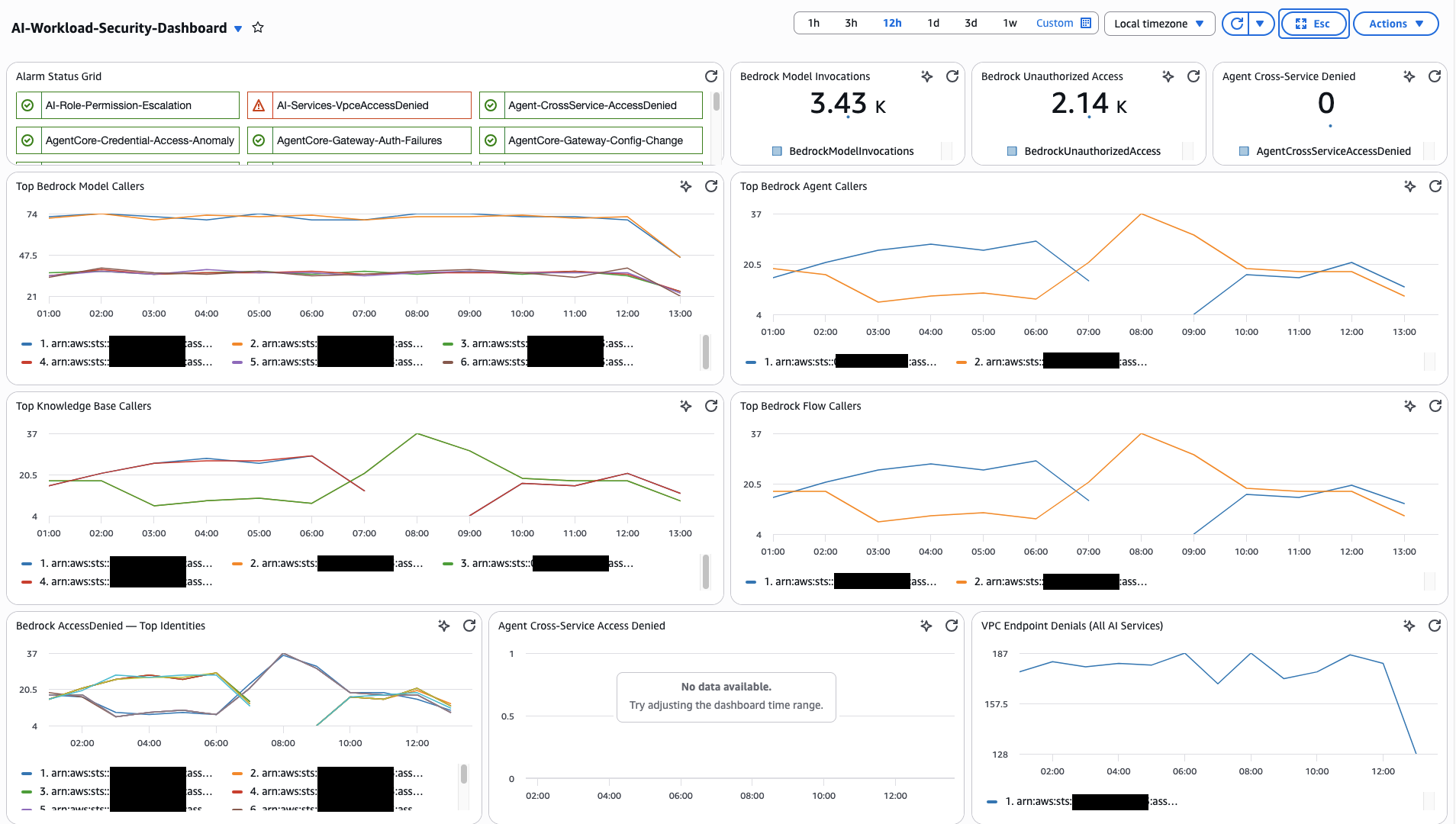
推荐的小组件布局
对于 Logs Insights 小组件,根据查询来源选择 SQL 或 CWLI 作为查询语言。跨 log group 的 JOIN 查询(来自跨管道关联查询)必须使用 SQL。单个 log group 的查询可以使用任何一种。
- Status Overview
- Audit — Bedrock
- Audit — AgentCore
- Monitoring & Cost
- Investigation & Correlation
第 1 行 — 高级健康状况和关键计数器。
| Widget | Widget Type | Data Source |
|---|---|---|
| Alarm Status Grid | Alarm Status | All metric filter alarms from CloudWatch Alarms |
| Bedrock Model Invocations Count | Number (Metric) | AIWorkloadMetrics/BedrockModelInvocations |
| Total Bedrock Spend | Single value (Logs) | Model Invocation Log — total cost query (FinOps dashboard) |
| Agent Cross-Service Denied Count | Number (Metric) | AIWorkloadMetrics/AgentCrossServiceAccessDenied |
第 2 行 — 模型和 Agent 活动
| Widget | Widget Type | Data Source |
|---|---|---|
| Top Bedrock Model Callers | Contributor Insights | Rule 1: AI-TopBedrockModelCallers |
| Top Bedrock Agent Callers | Contributor Insights | Rule 2: AI-TopBedrockAgentCallers |
第 3 行 — 数据和访问拒绝
| Widget | Widget Type | Data Source |
|---|---|---|
| Top Knowledge Base Callers | Contributor Insights | Rule 3: AI-TopKnowledgeBaseCallers |
| Bedrock AccessDenied Identities | Contributor Insights | Rule 5: AI-BedrockAccessDenied-TopIdentities |
| Agent Cross-Service Access Denied | Contributor Insights | Rule 6: AI-AgentCrossServiceAccessDenied |
Row 4 — Security Config
| Widget | Widget Type | Data Source |
|---|---|---|
| Guardrail Modification Events | Contributor Insights | Rule 10: AI-BedrockGuardrailChanges-TopIdentities |
| Logging & Security Config Changes | Contributor Insights | Rule 11: AI-SecurityConfigurationChanges |
| VPC Endpoint Denials | Contributor Insights | Rule 7: AI-VpceAccessDenied-AllAIServices |
Row 4.6 — Bedrock Extended
| Widget | Widget Type | Data Source |
|---|---|---|
| Session Activity | Contributor Insights | Rule 19: AI-TopBedrockSessionCallers |
| Flow Execution Activity | Contributor Insights | Rule 20: AI-TopBedrockFlowExecutionCallers |
| Data Automation Activity | Contributor Insights | Rule 21: AI-TopBedrockDataAutomationCallers |
| Bedrock Tool Invocations | Contributor Insights | Rule 22: AI-TopBedrockToolCallers |
| Automated Reasoning Changes | Contributor Insights | Rule 23: AI-AutomatedReasoningChanges-TopIdentities |
第 4.5 行 — AgentCore 活动
| Widget | Widget Type | Data Source |
|---|---|---|
| Gateway Traffic by JWT Subject | Contributor Insights | Rule 13: AI-TopGatewayCallers |
| Gateway Auth Failures | Contributor Insights | Rule 14: AI-GatewayAuthFailures-TopSources |
| AgentCore Tool Usage | Contributor Insights | Rule 15: AI-TopAgentCoreToolUsers |
| Credential Access Patterns | Contributor Insights | Rule 16: AI-TopAgentCoreCredentialAccessors |
| Memory Access Patterns | Contributor Insights | Rule 17: AI-TopAgentCoreMemoryAccessors |
| Gateway Config Changes | Contributor Insights | Rule 18: AI-AgentCoreGatewayConfigChanges |
Row 5 — Model Performance
| Widget | Widget Type | Data Source |
|---|---|---|
| Completion Rate (ok vs truncated) | Time series (Logs) | Model Invocation Log — DevOps query (DevOps dashboard) |
| Cross-Region Latency by Model | Table (Logs) | Model Invocation Log — latency query |
Row 6 — Agent Workflow
| Widget | Widget Type | Data Source |
|---|---|---|
| Agent Traces vs Errors | Time series (Logs) | ADOT aws/spans — agent error query |
| Component Performance (P95) | Table (Logs) | ADOT aws/spans — component breakdown |
Row 7 — Cost (FinOps)
| Widget | Widget Type | Data Source |
|---|---|---|
| Cost Distribution by Model | Pie (Logs) | Model Invocation Log — cost by model |
| Top 10 Spenders by Role | Table (Logs) | Model Invocation Log — top spenders |
Row 8 — Investigation
| Widget | Widget Type | Data Source |
|---|---|---|
| Config Change Log Table | Logs Insights (SQL) | Query 7: All AI Infrastructure Config Changes |
| Bedrock Calls by Source IP | Logs Insights (SQL) | Query 6: Bedrock and AgentCore Calls from Unexpected IPs |
| AgentCore Credential Access | Logs Insights (SQL) | Query 14: Detect Unauthorized Credential Access |
| AgentCore Gateway Auth Failures | Logs Insights (SQL) | Query 11: Gateway Authentication Failures |
| Bedrock Session & Flow Execution Activity | Logs Insights (SQL) | Query 23: Bedrock Session Activity |
| Data Automation & Tool Activity | Logs Insights (SQL) | Query 25: Bedrock Data Automation Activity |
| Automated Reasoning Policy Changes | Logs Insights (SQL) | Query 27: Automated Reasoning Policy Activity |
第 9 行 — 跨管道关联
| Widget | Widget Type | Data Source |
|---|---|---|
| Who Asked What, Model Response | Logs Insights (SQL) | Query 18: CloudTrail + Invocation Log join |
| Agent Session with Identity | Logs Insights (SQL) | Query 19: ADOT + CloudTrail join |
| Full Three-Pipeline View | Logs Insights (SQL) | Query 20: All three joined |
第 5-7 行使用配套指南 Custom Dashboards for GenAI Telemetry 中的查询。请直接使用那些查询,而不是在此处复制。
结论和后续步骤
本指南涵盖了 AWS 上 AI 工作负载的端到端监控和审计架构 — 三条遥测管道、每条管道的启用方法、针对 Bedrock 和 AgentCore 数据事件的 CloudTrail 专属检测(metric 过滤器、告警、Contributor Insights)、将 CloudTrail 与 Bedrock Model Invocation Logging 和 ADOT spans 关联的跨管道关联查询,以及统一的 CloudWatch dashboard。每个章节都设计为按照实施概述中的分阶段路线图逐步实施。
核心思想:CloudTrail 单独显示谁做了什么,Model Invocation Logging 显示模型说了什么,ADOT 显示 Agent 表现如何。借助 AgentCore 数据事件,CloudTrail 现在还显示 Agent 实际做了什么 — 它调用了哪些工具、访问了哪些凭证、哪些网关接收了流量以及它在内存中存储了什么。价值来自于在调查期间关联这些信号 — 没有任何单一管道能回答所有问题。
这些功能共同为 Generative AI Security Scoping Matrix 和 Agentic AI Security Scoping Matrix 中定义的安全维度提供了具体实现。
后续步骤
- 从第 1 阶段开始。 启用所有三条遥测管道。另外两条(Model Invocation Logging、ADOT)使关联查询成为可能。
- 启用 CloudTrail Bedrock 数据事件。 这是审计 AI 工作负载的关键步骤。
- 启用 CloudTrail AgentCore 数据事件。 从 Gateway 和凭证访问开始(第 2 和第 3 组),然后在建立基线数据量后扩展到内置工具和内存(第 1 和第 4 组)。
- 验证您的基线。 运行安全分析中的查询 2 和 4,以及安全分析中 AgentCore 标签页的查询 12-14,在设置告警阈值之前建立正常使用基线。
- 自动化响应。 将您的 CloudWatch Alarms 连接到 Amazon SNS 主题、AWS Lambda 函数或 Systems Manager runbooks,以弥合检测和修复之间的差距。
- 与 GuardDuty 集成。 Amazon GuardDuty 提供托管威胁检测,补充此处的自定义监控。GuardDuty 分析 CloudTrail 事件中的已知威胁模式,无需您维护检测规则。
- 审查成本。 数据事件、Insights 分析和网络活动事件都会产生费用。请使用 CloudTrail 定价页面和优化数据事件收集中的数据量减少策略。
配套指南
- Generative AI Security Scoping Matrix — 生成式 AI 工作负载的安全维度(Governance & Compliance、Legal & Privacy、Risk Management、Controls、Resilience)
- Agentic AI Security Scoping Matrix — Agent 式 AI 系统的安全维度(Identity、Data、Audit & Logging、Guardrails、Scope、Orchestration)
- GenAI 可观测性 on AWS — 深入了解 Bedrock Model Invocation Logging 和 Agent Telemetry(ADOT SDK)管道
- Custom Dashboards for GenAI Telemetry — 基于角色的 dashboard(DevOps、FinOps),提供即用型查询