GenAI Observability on AWS
Overview
Generative AI workloads differ from traditional applications in ways that make observability essential from day one. Responses are non-deterministic, latency varies dramatically with prompt complexity, costs are directly tied to token usage, and a single agent invocation can chain dozens of API calls across Bedrock, S3, Lambda, and KMS within seconds.
Without proper observability, teams face predictable problems:
- Cost overruns — untracked token usage leads to unexpected bills. A single runaway agent loop can burn through hundreds of dollars in minutes.
- Performance degradation — slow responses impact user experience, and you can't fix what you can't see. Agent workflows can fail silently at the orchestration layer while model calls succeed.
- Quality gaps — errors, hallucinations, and unexpected outputs go undetected until users complain.
- Compliance and audit risk — no record of what the model said, what parameters it used, or which IAM role asked.
This guide walks you through strategy, AWS implementation, enablement patterns, and dashboard design for monitoring GenAI workloads on AWS. It pairs with the companion Creating Custom Dashboards for GenAI Telemetry guide, which shows how to turn the same telemetry into persona-based dashboards for DevOps, FinOps, and other stakeholders.
Why GenAI Observability Is Different
Unique Challenges
Non-deterministic behavior — the same input can produce different outputs. Traditional "did it return the right value" testing doesn't apply. You need quality metrics, not just success/failure.
Variable latency — response times depend on prompt complexity, output length, model load, and cross-region routing. P50 and P95 diverge much more than in traditional APIs.
Token-based pricing — costs scale with usage patterns, not just request count. A small increase in average prompt length can 2x your monthly bill.
Multi-service complexity — agents chain API calls across multiple AWS services. No single log source tells the complete story.
Rapid iteration — models and prompts change frequently. Your observability must track model versions, prompt templates, and configuration changes over time.
Business Impact
Organizations that treat observability as an afterthought typically discover these patterns after the fact:
- A single untuned prompt consuming 80% of the monthly Bedrock budget
- Agent workflows failing at the tool layer while model metrics look healthy
- PII leaking into logs because redaction wasn't configured upfront
- Cost attribution impossible because no team tags were applied
Getting observability right early prevents expensive retrofits later.
Core Pillars for GenAI
Metrics
Operational telemetry that answers "how is my AI performing?"
Essential metrics to track:
- Token usage — input tokens per request, output tokens per request, total tokens by model and user, token cost calculations
- Latency — time to first token (TTFT), total response time, P50/P95/P99 percentiles, latency by model and region
- Request volume — requests per second/minute/hour, success vs error rates, concurrent requests
- Cost — cost per request, cost by model/user/team, daily/monthly trends, cost efficiency (output tokens per dollar)
Logs
Content and context that answers "what did my AI say, and to whom?"
What to log:
- Request/response pairs (with PII redaction)
- Prompt templates and variables
- Model parameters (temperature, max_tokens, top_p)
- Error messages and stack traces
- User context and session IDs
- A/B test variants
Log levels:
DEBUG— detailed prompt engineering iterationsINFO— successful requests with metadataWARN— retries, fallbacks, rate limitsERROR— failures, timeouts, invalid responses
Traces
Distributed flow that answers "how did the request move through my system?"
What to capture:
- End-to-end request flow
- Prompt preprocessing steps
- Model invocation spans
- Tool and function call spans
- Post-processing and validation
- Integration with downstream services
- Multi-hop agent workflows
Strategic Best Practices
- Instrument early — add observability when you build, not after you ship. Use OpenTelemetry so your instrumentation is vendor-neutral and portable.
- Multi-dimensional tagging — tag every metric with
model,environment,application,team, andregiondimensions so you can slice costs and performance later. - Set baselines before alarms — run in production for at least a week to establish normal behavior before setting alarm thresholds. Alarms without baselines create noise fatigue.
- Watch business metrics, not just technical — track output quality, user satisfaction (thumbs up/down), and cost-per-feature alongside latency and error rates.
- Plan for PII from day one — redact sensitive data in logs before it lands. Use CloudWatch Logs data protection policies for automated masking.
- Set retention policies — log volume grows fast. Differentiate retention by purpose:
- Operational logs: 7 days
- Model invocations: 30-90 days
- Audit/compliance: per regulatory requirement (often 7 years)
- Track model version and prompt template — when something changes, you need to correlate with what was in production at the time.
The Two Data Pipelines on AWS
Amazon CloudWatch provides end-to-end observability for GenAI through two complementary data pipelines. They serve different purposes, capture different data, and are enabled differently. Most production setups need both.
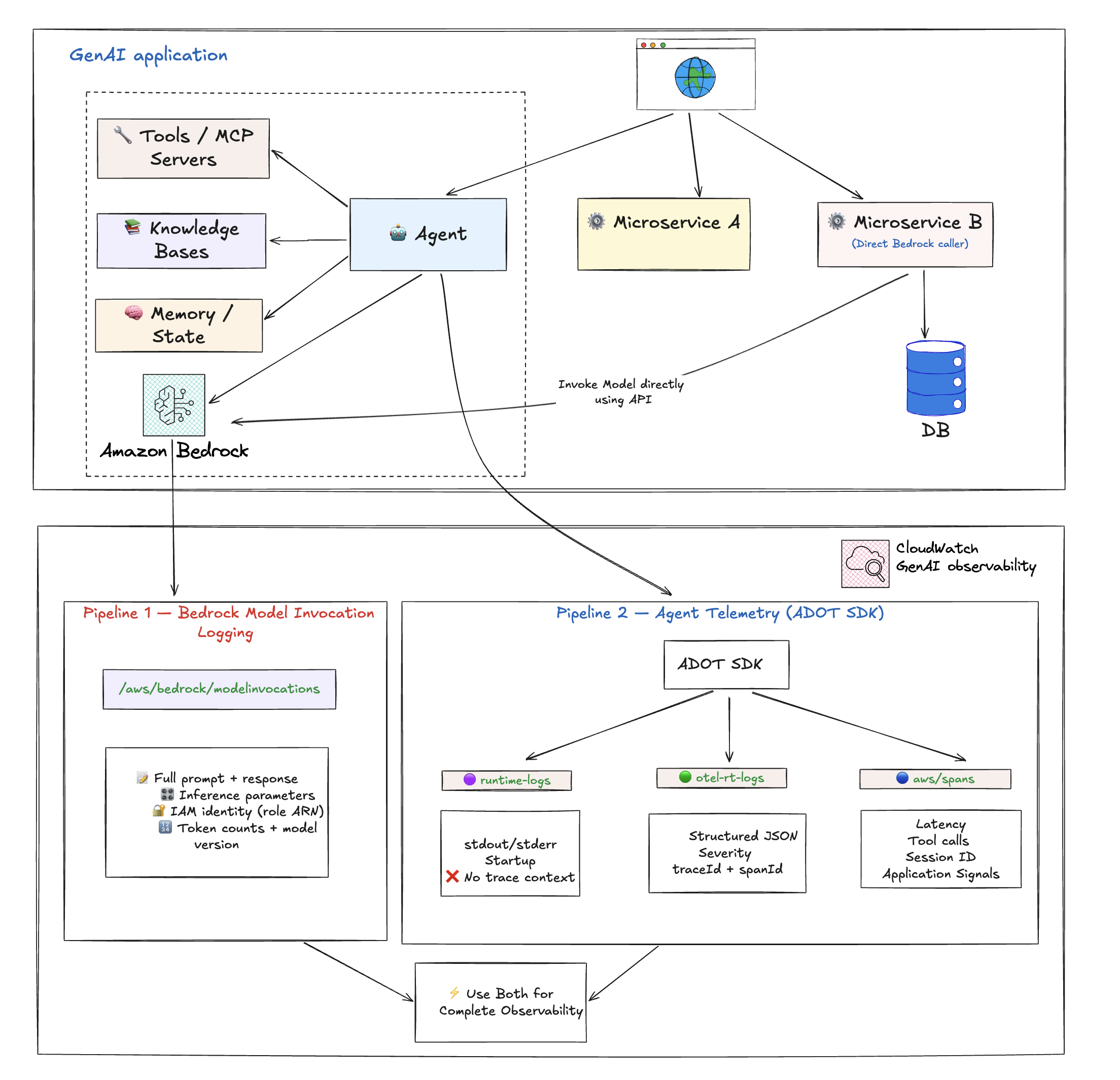
Pipeline 1: Bedrock Model Invocation Logging
A Bedrock-level logging feature that captures the raw request and response for every model invocation. This is Bedrock-only — it only covers calls made to Amazon Bedrock foundation models. If you are using non-Bedrock models (self-hosted on SageMaker, external providers), this pipeline does not apply.
What it captures:
| Field | Why it matters |
|---|---|
| Full request payload | See exactly what was sent to the model, including system prompt and message history |
| Full response payload | See exactly what the model returned, verbatim |
Inference parameters (temperature, max_tokens, top_p) | Debug unexpected model behavior — was it called with temp 0.7 or 0.0? |
| Caller IAM identity (role ARN) | Security audit, cost attribution per team/role |
| Bedrock operation type | InvokeModel, Converse, ConverseStream |
| Model version | Exact model ID including suffix (e.g., cohere.command-r-plus-v1:0) |
| Token counts | Input and output token counts tied directly to content |
What it does NOT capture:
- Agent orchestration flow (which tools were called, agent loop behavior)
- Client-side latency
- Distributed trace correlation (no traceId/spanId — only requestId)
- Tool call details
- Infrastructure context
- Non-Bedrock model calls
Sample log entry:
{
  "timestamp": "2026-04-17T14:21:50Z",
  "accountId": "123456789012",
  "region": "us-east-1",
  "requestId": "a1b2c3d4-e5f6-7890-abcd-ef1234567890",
  "operation": "InvokeModel",
  "modelId": "cohere.command-r-plus-v1:0",
  "input": {
    "inputBodyJson": {
      "message": "Write a short joke about software engineers.",
      "max_tokens": 256,
      "temperature": 0.7
    },
    "inputTokenCount": 8
  },
  "output": {
    "outputBodyJson": {
      "text": "Why did the engineer break up? Because they couldn't commit.",
      "finish_reason": "COMPLETE"
    },
    "outputTokenCount": 20
  },
  "identity": {
    "arn": "arn:aws:sts::123456789012:assumed-role/my-bedrock-role/my-session"
  },
  "schemaType": "ModelInvocationLog"
}
How to enable:
Manual opt-in via the Amazon Bedrock console (or API). This is the same step whether the model is invoked by an agent, a direct API call, an SDK, or anything else. It applies account-wide to all Bedrock model invocations once turned on.
- Open the Amazon Bedrock console
- Choose Settings
- Under Model invocation logging, select Model invocation logging
- Choose the required data types to include in the logs. Choose to send the logs to CloudWatch Logs only, or both Amazon S3 and CloudWatch Logs.
- Under the CloudWatch Logs configurations, create a log group name and select the appropriate service roles
- Choose Save settings
For more information, see Model Invocations and Set up a CloudWatch Logs destination.
Pre-configured dashboards:
After enabling Model Invocation Logging, CloudWatch automatically provides dashboards showing:
- Invocation count — Number of successful requests to the Converse, ConverseStream, InvokeModel, and InvokeModelWithResponseStream APIs
- Invocation latency — Latency of the invocations
- Token Counts by Model — Input and output token counts by model
- Daily Token Counts by ModelID — Daily total token counts by model ID
- Requests grouped by input tokens — Number of requests grouped into token ranges
- Invocation Throttles — Number of throttled invocations
- Invocation Error Count — Count of invocations resulting in errors
Pipeline 2: Agent Telemetry (via ADOT SDK)
OpenTelemetry-based traces, spans, and logs captured by the AWS Distro for OpenTelemetry (ADOT) SDK. Unlike Model Invocation Logging, Agent Telemetry works with any model provider (Bedrock, SageMaker, external), not just Bedrock.
What it captures:
- Agent orchestration flow — which tools were called, in what order, agent loop iterations
- Model call metadata — model ID, token counts (input/output), latency, status codes, finish reasons
- Tool execution details — tool name, duration, success/failure for every tool call
- Distributed trace correlation — traceId, spanId, parentSpanId for full end-to-end request tracing
- Session tracking — session.id ties multiple invocations to a single user session
- Platform and environment context — cloud.platform, deployment.environment, service metadata
What it does NOT capture:
- Inference parameters (temperature, max_tokens, top_p)
- Caller IAM identity
- Full prompt/response content by default (framework-dependent — Strands, LangChain, CrewAI etc. are supported; others vary)
Sample model call span (aws/spans):
{
  "resource": {
    "attributes": {
      "deployment.environment.name": "bedrock-agentcore:default",
      "service.name": "MyAgent.DEFAULT",
      "cloud.platform": "aws_bedrock_agentcore",
      "telemetry.sdk.version": "1.40.0"
    }
  },
  "traceId": "a1b2c3d4e5f6a7b8c9d0e1f2a3b4c5d6",
  "spanId": "1a2b3c4d5e6f7a8b",
  "parentSpanId": "9c8d7e6f5a4b3c2d",
  "name": "chat us.anthropic.claude-sonnet-4-6",
  "durationNano": 2644916837,
  "attributes": {
    "gen_ai.request.model": "us.anthropic.claude-sonnet-4-6",
    "gen_ai.usage.input_tokens": 1980,
    "gen_ai.usage.output_tokens": 119,
    "gen_ai.response.finish_reasons": ["tool_use"],
    "http.response.status_code": 200,
    "session.id": "session-a1b2c3d4-e5f6-7890"
  }
}
Sample tool execution span (aws/spans):
{
  "traceId": "a1b2c3d4e5f6a7b8c9d0e1f2a3b4c5d6",
  "spanId": "2b3c4d5e6f7a8b9c",
  "parentSpanId": "d4e5f6a7b8c9d0e1",
  "name": "execute_tool http_request",
  "durationNano": 37505594,
  "attributes": {
    "gen_ai.tool.name": "http_request",
    "gen_ai.tool.status": "success",
    "gen_ai.system": "strands-agents"
  }
}
Where the data lands:
| Log Group | What's in it |
|---|---|
aws/spans | OTel trace spans — model calls, tool executions, agent loop iterations |
/aws/bedrock-agentcore/runtimes/<agent> (runtime-logs) | Application stdout/stderr — startup logs, errors, custom app logging |
/aws/bedrock-agentcore/runtimes/<agent> (otel-rt-logs) | OTel log records from agent framework (prompt/response content for supported frameworks) |
What it powers in CloudWatch:
- Application Signals dashboards — latency percentiles, error rates, throughput
- Application Maps — visualize agent → model → tool call chains
- Distributed Tracing — end-to-end request tracing across services
- SLO monitoring
- Trace analytics — drill into individual requests end-to-end
- Correlation with infrastructure metrics
How to enable:
| Deployment Model | What you do |
|---|---|
| Bedrock AgentCore | Nothing — ADOT SDK is baked into the runtime. Telemetry flows automatically. |
| Non-AgentCore (EKS/ECS/self-hosted) | Attach the ADOT auto-instrumentation agent. No code changes needed. |
Side-by-Side Comparison
| What you want to know | Model Invocation Logging (Bedrock only) | Agent Telemetry (ADOT) |
|---|---|---|
| Which model was called? | ✅ | ✅ |
| Latency / duration? | ❌ | ✅ (client-side) |
| Token counts? | ✅ | ✅ |
| Error rates / status? | ✅ | ✅ |
| Agent orchestration flow? | ❌ | ✅ |
| Tool call details? | ❌ | ✅ |
| Full prompt text? | ✅ | Framework-dependent |
| Full model response? | ✅ | Framework-dependent |
| Inference parameters? | ✅ | ❌ |
| Caller IAM identity? | ✅ | ❌ |
| Distributed trace correlation? | ❌ | ✅ |
| Works for non-agent Bedrock calls? | ✅ | ❌ |
| Works for non-Bedrock models? | ❌ (Bedrock only) | ✅ |
| Application Signals / Application Maps? | ❌ | ✅ |
Prompt/response content capture in Pipeline 2 depends on the agent framework's OTel instrumentation. Strands, LangChain, and CrewAI are supported; other frameworks may vary.
In summary: Agent Telemetry tells you how your agent is performing. Model Invocation Logging tells you what your model is saying and who is asking. For complete observability, enable both.
Enabling Observability for Agentic Workloads
Before you begin, enable CloudWatch Transaction Search to unlock the full GenAI observability experience.
AgentCore Runtime hosted agents
AgentCore Runtime is a secure, serverless runtime purpose-built for deploying and scaling dynamic AI agents and tools. It supports any open-source framework including LangGraph, CrewAI, Strands Agents, any protocol, and any model.
Observability is built in — the ADOT SDK is baked into the AgentCore runtime. Metrics are automatically generated, and traces flow without any code changes.
- Configure custom observability
- Step-by-step tutorial: Enabling observability for AgentCore Runtime hosted agents
Non-AgentCore hosted agents (EKS, ECS, self-hosted)
You can host your agents outside of AgentCore and bring your observability data into CloudWatch for end-to-end monitoring in one location. Attach the ADOT auto-instrumentation agent to your workload — no code changes needed.
- Configure third-party observability
- Step-by-step tutorial: Enabling observability for non-AgentCore hosted agents
AgentCore memory, gateway, and built-in tool resources
Gain visibility into the metrics and traces of AgentCore modular services. See Configure CloudWatch observability.
AgentCore Evaluations
AgentCore Evaluations provide capabilities to monitor and assess the performance, quality, and reliability of your AI agents. See AgentCore evaluations.
Enablement Summary
| Component | AgentCore | Non-AgentCore (EKS/ECS) |
|---|---|---|
| Metrics | Automatic | ADOT auto-instrumentation agent |
| Agent traces and spans | Automatic (ADOT baked in) | ADOT auto-instrumentation agent |
| Model Invocation Logging | Manual opt-in via Bedrock console | Manual opt-in via Bedrock console |
The only thing that truly requires manual opt-in across both paths is Model Invocation Logging. Everything else is either automatic or handled by attaching the ADOT auto-instrumentation agent.
Protecting Sensitive Data
When logging model invocations, prompts and responses may contain PII or sensitive information. Amazon CloudWatch Logs provides data protection policies to identify and mask sensitive data using machine learning and pattern matching.
You can configure data protection at two levels:
Account-level data protection
- Open the Amazon CloudWatch console
- In the navigation pane, choose Settings
- Choose the Logs tab
- Choose Configure the Data protection account policy
- Specify the data identifiers relevant to your data (managed or custom)
- (Optional) Choose a destination for audit findings (CloudWatch Logs, Firehose, or S3)
- Choose Activate data protection
Log-group-level data protection
- Open the Amazon CloudWatch console
- In the navigation panel, choose Logs, Log Management
- Choose the Log groups tab, select the log group (e.g.,
aws/bedrock/modelinvocations), and choose Create data protection policy - Specify the data identifiers relevant to your data
- (Optional) Choose a destination for audit findings
- Choose Activate data protection
For more information, see Protecting sensitive log data with masking and Protect sensitive data.
When to Enable What
| Scenario | Model Invocation Logging | Agent Telemetry (ADOT) |
|---|---|---|
| Using Bedrock without agents (direct API) | ✅ Only option | ❌ Not applicable |
| Compliance/audit trail of all LLM interactions | ✅ Required | Nice to have |
| Debugging prompt quality or unexpected model outputs | ✅ Required (inference params + content) | Helpful for context |
| Cost attribution per team/role | ✅ Required (IAM identity) | ❌ Cannot do this |
| Building evaluation/fine-tuning pipelines | ✅ Required (structured content) | Framework-dependent |
| Running agents, wants operational dashboards | Nice to have | ✅ Required |
| Latency/error monitoring only | Not needed | ✅ Sufficient |
Building Dashboards
Once both pipelines are flowing, you can build dashboards for different audiences. For ready-to-use queries, see the Creating Custom Dashboards for GenAI Telemetry guide.
Dashboard Tiers by Audience
Executive dashboard — high-level KPIs:
- Total daily cost
- Request volume trends
- Error rate
- Top models by usage
DevOps dashboard — real-time monitoring:
- Stop reason breakdown (end_turn vs tool_use vs max_tokens)
- Completion rate vs truncation trend
- Agent traces vs errors (hourly)
- Span error drill-down
- Component performance breakdown (P50/P95/P99)
- Cross-region inference latency
FinOps dashboard — cost management:
- Total spend (hourly, daily, monthly)
- Cost distribution by model
- Top 10 spenders by role/user
- Input vs output cost split
- Prompt caching opportunities
- Daily cost trend with anomaly detection
Developer dashboard — debugging and optimization:
- Request traces
- Token usage by feature
- Latency breakdown
- Error details with stack traces
- Token efficiency (high input, low output waste detection)
Sample DevOps Query: Completion Rate
Tracks hourly ratio of successful completions vs truncated responses. Target 95%+ completion rate.
fields @timestamp, modelId,
       output.outputBodyJson.stopReason as stop_reason
| filter schemaType = "ModelInvocationLog"
| filter ispresent(output.outputBodyJson.stopReason)
| stats sum(stop_reason = "end_turn" or stop_reason = "tool_use") as ok,
        sum(stop_reason = "max_tokens") as truncated
  by bin(@timestamp, 1h) as hour
| sort hour desc
Sample FinOps Query: Top Spenders by Role
SOURCE "bedrock-model-invocation-logging"
| filter @logStream = 'aws/bedrock/modelinvocations'
| fields replace(`identity.arn`, "arn:aws:sts::ACCOUNT_ID:assumed-role/", "") as userRole
| stats sum(totalCostUSD) as spend, count(*) as invocations
  by userRole
| sort spend desc
| limit 10
See the dashboard queries guide for the full cost calculation and more examples.
Alerting Strategy
Set up alerts in tiers matching urgency and impact.
Critical Alerts (page immediately)
- Error rate above 5%
- P95 latency above 10 seconds
- Daily cost above 150% of baseline
- Model unavailability
- Agent error rate above 10% for 15 minutes
Warning Alerts (investigate during business hours)
- Token usage trending up 20% week-over-week
- Latency degradation over 7 days
- Cache hit rate dropping
- Unusual request patterns
- Completion rate below 95% for 2 hours
- Component P95 above 5000ms
Informational Alerts (daily digest)
- Daily cost summaries
- Weekly usage reports
- Model performance comparisons
- Top spenders report
Alert Routing Example
route:
  group_by: ['alertname', 'cloud_provider']
  group_wait: 30s
  group_interval: 5m
  repeat_interval: 4h
  receiver: 'default'
  routes:
    - match:
        severity: critical
      receiver: 'pagerduty'
    - match:
        severity: warning
      receiver: 'slack-ops'
    - match:
        alertname: MonthlyBudgetExceeded
      receiver: 'slack-finops'
Observability Maturity Model
Level 1: Basic Monitoring
- Track request counts and errors
- Basic latency metrics
- Manual cost tracking
Level 2: Comprehensive Metrics
- Token-level tracking
- Multi-dimensional metrics (model, team, environment)
- Automated dashboards
- Basic alerting with baselines
Level 3: Advanced Analytics
- Distributed tracing across agent workflows
- Cost attribution per team/feature
- Quality scoring and user feedback integration
- Predictive alerting based on trends
Level 4: AI-Powered Observability
- Anomaly detection on cost and behavior
- Automated root cause analysis
- Self-healing systems (automatic fallback to cheaper models)
- Continuous optimization loops
Integration with MLOps
Observability should extend across the ML lifecycle, not just production:
Training Phase:
- Track training costs and duration
- Monitor model quality metrics
- Version control for models and prompts
Deployment Phase:
- Canary deployments with metric comparison
- Blue-green deployment monitoring
- Rollback triggers based on observability signals
Production Phase:
- Continuous monitoring
- Automated retraining triggers based on drift detection
- Performance degradation detection
Optimization Phase:
- A/B testing frameworks for prompts and models
- Cost-performance tradeoff analysis
- Prompt engineering feedback loops
Common Anti-Patterns to Avoid
- Logging full prompts and responses without PII redaction — compliance violations, data breach risk. Configure data protection policies before enabling Model Invocation Logging.
- Tracking only aggregate metrics — you can't debug individual issues or attribute costs without per-request detail.
- Setting alerts without baselines — alert fatigue from false positives. Always establish normal behavior first.
- Ignoring token usage until the bill arrives — by the time you see the bill, the damage is done. Monitor daily.
- Using different metric names per provider — you can't compare performance across models. Standardize on OpenTelemetry GenAI semantic conventions.
- Storing telemetry data indefinitely — compliance issues and unnecessary storage costs. Set retention policies per data class.
- Manual dashboard creation — inconsistency and maintenance burden. Use Infrastructure as Code for dashboards.
- Monitoring only technical metrics — you miss quality and business impact issues. Track user satisfaction alongside latency.
Getting Started Checklist
Pre-Production
- Enable CloudWatch Transaction Search
- For AgentCore: deploy your agent — telemetry flows automatically
- For non-AgentCore: attach the ADOT auto-instrumentation agent
- Enable Bedrock Model Invocation Logging via the Bedrock console
- Configure data protection policies for PII redaction
- Set log retention policies for each log group
- Build initial dashboards using the dashboard queries guide
- Document baseline metrics (latency, token usage, cost)
- Configure alarms with appropriate thresholds
- Create runbooks for common issues
Production
- Monitoring enabled in production
- Alerts routed to correct channels (PagerDuty, Slack)
- Team access configured (read-only dashboards for stakeholders)
- Backup and disaster recovery tested
- Regular review schedule established (weekly cost review, monthly performance review)
Additional Resources
Companion Guides
- Creating Custom Dashboards for GenAI Telemetry — Turn the telemetry into persona-based dashboards for DevOps, FinOps, and other stakeholders
AWS Documentation
- Model Invocations — CloudWatch GenAI Observability
- Getting Started with AgentCore Observability
- Set up Bedrock Model Invocation Logging
- Protect Sensitive Data in CloudWatch Logs
- Configure Custom Observability for AgentCore
- Configure Third-Party Observability
- AgentCore Evaluations
Standards and Tools
- AWS Distro for OpenTelemetry (ADOT)
- OpenTelemetry GenAI Semantic Conventions
- OpenTelemetry Specification
Contributors: AWS Observability Team Last Updated: 2026-04-21