Querying Historical Security Lake Data with Amazon CloudWatch Logs Using Athena
Overview
When you migrate your security log management to Amazon CloudWatch Unified Data Store (unified data store), you gain a modern, unified destination for operational and security telemetry going forward. But your historical security data — the AWS CloudTrail events, Amazon Virtual Private Cloud (Amazon VPC) Flow Logs, AWS Security Hub findings, and other records you accumulated in Amazon Security Lake before the migration — doesn't disappear. It stays exactly where it is, already stored and partitioned in Security Lake's Amazon S3 backed structure.
This guide shows how to use Amazon Athena as a single query console for both your historical Security Lake data and your new CloudWatch unified data store logs — without exporting, copying, or duplicating any data. You can query each data store independently, or combine results from both using UNION ALL for cross-platform visibility.
New log events flow into CloudWatch unified data store as your primary platform. Historical events remain in Security Lake. Athena queries both from a single console.
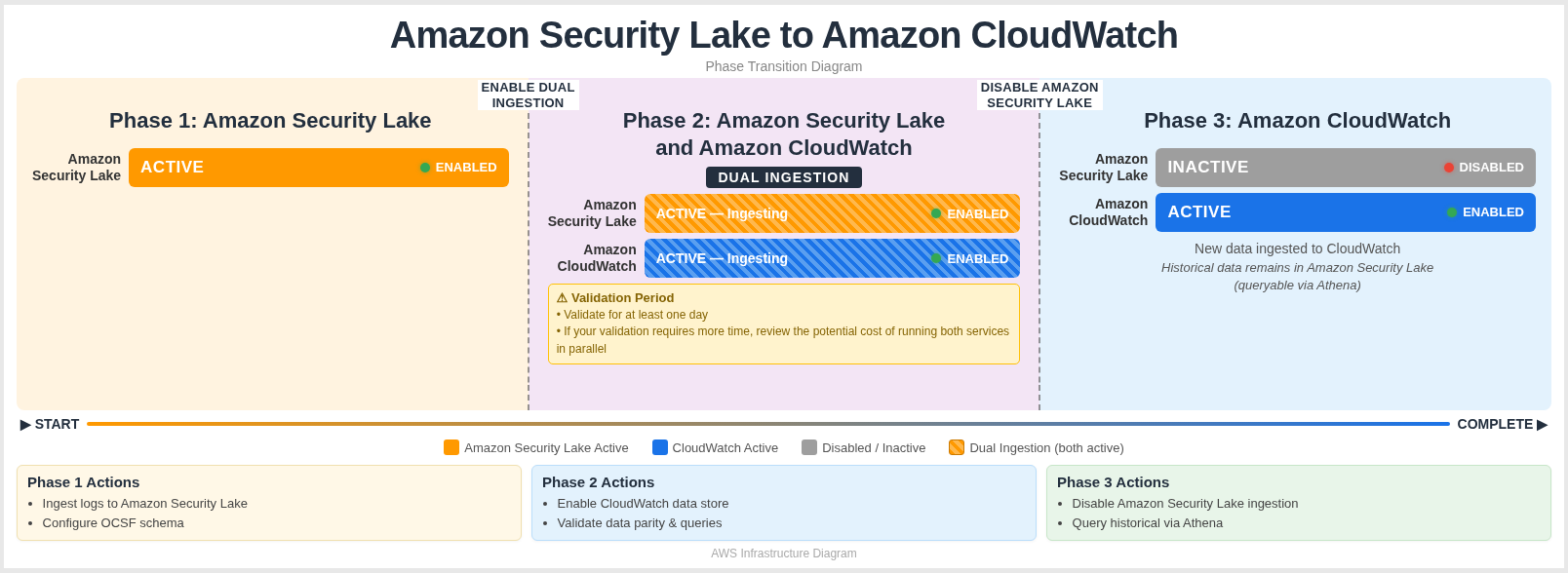
| Phase | What Happens |
|---|---|
| Phase 1 — Security Lake | VPC Flow Logs and other security data sources write exclusively to Security Lake, building a historical archive of OCSF-formatted records stored in Amazon S3 and queryable via AWS Glue Data Catalog. |
| Phase 2 — Dual Ingestion of Security Lake and CloudWatch | Both Security Lake and CloudWatch simultaneously receive data. This validation period is recommended for a minimum of 24 hours, giving teams time to verify log ingestion and consistency across both platforms before fully migrating over to CloudWatch. If your validation requires more time, review the potential costs of running both services in parallel. |
| Phase 3 — CloudWatch Only | Data sources write exclusively to CloudWatch. All historical Security Lake data remains preserved and accessible — and Athena lets you query both data stores from a single console, either independently or combined using UNION ALL. |
Both Security Lake and Amazon CloudWatch unified data store normalize their data to the Open Cybersecurity Schema Framework (OCSF), which means field names like src_endpoint.ip, api.operation, and actor.user.name are consistent across both sources. This consistency makes cross-source queries straightforward — the same field references work whether you're querying Security Lake history or CloudWatch unified data store recent data.
Why Query In-Place Instead of Exporting?
Athena cross-catalog queries let you access historical Security Lake data directly without the need to export the data. Below are some of the benefits that make querying in-place the more efficient approach.
| Benefit | Details |
|---|---|
| No duplicate storage charges | Your historical data already lives in Security Lake's Amazon S3 backed store. Exporting it into CloudWatch Logs means paying to store the same data twice. Querying it in-place means you pay only for what you already have. |
| No ETL pipelines to build or maintain | Exporting data requires a pipeline: something to read from Security Lake, transform or reformat the records, and write them into CloudWatch Logs. That pipeline needs to be built, tested, monitored, and maintained. Athena cross-catalog queries remove the need for a separate pipeline. |
| Historical data stays organized | Security Lake stores and partitions data by account, Region, and date — a structure well-suited for historical analysis. Moving that data into CloudWatch Logs disrupts that organization and may require re-partitioning or re-indexing. |
| New data flows naturally | Once you've migrated, CloudWatch becomes your primary destination for new log events. No need to run both pipelines simultaneously or maintain a complex routing layer. |
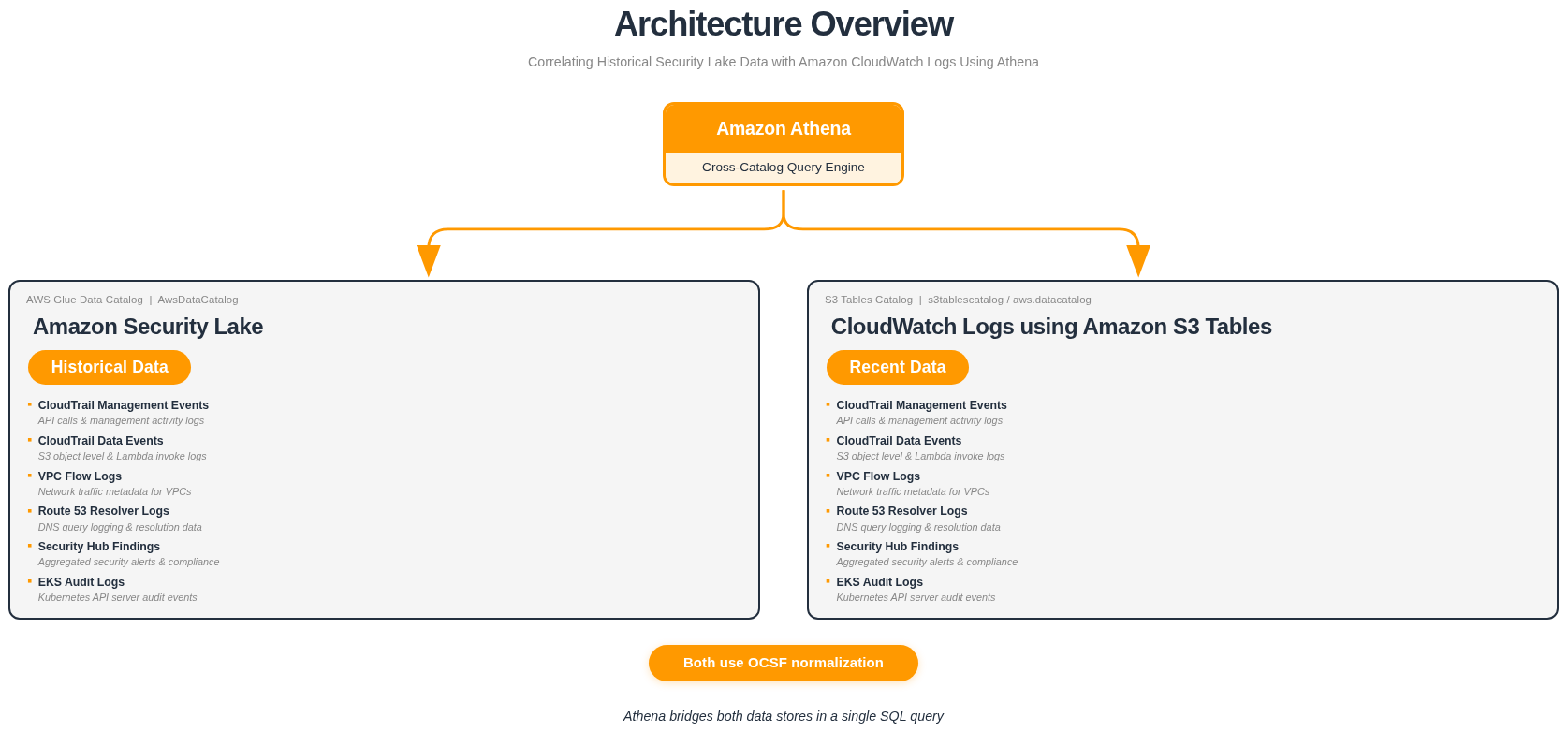
| Athena bridges both efficiently | Security Lake registers its tables in the default AWS Glue Data Catalog (AwsDataCatalog). CloudWatch uses an Amazon S3 Tables catalog (s3tablescatalog/aws-cloudwatch). Athena can reference both in a single SQL query using fully qualified catalog paths — no data movement required. |
You retain full access to your historical Security Lake data for event investigation, threat hunting, and compliance audits — while your new CloudWatch unified data store data flows in as the primary source for ongoing monitoring.
How It Works
Understanding how the two data stores fit together makes the queries easier to reason about.
Architecture
- Security Lake →
"awsdatacatalog"."<database>"."<table>" - CloudWatch unified data store →
"s3tablescatalog/aws-cloudwatch"."logs"."<table>"
Athena supports querying across multiple Glue catalogs in a single SQL statement. By referencing each source with its fully qualified catalog path, you can query Security Lake and CloudWatch unified data store independently from the same Athena console — or combine results with UNION ALL when you need a unified view across both.
Both sources normalize their data to OCSF, so field names, types, and structures are consistent across both — making queries intuitive and reliable regardless of which data store you're targeting.
Prerequisites
Before running cross-catalog queries, confirm your catalog paths, databases, and table names using the Athena console. The examples in this guide use the following naming conventions based on a us-east-1 deployment.
Security Lake Tables
| Catalog | Database | Example Tables |
|---|---|---|
awsdatacatalog | amazon_security_lake_glue_db_us_east_1 | amazon_security_lake_table_us_east_1_cloud_trail_mgmt_2_0 |
amazon_security_lake_table_us_east_1_vpc_flow_2_0 | ||
amazon_security_lake_table_us_east_1_route53_2_0 | ||
amazon_security_lake_table_us_east_1_sh_findings_2_0 | ||
amazon_security_lake_table_us_east_1_eks_audit_2_0 | ||
amazon_security_lake_table_us_east_1_lambda_execution_2_0 |
CloudWatch Unified Data Store Tables
| Catalog | Database | Example Tables |
|---|---|---|
s3tablescatalog/aws-cloudwatch | logs | aws_cloudtrail__management |
aws_cloudtrail__data | ||
amazon_vpc__flow | ||
cloudtrail__networkactivityevent | ||
cloudtrailcustom__networkactivityevent | ||
microsoft_entraid__account_change |
The Security Lake database and table names include your deployment Region. The examples in this guide use us_east_1 (e.g., amazon_security_lake_glue_db_us_east_1). If Security Lake is enabled in a different Region, replace us_east_1 with your Region's identifier — for example, amazon_security_lake_glue_db_eu_west_1 for eu-west-1. The same applies to table names.
Your table names may vary depending on your Region, Security Lake configuration, and which CloudWatch unified data store data sources you have enabled. Verify your table names by running:
SHOW TABLES IN "s3tablescatalog/aws-cloudwatch"."logs"
Querying Both Data Stores from Athena
After migrating to CloudWatch unified data store, Athena becomes your single query console for both historical and current security data. Security Lake tables are registered in the AWS Glue Data Catalog, and CloudWatch unified data store tables are registered in an S3 Tables catalog. Athena can access both — no data movement, no export pipelines, no duplication.
The sections below walk through three levels of querying:
- Querying Security Lake — access your historical archive directly
- Querying CloudWatch unified data store — access your current data via S3 Tables
- Combining both with UNION ALL — view historical and recent data side by side in a single result set
Syntax Overview
The general pattern for referencing a table from a specific catalog:
-- Security Lake (Glue Data Catalog)
SELECT ...
FROM "awsdatacatalog"."amazon_security_lake_glue_db_us_east_1"."table_name"

-- CloudWatch Unified Data Store (S3 Tables Catalog)
SELECT ...
FROM "s3tablescatalog/aws-cloudwatch"."logs"."table_name"
Available Tables Reference
Use these tables as a reference when building your own queries. Both Security Lake and CloudWatch unified data store use OCSF normalization, so the field names are consistent across data source types.
Security Lake
| Table | OCSF Class | Common Query Fields |
|---|---|---|
..._cloud_trail_mgmt_2_0 | API Activity | api.operation, src_endpoint.ip, actor.user.name, time_dt |
..._vpc_flow_2_0 | Network Activity | src_endpoint.ip, dst_endpoint.ip, dst_endpoint.port, time_dt |
..._route53_2_0 | DNS Activity | src_endpoint.ip, query.hostname, time_dt |
..._sh_findings_2_0 | Vulnerability / Compliance / Detection Finding | finding.title, cloud.account.uid, severity, severity_id, time_dt |
..._eks_audit_2_0 | API Activity | api.operation, actor.user.name, time_dt |
..._lambda_execution_2_0 | API Activity | api.operation, cloud.account.uid, time_dt |
In OCSF v2 (1.1.0), Security Hub CSPM findings map to multiple OCSF class names — Vulnerability Finding, Compliance Finding, or Detection Finding — depending on the finding type.
CloudWatch Unified Data Store
| Table | OCSF Class | Common Query Fields |
|---|---|---|
aws_cloudtrail__management | API Activity | api.operation, src_endpoint.ip, actor.user.name, time_dt |
aws_cloudtrail__data | API Activity | api.operation, src_endpoint.ip, actor.user.name, time_dt |
amazon_vpc__flow | Network Activity | src_endpoint.ip, dst_endpoint.ip, dst_endpoint.port, time_dt |
cloudtrail__networkactivityevent | Network Activity | src_endpoint.ip, dst_endpoint.ip, time_dt |
cloudtrailcustom__networkactivityevent | Network Activity | src_endpoint.ip, dst_endpoint.ip, time_dt |
microsoft_entraid__account_change | Account Change | actor.user.name, time_dt |
aws_security_hub__compliance_finding | Compliance Finding | finding_info.title, finding_info.uid, cloud.account.uid, severity, status, time_dt |
aws_security_hub__vulnerability_finding | Vulnerability Finding | finding_info.title, finding_info.uid, cloud.account.uid, severity, status, time_dt |
aws_security_hub__detection_finding | Detection Finding | finding_info.title, finding_info.uid, cloud.account.uid, severity, status, time_dt |
CloudWatch unified data store table names are generated based on the data source name and type configured in your association. Run the following in Athena to discover your available tables:
SHOW TABLES IN "s3tablescatalog/aws-cloudwatch"."logs"
Part 1 — Querying Security Lake (Historical Data)
Your historical security data remains in Security Lake, stored in Amazon S3 and registered in the AWS Glue Data Catalog. These queries run against the awsdatacatalog catalog and access the same OCSF-formatted data that was collected before your migration.
Example 1a — Historical CloudTrail Management Events
Query CloudTrail management events from your Security Lake archive. This is useful for investigating past events, auditing historical API activity, or establishing baselines.
View SQL Query
SELECT
    api.operation        AS event_name,
    api.service.name     AS event_source,
    actor.user.name      AS username,
    src_endpoint.ip      AS source_ip,
    time_dt,
    status
FROM "awsdatacatalog"."amazon_security_lake_glue_db_us_east_1"."amazon_security_lake_table_us_east_1_cloud_trail_mgmt_2_0"
WHERE time_dt BETWEEN TIMESTAMP '2025-01-01' AND TIMESTAMP '2025-06-01'
    AND api.operation = 'AssumeRole'
LIMIT 25;
Example 1b — Historical VPC Flow Logs
Query VPC Flow Logs from your Security Lake archive to investigate historical network activity.
View SQL Query
SELECT
    src_endpoint.ip              AS source_ip,
    dst_endpoint.ip              AS dest_ip,
    dst_endpoint.port            AS dest_port,
    traffic.bytes                AS bytes,
    activity_name                AS activity,
    time_dt,
    status_code,
    connection_info.direction    AS direction
FROM "awsdatacatalog"."amazon_security_lake_glue_db_us_east_1"."amazon_security_lake_table_us_east_1_vpc_flow_2_0"
WHERE time_dt BETWEEN TIMESTAMP '2025-01-01' AND TIMESTAMP '2025-06-01'
    AND activity_name = 'Reject'
LIMIT 25;
Example 1c — Historical Security Hub Findings
Query Security Hub findings from your Security Lake archive to review your historical security posture.
View SQL Query
SELECT
    finding_info.title       AS finding_title,
    finding_info.uid         AS finding_uid,
    severity,
    status,
    cloud.account.uid        AS account,
    time_dt
FROM "awsdatacatalog"."amazon_security_lake_glue_db_us_east_1"."amazon_security_lake_table_us_east_1_sh_findings_2_0"
WHERE time_dt BETWEEN TIMESTAMP '2025-01-01' AND TIMESTAMP '2025-06-01'
    AND severity_id >= 3
LIMIT 25;
Part 2 — Querying CloudWatch Unified Data Store (Recent Data)
After migration, your new security data flows into CloudWatch unified data store and is stored in Amazon S3 Tables. These queries run against the s3tablescatalog/aws-cloudwatch catalog and access OCSF-formatted data collected after your migration.
Example 2a — Recent CloudTrail Management Events
Query recent CloudTrail management events from CloudWatch unified data store. The same OCSF field names used in Security Lake queries work here.
View SQL Query
SELECT
    api.operation        AS event_name,
    api.service.name     AS event_source,
    actor.user.name      AS username,
    src_endpoint.ip      AS source_ip,
    time_dt,
    status
FROM "s3tablescatalog/aws-cloudwatch"."logs"."aws_cloudtrail__management"
WHERE time_dt BETWEEN TIMESTAMP '2025-06-01' AND TIMESTAMP '2025-07-01'
    AND api.operation = 'AssumeRole'
LIMIT 25;
Example 2b — Recent VPC Flow Logs
Query recent VPC Flow Logs from CloudWatch unified data store.
View SQL Query
SELECT
    src_endpoint.ip              AS source_ip,
    dst_endpoint.ip              AS dest_ip,
    dst_endpoint.port            AS dest_port,
    traffic.bytes                AS bytes,
    activity_name                AS activity,
    time_dt,
    status_code,
    connection_info.direction    AS direction
FROM "s3tablescatalog/aws-cloudwatch"."logs"."amazon_vpc__flow"
WHERE time_dt BETWEEN TIMESTAMP '2025-06-01' AND TIMESTAMP '2025-07-01'
    AND activity_name = 'Reject'
LIMIT 25;
Example 2c — Recent Security Hub Findings
Query recent Security Hub compliance findings from CloudWatch unified data store.
View SQL Query
SELECT
    finding_info.title       AS finding_title,
    finding_info.uid         AS finding_uid,
    severity,
    status,
    cloud.account.uid        AS account,
    time_dt
FROM "s3tablescatalog/aws-cloudwatch"."logs"."aws_security_hub__compliance_finding"
WHERE time_dt BETWEEN TIMESTAMP '2025-06-01' AND TIMESTAMP '2025-07-01'
    AND severity_id >= 3
LIMIT 25;
Security Hub findings map to multiple OCSF event classes in CloudWatch unified data store. Depending on the finding type, your data may be in one of these tables:
| CW UDS Table | Finding Type |
|---|---|
aws_security_hub__compliance_finding | Compliance check results |
aws_security_hub__detection_finding | Threat detection findings |
aws_security_hub__vulnerability_finding | Vulnerability findings |
aws_security_hub__data_security_finding | Data security findings |
Run SHOW TABLES IN "s3tablescatalog/aws-cloudwatch"."logs" to discover your available tables.
Part 3 — Combining Both Data Stores with UNION ALL
Once you're comfortable querying each data store independently, you can combine results from both in a single query using UNION ALL. This gives you a unified view across the migration boundary — historical data from Security Lake and recent data from CloudWatch unified data store, side by side.
The key to making UNION ALL work well is using specific filters (e.g., a particular API operation, IP address, or finding title) so that both sides return relevant, comparable results. Without filters, the LIMIT will be consumed by whichever side returns rows first, and you may not see results from both data stores.
Cross-catalog JOINs between the AWS Glue Data Catalog (Security Lake) and S3 Tables catalog (CloudWatch unified data store) are technically possible in Athena, but they have significant performance and cost limitations. Athena cannot efficiently push down predicates across different catalog types, which results in large full-table scans on both sides before the join is evaluated. This leads to long-running queries and higher costs (Athena charges $5 per TB scanned). Using UNION ALL avoids this by running each query independently against its own catalog with proper partition pruning, then combining the results — delivering faster performance at lower cost.
The WHERE clauses in these examples use hardcoded date ranges for both data sources to reflect the migration scenario. Security Lake filters target your historical archive (e.g., TIMESTAMP '2025-01-01' to TIMESTAMP '2025-06-01'), while CloudWatch unified data store filters target the period after migration (e.g., TIMESTAMP '2025-06-01' to TIMESTAMP '2025-07-01'). Replace these with the actual dates that match your migration timeline and retention periods.
UNION ALL Query Template
SELECT
    'Security Lake'   AS source,
    <field_1>         AS <alias>,
    <field_2>         AS <alias>,
    time_dt
FROM "awsdatacatalog"."amazon_security_lake_glue_db_us_east_1"."<security_lake_table>"
WHERE time_dt BETWEEN TIMESTAMP '<YYYY-MM-DD>' AND TIMESTAMP '<YYYY-MM-DD>'
    AND <specific_filter>

UNION ALL

SELECT
    'CloudWatch UDS'  AS source,
    <field_1>         AS <alias>,
    <field_2>         AS <alias>,
    time_dt
FROM "s3tablescatalog/aws-cloudwatch"."logs"."<cw_uds_table>"
WHERE time_dt BETWEEN TIMESTAMP '<YYYY-MM-DD>' AND TIMESTAMP '<YYYY-MM-DD>'
    AND <specific_filter>

LIMIT 50;
Example 3a — AssumeRole Activity Across Both Time Periods
Track AssumeRole calls across the migration boundary. This is useful for investigating whether the same roles are being assumed before and after migration, or for detecting changes in access patterns.
View SQL Query
SELECT
    'Security Lake'      AS source,
    api.operation        AS event_name,
    api.service.name     AS event_source,
    actor.user.name      AS username,
    src_endpoint.ip      AS source_ip,
    time_dt,
    status
FROM "awsdatacatalog"."amazon_security_lake_glue_db_us_east_1"."amazon_security_lake_table_us_east_1_cloud_trail_mgmt_2_0"
WHERE time_dt BETWEEN TIMESTAMP '2025-01-01' AND TIMESTAMP '2025-06-01'
    AND api.operation = 'AssumeRole'

UNION ALL

SELECT
    'CloudWatch UDS'     AS source,
    api.operation        AS event_name,
    api.service.name     AS event_source,
    actor.user.name      AS username,
    src_endpoint.ip      AS source_ip,
    time_dt,
    status
FROM "s3tablescatalog/aws-cloudwatch"."logs"."aws_cloudtrail__management"
WHERE time_dt BETWEEN TIMESTAMP '2025-06-01' AND TIMESTAMP '2025-07-01'
    AND api.operation = 'AssumeRole'

LIMIT 50;
What this query shows:
AssumeRoleevents from both time periods, with thesourcecolumn identifying the data store- User identity and source IP to track who is assuming roles and from where, across the migration boundary
- Status codes to identify whether role assumptions are succeeding or failing in both periods
Adapting this query:
| Goal | Modification |
|---|---|
| Hunt for different API calls | Change api.operation = 'AssumeRole' to another operation like 'CreateUser', 'PutBucketPolicy', etc. |
| Filter by error events | Add AND status = 'Failure' to both SELECT blocks |
| Narrow to a specific user | Add AND actor.user.name = '[USERNAME]' to both SELECT blocks |
Example 3b — Rejected VPC Flows Across Both Time Periods
Compare rejected network flows from Security Lake (historical) and CloudWatch unified data store (recent). This is useful for validating that security group and NACL rules are producing consistent deny patterns before and after migration.
View SQL Query
SELECT
    'Security Lake'              AS source,
    src_endpoint.ip              AS source_ip,
    dst_endpoint.ip              AS dest_ip,
    dst_endpoint.port            AS dest_port,
    traffic.bytes                AS bytes,
    time_dt,
    connection_info.direction    AS direction
FROM "awsdatacatalog"."amazon_security_lake_glue_db_us_east_1"."amazon_security_lake_table_us_east_1_vpc_flow_2_0"
WHERE time_dt BETWEEN TIMESTAMP '2025-01-01' AND TIMESTAMP '2025-06-01'
    AND activity_name = 'Reject'

UNION ALL

SELECT
    'CloudWatch UDS'             AS source,
    src_endpoint.ip              AS source_ip,
    dst_endpoint.ip              AS dest_ip,
    dst_endpoint.port            AS dest_port,
    traffic.bytes                AS bytes,
    time_dt,
    connection_info.direction    AS direction
FROM "s3tablescatalog/aws-cloudwatch"."logs"."amazon_vpc__flow"
WHERE time_dt BETWEEN TIMESTAMP '2025-06-01' AND TIMESTAMP '2025-07-01'
    AND activity_name = 'Reject'

LIMIT 50;
What this query shows:
- Rejected network flows from both time periods, identified by the
sourcecolumn - Source and destination IPs with port numbers to identify which traffic is being denied
- Byte counts and direction to understand the volume and flow of rejected traffic
Adapting this query:
| Goal | Modification |
|---|---|
| Filter by specific destination port | Add AND dst_endpoint.port = 443 to both SELECT blocks |
| Filter by specific source IP | Add AND src_endpoint.ip = '[IP_ADDRESS]' to both SELECT blocks |
| Include accepted traffic too | Remove the AND activity_name = 'Reject' filter, or change to 'Accept' |
Example 3c — High-Severity Security Hub Findings Across Both Time Periods
Track high-severity Security Hub findings across the migration boundary. This is useful for identifying whether critical findings that existed before migration have been remediated, or whether new high-severity findings have appeared.
View SQL Query
SELECT
    'Security Lake'          AS source,
    finding_info.title       AS finding_title,
    finding_info.uid         AS finding_uid,
    severity,
    status,
    cloud.account.uid        AS account,
    time_dt
FROM "awsdatacatalog"."amazon_security_lake_glue_db_us_east_1"."amazon_security_lake_table_us_east_1_sh_findings_2_0"
WHERE time_dt BETWEEN TIMESTAMP '2025-01-01' AND TIMESTAMP '2025-06-01'
    AND severity_id >= 4

UNION ALL

SELECT
    'CloudWatch UDS'         AS source,
    finding_info.title       AS finding_title,
    finding_info.uid         AS finding_uid,
    severity,
    status,
    cloud.account.uid        AS account,
    time_dt
FROM "s3tablescatalog/aws-cloudwatch"."logs"."aws_security_hub__compliance_finding"
WHERE time_dt BETWEEN TIMESTAMP '2025-06-01' AND TIMESTAMP '2025-07-01'
    AND severity_id >= 4

LIMIT 50;
What this query shows:
- High-severity findings (HIGH and CRITICAL) from both time periods, with the
sourcecolumn identifying the data store - Finding titles and UIDs to track specific findings across the migration boundary
- Status to identify whether findings have been remediated or are still active
- Account-level detail for multi-account environments
Adapting this query:
| Goal | Modification |
|---|---|
| Include MEDIUM severity | Change severity_id >= 4 to severity_id >= 3 in both SELECT blocks |
| Filter by finding status | Add AND status = 'New' to both SELECT blocks to find unresolved findings |
| Focus on a specific account | Add AND cloud.account.uid = '[ACCOUNT_ID]' to both SELECT blocks |
| Query vulnerability findings | Replace the CW UDS table with aws_security_hub__vulnerability_finding |