使用 Athena 通过 Amazon CloudWatch Logs 查询 Security Lake 历史数据
概述
当您将安全日志管理迁移到 Amazon CloudWatch Unified Data Store(统一数据存储)时,您将获得一个现代化的统一目的地,用于未来的运维和安全遥测数据。但您的历史安全数据——在迁移前积累在 Amazon Security Lake 中的 AWS CloudTrail 事件、Amazon Virtual Private Cloud (Amazon VPC) Flow Logs、AWS Security Hub 发现和其他记录——并不会消失。它们保持在原位,已存储并分区在 Security Lake 的 Amazon S3 支持的结构中。
本指南展示如何使用 Amazon Athena 作为单一查询控制台,同时查询您的历史 Security Lake 数据和新的 CloudWatch 统一数据存储 logs——无需导出、复制或重复任何数据。您可以独立查询每个数据存储,或使用 UNION ALL 组合两者的结果以实现跨平台可见性。
新的 log 事件流入 CloudWatch 统一数据存储作为您的主要平台。 历史 事件保留在 Security Lake 中。 Athena 从单一控制台查询两者。
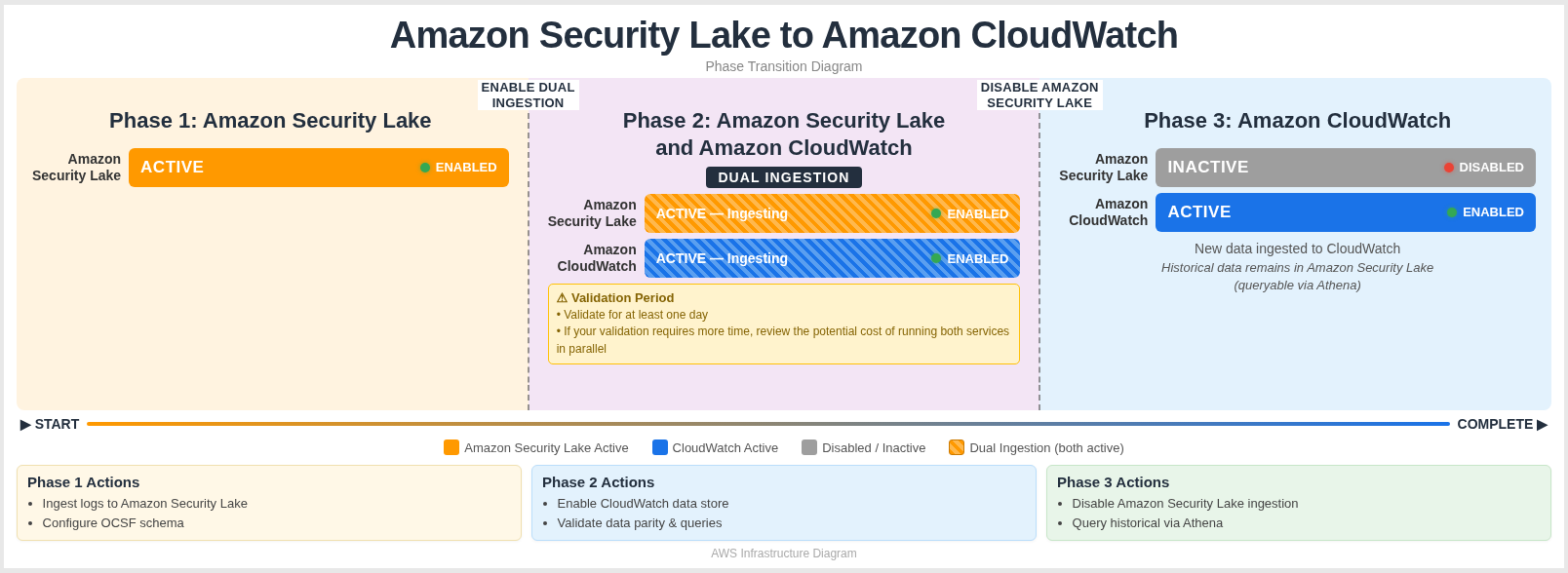
| 阶段 | 发生了什么 |
|---|---|
| 阶段 1 — Security Lake | VPC Flow Logs 和其他安全数据源专门写入 Security Lake,构建 OCSF 格式记录的历史归档,存储在 Amazon S3 中,可通过 AWS Glue Data Catalog 查询。 |
| 阶段 2 — Security Lake 和 CloudWatch 双重摄取 | Security Lake 和 CloudWatch 同时接收数据。建议此验证期至少为 24 小时,让团队有时间验证 log 摄取和两个平台间的一致性,然后再完全迁移到 CloudWatch。如果您的验证需要更多时间,请审查同时运行两个服务的潜在成本。 |
| 阶段 3 — 仅 CloudWatch | 数据源专门写入 CloudWatch。所有历史 Security Lake 数据仍然保留且可访问——Athena 让您从单一控制台查询两个数据存储,可以独立查询或使用 UNION ALL 组合。 |
Security Lake 和 Amazon CloudWatch 统一数据存储都将其数据规范化为 Open Cybersecurity Schema Framework (OCSF),这意味着像 src_endpoint.ip、api.operation 和 actor.user.name 这样的字段名称在两个来源间是一致的。这种一致性使跨源查询变得简单直接——无论您查询的是 Security Lake 历史数据还是 CloudWatch 统一数据存储的近期数据,相同的字段引用都有效。
为什么选择就地查询而非导出?
Athena 跨目录查询让您无需导出数据即可直接访问历史 Security Lake 数据。以下是使就地查询成为更高效方法的一些好处。
| 好处 | 详细信息 |
|---|---|
| 无重复存储费用 | 您的历史数据已存储在 Security Lake 的 Amazon S3 支持的存储中。将其导出到 CloudWatch Logs 意味着为相同数据支付两次存储费用。就地查询意味着您只需为已有的数据付费。 |
| 无需构建或维护 ETL 管道 | 导出数据需要管道:读取 Security Lake 数据、转换或重新格式化记录,然后写入 CloudWatch Logs。该管道需要构建、测试、监控和维护。Athena 跨目录查询消除了对单独管道的需求。 |
| 历史数据保持有序 | Security Lake 按账户、区域和日期存储和分区数据——这种结构非常适合历史分析。将数据移入 CloudWatch Logs 会打乱这种组织,可能需要重新分区或重新索引。 |
| 新数据自然流入 | 迁移完成后,CloudWatch 成为新 log 事件的主要目的地。无需同时运行两个管道或维护复杂的路由层。 |
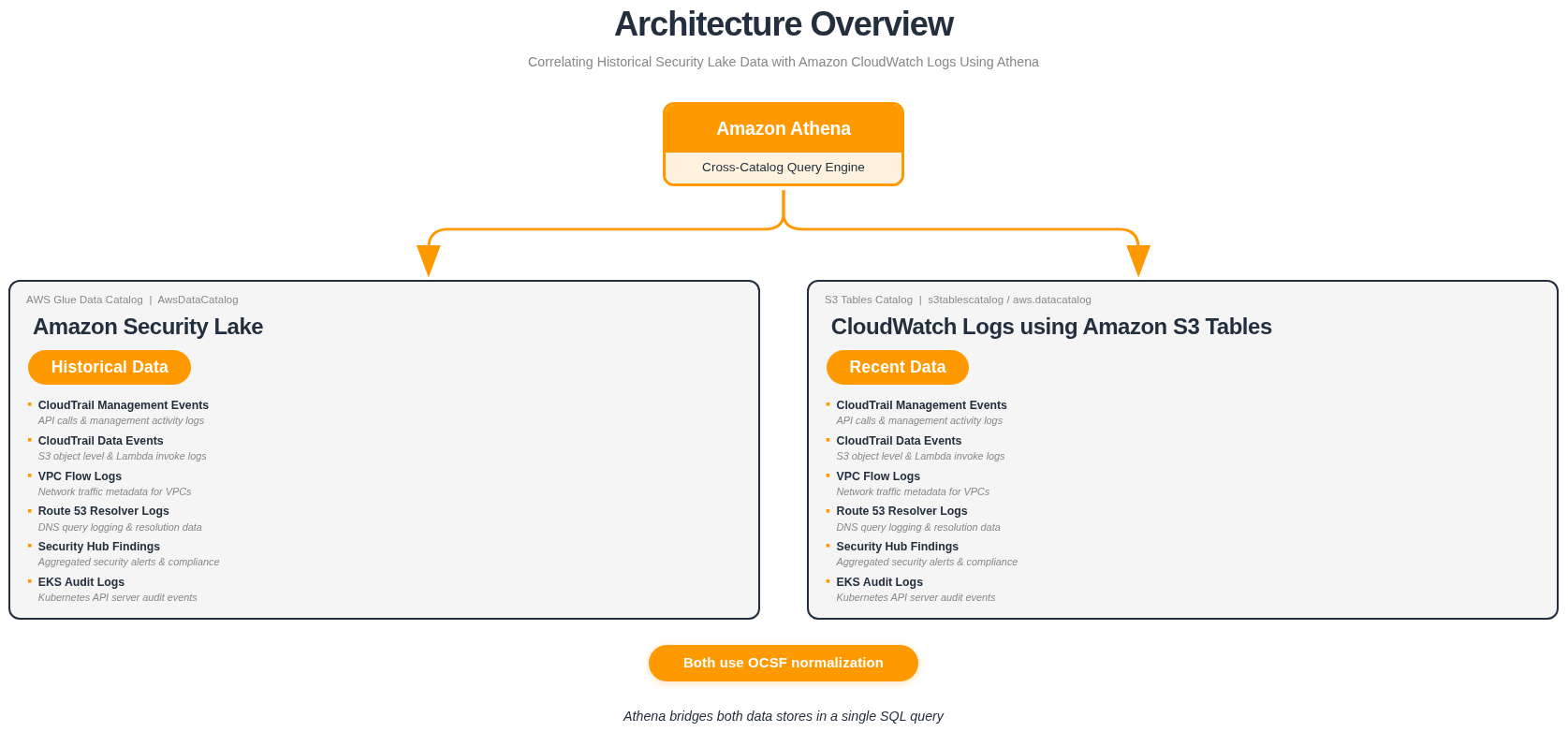
| Athena 高效桥接两者 | Security Lake 在默认 AWS Glue Data Catalog (AwsDataCatalog) 中注册其表。CloudWatch 使用 Amazon S3 Tables 目录 (s3tablescatalog/aws-cloudwatch)。Athena 可以在单个 SQL 查询中使用完全限定的目录路径引用两者——无需数据移动。 |
您保留对历史 Security Lake 数据的完全访问权限,用于事件调查、威胁追踪和合规审计——同时新的 CloudWatch 统一数据存储数据作为持续监控的主要来源流入。
工作原理
了解两个数据存储如何结合在一起使查询更容易理解。
架构
- Security Lake →
"awsdatacatalog"."<database>"."<table>" - CloudWatch 统一数据存储 →
"s3tablescatalog/aws-cloudwatch"."logs"."<table>"
Athena 支持在单个 SQL 语句中跨多个 Glue 目录查询。通过使用完全限定的目录路径引用每个来源,您可以从同一个 Athena 控制台独立查询 Security Lake 和 CloudWatch 统一数据存储——或在需要统一视图时使用 UNION ALL 组合结果。
两个来源都将数据规范化为 OCSF,因此字段名称、类型和结构在两者间是一致的——使查询直观可靠,无论您针对哪个数据存储。
前提条件
在运行跨目录查询之前,请使用 Athena 控制台确认您的目录路径、数据库和表名。本指南中的示例使用以下基于 us-east-1 部署的命名约定。
Security Lake 表
| 目录 | 数据库 | 示例表 |
|---|---|---|
awsdatacatalog | amazon_security_lake_glue_db_us_east_1 | amazon_security_lake_table_us_east_1_cloud_trail_mgmt_2_0 |
amazon_security_lake_table_us_east_1_vpc_flow_2_0 | ||
amazon_security_lake_table_us_east_1_route53_2_0 | ||
amazon_security_lake_table_us_east_1_sh_findings_2_0 | ||
amazon_security_lake_table_us_east_1_eks_audit_2_0 | ||
amazon_security_lake_table_us_east_1_lambda_execution_2_0 |
CloudWatch 统一数据存储表
| 目录 | 数据库 | 示例表 |
|---|---|---|
s3tablescatalog/aws-cloudwatch | logs | aws_cloudtrail__management |
aws_cloudtrail__data | ||
amazon_vpc__flow | ||
cloudtrail__networkactivityevent | ||
cloudtrailcustom__networkactivityevent | ||
microsoft_entraid__account_change |
Security Lake 数据库和表名包含您的部署区域。本指南中的示例使用 us_east_1(例如 amazon_security_lake_glue_db_us_east_1)。如果 Security Lake 在不同区域启用,请将 us_east_1 替换为您的区域标识符——例如,对于 eu-west-1 使用 amazon_security_lake_glue_db_eu_west_1。表名同理。
您的表名可能因区域、Security Lake 配置和启用的 CloudWatch 统一数据存储数据源而异。通过运行以下命令验证您的表名:
SHOW TABLES IN "s3tablescatalog/aws-cloudwatch"."logs"
从 Athena 查询两个数据存储
迁移到 CloudWatch 统一数据存储后,Athena 成为您查询历史和当前安全数据的单一控制台。Security Lake 表注册在 AWS Glue Data Catalog 中,CloudWatch 统一数据存储表注册在 S3 Tables 目录中。Athena 可以访问两者——无需数据移动、导出管道或重复。
以下部分介绍三个查询级别:
- 查询 Security Lake — 直接访问您的历史归档
- 查询 CloudWatch 统一数据存储 — 通过 S3 Tables 访问当前数据
- 使用 UNION ALL 组合两者 — 在单个结果集中并排查看历史和近期数据
语法概览
引用特定目录中表的通用模式:
-- Security Lake (Glue Data Catalog)
SELECT ...
FROM "awsdatacatalog"."amazon_security_lake_glue_db_us_east_1"."table_name"

-- CloudWatch Unified Data Store (S3 Tables Catalog)
SELECT ...
FROM "s3tablescatalog/aws-cloudwatch"."logs"."table_name"
可用表参考
构建您自己的查询时可使用这些表作为参考。Security Lake 和 CloudWatch 统一数据存储都使用 OCSF 规范化,因此字段名称在数据源类型间是一致的。
Security Lake
| 表 | OCSF 类 | 常用查询字段 |
|---|---|---|
..._cloud_trail_mgmt_2_0 | API Activity | api.operation, src_endpoint.ip, actor.user.name, time_dt |
..._vpc_flow_2_0 | Network Activity | src_endpoint.ip, dst_endpoint.ip, dst_endpoint.port, time_dt |
..._route53_2_0 | DNS Activity | src_endpoint.ip, query.hostname, time_dt |
..._sh_findings_2_0 | Vulnerability / Compliance / Detection Finding | finding.title, cloud.account.uid, severity, severity_id, time_dt |
..._eks_audit_2_0 | API Activity | api.operation, actor.user.name, time_dt |
..._lambda_execution_2_0 | API Activity | api.operation, cloud.account.uid, time_dt |
在 OCSF v2 (1.1.0) 中,Security Hub CSPM 发现映射到多个 OCSF 类名——Vulnerability Finding、Compliance Finding 或 Detection Finding——取决于发现类型。
CloudWatch 统一数据存储
| 表 | OCSF 类 | 常用查询字段 |
|---|---|---|
aws_cloudtrail__management | API Activity | api.operation, src_endpoint.ip, actor.user.name, time_dt |
aws_cloudtrail__data | API Activity | api.operation, src_endpoint.ip, actor.user.name, time_dt |
amazon_vpc__flow | Network Activity | src_endpoint.ip, dst_endpoint.ip, dst_endpoint.port, time_dt |
cloudtrail__networkactivityevent | Network Activity | src_endpoint.ip, dst_endpoint.ip, time_dt |
cloudtrailcustom__networkactivityevent | Network Activity | src_endpoint.ip, dst_endpoint.ip, time_dt |
microsoft_entraid__account_change | Account Change | actor.user.name, time_dt |
aws_security_hub__compliance_finding | Compliance Finding | finding_info.title, finding_info.uid, cloud.account.uid, severity, status, time_dt |
aws_security_hub__vulnerability_finding | Vulnerability Finding | finding_info.title, finding_info.uid, cloud.account.uid, severity, status, time_dt |
aws_security_hub__detection_finding | Detection Finding | finding_info.title, finding_info.uid, cloud.account.uid, severity, status, time_dt |
CloudWatch 统一数据存储表名是根据您的关联中配置的数据源名称和类型生成的。在 Athena 中运行以下命令以发现可用表:
SHOW TABLES IN "s3tablescatalog/aws-cloudwatch"."logs"
第 1 部分 — 查询 Security Lake(历史数据)
您的历史安全数据保留在 Security Lake 中,存储在 Amazon S3 中并注册在 AWS Glue Data Catalog 中。这些查询针对 awsdatacatalog 目录运行,访问迁移前收集的相同 OCSF 格式数据。
示例 1a — 历史 CloudTrail 管理事件
查询 Security Lake 归档中的 CloudTrail 管理事件。这对于调查过去的事件、审计历史 API 活动或建立基线很有用。
查看 SQL 查询
SELECT
    api.operation        AS event_name,
    api.service.name     AS event_source,
    actor.user.name      AS username,
    src_endpoint.ip      AS source_ip,
    time_dt,
    status
FROM "awsdatacatalog"."amazon_security_lake_glue_db_us_east_1"."amazon_security_lake_table_us_east_1_cloud_trail_mgmt_2_0"
WHERE time_dt BETWEEN TIMESTAMP '2025-01-01' AND TIMESTAMP '2025-06-01'
    AND api.operation = 'AssumeRole'
LIMIT 25;
示例 1b — 历史 VPC Flow Logs
查询 Security Lake 归档中的 VPC Flow Logs 以调查历史网络活动。
查看 SQL 查询
SELECT
    src_endpoint.ip              AS source_ip,
    dst_endpoint.ip              AS dest_ip,
    dst_endpoint.port            AS dest_port,
    traffic.bytes                AS bytes,
    activity_name                AS activity,
    time_dt,
    status_code,
    connection_info.direction    AS direction
FROM "awsdatacatalog"."amazon_security_lake_glue_db_us_east_1"."amazon_security_lake_table_us_east_1_vpc_flow_2_0"
WHERE time_dt BETWEEN TIMESTAMP '2025-01-01' AND TIMESTAMP '2025-06-01'
    AND activity_name = 'Reject'
LIMIT 25;
示例 1c — 历史 Security Hub 发现
查询 Security Lake 归档中的 Security Hub 发现以审查您的历史安全状况。
查看 SQL 查询
SELECT
    finding_info.title       AS finding_title,
    finding_info.uid         AS finding_uid,
    severity,
    status,
    cloud.account.uid        AS account,
    time_dt
FROM "awsdatacatalog"."amazon_security_lake_glue_db_us_east_1"."amazon_security_lake_table_us_east_1_sh_findings_2_0"
WHERE time_dt BETWEEN TIMESTAMP '2025-01-01' AND TIMESTAMP '2025-06-01'
    AND severity_id >= 3
LIMIT 25;
第 2 部分 — 查询 CloudWatch 统一数据存储(近期数据)
迁移后,您的新安全数据流入 CloudWatch 统一数据存储并存储在 Amazon S3 Tables 中。这些查询针对 s3tablescatalog/aws-cloudwatch 目录运行,访问迁移后收集的 OCSF 格式数据。
示例 2a — 近期 CloudTrail 管理事件
从 CloudWatch 统一数据存储查询近期 CloudTrail 管理事件。Security Lake 查询中使用的相同 OCSF 字段名称在此处同样有效。
查看 SQL 查询
SELECT
    api.operation        AS event_name,
    api.service.name     AS event_source,
    actor.user.name      AS username,
    src_endpoint.ip      AS source_ip,
    time_dt,
    status
FROM "s3tablescatalog/aws-cloudwatch"."logs"."aws_cloudtrail__management"
WHERE time_dt BETWEEN TIMESTAMP '2025-06-01' AND TIMESTAMP '2025-07-01'
    AND api.operation = 'AssumeRole'
LIMIT 25;
示例 2b — 近期 VPC Flow Logs
从 CloudWatch 统一数据存储查询近期 VPC Flow Logs。
查看 SQL 查询
SELECT
    src_endpoint.ip              AS source_ip,
    dst_endpoint.ip              AS dest_ip,
    dst_endpoint.port            AS dest_port,
    traffic.bytes                AS bytes,
    activity_name                AS activity,
    time_dt,
    status_code,
    connection_info.direction    AS direction
FROM "s3tablescatalog/aws-cloudwatch"."logs"."amazon_vpc__flow"
WHERE time_dt BETWEEN TIMESTAMP '2025-06-01' AND TIMESTAMP '2025-07-01'
    AND activity_name = 'Reject'
LIMIT 25;
示例 2c — 近期 Security Hub 发现
从 CloudWatch 统一数据存储查询近期 Security Hub 合规发现。
查看 SQL 查询
SELECT
    finding_info.title       AS finding_title,
    finding_info.uid         AS finding_uid,
    severity,
    status,
    cloud.account.uid        AS account,
    time_dt
FROM "s3tablescatalog/aws-cloudwatch"."logs"."aws_security_hub__compliance_finding"
WHERE time_dt BETWEEN TIMESTAMP '2025-06-01' AND TIMESTAMP '2025-07-01'
    AND severity_id >= 3
LIMIT 25;
Security Hub 发现在 CloudWatch 统一数据存储中映射到多个 OCSF 事件类。根据发现类型,您的数据可能在以下表之一中:
| CW UDS 表 | 发现类型 |
|---|---|
aws_security_hub__compliance_finding | 合规检查结果 |
aws_security_hub__detection_finding | 威胁检测发现 |
aws_security_hub__vulnerability_finding | 漏洞发现 |
aws_security_hub__data_security_finding | 数据安全发现 |
运行 SHOW TABLES IN "s3tablescatalog/aws-cloudwatch"."logs" 以发现可用表。
第 3 部分 — 使用 UNION ALL 组合两个数据存储
当您熟练地独立查询每个数据存储后,可以使用 UNION ALL 在单个查询中组合两者的结果。这为您提供跨迁移边界的统一视图——来自 Security Lake 的历史数据和来自 CloudWatch 统一数据存储的近期数据并排显示。
使 UNION ALL 良好工作的关键是使用特定过滤器(例如特定的 API 操作、IP 地址或发现标题),以便两侧返回相关的可比较结果。没有过滤器时,LIMIT 将被先返回行的一侧消耗,您可能看不到来自两个数据存储的结果。
AWS Glue Data Catalog(Security Lake)和 S3 Tables 目录(CloudWatch 统一数据存储)之间的跨目录 JOIN 在 Athena 中技术上是可行的,但存在显著的性能和成本限制。Athena 无法有效地跨不同目录类型下推谓词,这会导致在评估 join 之前对两侧进行大型全表扫描。这导致查询运行时间长且成本更高(Athena 按每 TB 扫描收费 $5)。使用 UNION ALL 通过独立地针对各自的目录运行每个查询并进行适当的分区裁剪来避免这一问题,然后组合结果——以更低的成本提供更快的性能。
这些示例中的 WHERE 子句对两个数据源使用硬编码日期范围以反映迁移场景。Security Lake 过滤器针对您的历史归档(例如 TIMESTAMP '2025-01-01' 到 TIMESTAMP '2025-06-01'),而 CloudWatch 统一数据存储过滤器针对迁移后的时期(例如 TIMESTAMP '2025-06-01' 到 TIMESTAMP '2025-07-01')。请将这些替换为与您的迁移时间线和保留期匹配的实际日期。
UNION ALL 查询模板
SELECT
    'Security Lake'   AS source,
    <field_1>         AS <alias>,
    <field_2>         AS <alias>,
    time_dt
FROM "awsdatacatalog"."amazon_security_lake_glue_db_us_east_1"."<security_lake_table>"
WHERE time_dt BETWEEN TIMESTAMP '<YYYY-MM-DD>' AND TIMESTAMP '<YYYY-MM-DD>'
    AND <specific_filter>

UNION ALL

SELECT
    'CloudWatch UDS'  AS source,
    <field_1>         AS <alias>,
    <field_2>         AS <alias>,
    time_dt
FROM "s3tablescatalog/aws-cloudwatch"."logs"."<cw_uds_table>"
WHERE time_dt BETWEEN TIMESTAMP '<YYYY-MM-DD>' AND TIMESTAMP '<YYYY-MM-DD>'
    AND <specific_filter>

LIMIT 50;
示例 3a — 跨两个时间段的 AssumeRole 活动
跟踪跨迁移边界的 AssumeRole 调用。这对于调查迁移前后是否使用相同角色,或检测访问模式变化很有用。
查看 SQL 查询
SELECT
    'Security Lake'      AS source,
    api.operation        AS event_name,
    api.service.name     AS event_source,
    actor.user.name      AS username,
    src_endpoint.ip      AS source_ip,
    time_dt,
    status
FROM "awsdatacatalog"."amazon_security_lake_glue_db_us_east_1"."amazon_security_lake_table_us_east_1_cloud_trail_mgmt_2_0"
WHERE time_dt BETWEEN TIMESTAMP '2025-01-01' AND TIMESTAMP '2025-06-01'
    AND api.operation = 'AssumeRole'

UNION ALL

SELECT
    'CloudWatch UDS'     AS source,
    api.operation        AS event_name,
    api.service.name     AS event_source,
    actor.user.name      AS username,
    src_endpoint.ip      AS source_ip,
    time_dt,
    status
FROM "s3tablescatalog/aws-cloudwatch"."logs"."aws_cloudtrail__management"
WHERE time_dt BETWEEN TIMESTAMP '2025-06-01' AND TIMESTAMP '2025-07-01'
    AND api.operation = 'AssumeRole'

LIMIT 50;
此查询显示:
- 两个时间段的
AssumeRole事件,source列标识数据存储 - 用户身份和源 IP,用于跟踪谁在假设角色以及从哪里,跨越迁移边界
- 状态代码,用于识别角色假设在两个时期是成功还是失败
调整此查询:
| 目标 | 修改 |
|---|---|
| 追踪不同的 API 调用 | 将 api.operation = 'AssumeRole' 更改为其他操作,如 'CreateUser'、'PutBucketPolicy' 等。 |
| 按错误事件过滤 | 在两个 SELECT 块中添加 AND status = 'Failure' |
| 缩小到特定用户 | 在两个 SELECT 块中添加 AND actor.user.name = '[USERNAME]' |
示例 3b — 跨两个时间段的被拒绝 VPC 流量
比较来自 Security Lake(历史)和 CloudWatch 统一数据存储(近期)的被拒绝网络流量。这对于验证安全组和 NACL 规则在迁移前后产生一致的拒绝模式很有用。
查看 SQL 查询
SELECT
    'Security Lake'              AS source,
    src_endpoint.ip              AS source_ip,
    dst_endpoint.ip              AS dest_ip,
    dst_endpoint.port            AS dest_port,
    traffic.bytes                AS bytes,
    time_dt,
    connection_info.direction    AS direction
FROM "awsdatacatalog"."amazon_security_lake_glue_db_us_east_1"."amazon_security_lake_table_us_east_1_vpc_flow_2_0"
WHERE time_dt BETWEEN TIMESTAMP '2025-01-01' AND TIMESTAMP '2025-06-01'
    AND activity_name = 'Reject'

UNION ALL

SELECT
    'CloudWatch UDS'             AS source,
    src_endpoint.ip              AS source_ip,
    dst_endpoint.ip              AS dest_ip,
    dst_endpoint.port            AS dest_port,
    traffic.bytes                AS bytes,
    time_dt,
    connection_info.direction    AS direction
FROM "s3tablescatalog/aws-cloudwatch"."logs"."amazon_vpc__flow"
WHERE time_dt BETWEEN TIMESTAMP '2025-06-01' AND TIMESTAMP '2025-07-01'
    AND activity_name = 'Reject'

LIMIT 50;
此查询显示:
- 两个时间段的被拒绝网络流量,由
source列标识 - 源和目标 IP 及端口号,用于识别哪些流量被拒绝
- 字节数和方向,用于了解被拒绝流量的数量和流向
调整此查询:
| 目标 | 修改 |
|---|---|
| 按特定目标端口过滤 | 在两个 SELECT 块中添加 AND dst_endpoint.port = 443 |
| 按特定源 IP 过滤 | 在两个 SELECT 块中添加 AND src_endpoint.ip = '[IP_ADDRESS]' |
| 同时包含接受的流量 | 删除 AND activity_name = 'Reject' 过滤器,或更改为 'Accept' |
示例 3c — 跨两个时间段的高严重性 Security Hub 发现
跟踪跨迁移边界的高严重性 Security Hub 发现。这对于识别迁移前存在的关键发现是否已修复,或是否出现新的高严重性发现很有用。
查看 SQL 查询
SELECT
    'Security Lake'          AS source,
    finding_info.title       AS finding_title,
    finding_info.uid         AS finding_uid,
    severity,
    status,
    cloud.account.uid        AS account,
    time_dt
FROM "awsdatacatalog"."amazon_security_lake_glue_db_us_east_1"."amazon_security_lake_table_us_east_1_sh_findings_2_0"
WHERE time_dt BETWEEN TIMESTAMP '2025-01-01' AND TIMESTAMP '2025-06-01'
    AND severity_id >= 4

UNION ALL

SELECT
    'CloudWatch UDS'         AS source,
    finding_info.title       AS finding_title,
    finding_info.uid         AS finding_uid,
    severity,
    status,
    cloud.account.uid        AS account,
    time_dt
FROM "s3tablescatalog/aws-cloudwatch"."logs"."aws_security_hub__compliance_finding"
WHERE time_dt BETWEEN TIMESTAMP '2025-06-01' AND TIMESTAMP '2025-07-01'
    AND severity_id >= 4

LIMIT 50;
此查询显示:
- 两个时间段的高严重性发现(HIGH 和 CRITICAL),
source列标识数据存储 - 发现标题和 UID,用于跟踪跨迁移边界的特定发现
- 状态,用于识别发现是否已修复或仍处于活动状态
- 多账户环境的账户级详细信息
调整此查询:
| 目标 | 修改 |
|---|---|
| 包含 MEDIUM 严重性 | 在两个 SELECT 块中将 severity_id >= 4 更改为 severity_id >= 3 |
| 按发现状态过滤 | 在两个 SELECT 块中添加 AND status = 'New' 以查找未解决的发现 |
| 关注特定账户 | 在两个 SELECT 块中添加 AND cloud.account.uid = '[ACCOUNT_ID]' |
| 查询漏洞发现 | 将 CW UDS 表替换为 aws_security_hub__vulnerability_finding |