EKS クラスター全体の GPU コスト配分
この投稿では、Amazon EKS 上での GPU スライスコスト割り当てのエンドツーエンドの概念実証 (PoC) について説明します。
問題の説明
複数のテナントが GPU 容量を共有する場合(例:MIG スライス)、次の点を明確にする必要があります。
- 誰が GPU のどのシェアをリクエストしたか(Pod / Namespace / BU 別)?
- 誰が実際に GPU を使用したか(そしてどれだけ使用したか)?
- GPU 時間あたり $12 のような「公開」価格が与えられた場合、以下をどのように計算するか:
- 割り当てコスト(リクエストされたシェアに基づく)
- 実効コスト(観測された使用率に基づく)
- 無駄(割り当て済みから実効を引いたもの)
アーキテクチャ(高レベル)
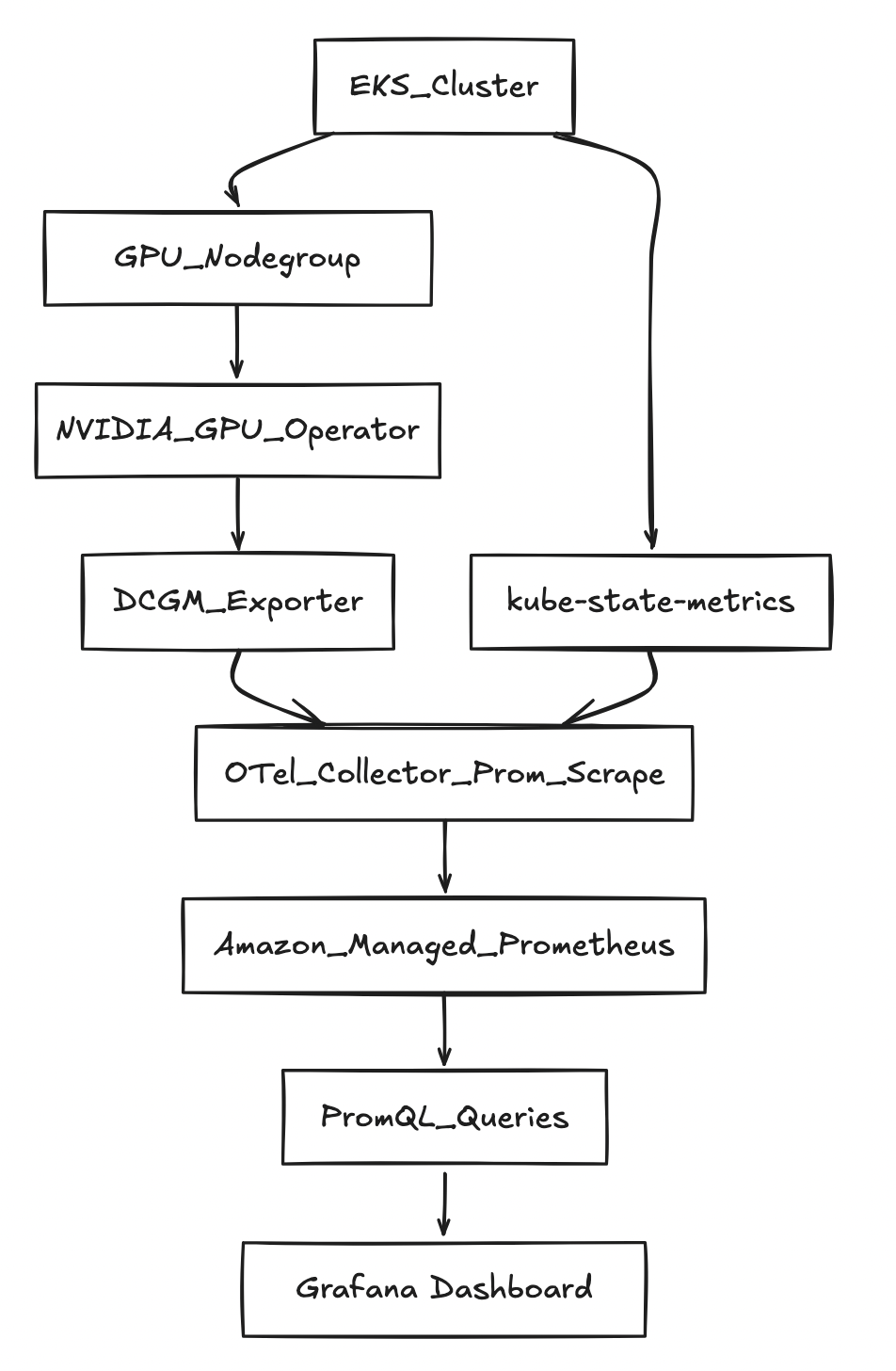
前提条件
AWS + EKS の前提条件
- 以下を作成する権限を持つ AWS アカウント:
- EKS クラスター + ノードグループ
- サービスアカウント用の IAM ロール (IRSA)
- AMP ワークスペース
- リージョン内で GPU インスタンスを実行するためのクォータと AZ キャパシティ
使用される変数
export AWS_REGION="us-west-2"
export CLUSTER_NAME="gpu-cost-poc"
export AMP_ALIAS="gpu-cost-poc"

# Public/benchmark price you want to demonstrate (not CUR yet)
export GPU_HOURLY_RATE="12"

# MIG profile for the PoC (eg: A100 40GB commonly supports 1g.5gb with 7 slices/GPU)
export MIG_PROFILE_LABEL="all-1g.5gb"

# IMPORTANT: in this PoC, MIG slices were exposed as nvidia.com/gpu (1 “gpu” == 1 MIG slice)
export MIG_RESOURCE_KEY="nvidia.com/gpu"

# For 1g.5gb on A100: typically 7 slices per physical GPU
export SLICES_PER_GPU="7"

# kube-state-metrics may “sanitize” extended resource names
export KSM_RESOURCE_REGEX='nvidia.*(gpu|mig).*'
ステップバイステップの手順
ステップ 1 — EKS クラスターを作成する
バージョンを一覧表示します eksctl サポート対象:
eksctl utils describe cluster-versions
クラスターを作成します(省略 --version を可能にするために eksctl サポートされているデフォルトを選択します)。
eksctl create cluster \
  --name "$CLUSTER_NAME" \
  --region "$AWS_REGION" \
  --managed
ステップ 2 — "system" ノードグループを追加する(推奨)
これにより、CoreDNS とオペレーターはコストの高い GPU ノードから切り離されます。
eksctl create nodegroup \
  --cluster "$CLUSTER_NAME" \
  --region "$AWS_REGION" \
  --name "system-ng" \
  --node-type "m5.large" \
  --nodes 2 --nodes-min 2 --nodes-max 3
ステップ 3 — GPU ノードグループを追加する
eksctl create nodegroup \
  --cluster "$CLUSTER_NAME" \
  --region "$AWS_REGION" \
  --name "gpu-ng-ubuntu" \
  --node-type "p4d.24xlarge" \
  --node-ami-family "Ubuntu2204" \
  --install-nvidia-plugin=false \
  --nodes 1 --nodes-min 1 --nodes-max 1 \
  --node-labels "workload=gpu"
GPU ワークロードのみがスケジュールされるようにテイントを適用します。
kubectl taint nodes -l workload=gpu nvidia.com/gpu=present:NoSchedule --overwrite
ステップ 4 — NVIDIA GPU Operator のインストール(MIG 有効)
helm repo add nvidia https://helm.ngc.nvidia.com/nvidia
helm repo update

helm upgrade --install gpu-operator nvidia/gpu-operator \
  -n gpu-operator --create-namespace \
  --set mig.strategy=single
ステップ 5 — GPU ノードで MIG プロファイルを有効にする
現在の MIG ラベルを確認します。
kubectl get nodes -l workload=gpu -o jsonpath='{range .items[*]}{.metadata.name}{"\t"}{.metadata.labels.nvidia\.com/mig\.capable}{"\t"}{.metadata.labels.nvidia\.com/mig\.config}{"\t"}{.metadata.labels.nvidia\.com/mig\.config\.state}{"\n"}{end}'
MIG ジオメトリを適用します。
kubectl label nodes -l workload=gpu nvidia.com/mig.config="$MIG_PROFILE_LABEL" --overwrite
成功を待ちます。
kubectl get nodes -l workload=gpu -o jsonpath='{range .items[*]}{.metadata.name}{"\t"}{.metadata.labels.nvidia\.com/mig\.config}{"\t"}{.metadata.labels.nvidia\.com/mig\.config\.state}{"\n"}{end}'
ステップ 6 — AMP ワークスペースを作成する
aws amp create-workspace --alias "$AMP_ALIAS" --region "$AWS_REGION"

export AMP_WORKSPACE_ID="$(aws amp list-workspaces --region "$AWS_REGION" --query "workspaces[?alias=='$AMP_ALIAS'].workspaceId | [0]" --output text)"
export AMP_ENDPOINT="$(aws amp describe-workspace --workspace-id "$AMP_WORKSPACE_ID" --region "$AWS_REGION" --query "workspace.prometheusEndpoint" --output text)"

echo "$AMP_WORKSPACE_ID"
echo "$AMP_ENDPOINT"
ステップ 7 — 取り込みとクエリのための IRSA
eksctl utils associate-iam-oidc-provider \
  --cluster "$CLUSTER_NAME" \
  --region "$AWS_REGION" \
  --approve

eksctl create iamserviceaccount \
  --cluster "$CLUSTER_NAME" --region "$AWS_REGION" \
  --name amp-ingest --namespace observability \
  --attach-policy-arn arn:aws:iam::aws:policy/AmazonPrometheusRemoteWriteAccess \
  --approve --override-existing-serviceaccounts

eksctl create iamserviceaccount \
  --cluster "$CLUSTER_NAME" --region "$AWS_REGION" \
  --name amp-query --namespace observability \
  --attach-policy-arn arn:aws:iam::aws:policy/AmazonPrometheusQueryAccess \
  --approve --override-existing-serviceaccounts
ステップ 8 — kube-state-metrics をインストールする
helm repo add prometheus-community https://prometheus-community.github.io/helm-charts
helm repo update

helm upgrade --install kube-state-metrics prometheus-community/kube-state-metrics \
  -n kube-system
ステップ 9 — OTel コレクターをデプロイする(Prometheus スクレイプ → AMP remote_write)
kubectl -n observability patch configmap amp-scraper-otel-env --type merge -p "$(cat <<PATCH
{
  "data": {
    "AWS_REGION": "${AWS_REGION}",
    "AMP_ENDPOINT": "${AMP_ENDPOINT}"
  }
}
PATCH
)"

kubectl -n observability rollout restart deploy/amp-scraper-otel
kubectl -n observability rollout status deploy/amp-scraper-otel
ステップ 10 — 3 つの BU ワークロードをデプロイする(3/2/2 スライス)
BU の名前空間とデプロイメントを適用します。
重要な詳細: リクエスト nvidia.com/gpu: 1 ポッドごと(MIG スライスは次のように公開されているため nvidia.com/gpu ここ)。
クエリ: allocation、utilization、effective cost、waste
1) 名前空間ごとのリクエストされたスライス数 (BU)
Q='sum by (namespace) (kube_pod_container_resource_requests{resource=~"nvidia.*(gpu|mig).*",unit="integer"})'
ENCODED="$(python3 -c 'import urllib.parse,sys; print(urllib.parse.quote(sys.argv[1]))' "$Q")"

awscurl --service aps --region "$AWS_REGION" \
  -X POST "${AMP_ENDPOINT}api/v1/query" \
  -H "Content-Type: application/x-www-form-urlencoded" \
  -d "query=${ENCODED}"
観測された出力:
{"namespace":"bu-a","value":[...,"3"]}
{"namespace":"bu-b","value":[...,"2"]}
{"namespace":"bu-c","value":[...,"2"]}
2) GPU 使用率メトリクスを見つける
メトリクス名を一覧表示します。
awscurl --service aps --region "$AWS_REGION" \
  "${AMP_ENDPOINT}api/v1/label/__name__/values" \
| python3 -c 'import sys,json; j=json.load(sys.stdin); print("\n".join(j["data"]))' \
| egrep -i "dcgm.*util|DCGM.*UTIL|gr_engine_active|sm_active" \
| head -n 30
見つかった内容:
DCGM_FI_PROF_GR_ENGINE_ACTIVE
3) 使用率の割合 (スカラー)
Q='scalar(avg(DCGM_FI_PROF_GR_ENGINE_ACTIVE)/100)'
ENCODED="$(python3 -c 'import urllib.parse,sys; print(urllib.parse.quote(sys.argv[1]))' "$Q")"

awscurl --service aps --region "$AWS_REGION" \
  -X POST "${AMP_ENDPOINT}api/v1/query" \
  -H "Content-Type: application/x-www-form-urlencoded" \
  -d "query=${ENCODED}"
観測された例(低負荷の場合):
{"resultType":"scalar","result":[...,"0.0004539326785714286"]}
4) 割り当て計算(1 時間あたり)
BU あたりの割り当て $/時間:
allocated_usd_per_hr =
sum by (namespace) (kube_pod_container_resource_requests{resource=~"nvidia.*(gpu|mig).*",unit="integer"})
* (GPU_HOURLY_RATE / SLICES_PER_GPU)
定数 (12/7) を使用:
Q='sum by (namespace) (kube_pod_container_resource_requests{resource=~"nvidia.*(gpu|mig).*",unit="integer"}) * (12/7)'
ENCODED="$(python3 -c 'import urllib.parse,sys; print(urllib.parse.quote(sys.argv[1]))' "$Q")"

awscurl --service aps --region "$AWS_REGION" \
  -X POST "${AMP_ENDPOINT}api/v1/query" \
  -H "Content-Type: application/x-www-form-urlencoded" \
  -d "query=${ENCODED}"
これはストーリーと一致します。
- BU-A: (3/7 × 12 = 5.142857) $/hr
- BU-B: (2/7 × 12 = 3.428571) $/hr
- BU-C: (2/7 × 12 = 3.428571) $/hr
5) 実効 $/hr と無駄 $/hr
重要なポイント:使用率はスカラーであり、割り当ては名前空間ラベル付きベクターです。使用 scalar(...) そのため、Prometheus はそれを「ブロードキャスト」します。
実効 $/hr:
Q='(sum by (namespace) (kube_pod_container_resource_requests{resource=~"nvidia.*(gpu|mig).*",unit="integer"}) * (12/7))
   * scalar(clamp_min(clamp_max(avg(DCGM_FI_PROF_GR_ENGINE_ACTIVE)/100, 1), 0))'
ENCODED="$(python3 -c 'import urllib.parse,sys; print(urllib.parse.quote(sys.argv[1]))' "$Q")"

awscurl --service aps --region "$AWS_REGION" \
  -X POST "${AMP_ENDPOINT}api/v1/query" \
  -H "Content-Type: application/x-www-form-urlencoded" \
  -d "query=${ENCODED}"
確認された出力例:
{"namespace":"bu-a","value":[...,"0.002325599081632653"]}
{"namespace":"bu-b","value":[...,"0.0015503993877551022"]}
{"namespace":"bu-c","value":[...,"0.0015503993877551022"]}
無駄なコスト ($/時間):
Q='(sum by (namespace) (kube_pod_container_resource_requests{resource=~"nvidia.*(gpu|mig).*",unit="integer"}) * (12/7))
 - (
    (sum by (namespace) (kube_pod_container_resource_requests{resource=~"nvidia.*(gpu|mig).*",unit="integer"}) * (12/7))
    * scalar(clamp_min(clamp_max(avg(DCGM_FI_PROF_GR_ENGINE_ACTIVE)/100, 1), 0))
   )'
ENCODED="$(python3 -c 'import urllib.parse,sys; print(urllib.parse.quote(sys.argv[1]))' "$Q")"

awscurl --service aps --region "$AWS_REGION" \
  -X POST "${AMP_ENDPOINT}api/v1/query" \
  -H "Content-Type: application/x-www-form-urlencoded" \
  -d "query=${ENCODED}"
出力例を以下に示します。
{"namespace":"bu-a","value":[...,"5.14053154377551"]}
{"namespace":"bu-b","value":[...,"3.427021029183673"]}
{"namespace":"bu-c","value":[...,"3.427021029183673"]}
Amazon Managed Grafana (AMG): AMP 上のダッシュボード
この PoC を簡単に共有できるようにするため、最も手軽なビジュアライゼーションレイヤーは Amazon Managed Grafana (AMG) です。
1) AMG ワークスペースを作成する (CLI)
aws grafana create-workspace \
  --name "${CLUSTER_NAME}-gpu-cost" \
  --region "${AWS_REGION}" \
  --authentication-providers AWS_SSO \
  --permission-type SERVICE_MANAGED \
  --workspace-data-sources PROMETHEUS
ワークスペース URL を取得します。
export AMG_WORKSPACE_ID="$(aws grafana list-workspaces --region "${AWS_REGION}" --query "workspaces[?name=='${CLUSTER_NAME}-gpu-cost'].id | [0]" --output text)"
aws grafana describe-workspace --region "${AWS_REGION}" --workspace-id "${AMG_WORKSPACE_ID}" \
  --query "workspace.{status:status,endpoint:endpoint,roleArn:iamRoleArn}" --output yaml
2) AMG が AMP をクエリできるようにする
export AMG_ROLE_ARN="$(aws grafana describe-workspace --region "${AWS_REGION}" --workspace-id "${AMG_WORKSPACE_ID}" --query "workspace.iamRoleArn" --output text)"
ROLE_NAME="$(basename "$AMG_ROLE_ARN")"
aws iam attach-role-policy --role-name "$ROLE_NAME" --policy-arn arn:aws:iam::aws:policy/AmazonPrometheusQueryAccess
3) AMP を Prometheus データソースとして追加する (Grafana UI)
AMG UI で次の操作を行います。
- Connections → Data sources → Add data source → Prometheus
- URL:
https://aps-workspaces.${AWS_REGION}.amazonaws.com/workspaces/${AMP_WORKSPACE_ID} - SigV4: enabled
- Region:
${AWS_REGION} - サービス:
aps
- Region:
- 保存してテスト
4) スターターパネル (PromQL)
BU/namespace 別のリクエスト済みスライス
sum by (namespace) (
  kube_pod_container_resource_requests{resource=~"nvidia.*(gpu|mig).*",unit="integer"}
)
BU/ネームスペース別の割り当て $/時間 (12/7 定数)
sum by (namespace) (
  kube_pod_container_resource_requests{resource=~"nvidia.*(gpu|mig).*",unit="integer"}
) * (12/7)
使用率フラクションスカラー (クラスターレベルプロキシ)
scalar(avg(DCGM_FI_PROF_GR_ENGINE_ACTIVE)/100)
実効 $/時間 (プロキシ)
(sum by (namespace) (
  kube_pod_container_resource_requests{resource=~"nvidia.*(gpu|mig).*",unit="integer"}
) * (12/7))
* scalar(clamp_min(clamp_max(avg(DCGM_FI_PROF_GR_ENGINE_ACTIVE)/100, 1), 0))
無駄なコスト ($/時間) (プロキシ)
(sum by (namespace) (
  kube_pod_container_resource_requests{resource=~"nvidia.*(gpu|mig).*",unit="integer"}
) * (12/7))
-
((sum by (namespace) (
  kube_pod_container_resource_requests{resource=~"nvidia.*(gpu|mig).*",unit="integer"}
) * (12/7))
* scalar(clamp_min(clamp_max(avg(DCGM_FI_PROF_GR_ENGINE_ACTIVE)/100, 1), 0)))
学習内容と今後の改善点
この PoC が証明すること
- リクエストが宣言されている場合、割り当ては簡単です(BU ごとのスライス)。シンプルな定数で価格設定されます。
- MIG を使用すると、リクエストされたスライスがコストシェアに明確にマッピングされます。
- アイドル状態のスライスの ROI が低いことを示すために、「割り当て済みから有効分を引いた値」として無駄を計算できます。
この PoC における「近似」とは
- MIG を使用する場合、バージョンや設定によっては、ポッドごとの GPU 使用率ラベルが DCGM メトリクスに存在しない場合があります。
- この PoC では、BU ごとの「実際の使用量」の代理として、クラスターレベルの使用率スカラーを使用しました。
本番環境対応にするための次のステップ
- 真のポッド単位の帰属:
- ポッド単位の GPU 使用量エクスポーターを追加する(割り当てられた MIG デバイスを読み取り、ポッドラベルとともに使用率を報告する)、または
- NVIDIA デバイスプラグイン / ランタイムからスケジューラー / デバイスマッピングを統合する
- 実際の料金:
- 定数の $/GPU 時間を AWS CUR またはオンデマンド価格 API に置き換える
- ダッシュボード:
- AMP を Grafana に接続してグラフを作成する
allocated,effective、およびwasteBU ごとの経時変化
- AMP を Grafana に接続してグラフを作成する
クリーンアップ
PoC が完了したら、孤立したインフラストラクチャや継続的な料金が発生しないよう、依存関係の逆順ですべてのリソースを削除してください。
1) BU ワークロードの削除
kubectl delete namespace bu-a bu-b bu-c
2) OTel コレクターを削除する
kubectl delete namespace observability
3) kube-state-metrics のアンインストール
helm uninstall kube-state-metrics -n kube-system
4) NVIDIA GPU Operator のアンインストール
helm uninstall gpu-operator -n gpu-operator
kubectl delete namespace gpu-operator
5) Amazon Managed Grafana ワークスペースの削除
aws grafana delete-workspace \
  --workspace-id "$AMG_WORKSPACE_ID" \
  --region "$AWS_REGION"
6) AMG IAM ポリシーのデタッチ
ROLE_NAME="$(basename "$AMG_ROLE_ARN")"
aws iam detach-role-policy \
  --role-name "$ROLE_NAME" \
  --policy-arn arn:aws:iam::aws:policy/AmazonPrometheusQueryAccess
7) AMP ワークスペースの削除
aws amp delete-workspace \
  --workspace-id "$AMP_WORKSPACE_ID" \
  --region "$AWS_REGION"
8) IRSA サービスアカウントの削除
eksctl delete iamserviceaccount \
  --cluster "$CLUSTER_NAME" --region "$AWS_REGION" \
  --name amp-ingest --namespace observability

eksctl delete iamserviceaccount \
  --cluster "$CLUSTER_NAME" --region "$AWS_REGION" \
  --name amp-query --namespace observability
9) ノードグループの削除
eksctl delete nodegroup \
  --cluster "$CLUSTER_NAME" --region "$AWS_REGION" \
  --name gpu-ng-ubuntu

eksctl delete nodegroup \
  --cluster "$CLUSTER_NAME" --region "$AWS_REGION" \
  --name system-ng
10) EKS クラスターを削除する
eksctl delete cluster \
  --name "$CLUSTER_NAME" \
  --region "$AWS_REGION"
eksctl delete cluster また、OIDC プロバイダーと、個別に削除されていない残りのノードグループも削除されます。ただし、最初にノードグループを削除することで、CloudFormation スタックの削除時の再試行が少なくなり、よりクリーンなティアダウンが確保されます。