Amazon Managed Service for Prometheus Alert Manager
परिचय
Amazon Managed Service for Prometheus (AMP) दो प्रकार के नियमों का समर्थन करता है - 'Recording rules' और 'Alerting rules', जिन्हें आपके मौजूदा Prometheus server से import किया जा सकता है और नियमित अंतराल पर मूल्यांकन किया जाता है।
Alerting rules ग्राहकों को PromQL और एक threshold के आधार पर अलर्ट शर्तें परिभाषित करने की अनुमति देते हैं। जब alerting rule का मान threshold से अधिक हो जाता है, तो Amazon Managed Service for Prometheus में Alert manager को एक नोटिफिकेशन भेजा जाता है जो standalone Prometheus में alert manager के समान कार्यक्षमता प्रदान करता है। एक अलर्ट Prometheus में एक alerting rule का परिणाम है जब वह सक्रिय होता है।
Alerting Rules फ़ाइल
Amazon Managed Service for Prometheus में एक Alerting rule YAML प्रारूप में एक rules फ़ाइल द्वारा परिभाषित किया जाता है, जो standalone Prometheus में rules फ़ाइल के समान प्रारूप का पालन करता है। ग्राहकों के पास Amazon Managed Service for Prometheus workspace में कई rules फ़ाइलें हो सकती हैं। एक workspace Prometheus मेट्रिक्स के भंडारण और querying के लिए समर्पित एक तार्किक स्थान है।
एक rules फ़ाइल में आमतौर पर निम्नलिखित फ़ील्ड होते हैं:
groups:
  - name:
  rules:
  - alert:
  expr:
  for:
  labels:
  annotations:
Groups: नियमों का एक संग्रह जो नियमित अंतराल पर क्रमिक रूप से चलाए जाते हैं
Name: समूह का नाम
Rules: एक समूह में नियम
Alert: अलर्ट का नाम
Expr: अलर्ट ट्रिगर होने के लिए अभिव्यक्ति
For: firing स्थिति में अपडेट होने से पहले अलर्ट की अभिव्यक्ति द्वारा threshold पार करने की न्यूनतम अवधि
Labels: अलर्ट से जुड़े कोई भी अतिरिक्त labels
Annotations: संदर्भात्मक विवरण जैसे विवरण या लिंक
एक नमूना rule फ़ाइल नीचे जैसी दिखती है
groups:
  - name: test
    rules:
    - record: metric:recording_rule
      expr: avg(rate(container_cpu_usage_seconds_total[5m]))
  - name: alert-test
    rules:
    - alert: metric:alerting_rule
      expr: avg(rate(container_cpu_usage_seconds_total[5m])) > 0
      for: 2m
Alert Manager कॉन्फ़िगरेशन फ़ाइल
Amazon Managed Service for Prometheus Alert Manager अलर्ट सेटअप करने के लिए (प्राप्तकर्ता सेवा के लिए) YAML प्रारूप में एक कॉन्फ़िगरेशन फ़ाइल का उपयोग करता है जो standalone Prometheus में alert manager config फ़ाइल के समान संरचना में है। कॉन्फ़िगरेशन फ़ाइल में alert manager और templating के लिए दो प्रमुख अनुभाग होते हैं
-
template_files, जिसमें अलर्ट में annotations और labels के templates होते हैं जो सुविधा के लिए
$value,$labels,$externalLabels, और$externalURLvariables के रूप में expose किए जाते हैं।$labelsvariable एक अलर्ट instance के label key/value pairs को रखता है। कॉन्फ़िगर किए गए external labels को$externalLabelsvariable के माध्यम से एक्सेस किया जा सकता है।$valuevariable एक अलर्ट instance के evaluated मान को रखता है।.Value,.Labels,.ExternalLabels, और.ExternalURLक्रमशः अलर्ट मान, अलर्ट labels, globally कॉन्फ़िगर किए गए external labels, और external URL (जो--web.external-urlके साथ कॉन्फ़िगर किया गया है) को contain करते हैं। -
alertmanager_config, जिसमें alert manager कॉन्फ़िगरेशन होता है जो standalone Prometheus में alert manager config फ़ाइल के समान संरचना का उपयोग करता है।
template_files और alertmanager_config दोनों वाली एक नमूना alert manager कॉन्फ़िगरेशन फ़ाइल नीचे जैसी दिखती है,
template_files:
  default_template: |
    {{ define "sns.default.subject" }}[{{ .Status | toUpper }}{{ if eq .Status "firing" }}:{{ .Alerts.Firing | len }}{{ end }}]{{ end }}
    {{ define "__alertmanager" }}AlertManager{{ end }}
    {{ define "__alertmanagerURL" }}{{ .ExternalURL }}/#/alerts?receiver={{ .Receiver | urlquery }}{{ end }}
alertmanager_config: |
  global:
  templates:
    - 'default_template'
  route:
    receiver: default
  receivers:
    - name: 'default'
      sns_configs:
      - topic_arn: arn:aws:sns:us-east-2:accountid:My-Topic
        sigv4:
          region: us-east-2
        attributes:
          key: severity
          value: SEV2
अलर्टिंग के प्रमुख पहलू
Amazon Managed Service for Prometheus Alert Manager कॉन्फ़िगरेशन फ़ाइल बनाते समय तीन महत्वपूर्ण पहलुओं से अवगत होना आवश्यक है।
- Grouping: यह समान अलर्ट को एक एक नोटिफिकेशन में एकत्र करने में मदद करता है, जो तब उपयोगी होता है जब विफलता या आउटेज का blast radius बड़ा होता है और कई सिस्टम प्रभावित होते हैं और कई अलर्ट एक साथ fire होते हैं। इसका उपयोग श्रेणियों में समूहित करने के लिए भी किया जा सकता है (उदा., node अलर्ट, pod अलर्ट)। alert manager कॉन्फ़िगरेशन फ़ाइल में route ब्लॉक का उपयोग इस grouping को कॉन्फ़िगर करने के लिए किया जा सकता है।
- Inhibition: यह कुछ नोटिफिकेशन को दबाने का एक तरीका है ताकि पहले से सक्रिय और fire हो चुके समान अलर्ट को स्पैम करने से बचा जा सके। inhibit_rules ब्लॉक का उपयोग inhibition rules लिखने के लिए किया जा सकता है।
- Silencing: अलर्ट को एक निर्दिष्ट अवधि के लिए mute किया जा सकता है, जैसे maintenance window या planned outage के दौरान। आने वाले अलर्ट को अलर्ट silence करने से पहले सभी equality या regular expression मिलान के लिए सत्यापित किया जाता है। PutAlertManagerSilences API का उपयोग silencing बनाने के लिए किया जा सकता है।
Amazon Simple Notification Service (SNS) के माध्यम से अलर्ट रूट करना
वर्तमान में Amazon Managed Service for Prometheus Alert Manager Amazon SNS का समर्थन करता है एकमात्र receiver के रूप में। alertmanager_config ब्लॉक में प्रमुख अनुभाग receivers है, जो ग्राहकों को अलर्ट प्राप्त करने के लिए Amazon SNS कॉन्फ़िगर करने देता है। निम्नलिखित अनुभाग receivers ब्लॉक के लिए एक template के रूप में उपयोग किया जा सकता है।
- name: name_of_receiver
  sns_configs:
    - sigv4:
        region: <AWS_Region>
    topic_arn: <ARN_of_SNS_topic>
    subject: somesubject
    attributes:
       key: <somekey>
       value: <somevalue>
Amazon SNS कॉन्फ़िगरेशन निम्नलिखित template का उपयोग डिफ़ॉल्ट रूप से करता है जब तक कि इसे स्पष्ट रूप से override नहीं किया जाता।
{{ define "sns.default.message" }}{{ .CommonAnnotations.SortedPairs.Values | join " " }}
  {{ if gt (len .Alerts.Firing) 0 -}}
  Alerts Firing:
    {{ template "__text_alert_list" .Alerts.Firing }}
  {{- end }}
  {{ if gt (len .Alerts.Resolved) 0 -}}
  Alerts Resolved:
    {{ template "__text_alert_list" .Alerts.Resolved }}
  {{- end }}
{{- end }}
अतिरिक्त संदर्भ: Notification Template Examples
Amazon SNS से परे अन्य डेस्टिनेशन पर अलर्ट रूट करना
Amazon Managed Service for Prometheus Alert Manager Amazon SNS का उपयोग अन्य डेस्टिनेशन से कनेक्ट करने के लिए कर सकता है जैसे email, webhook (HTTP), Slack, PagerDuty, और OpsGenie।
- Email एक सफल नोटिफिकेशन का परिणाम Amazon Managed Service for Prometheus Alert Manager से Amazon SNS topic के माध्यम से अलर्ट विवरण के साथ एक ईमेल प्राप्त होना होगा।
- Amazon Managed Service for Prometheus Alert Manager JSON प्रारूप में अलर्ट भेज सकता है, ताकि उन्हें Amazon SNS से downstream AWS Lambda या webhook-receiving endpoints में प्रोसेस किया जा सके।
- Webhook एक मौजूदा Amazon SNS topic को webhook endpoint पर messages आउटपुट करने के लिए कॉन्फ़िगर किया जा सकता है। Webhooks serialized form-encoded JSON या XML प्रारूपों में messages हैं, जो event driven triggers के आधार पर HTTP पर applications के बीच exchange होते हैं। इसका उपयोग अलर्टिंग, टिकटिंग या incident management systems के लिए किसी भी मौजूदा SIEM या collaboration tools को hook करने के लिए किया जा सकता है।
- Slack ग्राहक Slack के email-to-channel integration के साथ integrate कर सकते हैं जहां Slack एक email स्वीकार कर सकता है और इसे Slack channel पर forward कर सकता है, या SNS नोटिफिकेशन को Slack पर rewrite करने के लिए Lambda function का उपयोग कर सकते हैं।
- PagerDuty
alertmanager_configपरिभाषा मेंtemplate_filesब्लॉक में उपयोग किया गया template Amazon SNS के डेस्टिनेशन के रूप में PagerDuty को payload भेजने के लिए अनुकूलित किया जा सकता है।
अतिरिक्त संदर्भ: Custom Alert manager Templates
अलर्ट स्थिति
Alerting rules अभिव्यक्तियों के आधार पर अलर्ट शर्तें परिभाषित करते हैं ताकि जब भी निर्धारित threshold पार हो जाए तो किसी भी notification service को अलर्ट भेजे जा सकें। एक उदाहरण rule और उसकी अभिव्यक्ति नीचे दिखाई गई है।
rules:
- alert: metric:alerting_rule
  expr: avg(rate(container_cpu_usage_seconds_total[5m])) > 0
  for: 2m
जब भी अलर्ट अभिव्यक्ति किसी दिए गए समय बिंदु पर एक या अधिक vector elements उत्पन्न करती है, तो अलर्ट सक्रिय माना जाता है। अलर्ट active (pending | firing) या resolved स्थिति लेते हैं।
- Pending: threshold breach के बाद बीता हुआ समय recording interval से कम है
- Firing: threshold breach के बाद बीता हुआ समय recording interval से अधिक है और Alert Manager अलर्ट रूट कर रहा है।
- Resolved: अलर्ट अब firing नहीं है क्योंकि threshold अब पार नहीं हो रहा है।
इसे awscurl कमांड का उपयोग करके ListAlerts API के साथ Amazon Managed Service for Prometheus Alert Manager endpoint को query करके मैन्युअल रूप से सत्यापित किया जा सकता है। एक नमूना request नीचे दिखाया गया है।
awscurl https://aps-workspaces.us-east-1.amazonaws.com/workspaces/$WORKSPACE_ID/alertmanager/api/v2/alerts --service="aps" -H "Content-Type: application/json"
Amazon Managed Grafana में Amazon Managed Service for Prometheus Alert Manager rules
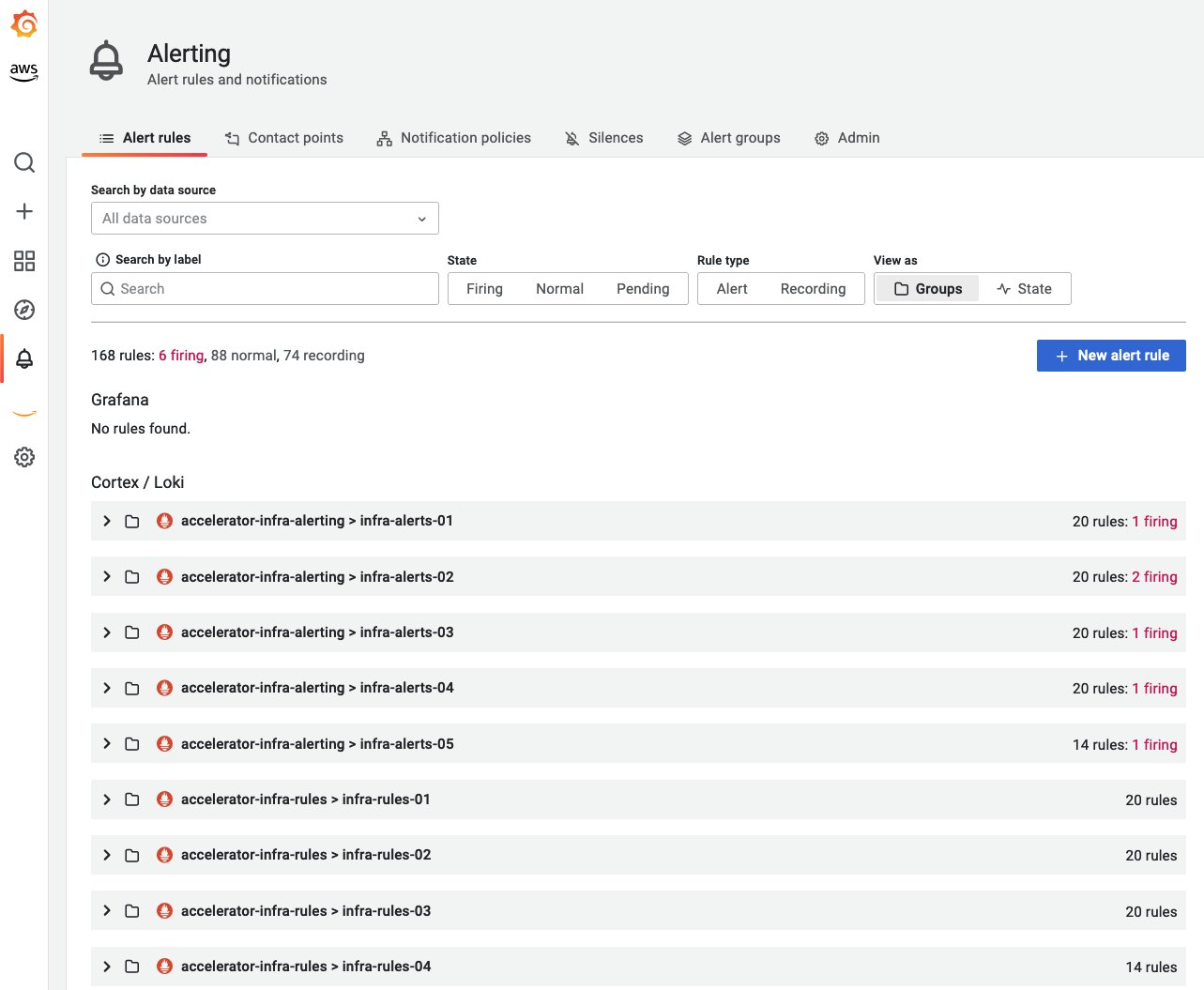
Amazon Managed Grafana (AMG) alerting सुविधा ग्राहकों को उनके Amazon Managed Grafana workspace से Amazon Managed Service for Prometheus Alert Manager अलर्ट में दृश्यता प्राप्त करने की अनुमति देती है। Prometheus मेट्रिक्स एकत्र करने के लिए Amazon Managed Service for Prometheus workspaces का उपयोग करने वाले ग्राहक alerting और recording rules कॉन्फ़िगर करने के लिए सेवा में fully managed Alert Manager और Ruler सुविधाओं का उपयोग करते हैं। इस सुविधा के साथ, वे अपने Amazon Managed Service for Prometheus workspace में कॉन्फ़िगर किए गए सभी अलर्ट और recording rules को visualize कर सकते हैं। Prometheus अलर्ट दृश्य Amazon Managed Grafana (AMG) कंसोल में Workspace configuration options टैब में Grafana alerting checkbox चेक करके देखा जा सकता है। एक बार enabled होने पर, यह उन native Grafana अलर्ट को भी migrate करेगा जो पहले Grafana dashboards में बनाए गए थे, Grafana workspace में एक नए Alerting पेज में।
संदर्भ: Announcing Prometheus Alert manager rules in Amazon Managed Grafana
बेसलाइन मॉनिटरिंग के लिए अनुशंसित अलर्ट
अलर्टिंग मजबूत मॉनिटरिंग और ऑब्ज़र्वेबिलिटी बेस्ट प्रैक्टिसेज़ का एक प्रमुख पहलू है। अलर्टिंग तंत्र को alert fatigue और महत्वपूर्ण अलर्ट चूकने के बीच संतुलन बनाना चाहिए। यहां कुछ अलर्ट हैं जो वर्कलोड की समग्र विश्वसनीयता में सुधार के लिए अनुशंसित हैं। ऑर्गनाइज़ेशन में विभिन्न टीमें विभिन्न दृष्टिकोणों से अपने इंफ्रास्ट्रक्चर और वर्कलोड की निगरानी करती हैं और इसलिए इसे आवश्यकता और परिदृश्य के आधार पर विस्तारित या बदला जा सकता है और निश्चित रूप से यह एक व्यापक सूची नहीं है।
- Container Node निर्धारित (उदा. 80%) memory limit से अधिक का उपयोग कर रहा है।
- Container Node निर्धारित (उदा. 80%) CPU limit से अधिक का उपयोग कर रहा है।
- Container Node निर्धारित (उदा. 90%) disk space से अधिक का उपयोग कर रहा है।
- Namespace में pod में Container निर्धारित (उदा. 80%) CPU limit से अधिक का उपयोग कर रहा है।
- Namespace में pod में Container निर्धारित (उदा. 80%) memory limit से अधिक का उपयोग कर रहा है।
- Namespace में pod में Container में बहुत अधिक restarts हुए।
- Namespace में Persistent Volume निर्धारित (अधिकतम 75%) disk space से अधिक का उपयोग कर रहा है।
- Deployment में वर्तमान में कोई active pod नहीं चल रहा है
- Namespace में Horizontal Pod Autoscaler (HPA) अधिकतम क्षमता पर चल रहा है
उपरोक्त या किसी भी समान परिदृश्य के लिए अलर्ट सेटअप करने में आवश्यक बात यह है कि अभिव्यक्ति को आवश्यकतानुसार बदला जाए। उदाहरण के लिए,
expr: |
        ((sum(irate(container_cpu_usage_seconds_total{image!="",container!="POD", namespace!="kube-sys"}[30s])) by (namespace,container,pod) /
sum(container_spec_cpu_quota{image!="",container!="POD", namespace!="kube-sys"} /
container_spec_cpu_period{image!="",container!="POD", namespace!="kube-sys"}) by (namespace,container,pod) ) * 100)  > 80
      for: 5m
Amazon Managed Service for Prometheus के लिए ACK Controller
Amazon Managed Service for Prometheus AWS Controller for Kubernetes (ACK) controller Workspace, Alert Manager और Ruler संसाधनों के लिए उपलब्ध है जो ग्राहकों को custom resource definitions (CRDs) और native objects या services का उपयोग करके Prometheus का लाभ उठाने देता है जो Kubernetes cluster के बाहर कोई भी संसाधन परिभाषित किए बिना सहायक क्षमताएं प्रदान करते हैं। Amazon Managed Service for Prometheus के लिए ACK controller का उपयोग आप जिस Kubernetes cluster की निगरानी कर रहे हैं उससे सीधे सभी संसाधनों का प्रबंधन करने के लिए किया जा सकता है, जिससे Kubernetes आपके वर्कलोड की वांछित स्थिति के लिए आपके 'source of truth' के रूप में कार्य कर सके। ACK Kubernetes CRDs और custom controllers का एक संग्रह है जो Kubernetes API को extend करने और AWS संसाधनों को प्रबंधित करने के लिए एक साथ काम करते हैं।
ACK का उपयोग करके कॉन्फ़िगर किए गए alerting rules का एक snippet नीचे दिखाया गया है:
apiVersion: prometheusservice.services.k8s.aws/v1alpha1
kind: RuleGroupsNamespace
metadata:
  name: default-rule
spec:
  workspaceID: WORKSPACE-ID
  name: default-rule
  configuration: |
    groups:
    - name: example
      rules:
      - alert: HostHighCpuLoad
        expr: 100 - (avg(rate(node_cpu_seconds_total{mode="idle"}[2m])) * 100) > 60
        for: 5m
        labels:
          severity: warning
          event_type: scale_up
        annotations:
          summary: Host high CPU load (instance {{ $labels.instance }})
          description: "CPU load is > 60%\n  VALUE = {{ $value }}\n  LABELS = {{ $labels }}"
      - alert: HostLowCpuLoad
        expr: 100 - (avg(rate(node_cpu_seconds_total{mode="idle"}[2m])) * 100) < 30
        for: 5m
        labels:
          severity: warning
          event_type: scale_down
        annotations:
          summary: Host low CPU load (instance {{ $labels.instance }})
          description: "CPU load is < 30%\n  VALUE = {{ $value }}\n  LABELS = {{ $labels }}"
IAM policy का उपयोग करके rules तक पहुंच प्रतिबंधित करना
ऑर्गनाइज़ेशन्स को विभिन्न टीमों के लिए अपने recording और alerting आवश्यकताओं के लिए अपने स्वयं के rules बनाने और प्रशासित करने की आवश्यकता होती है। Amazon Managed Service for Prometheus में Rules management AWS Identity and Access Management (IAM) policy का उपयोग करके access controlled rules की अनुमति देता है ताकि प्रत्येक टीम rulegroupnamespaces द्वारा समूहित अपने स्वयं के rules और अलर्ट का सेट नियंत्रित कर सके।
नीचे दी गई छवि Amazon Managed Service for Prometheus के Rules management में जोड़े गए devops और engg नामक दो उदाहरण rulegroupnamespaces दिखाती है।
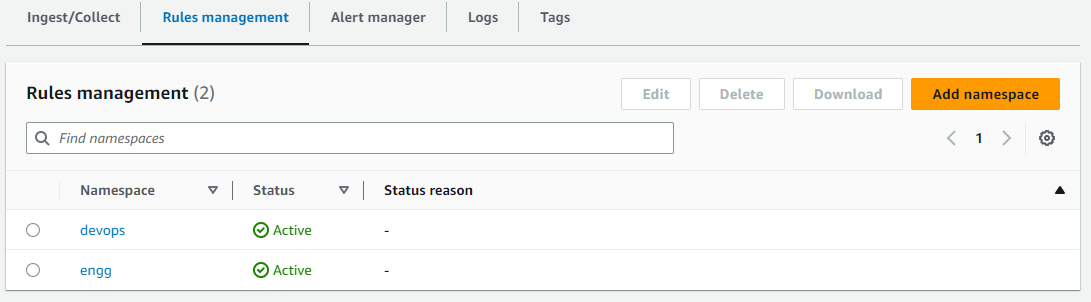
नीचे दिया गया JSON एक नमूना IAM policy है जो Resource ARN निर्दिष्ट करके devops rulegroupnamespace (ऊपर दिखाया गया) तक पहुंच प्रतिबंधित करता है। नीचे दी गई IAM policy में उल्लेखनीय actions PutRuleGroupsNamespace और DeleteRuleGroupsNamespace हैं जो AMP workspace के rulegroupsnamespace के निर्दिष्ट Resource ARN तक प्रतिबंधित हैं। एक बार policy बन जाने के बाद, इसे वांछित access control आवश्यकता के लिए किसी भी आवश्यक user, group या role को assign किया जा सकता है। IAM policy में Action को आवश्यक और अनुमत actions के लिए IAM permissions के आधार पर आवश्यकतानुसार संशोधित/प्रतिबंधित किया जा सकता है।
{
  "Version": "2012-10-17",
  "Statement": [
    {
      "Sid": "VisualEditor0",
      "Effect": "Allow",
      "Action": [
        "aps:RemoteWrite",
        "aps:DescribeRuleGroupsNamespace",
        "aps:PutRuleGroupsNamespace",
        "aps:DeleteRuleGroupsNamespace"
      ],
      "Resource": [
        "arn:aws:aps:us-west-2:XXXXXXXXXXXX:workspace/ws-8da31ad6-f09d-44ff-93a3-xxxxxxxxxx",
        "arn:aws:aps:us-west-2:XXXXXXXXXXXX:rulegroupsnamespace/ws-8da31ad6-f09d-44ff-93a3-xxxxxxxxxx/devops"
      ]
    }
  ]
}
नीचे दिया गया awscli इंटरैक्शन एक IAM user का उदाहरण दिखाता है जिसकी IAM policy में Resource ARN (अर्थात devops rulegroupnamespace) के माध्यम से निर्दिष्ट rulegroupsnamespace तक प्रतिबंधित पहुंच है और कैसे उसी user को अन्य संसाधनों (अर्थात engg rulegroupnamespace) तक पहुंच से वंचित किया जाता है जिनकी पहुंच नहीं है।
$ aws amp describe-rule-groups-namespace --workspace-id ws-8da31ad6-f09d-44ff-93a3-xxxxxxxxxx --name devops
{
    "ruleGroupsNamespace": {
        "arn": "arn:aws:aps:us-west-2:XXXXXXXXXXXX:rulegroupsnamespace/ws-8da31ad6-f09d-44ff-93a3-xxxxxxxxxx/devops",
        "createdAt": "2023-04-28T01:50:15.408000+00:00",
        "data": "Z3JvdXBzOgogIC0gbmFtZTogZGV2b3BzX3VwZGF0ZWQKICAgIHJ1bGVzOgogICAgLSByZWNvcmQ6IG1ldHJpYzpob3N0X2NwdV91dGlsCiAgICAgIGV4cHI6IGF2ZyhyYXRlKGNvbnRhaW5lcl9jcHVfdXNhZ2Vfc2Vjb25kc190b3RhbFsybV0pKQogICAgLSBhbGVydDogaGlnaF9ob3N0X2NwdV91c2FnZQogICAgICBleHByOiBhdmcocmF0ZShjb250YWluZXJfY3B1X3VzYWdlX3NlY29uZHNfdG90YWxbNW1dKSkKICAgICAgZm9yOiA1bQogICAgICBsYWJlbHM6CiAgICAgICAgICAgIHNldmVyaXR5OiBjcml0aWNhbAogIC0gbmFtZTogZGV2b3BzCiAgICBydWxlczoKICAgIC0gcmVjb3JkOiBjb250YWluZXJfbWVtX3V0aWwKICAgICAgZXhwcjogYXZnKHJhdGUoY29udGFpbmVyX21lbV91c2FnZV9ieXRlc190b3RhbFs1bV0pKQogICAgLSBhbGVydDogY29udGFpbmVyX2hvc3RfbWVtX3VzYWdlCiAgICAgIGV4cHI6IGF2ZyhyYXRlKGNvbnRhaW5lcl9tZW1fdXNhZ2VfYnl0ZXNfdG90YWxbNW1dKSkKICAgICAgZm9yOiA1bQogICAgICBsYWJlbHM6CiAgICAgICAgc2V2ZXJpdHk6IGNyaXRpY2FsCg==",
        "modifiedAt": "2023-05-01T17:47:06.409000+00:00",
        "name": "devops",
        "status": {
            "statusCode": "ACTIVE",
            "statusReason": ""
        },
        "tags": {}
    }
}


$ cat > devops.yaml <<EOF
> groups:
>  - name: devops_new
>    rules:
>   - record: metric:host_cpu_util
>     expr: avg(rate(container_cpu_usage_seconds_total[2m]))
>   - alert: high_host_cpu_usage
>     expr: avg(rate(container_cpu_usage_seconds_total[5m]))
>     for: 5m
>     labels:
>            severity: critical
>  - name: devops
>    rules:
>    - record: container_mem_util
>      expr: avg(rate(container_mem_usage_bytes_total[5m]))
>    - alert: container_host_mem_usage
>      expr: avg(rate(container_mem_usage_bytes_total[5m]))
>      for: 5m
>      labels:
>        severity: critical
> EOF


$ base64 devops.yaml > devops_b64.yaml


$ aws amp put-rule-groups-namespace --workspace-id ws-8da31ad6-f09d-44ff-93a3-xxxxxxxxxx --name devops --data file://devops_b64.yaml
{
    "arn": "arn:aws:aps:us-west-2:XXXXXXXXXXXX:rulegroupsnamespace/ws-8da31ad6-f09d-44ff-93a3-xxxxxxxxxx/devops",
    "name": "devops",
    "status": {
        "statusCode": "UPDATING"
    },
    "tags": {}
}
$ aws amp describe-rule-groups-namespace --workspace-id ws-8da31ad6-f09d-44ff-93a3-xxxxxxxxxx --name engg An error occurred (AccessDeniedException) when calling the DescribeRuleGroupsNamespace operation: User: arn:aws:iam::XXXXXXXXXXXX:user/amp_ws_user is not authorized to perform: aps:DescribeRuleGroupsNamespace on resource: arn:aws:aps:us-west-2:XXXXXXXXXXXX:rulegroupsnamespace/ws-8da31ad6-f09d-44ff-93a3-xxxxxxxxxx/engg
$ aws amp put-rule-groups-namespace --workspace-id ws-8da31ad6-f09d-44ff-93a3-xxxxxxxxxx --name engg --data file://devops_b64.yaml An error occurred (AccessDeniedException) when calling the PutRuleGroupsNamespace operation: User: arn:aws:iam::XXXXXXXXXXXX:user/amp_ws_user is not authorized to perform: aps:PutRuleGroupsNamespace on resource: arn:aws:aps:us-west-2:XXXXXXXXXXXX:rulegroupsnamespace/ws-8da31ad6-f09d-44ff-93a3-xxxxxxxxxx/engg
$ aws amp delete-rule-groups-namespace --workspace-id ws-8da31ad6-f09d-44ff-93a3-xxxxxxxxxx --name engg An error occurred (AccessDeniedException) when calling the DeleteRuleGroupsNamespace operation: User: arn:aws:iam::XXXXXXXXXXXX:user/amp_ws_user is not authorized to perform: aps:DeleteRuleGroupsNamespace on resource: arn:aws:aps:us-west-2:XXXXXXXXXXXX:rulegroupsnamespace/ws-8da31ad6-f09d-44ff-93a3-xxxxxxxxxx/engg
Rules का उपयोग करने के लिए user permissions को IAM policy (डॉक्यूमेंटेशन नमूना) का उपयोग करके भी प्रतिबंधित किया जा सकता है।
अधिक जानकारी के लिए ग्राहक AWS डॉक्यूमेंटेशन पढ़ सकते हैं, Amazon Managed Service for Prometheus Alert Manager पर AWS ऑब्ज़र्वेबिलिटी Workshop से गुजर सकते हैं।
अतिरिक्त संदर्भ: Amazon Managed Service for Prometheus Is Now Generally Available with Alert Manager and Ruler