Setup Unified Data Store
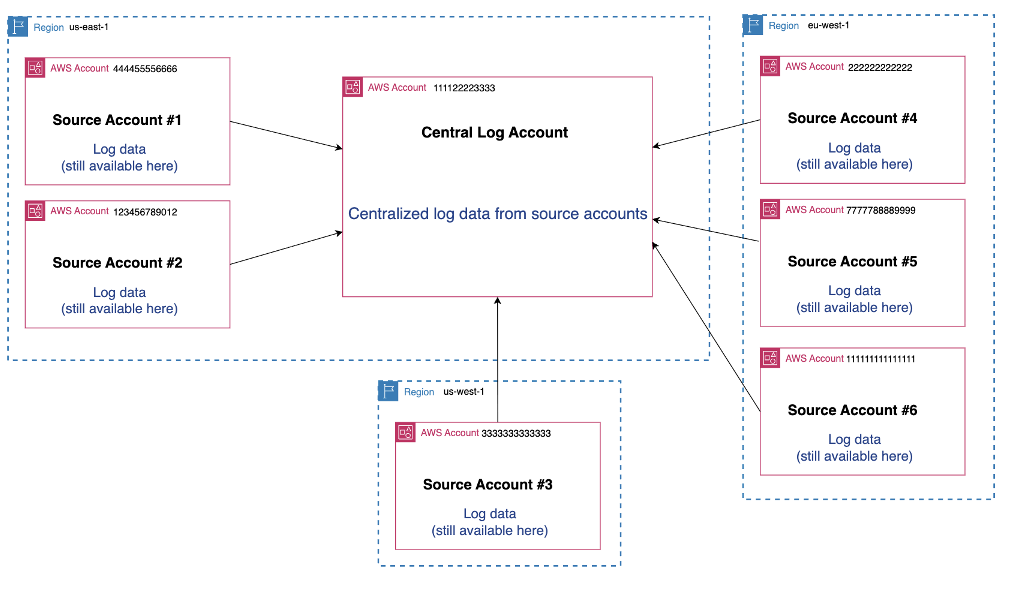
In addition to cross-account observability, you can also centralize (copy) logs to a central region and a central account.
The CloudWatch Unified Data Store helps you build a unified repository at scale for your organization. You can collect, shape, and analyze your telemetry from here.
Overview
CloudWatch Unified Data Store allows you to centralize your application, operational, security, and compliance data in one place. This means you can centralize your log data from multiple AWS accounts/regions, as well as from third-party tools into a single account and region for central querying and analysis.
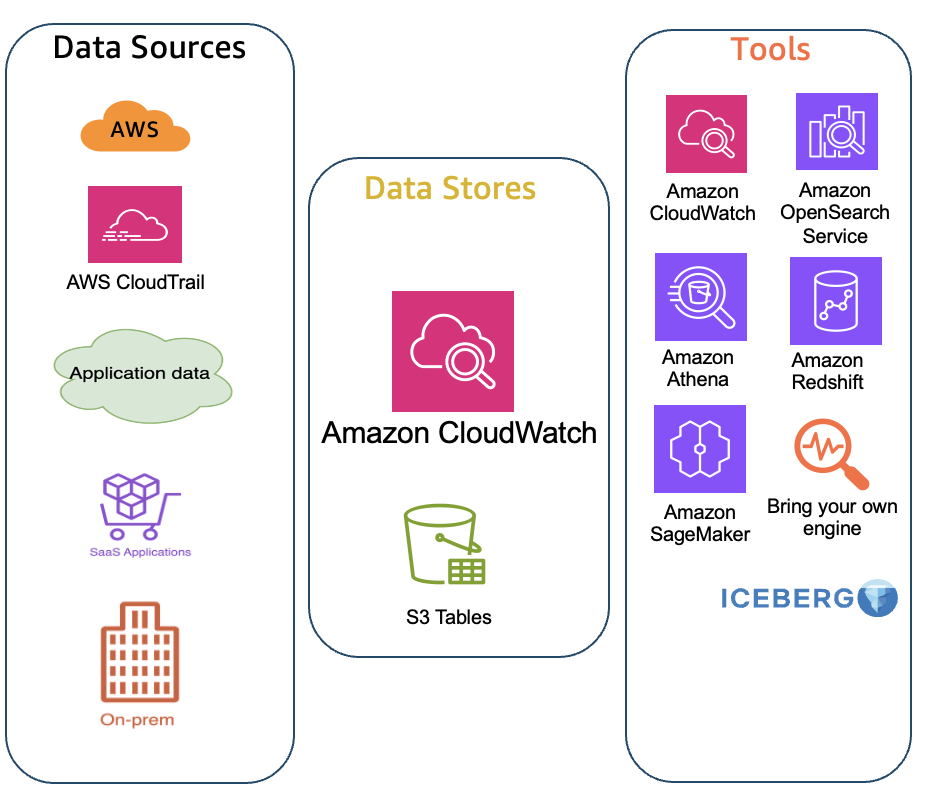
You can use the Unified Data Store in conjunction with cross-account observability or by itself.
Key Benefits
-
Centralize all observability data – Consolidate operational, security, and compliance data from AWS services and third-party sources into one unified store across multiple accounts and regions
-
Eliminate data silos and duplication – Remove unnecessary ETL pipelines, reduce storage costs, and simplify management by storing data once in a single location
-
Accelerate troubleshooting and reduce MTTR – Get faster insights with intuitive faceted queries, natural language search, and advanced visualizations through CloudWatch Logs Insights and Amazon OpenSearch Service
-
Unlock business intelligence with flexible analytics – Analyze unified data using your choice of tools including Amazon Athena, QuickSight, SageMaker, Apache Spark, and third-party Iceberg-compatible platforms without data duplication
Configuration Steps
This is configured at the organization level:
Step 1: Configure Root Account
In your root account:
- Turn on trusted access
- Identify a delegate account for the centralized datastore
Step 2: Configure Centralized Account
In your centralized account, create centralization rule(s) including:
- Organization ID or source accounts
- Source regions
Centralization Rules
You can decide and configure:
- Source accounts – Choose which source accounts you want to copy the data from and filter those by Organization, OU, or account ID
- Source regions – Select which source regions to copy the data from
- Destination account and region - Specify the AWS account and Region where you want to store your centralized telemetry data
- Backup region – Configure a backup region for a second copy of the data (optional)
- Log group filters – Filter log groups by name, prefix, or keyword using a number of operators
- Multiple rules – Configure multiple centralization rules based on your requirements
- KMS Encrypted log group options - chose centralization behaviour for KMS-encrypted log groups.
Your account structure for centralized logging may look something like this:
Summary
To summarize:
- Enable trusted access in root account and identify delegate account
- Create centralization rules in the centralized account
- Configure source accounts, regions, and log group filters
- Optionally configure backup regions for redundancy
Next Steps
Continue to Configure Agents/Collectors